
01Who this is for
- Independent affiliate marketers, need a fast way to receive commissions worldwide.
- Marketing agencies that run referral programs, can update payment methods and tax info centrally.
- International partners, benefit from ACH, PayPal or debit card options without a US bank.
02Affiliate payouts, explained
Tipalti is the payment automation service that HighLevel uses for all affiliate commissions. It replaces any previous processors and consolidates payment status, history and method changes in one place. Affiliates choose direct deposit, PayPal, ACH or a debit card depending on their location, fill tax forms in the portal, and view payouts in real time.
The platform sends an email invitation to every affiliate. After clicking the link, affiliates complete a three step registration inside the HighLevel Affiliate Portal. All data entered there is visible to anyone with agency admin rights, so agencies can adjust user roles if needed. Payments are approved on the 15th of each month for commissions earned the prior month, and are sent once the payout threshold is reached.
Tipalti’s dashboard is accessible from the Affiliate Portal under Payment Details. Tax information can be edited under Payment Details > Tax Forms. If an EIN is rejected, affiliates can log into the Tipalti supplier site to correct it or edit it again in the portal.
03How businesses use affiliate payouts
- Digital marketing agency. The agency registers its affiliate users in the HighLevel portal, selects the preferred payout method for each user, and monitors commission payouts on the 15th. When an affiliate’s EIN is invalid, the agency can re enter the number in Payment Details > Tax Forms.
- SaaS Founder with a referral program. The Founder links the referral program to HighLevel, sets up Tipalti through the Affiliate Portal, and selects PayPal as the payout method to receive commissions quickly. The Founder reviews the payment history in the portal to verify that payouts meet the required threshold.
- International consultant. The consultant chooses ACH Transfer or a debit card during the Tipalti onboarding inside the portal, completes the required tax forms, and tracks the status of each monthly payout. If the payment shows as pending, the consultant checks for self referral flags and files a support ticket if needed.
04The numbers and rules that matter
- Payouts are sent on the 15th of each month for the previous month’s commissions.
- Payments arrive in 1 to 3 days depending on the payout method.
- Account set up must be completed by January 14th to receive January commissions.
05Before you start
- Receive the invitation email from HighLevel to register for a Tipalti account.
- Have an active HighLevel subscription if you want to use the in app setup.
06How to set up and use affiliate payouts in HighLevel
Set up Tipalti via Affiliate Portal
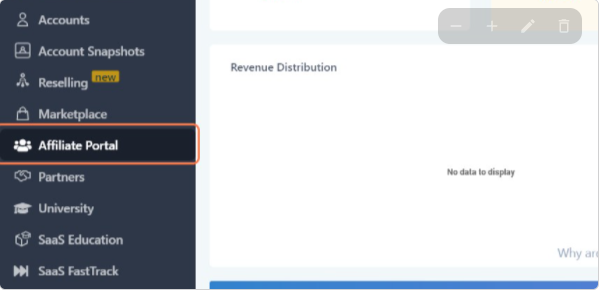
- Open the HighLevel dashboard and click Affiliate Portal.
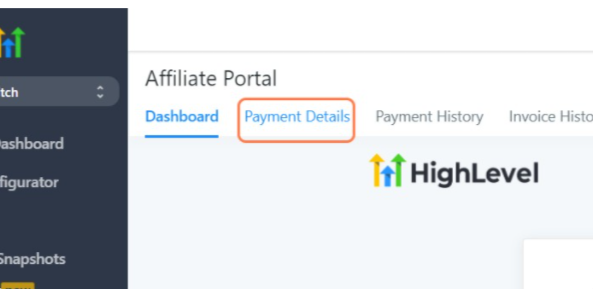
- Select Payment Details from the portal menu.
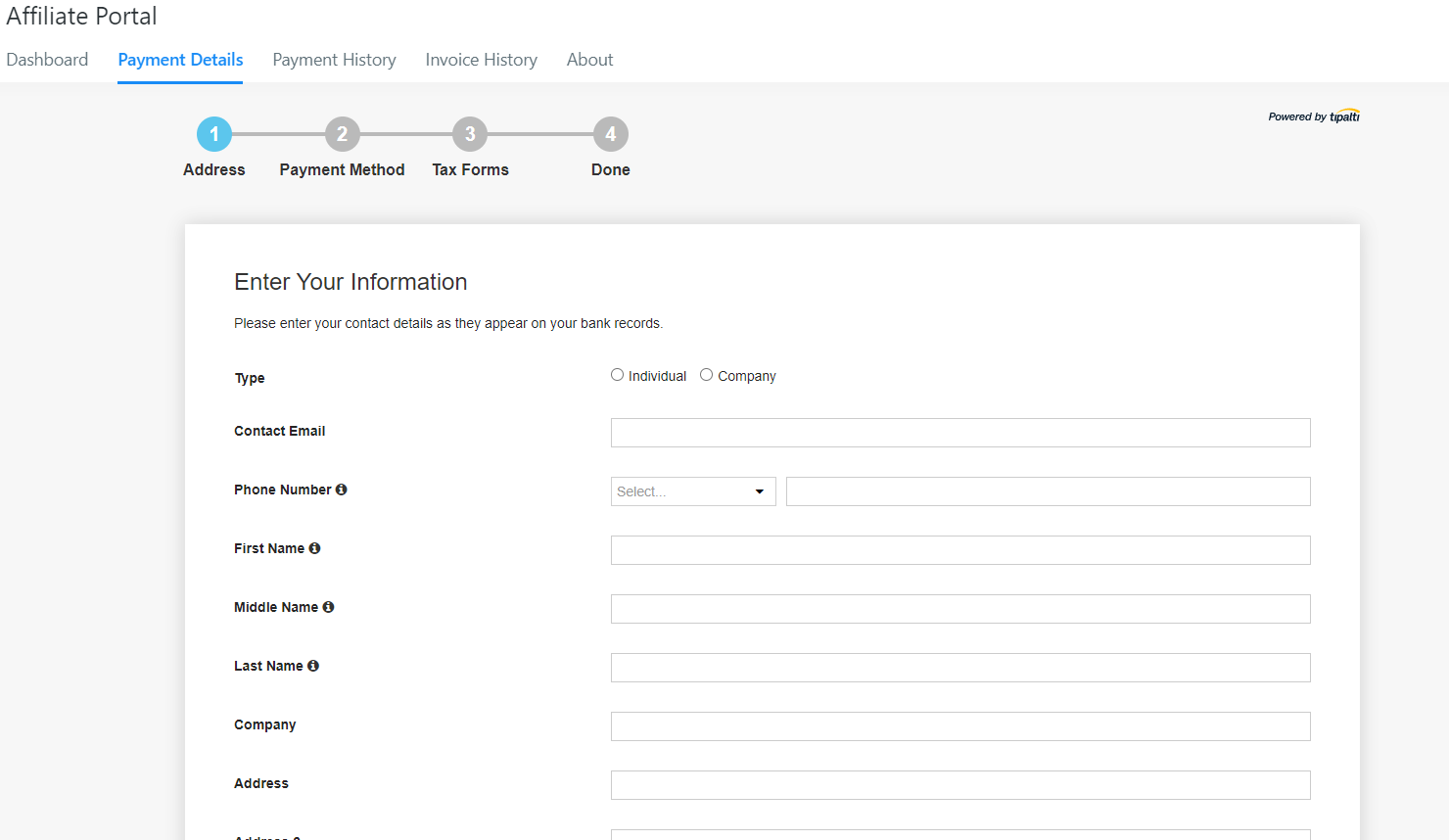
- Enter the required Tipalti information and submit the form.
Update EIN if invalid
- Log in to the Tipalti supplier site at https://suppliers.tipalti.com/highlevel/Account/Login and edit the EIN on the tax form page.
- Return to the HighLevel Affiliate Portal and re enter the EIN under Payment Details > Tax Forms.
- If validation still fails, email affiliatepayments@gohighlevel.com or open a support ticket with the affiliate email and referral link.
07What it looks like in HighLevel

08Settings that matter
- Payment Details. Controls the payment method selection and stores the affiliate’s banking or PayPal information.
- Tax Forms. Holds the EIN and other tax related data required for payment processing.
- Agency Settings > Agency Team management (Team) > Edit user > User roles. Determines which agency members can view payment information in the portal.
09Things to know before you rely on it
- All affiliates must complete Tipalti onboarding by the deadline; otherwise they cannot receive January commissions.
- Payouts are issued only on the 15th of each month for the prior month’s commissions.
- A minimum commission amount is required before a payout is sent.
- Tipalti is the sole payment processor; no alternative methods are supported.
10If something goes wrong
- Payment has not arrived. Confirm the payout method is current, verify the payout date is the 15th, and check that the commission total meets the required threshold.
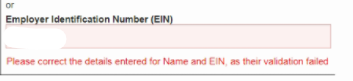
- Invalid EIN error. Update the EIN on the Tipalti supplier portal or in the HighLevel Affiliate Portal under Tax Forms, then re validate.
- Pending payment stuck on dashboard. Determine if the payment was flagged as a self referral; if not, open a support ticket with affiliate email and referral link.
11How it connects to the rest of HighLevel
- Learn how to become a HighLevel affiliate and earn recurring commissions Become an affiliate
- Step by step guide to using the Affiliate Portal in HighLevel Affiliate portal guide
- Review HighLevel pricing and plans to ensure you have an active subscription Pricing page
- Start a 30 day HighLevel trial if you do not yet have an account Free trial
- Read the Founder Plan details for agencies that need custom pricing Founder Plan
Michael's take

Affiliate payouts are a solid way for a small business to turn referral activity into cash without juggling multiple payment tools. The Tipalti integration gives you one place to see earnings, set your preferred method, and get paid on a predictable schedule.
Don’t let an outdated payment method or missed deadline keep your commission from being sent.