
01Who this is for
- Agency owners need to keep client subscriptions accurate, so they must know which SaaS system each client uses.
- Founders managing multiple SaaS products benefit from consistent plan visibility across their client base.
- Product managers can avoid plan selection errors by ensuring clients are on the correct SaaS version.
02SaaS plans, explained
HighLevel supports two SaaS architectures. SaaS V1 stores products, customers, and subscriptions in Stripe, while SaaS V2 keeps that data inside the platform under the agency’s master subaccount. Each client subaccount is linked to only one architecture, so the subscription UI shows only the plans that belong to that architecture. If a plan was created in V2 but the client resides in V1, the plan will not appear when you try to add it.
The missing plan symptom appears when you have both V1 and V2 active in the same agency. The platform behaves as designed; it does not merge the two data stores. Identifying the client’s current system and moving them to the matching system restores visibility of the intended plans.
03How businesses use saaS plans
- Digital marketing agency. The agency checks a client’s subaccount to see if the customer ID starts with “cus…”. If it does, the client is on V1. The agency then disables SaaS mode, re enables it with the correct agency subaccount, and finally selects the new V2 plan during subscription creation.
- Software SaaS startup. The startup creates a new product in the V2 configurator. When assigning it to an existing customer, staff verify the client’s system, disable SaaS mode, re enable it pointing to the agency’s master subaccount, and attach the newly created V2 plan.
- Coaching business. The coach reviews the client’s subaccount record, notes the ID format, disables SaaS mode if the client is on the wrong system, re enables SaaS with the appropriate provider, and then adds the correct coaching plan to the client’s subscription.
04The numbers and rules that matter
- SaaS V1 uses Stripe as the system of record.
- SaaS V2 uses the agency’s master subaccount as the system of record.
- Client subaccounts are linked to Stripe customers in V1.
- Client subaccounts are linked to contacts in the agency account in V2.
- Customer IDs that start with 'cus…' belong to V1.
- Subaccount contact IDs are random strings and belong to V2.
05How to set up and use saaS plans in HighLevel
Fix missing SaaS plans by aligning client to the correct system
- Navigate to Manage Client > SaaS.
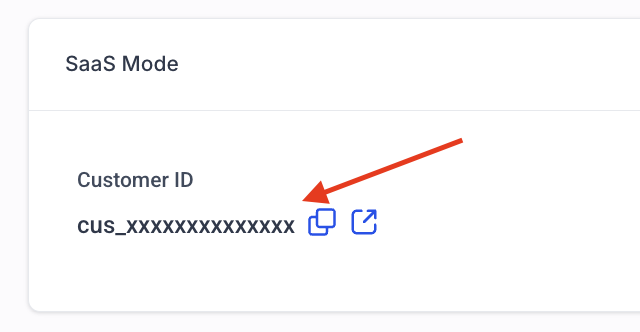
- Locate the customer ID shown for the subaccount.
- If the ID begins with “cus…”, note that the client uses the V1 system.
- If the ID is a random string, note that the client uses the V2 system.
- Disable SaaS mode for the subaccount.
- Re enable SaaS mode, selecting the appropriate provider or agency subaccount.
- Attach the desired SaaS plan to the client’s subscription.
06What it looks like in HighLevel
07Settings that matter
- SaaS mode. Controls whether a subaccount operates under the SaaS architecture; disabling and re enabling it moves the client between V1 and V2 systems.
08Things to know before you rely on it
- A client subaccount can view only plans that belong to its current SaaS system.
- V1 clients see exclusively V1 plans; V2 clients see exclusively V2 plans.
- Using both V1 and V2 in the same agency is expected behavior and not a platform error.
09If something goes wrong
- Plan does not appear when creating a subscription. Check the client’s system via the customer ID, then move the client to the matching SaaS system by disabling and re enabling SaaS mode. If the issue persists, contact support.
10How it connects to the rest of HighLevel
- Activate phone rebilling in SaaS mode Phone rebilling guide
- Convert an existing subaccount to SaaS mode Conversion guide
- HighLevel pricing and plans Pricing page
Michael's take

Most people assume a hidden plan is a glitch in HighLevel, but it’s actually the result of mixing the two SaaS systems.
If I were in that spot, I’d first verify the client’s system by checking the customer ID. Then I’d disable SaaS mode, reenable it, and pick the correct provider so the client lines up with the right set of plans.