
01Who this is for
- Founders of SaaS agencies that sell plans through a selling subaccount need the sync to keep billing data consistent.
- Agency admins who want to let clients self serve upgrades or downgrades without manual intervention.
- Finance teams that require accurate invoices and tax calculations after plan changes.
02SaaS plan changes, explained
The feature lets agencies enable or disable client initiated upgrades and downgrades. When enabled, a client can select a higher or lower SaaS tier from their Company Billing page. For eligible SaaS V1 subscriptions, the upgrade or downgrade updates both the Stripe subscription and the matching subscription stored in the selling subaccount, keeping product, price and tax data in sync. SaaS V2 clients can also change billing intervals at the same time, but the platform does not apply proration for tier or interval changes.
Settings for upgrades and downgrades are found in the SaaS Configurator. Agency level controls apply to all future clients, while per client controls allow selective permission. Downgrade settings let agencies collect reasons and offer retention incentives before a lower tier takes effect. All changes happen according to the configuration set by the agency.
03How businesses use saaS plan changes
- Digital marketing agency. The agency enables the upgrade permission in SaaS Configurator so that each client can move to a higher plan from their billing page. When a client upgrades, the platform updates the Stripe subscription and the selling subaccount subscription, ensuring invoices reflect the new plan.
- Software startup selling SaaS V1 plans. The startup turns on downgrade settings, requires a reason, and configures a retention offer. A client who wants a lower tier selects Downgrade in their billing area, and the downgrade is scheduled to start at the next billing cycle, keeping both Stripe and subaccount records aligned.
- Consulting firm with mixed V1 and V2 customers. The firm enables the option for immediate feature activation after an upgrade. When a V2 client upgrades, they can also switch from monthly to annual billing in the same flow, while the platform does not calculate proration.
04The numbers and rules that matter
- SaaS V1 continues to use Stripe as its system of record.
- SaaS V2 uses HighLevel through the selected Agency Subaccount.
- SaaS V2 does not support proration for tier changes, billing interval changes, or combined tier and interval changes.
- The V1 subscription bridge applies only to eligible V1 subscriptions sold through the supported selling subaccount workflow.
05How to set up and use saaS plan changes in HighLevel
Allow upgrades for all future SaaS clients
- Log into the agency account.
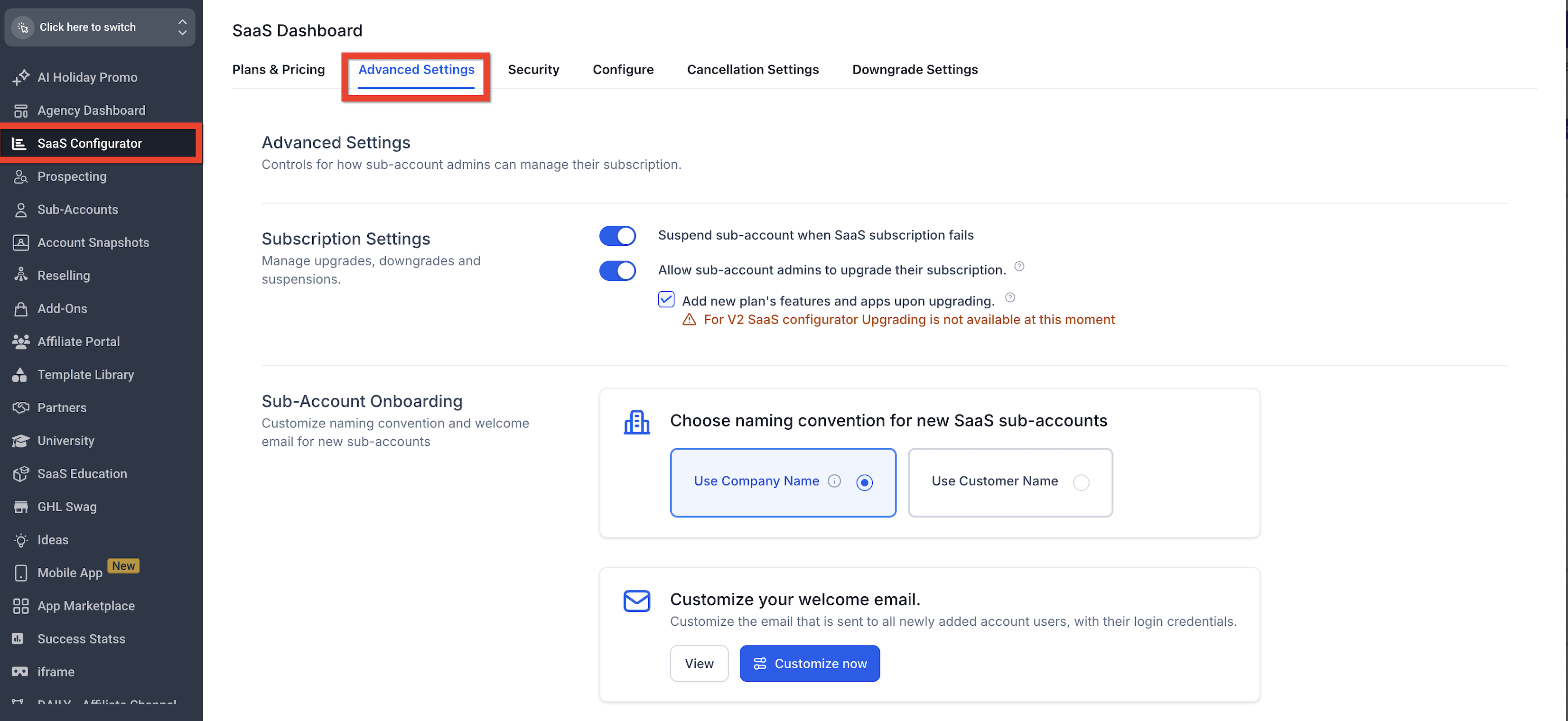
- Navigate to SaaS Configurator.
- Open Advanced Settings.
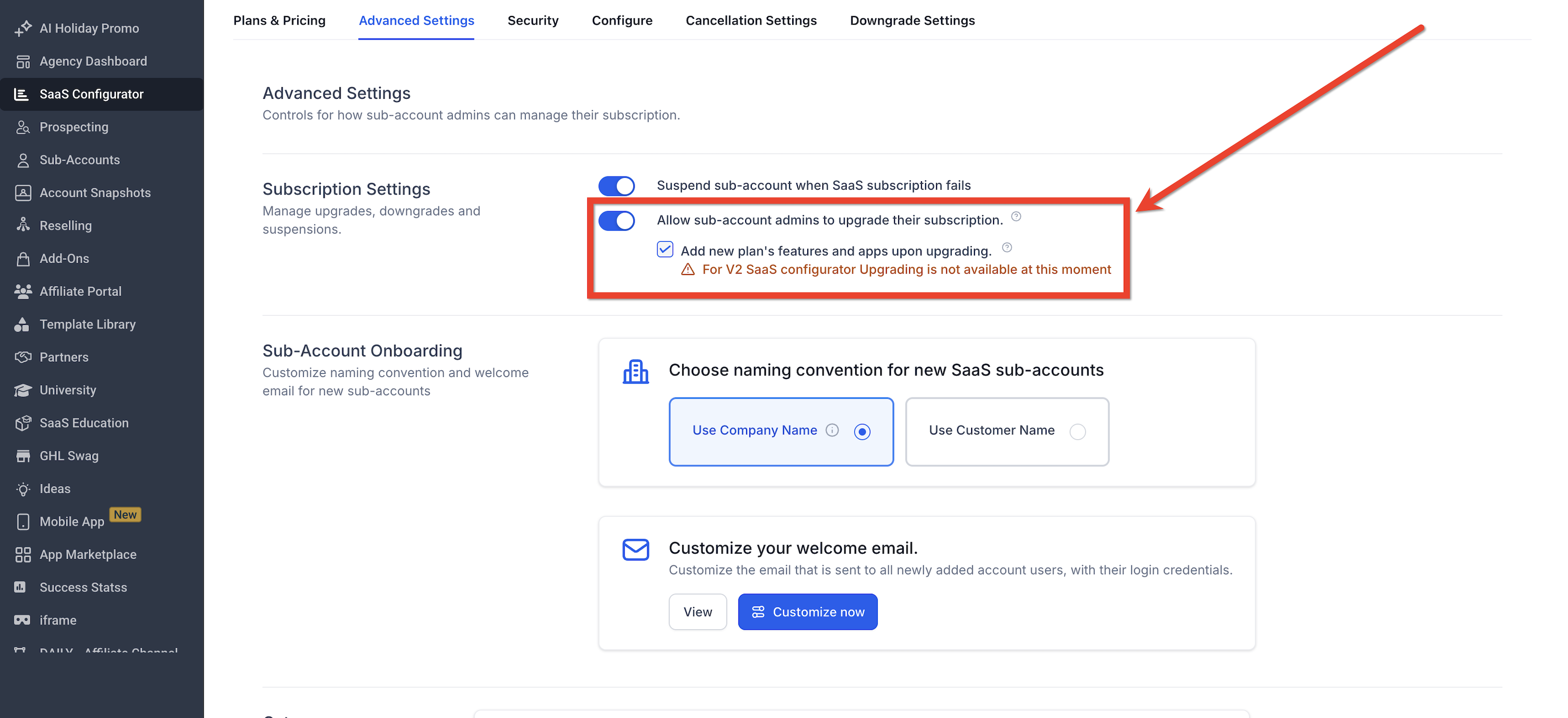
- Enable "Allow subaccount admins to upgrade their subscription".
- If immediate feature access is required, also enable "Add New Plans Features and Apps Upon Upgrading".
Allow upgrades for a specific client
- Log into the agency account.
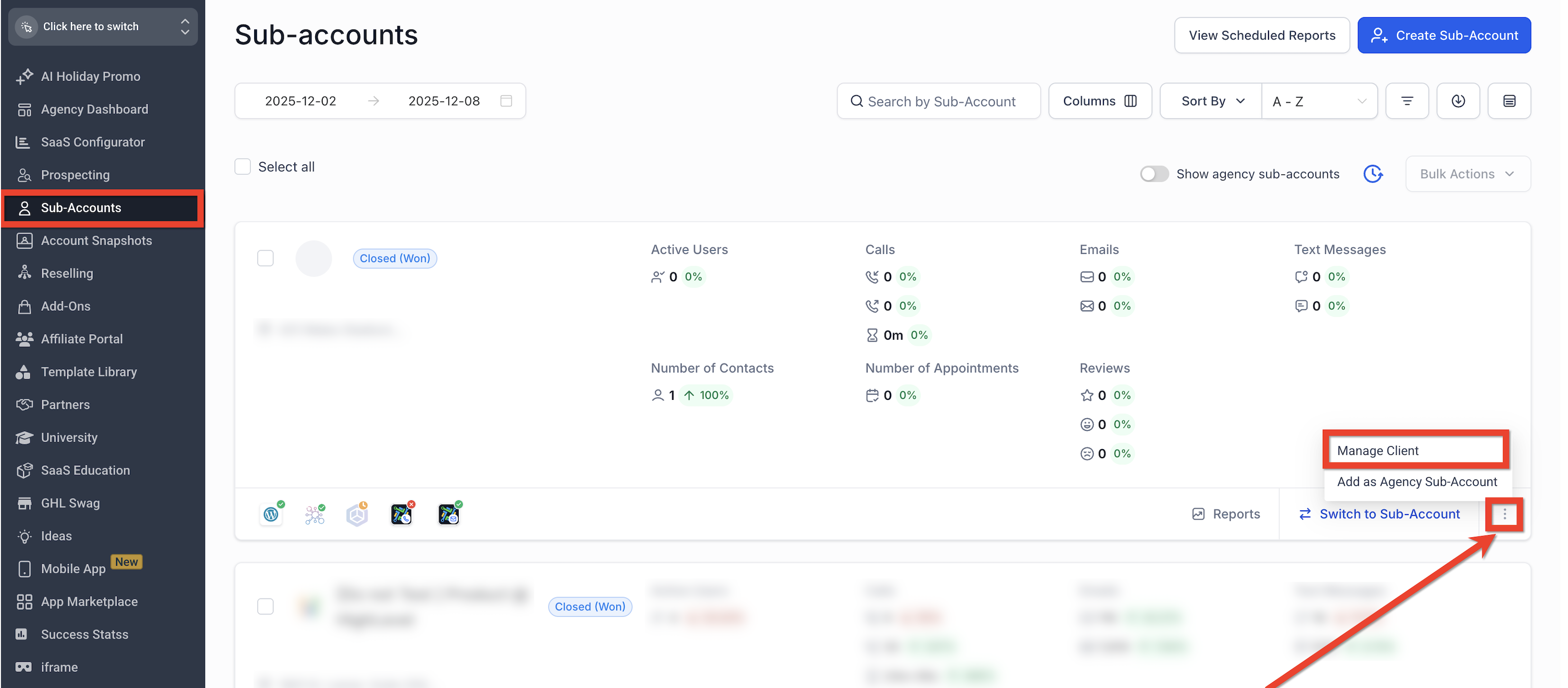
- Go to Subaccounts.
- Find the client subaccount and choose the menu (⋯) then Manage Client.
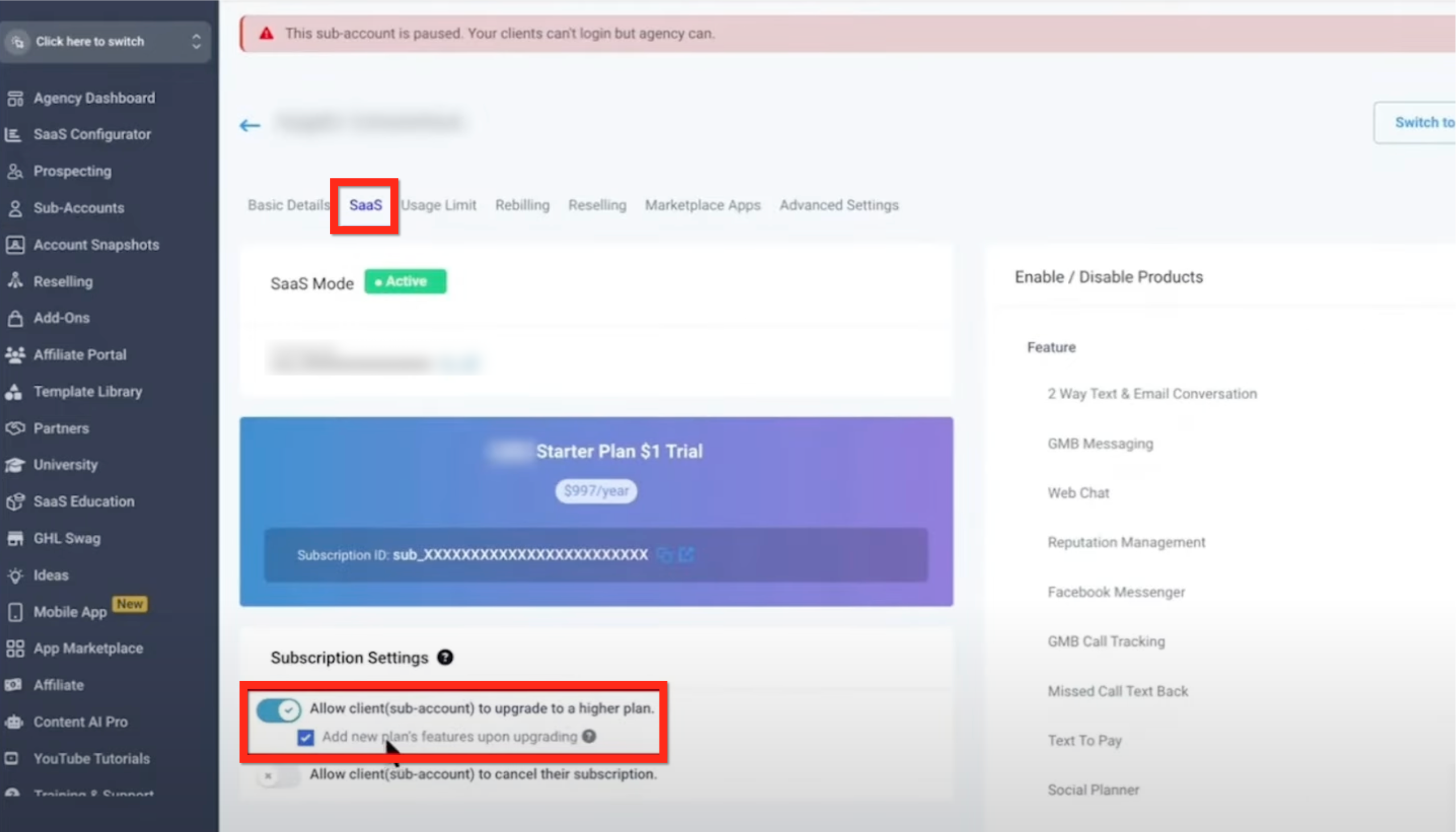
- Enable "Allow subaccount admins to upgrade their subscription".
- Enable "Add New Plans Features and Apps Upon Upgrading" if immediate feature activation is desired.
Configure client initiated downgrades
- Open SaaS Configurator.
- Select Downgrade Settings.
- Set whether subaccount admins may downgrade themselves.
- Optionally define required downgrade reasons and any retention offers.
Client upgrade flow
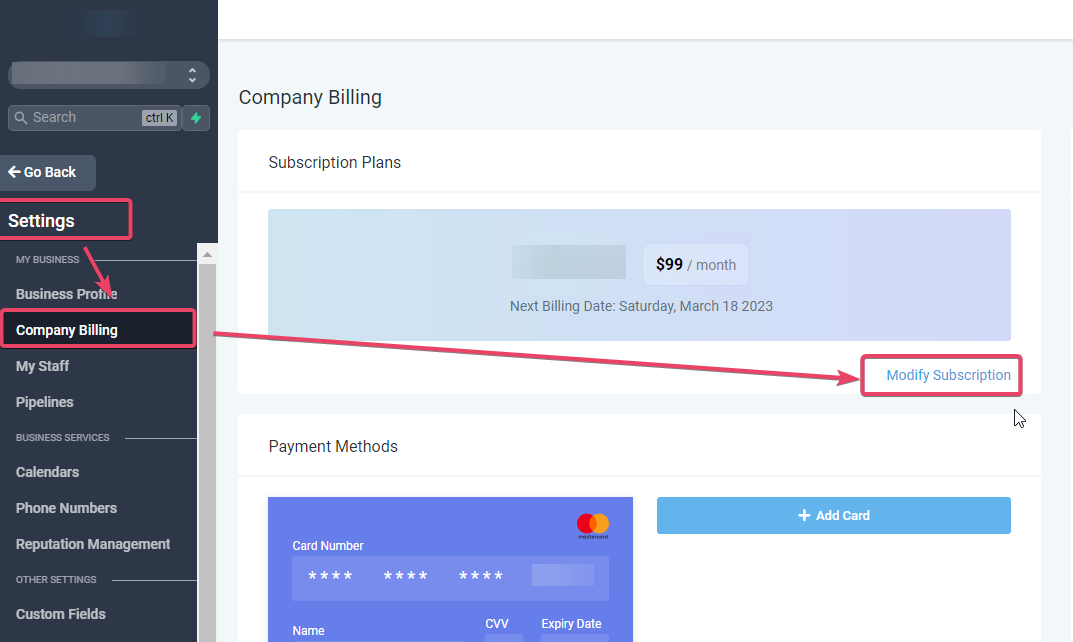
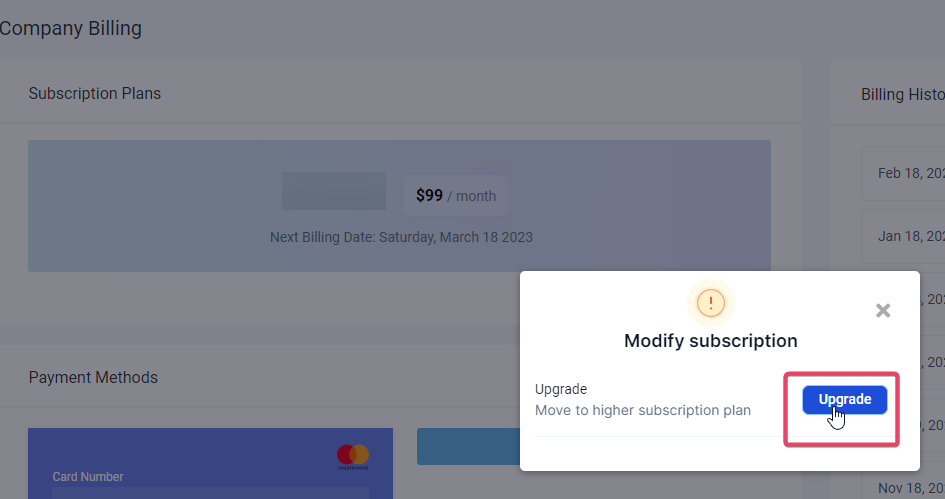
- Sign in to the client subaccount and open Settings > Company Billing.
- Click the Upgrade button.
- Select the desired higher tier SaaS plan.
- Review the price and, for SaaS V2, any billing interval options.
- Confirm the change by selecting Confirm & Pay; if immediate features are enabled, they become available now.
Client downgrade flow
- Open Account Settings > Billing > Modify Subscription.
- Choose Downgrade and provide a reason if required.
- Submit the request; the downgrade takes effect according to the agency’s schedule.
06What it looks like in HighLevel
07Settings that matter
- Allow subaccount admins to upgrade their subscription. Controls whether a client’s subaccount admin can upgrade their SaaS tier from the billing page.
- Add New Plans Features and Apps Upon Upgrading. Determines if features and apps attached to the new plan are granted to the client immediately after an upgrade.
- Downgrade Settings. Defines client downgrade permissions, required reasons and optional retention offers.
08Things to know before you rely on it
- Synchronization only applies to eligible SaaS V1 subscriptions sold through a supported selling subaccount; other V1 or V2 plans are not affected.
- SaaS V2 plan changes do not generate proration for tier or interval adjustments.
- The subscription bridge does not backfill historic mismatches; only future supported upgrades or downgrades update both Stripe and subaccount records.
- Manual edits in Stripe do not automatically trigger the subscription bridge; agencies must verify alignment after such edits.
- Downgrade timing follows the agency’s configuration, typically applying at the start of the next billing cycle.
09How it connects to the rest of HighLevel
- Enable email rebilling on Unlimited and Founder plans Email rebilling
- HighLevel pricing and plans Pricing
- Start a 30 day HighLevel trial Start trial
Michael's take

Clients often hit a wall when they need a higher tier or want to step down, and the billing data can get out of sync between Stripe and the agency account. The first setting I would get right is the agency level upgrade permission so any new client can change plans without waiting on support.
After that I would double check that the V1 subscription bridge is active for those sold through a selling subaccount, because that keeps invoices and tax calculations accurate when a client moves between plans.