
01Who this is for
- Agency owners who manage multiple client subaccounts, because they can control AI model access and recover costs.
- Founders on the $497 Founder Plan, since they can add markup to the rebilled charges (per HighLevel's help center, checked November 2026).
- SaaS product managers, because the feature integrates with the platform’s wallet and Stripe billing.
02Workflow, External AI Models, explained
The Workflow, External AI Models feature adds AI driven suggestions to help build and refine automations. When enabled, the assistant is available to every subaccount under the agency. Each new or existing subaccount receives a block of 100 free executions, after which usage generates OpenAI token costs.
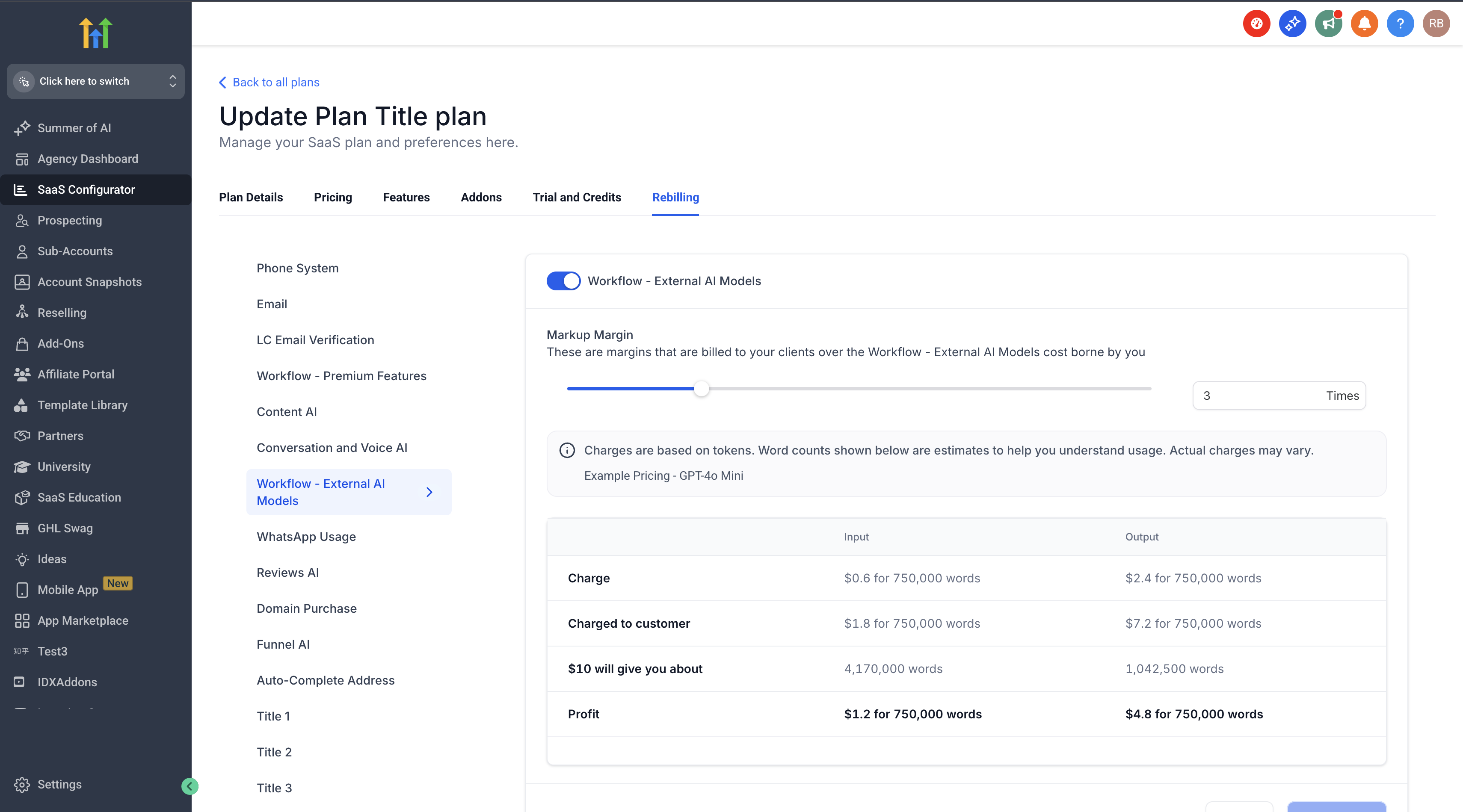
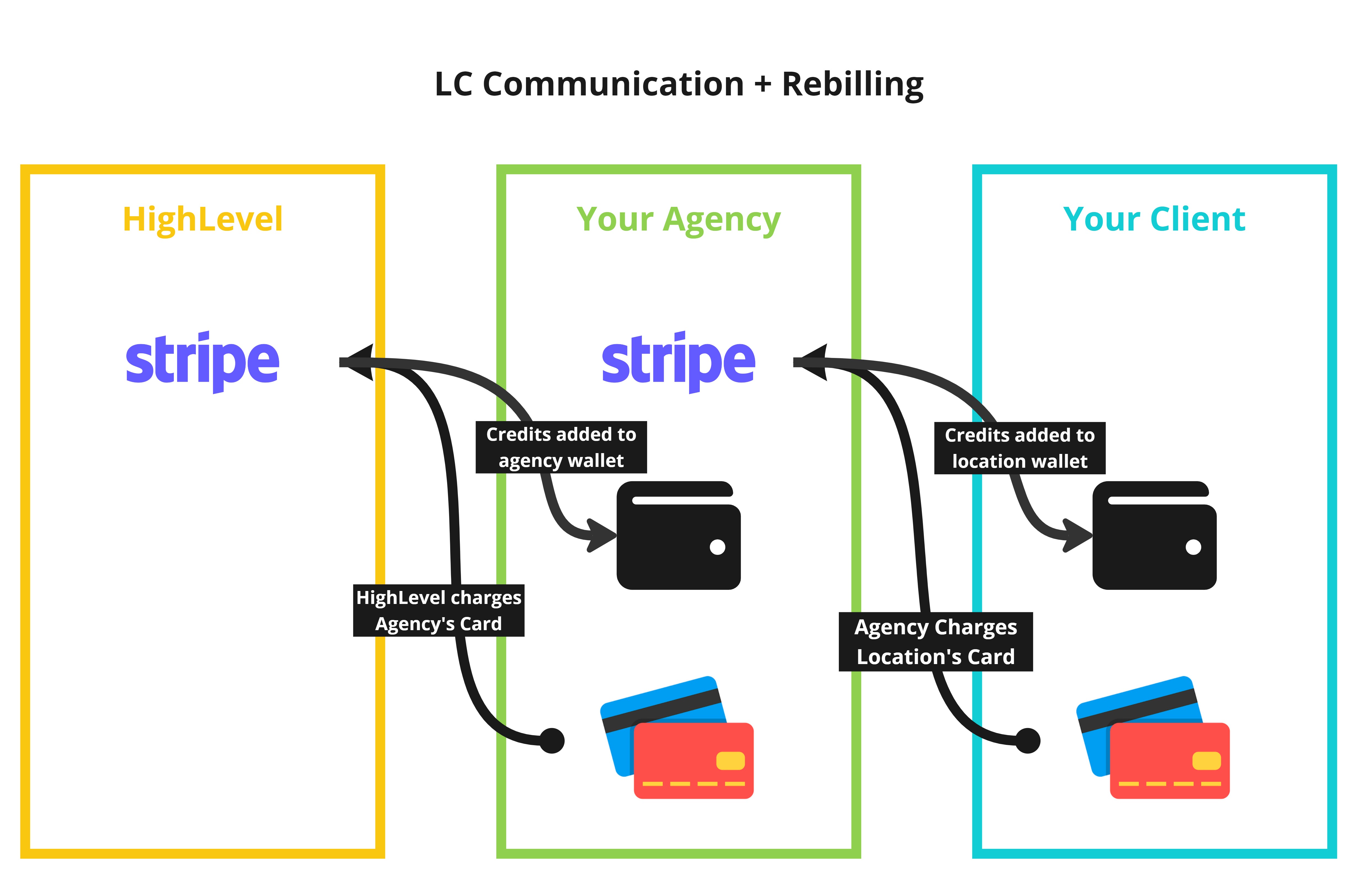
Rebilling lets the agency pass those token costs to clients. The agency receives an invoice with HighLevel branding, while clients receive invoices with the agency’s branding. Charges are drawn from the agency’s Stripe connected account and can include a markup set by the agency.
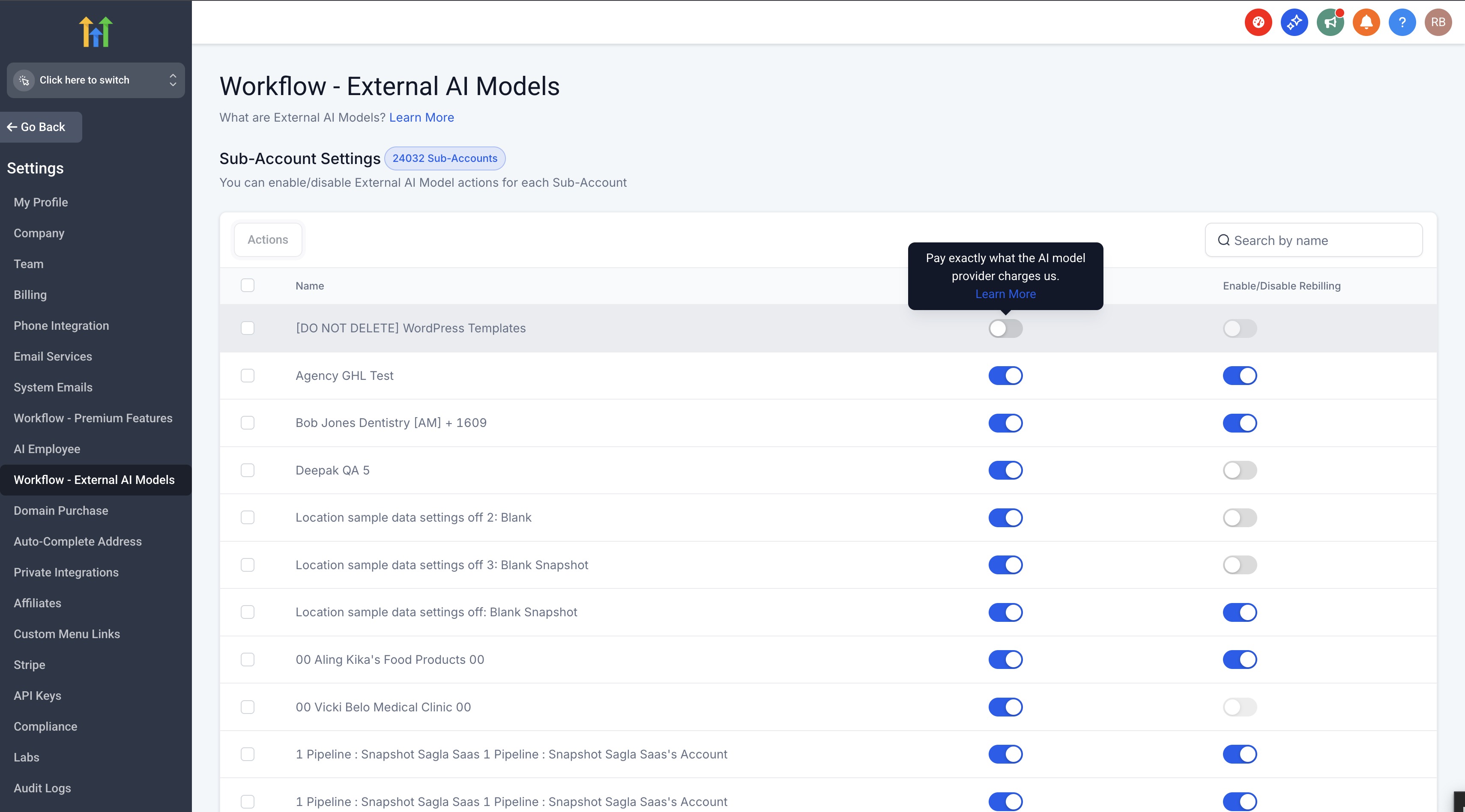
The controls live in the Agency settings area. A toggle turns the feature on or off for the whole agency, and individual subaccounts have their own toggle and markup slider under the Workflow, External AI Models Re Sell Settings section.
03How businesses use workflow, external AI models
- Marketing agency. The agency enables the AI assistant for all client accounts, then activates rebilling for each client subaccount. It sets a markup percentage using the slider so that token costs are covered and a margin is added. Clients receive invoices bearing the agency’s brand.
- SaaS Founder. After turning on the feature at the agency level, the Founder switches each subaccount to SaaS mode, opens the subaccount details, and toggles the rebill option. A markup is defined, allowing the Founder to recover AI usage fees while keeping the platform’s pricing unchanged.
- Consulting firm. The firm activates the external AI models across its organization, then for each consulting client’s subaccount, enables rebilling and selects a markup. This ensures the firm’s AI driven workflow recommendations are funded by the client.
04The numbers and rules that matter
- Agencies on Any Plan ($97, $970, $297, $2970, $497, $4970) can access Workflow, External AI Models (per HighLevel's help center, checked November 2026).
- Existing and new Subaccounts receive 100 free executions when the feature is enabled.
- Rebilling can be turned on only for agencies on the $497 Founder Plan (per HighLevel's help center, checked November 2026).
- GPT 4o input $2.50 per million tokens, output $10.00 per million tokens (per HighLevel's help center, checked November 2026).
- GPT 4o mini input $0.15 per million tokens, output $0.60 per million tokens (per HighLevel's help center, checked November 2026).
05Before you start
- Agency must be on any plan ($97, $970, $297, $2970, $497, $4970) (per HighLevel's help center, checked November 2026).
- External AI Models must be enabled at the agency level before rebilling can be turned on for subaccounts.
- The subaccount must be in SaaS Mode before its rebilling toggle appears.
06How to set up and use workflow, external AI models in HighLevel
Enable external AI models at agency level
- Navigate to AgencyLevel > Settings > Company > Workflow - External AI Models.
- Turn on the feature by moving the toggle to the enabled position.
- Check the box that says I confirm that I agree to the Workflow - External AI Models terms.
- Click the Enable button to save the change.
Turn on rebilling for a subaccount
- Confirm the agency has already enabled External AI Models.
- In the agency view, go to Accounts tab, locate the subaccount, click the three dots icon and choose Switch to SaaS.
- In Accounts tab, click the View Details link for the subaccount.
- Scroll to the Workflow - External AI Models Re Sell Settings section.
- Toggle the rebilling switch to on.
- Adjust the markup slider to the desired percentage and click Save.
07What it looks like in HighLevel
08Settings that matter
- Workflow - External AI Models. Controls whether the AI assistant is available to the agency and its subaccounts.
- I confirm that I agree to the Workflow - External AI Models terms. A required acknowledgment before the feature can be activated.
- Workflow - External AI Models Re, Sell Settings. Enables rebilling for a subaccount and stores the markup percentage set by the agency.
09Things to know before you rely on it
- All plans can access the feature, but only $497 Founder Plan customers can apply a markup when rebilling (per HighLevel's help center, checked November 2026).
- Existing and new subaccounts receive 100 free executions once the feature is enabled.
- For existing subaccounts, rebilling must be turned on manually; new subaccounts created in SaaS mode are enrolled automatically.
- Pricing follows OpenAI token rates with no additional commission.
10If something goes wrong
- Custom billing options are not available. Contact HighLevel support to discuss possible customizations.
- Discrepancies in AI model usage charges. Review billing reports against usage data, then reach out to HighLevel billing support with the details.
11How it connects to the rest of HighLevel
- Phone rebilling activation guide for agencies Phone rebilling guide
- Email rebilling on Unlimited and Founder plans Email rebilling guide
- HighLevel pricing and plans Pricing page
Michael's take

I’m wondering whether the AI powered workflow suggestions are worth the token cost for my agency.
I’d enable the feature first, then experiment with a modest markup on a pilot client to see how the pricing feels.