
01Who this is for
- Agency administrators, they need to end client subscriptions and clean up associated resources.
- SaaS agencies that provide Twilio or Mailgun services, they must close those connections when a client leaves.
- Founders of agencies that want to give clients the ability to cancel on their own, they can enable the self service option.
02SaaS subaccounts, explained
The cancellation feature lets an agency admin terminate a SaaS enabled subaccount. It requires the admin to refund any non complimentary wallet credits, disable SaaS mode, cancel the Stripe subscription, remove external service connections, and optionally delete the user or the entire subaccount. The feature also includes a toggle that lets agencies allow their clients to cancel their own subscriptions.
The admin only cancel option lives under Settings > SaaS for agencies. If the button is missing, the path Agency Dashboard > Subaccounts > three dot menu > Cancel Subscription can be used, provided the subaccount has an active SaaS plan. The self cancellation toggle is found in the SaaS configurator and can be applied globally or per subaccount via the Agency Sidebar > Subaccounts.
When a client cancels, the Stripe subscription ends, and any remaining wallet credits are forfeited unless refunded beforehand. The client sees a Modify Subscription button in Settings > Company Billing, followed by confirmation dialogs and a message until the account is reactivated.
03How businesses use saaS subaccounts
- Marketing agency. The agency admin follows the five step process to close a client’s SaaS subaccount, refunds non complimentary credits, disables SaaS mode, cancels the Stripe plan, removes Twilio/Mailgun connections, and then deletes the subaccount to keep records tidy.
- Consulting firm offering SaaS tools. The firm enables the client self cancellation toggle in the SaaS configurator, allowing each consulting client to cancel their own subscription from the Modify Subscription button without contacting the agency.
- Software reseller. When a reseller’s client leaves, the reseller removes the client’s user from Team Management to retain data, or deletes the subaccount entirely if no data retention is needed, after disabling SaaS and revoking third party connections.
04The numbers and rules that matter
- Per client enablement adds a Modify Subscription button in Settings > Company Billing.
05Before you start
- You must be logged in with an Agency level (admin) user.
- The subaccount must have an active SaaS plan; trial or inactive accounts do not show a cancel option.
06How to set up and use saaS subaccounts in HighLevel
Cancel SaaS enabled subaccount yourself
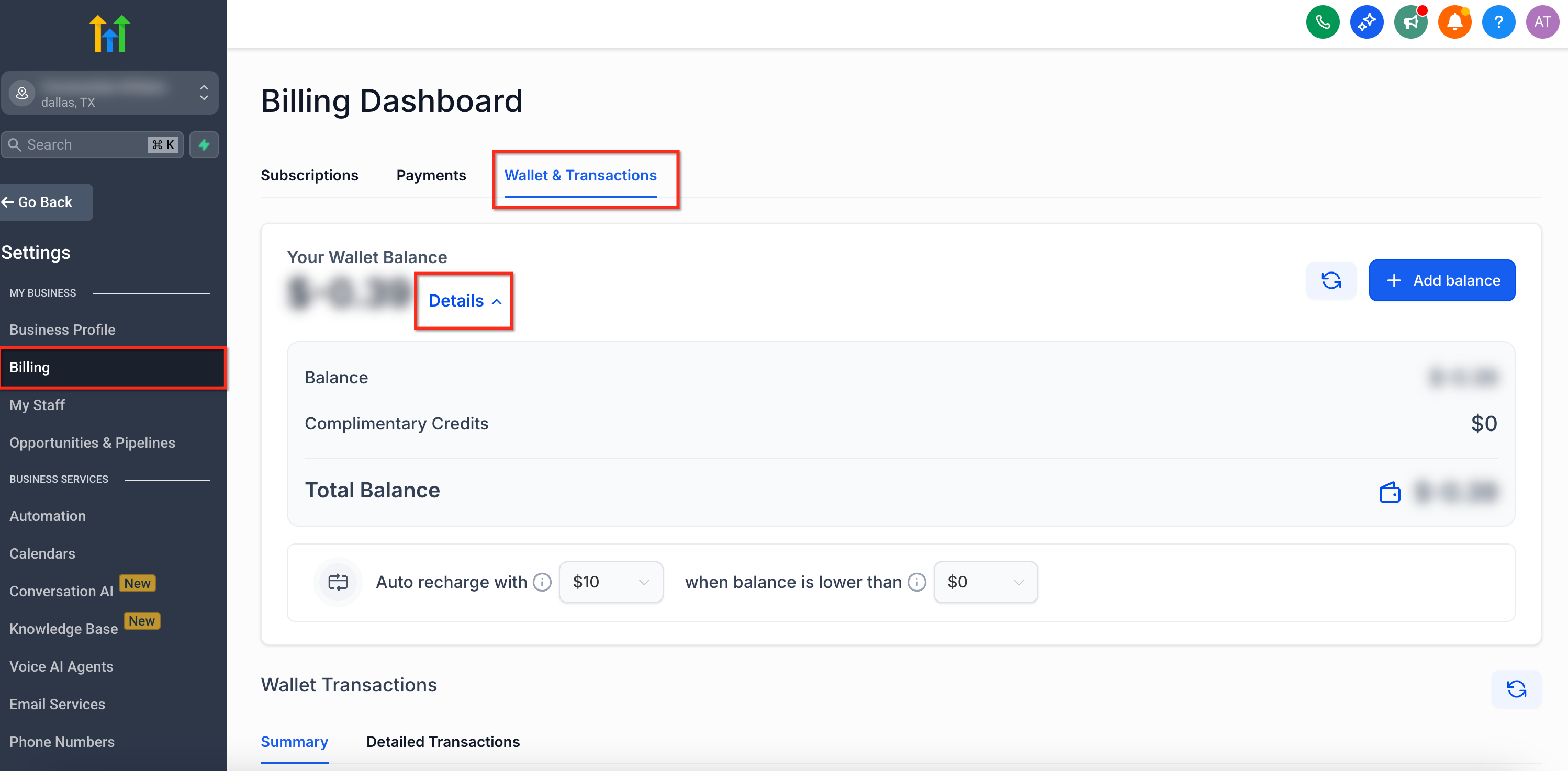
- Refund any non complimentary wallet credits in Stripe after checking the wallet details under subaccount Settings > Company Billing > See Details.
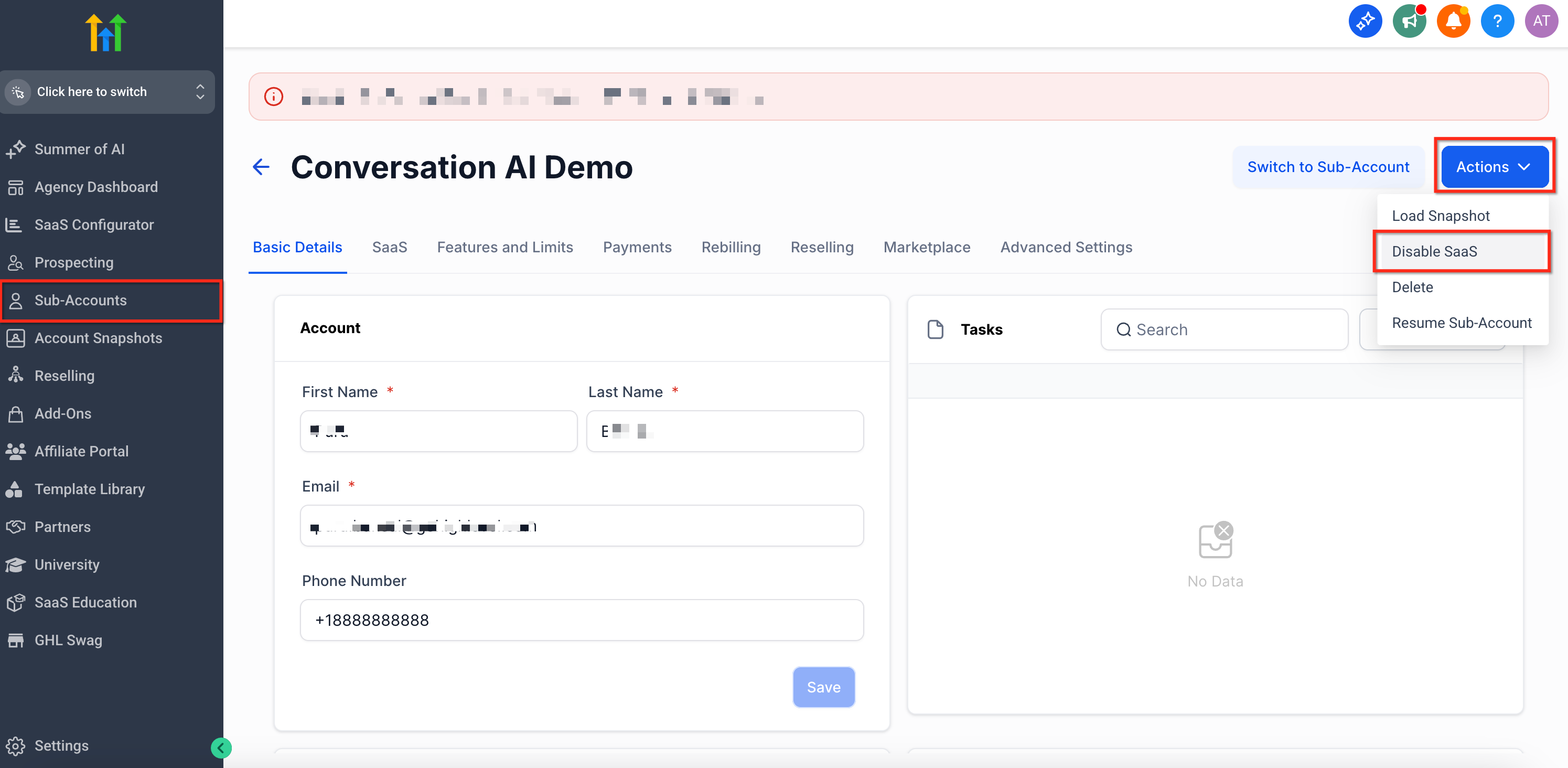
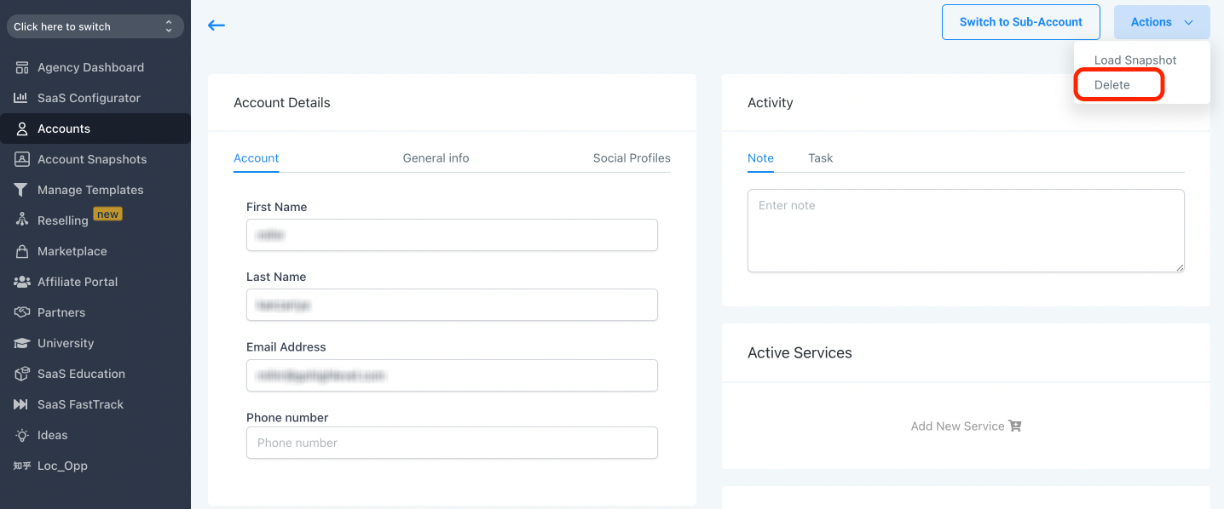
- Navigate to Agency view > Accounts tab and open View Details for the subaccount.
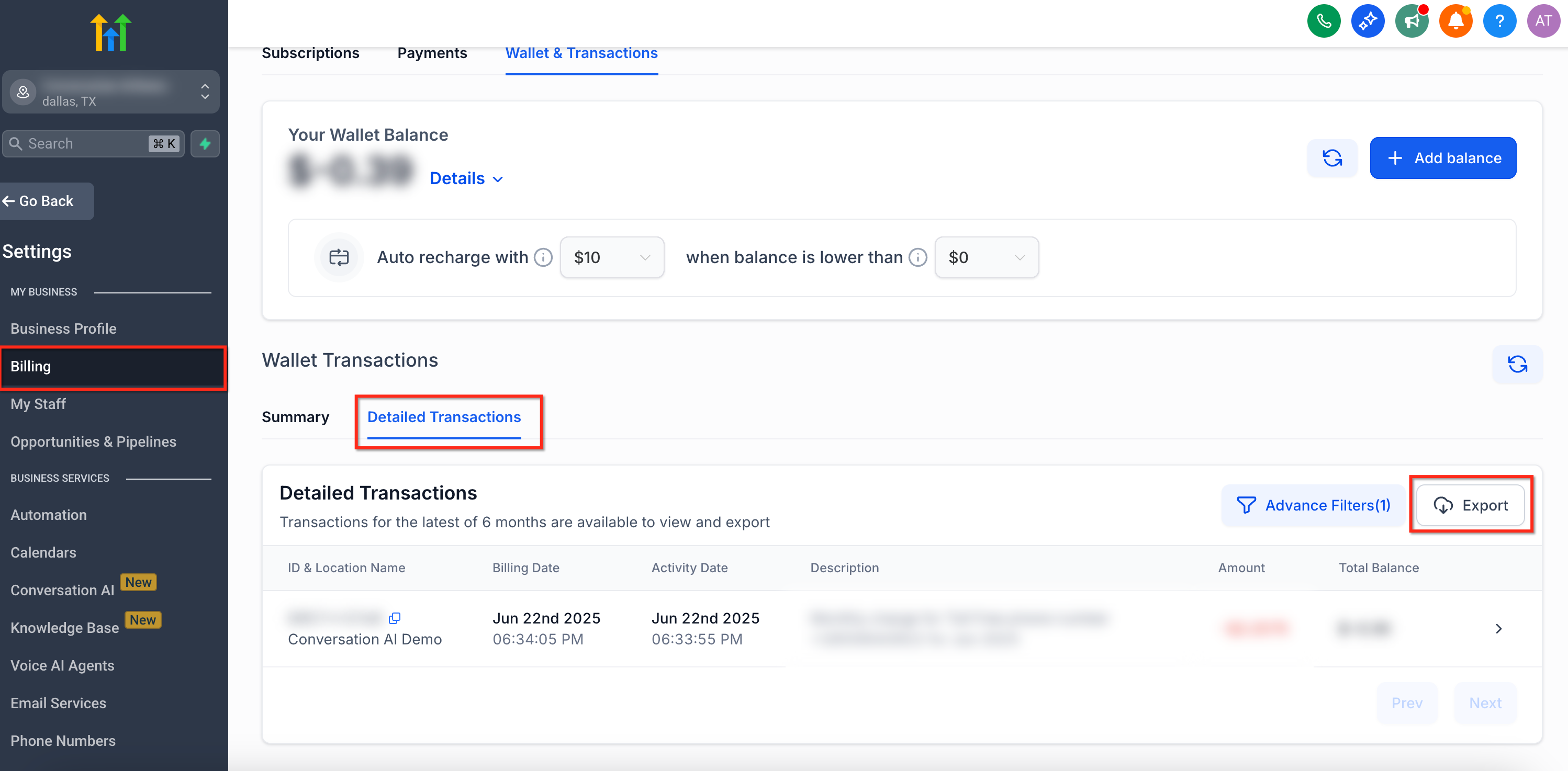
- Export all transaction details before disabling SaaS, because once SaaS mode is disabled the transaction and wallet history will be removed.
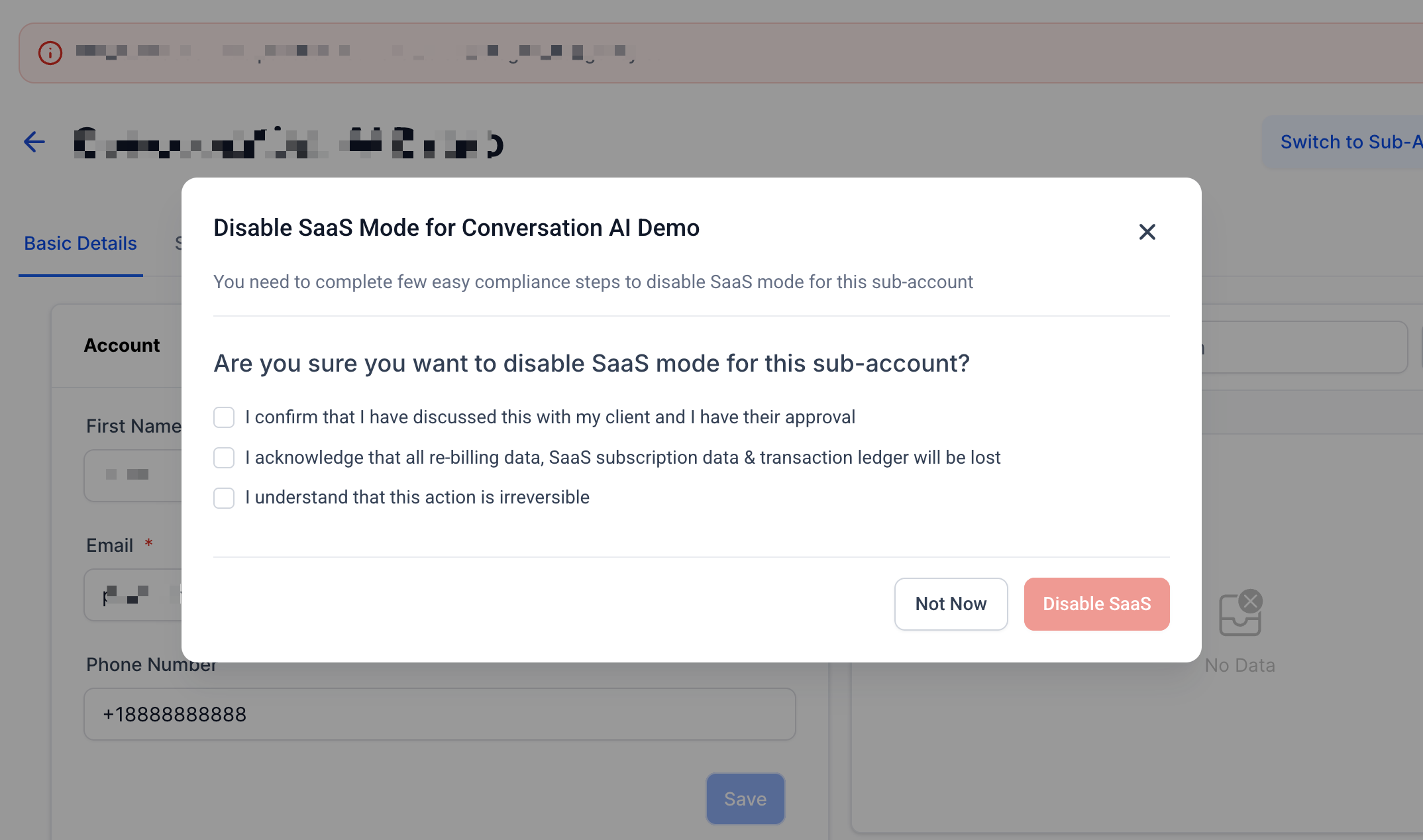
- Disable SaaS mode for the subaccount.
- Cancel the associated Stripe subscription to stop future charges.
- If the client is leaving, delete or close Twilio/Mailgun connections in Agency Settings > Twilio/Mailgun, then either remove the client’s user from Agency Settings > Team or delete the subaccount via Accounts > View Details.
Enable client self cancellation
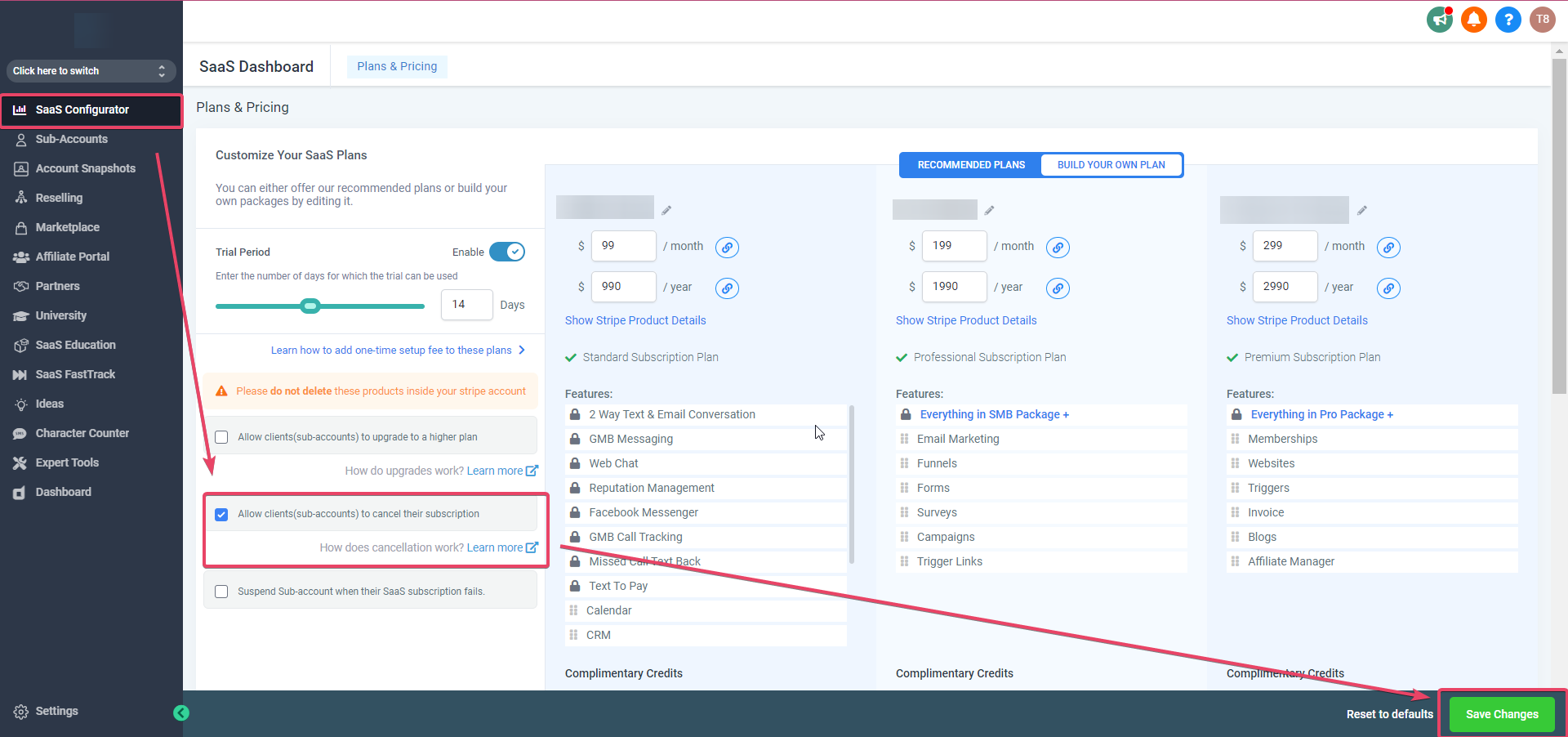
- Open the SaaS configurator in the agency settings.
- Check the box labeled "Allow clients (subaccounts) to cancel their subscriptions".
- Click the Save Changes button to apply the setting globally to future SaaS accounts.
- For an individual client, go to Agency Sidebar > Subaccounts, select the client, check the same box on the Manage Client screen, and save.
07What it looks like in HighLevel
08Settings that matter
- Allow clients (sub, accounts) to cancel their subscriptions. Controls whether subaccount owners can cancel their own SaaS subscription from the Modify Subscription button in Settings > Company Billing.
09Things to know before you rely on it
- Only Agency level admin users can cancel a SaaS subaccount.
- The cancel option is hidden for subaccounts without an active SaaS plan.
- Disabling SaaS mode removes all transaction and wallet history for that subaccount.
- The self cancellation toggle is off by default and applies only to accounts created after it is enabled, unless overridden per client.
10If something goes wrong
- Missing "Cancel SaaS" button under Settings > SaaS. Confirm you are logged in as an Agency admin, then go to Agency Dashboard > Subaccounts, click the three dot menu on the client’s tile, and select "Cancel Subscription". If the button remains absent, verify the subaccount has an active SaaS plan.
11How it connects to the rest of HighLevel
- All SaaS Configurator features SaaS configurator overview
- Managing SaaS wallet credits in HighLevel Wallet credit management
- HighLevel pricing and plans Pricing details
Michael's take

Wondering if you really need to go through all those steps when a client leaves? You can, but it’s worth doing it methodically so nothing slips through the cracks. Start by clearing any refundable credits in Stripe, then turn off the SaaS plan from the Agency View and pull a quick export of the transaction history. Once software is off that data disappears.
If you want to give clients the freedom to cancel on their own, just flip the checkbox in the SaaS configurator. That single setting adds a cancel button to their billing page and lets them reactivate later. I’d test the client side flow once to make sure the confirmation messages appear as expected before you roll it out to all accounts.