
01Who this is for
- Marketing managers who need a fast way to capture leads and follow up with automated reminders.
- Coaches or consultants who want to deliver pre recorded lessons without building a separate video platform.
- Event planners who run recurring training sessions and require a schedule that repeats on a set cadence.
02Webinar funnels, explained
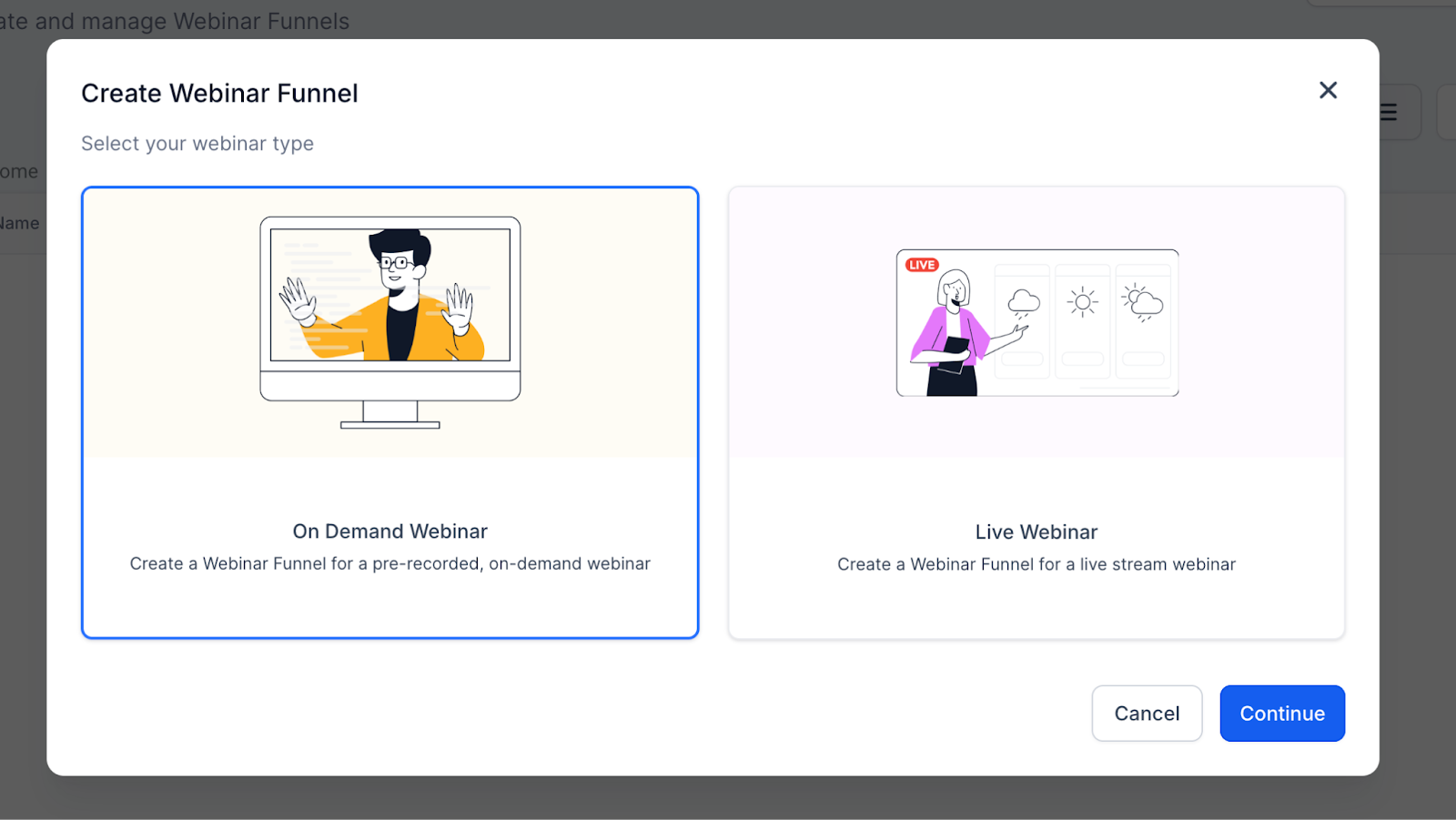
Webinar funnels are created inside the Sites section of the platform. After selecting New Webinar Funnel you choose one of three types, Live, On Demand, or Recurring. Each type provides a registration form, a broadcast page, and a set of automation recipes for reminders and post webinar follow ups.
Live webinars collect a date, time and timezone, then link to a streaming service such as Zoom or YouTube Live. On Demand webinars skip scheduling and require a video upload. Recurring webinars add a repeat schedule, letting the same funnel run multiple times without manual duplication.
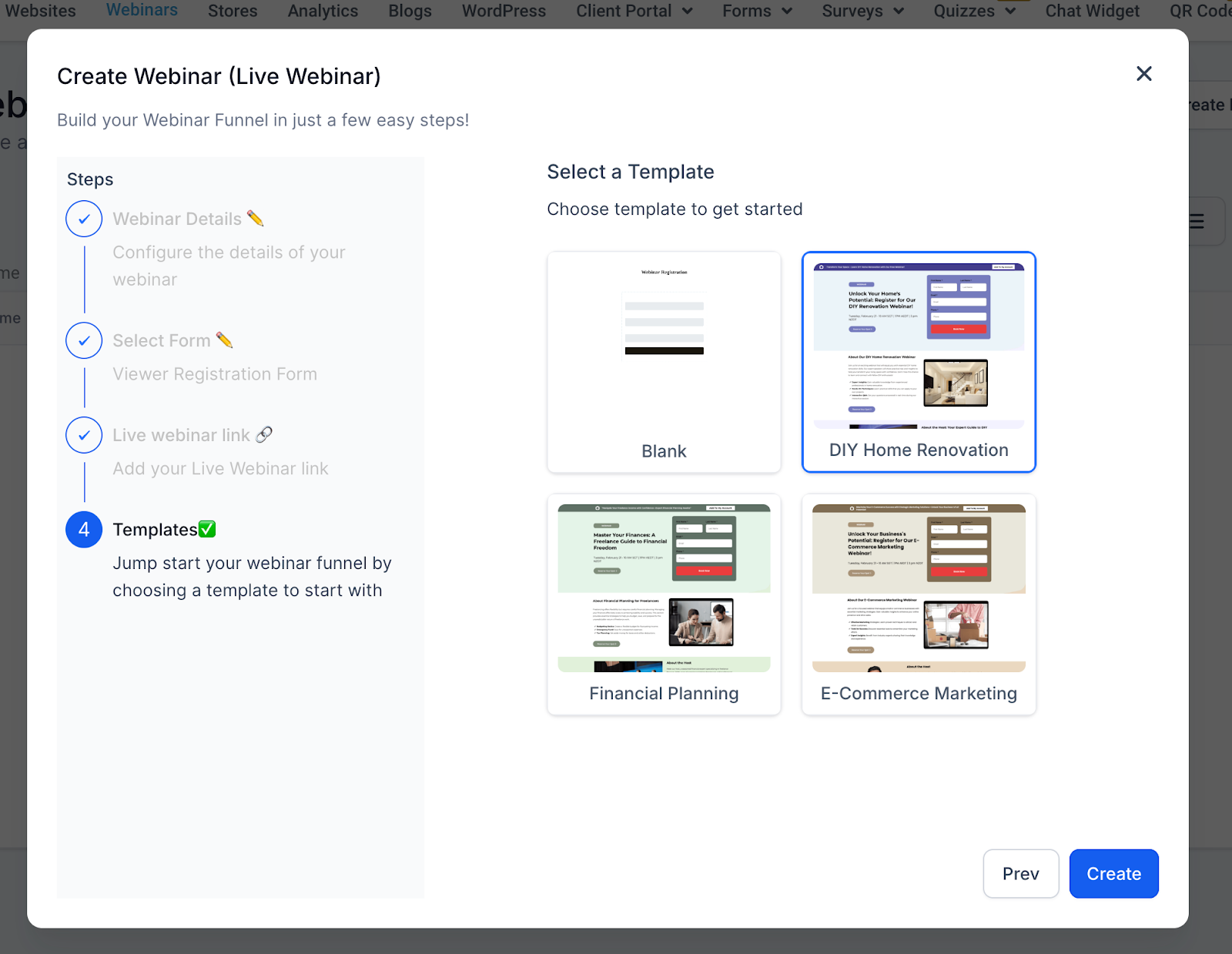
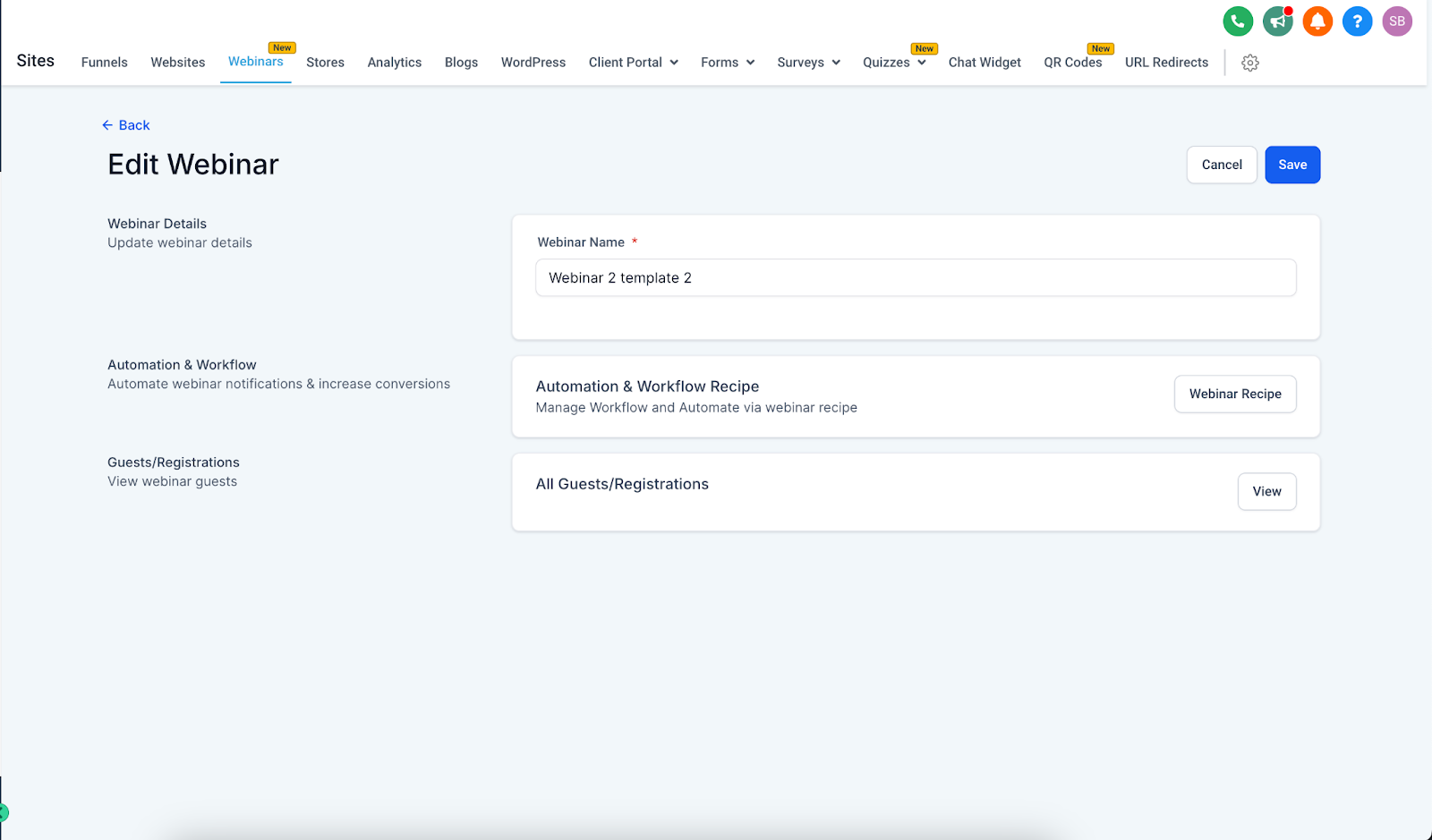
All funnels include pre built page templates and a three dot menu where you can edit the attached workflow, change the form, or adjust reminder timing. Analytics are available under Sites > Analytics > Webinars.
03How businesses use webinar funnels
- Digital marketing agency. The agency creates a Live webinar funnel, selects a Zoom link, and assigns a registration form to capture leads. The built in workflow sends email reminders 24 hours and 1 hour before the event and follows up with a replay link afterward.
- Online course creator. The creator uploads a pre recorded MP4, chooses an On Demand template, and pairs it with a lead capture form. After a visitor registers, the automation delivers the video link and a thank you email without any manual steps.
- Business coach. The coach enables a Recurring webinar, sets the frequency to weekly, and defines an end date for the series. Each week the same registration page reopens automatically, and the workflow sends out weekly reminder messages.
04The numbers and rules that matter
- Supported video formats, MP4, MOV, AVI.
05Before you start
- Log in to the HighLevel account at app.gohighlevel.com.
- Navigate to Sites in the left hand menu and open the Webinars section.
06How to set up and use webinar funnels in HighLevel
Create a new webinar funnel
- Log in to the HighLevel dashboard.
- Select Sites from the left sidebar.
- Click the Webinars option.
- Press New Webinar Funnel.
Set up a live webinar
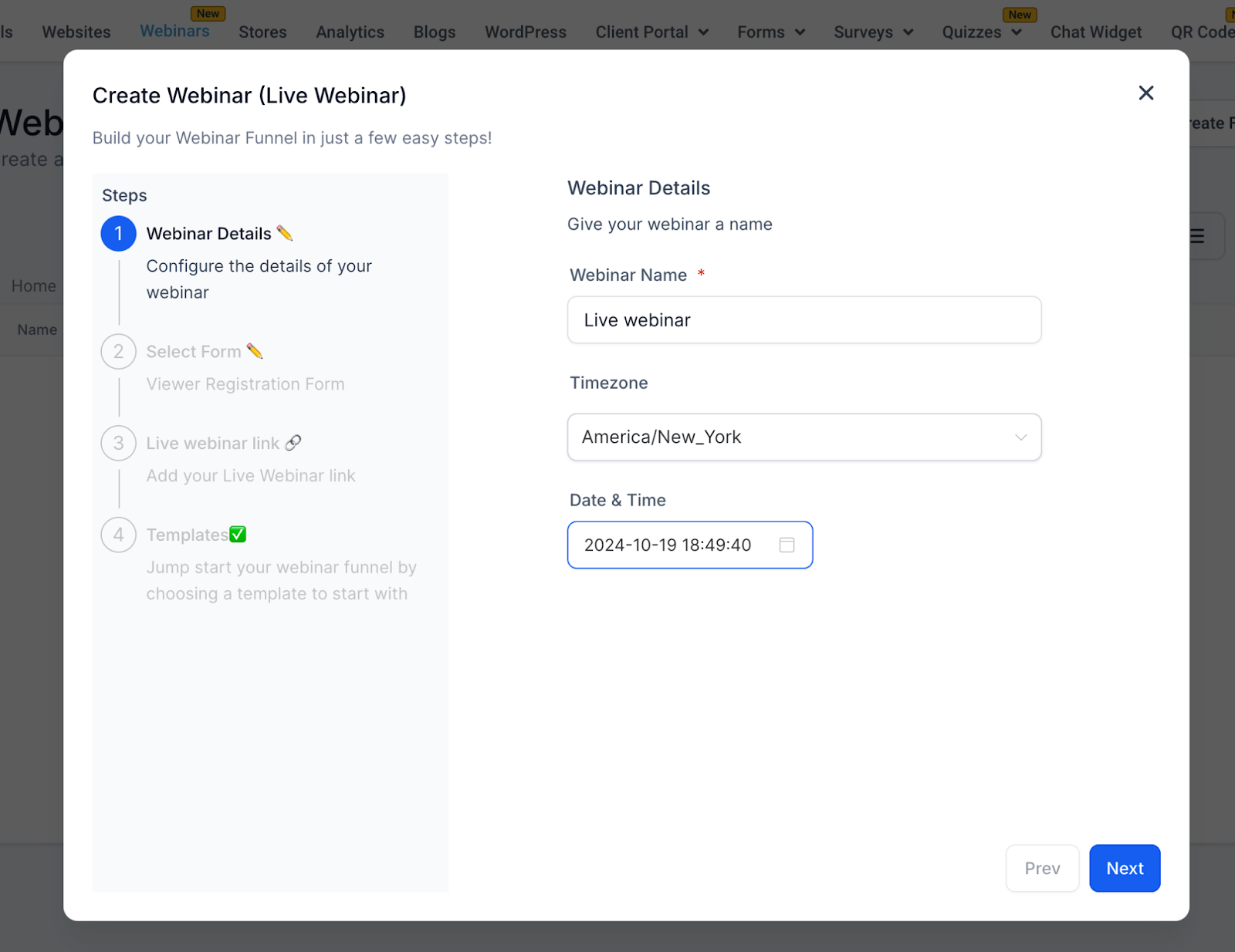
- Enter a Webinar Name, choose a Timezone, pick a future Date and set a Time.
- Pick a registration form from the dropdown list of existing forms.
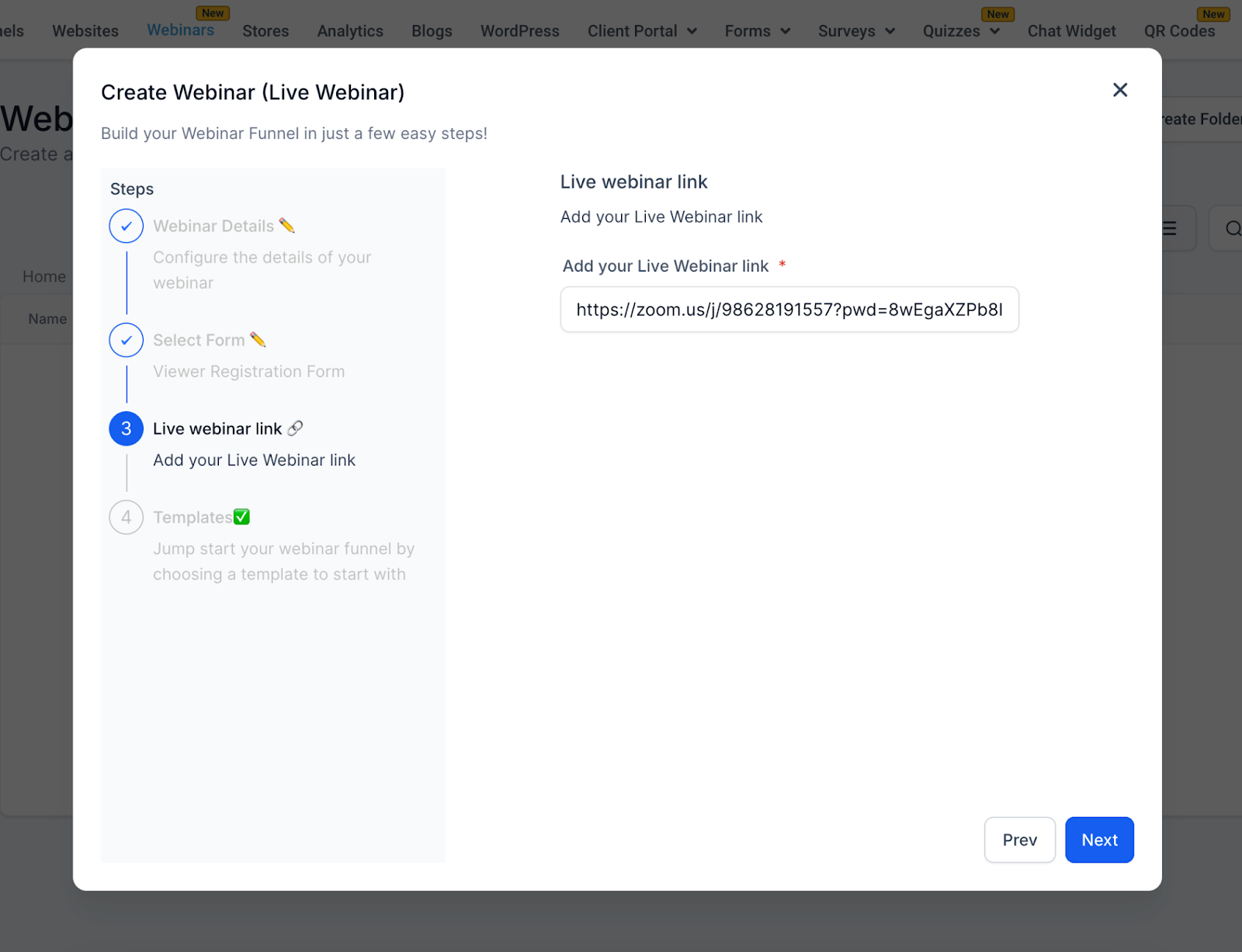
- Paste the streaming URL (Zoom, YouTube Live, or another supported service).
- Select a pre designed Live template for the registration and broadcast pages.
- Save the webinar funnel.
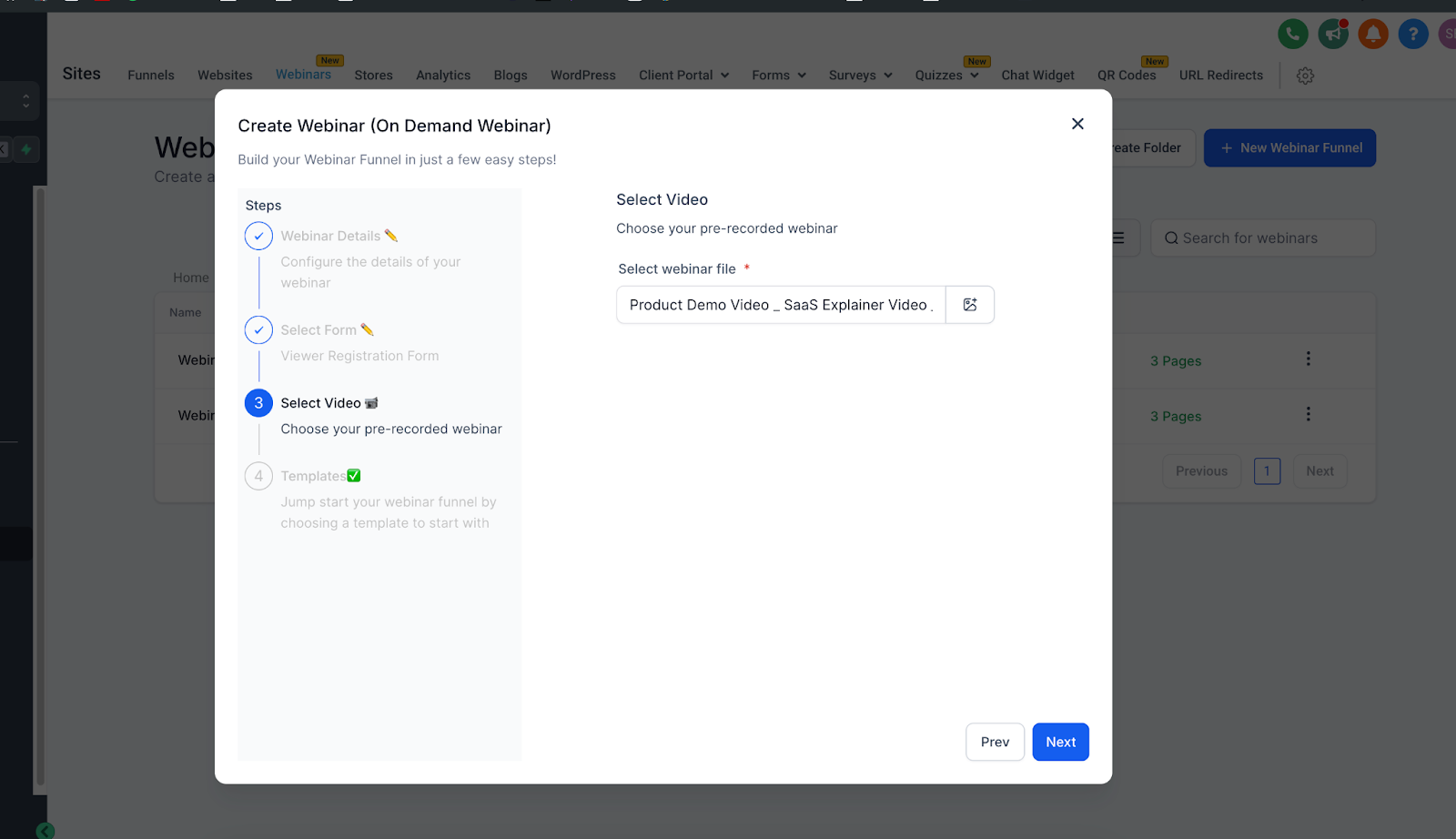
Set up an on demand webinar
- Enter a Webinar Name (no timezone, date or time needed).
- Choose a registration form from Sites > Forms.
- Upload a video file in MP4, MOV or AVI format or select one from the media library.
- Select an On Demand template for the funnel pages.
- Save the webinar funnel.
Enable a recurring webinar
- Open an existing webinar or create a new one.
- Complete the basic webinar details such as name and, if live, date and time.
- Toggle the Enable recurring webinar option.
- Choose the recurrence frequency (Daily, Weekly, Monthly, or No Fixed Time).
- Set the recurrence pattern and decide when the series should end.
07What it looks like in HighLevel
08Settings that matter
- Webinar Name. Defines the title shown on registration and broadcast pages.
- Timezone. Sets the reference zone for live webinar dates and times.
- Date. Specifies the calendar day for a live webinar.
- Time. Specifies the start time for a live webinar.
- Select Form. Chooses which registration form captures attendee information.
- Live Webinar Link. Provides the URL of the streaming service that attendees will join.
- Select Video. Points to the uploaded pre recorded file used for on demand webinars.
- Enable recurring webinar. Activates the repeat schedule feature for the webinar.
- Recurrence frequency. Determines how often the webinar repeats (Daily, Weekly, Monthly, No Fixed Time).
- Recurrence pattern. Sets the specific days or dates the recurring sessions occur.
- Series end condition. Stops the recurring series after a set number of sessions or on a chosen date.
09Things to know before you rely on it
- Supported video formats for on demand webinars are MP4, MOV and AVI.
- Recurrence frequency options are limited to Daily, Weekly, Monthly or No Fixed Time.
- Live webinar links must follow the proper URL format for the chosen streaming service.
10If something goes wrong
- Live webinar link not working. Verify the URL format and test the link before the event.
- Timezone confusion for attendees. Display the selected timezone clearly on registration and confirmation pages.
- Video upload fails. Check that the file uses a supported format, is within size limits, and that the internet connection is stable.
- Poor video quality in on demand webinar. Upload a higher resolution version of the video.
- Form does not capture leads. Test the form’s integration with HighLevel to ensure submissions are recorded.
- Template fails to load. Refresh the page or verify the internet connection.
11How it connects to the rest of HighLevel
- Learn how to add tracking code to your webinar funnel pages Add tracking code
- Set up a custom domain for your webinar funnel Domain Connect
- View pricing options for HighLevel plans HighLevel pricing
Michael's take

Most people treat a webinar like a one off event and never think about reusing the setup. They end up rebuilding the same registration form, page design and reminders each time they run a new session.
If I were setting this up, I would clone a proven webinar funnel, change the date and the streaming link, and let the built in automation handle all the reminders. A quick test of the registration form and a dry run of the live link saves you from last minute surprises.