
01Who this is for
- Marketing managers who need a quick way to point site visitors to their brand’s social pages.
- Small business owners who want a consistent social presence without writing code.
- Web designers building client sites in HighLevel and requiring a drag and drop social bar.
02Social media icons, explained
The Social Icons widget inserts recognizable social media symbols directly into a page built with the HighLevel website builder. Each icon can be linked to a specific URL, such as a Facebook or Instagram profile, and can appear as just the symbol, just text, or both.
The element is fully adjustable. You can reorder the icons, change their links, remove unused ones, add new platforms, set the alignment, and define the pixel dimensions. Size and alignment settings also affect how the icons look on mobile devices.
You find the widget inside the Website Builder under the “Social” category. After adding it to a section, all customizations are made through the icon’s inline controls.
03How businesses use the social icons
- Local restaurant. The owner drags the Social Icons widget into the footer, adds links to Facebook, Instagram and TikTok, and sets the icons to display only the symbols. This lets diners quickly follow the restaurant on their preferred platform.
- Coaching practice. A coach edits each icon’s URL to point to personal LinkedIn, YouTube and website pages, chooses the Icon & Text display, and aligns the bar to the center so it matches the site’s clean design.
- Ecommerce store. The store manager adds a Pinterest and WhatsApp icon, adjusts the icon size to 28 px, and aligns the bar to the right side of the header to fit the brand’s layout.
04The numbers and rules that matter
- Supported icons: Facebook, Instagram, X, LinkedIn, YouTube, TikTok, Google Plus, WhatsApp, Mail, Website, Pinterest.
05How to set up and use the social icons in HighLevel
Add social icons
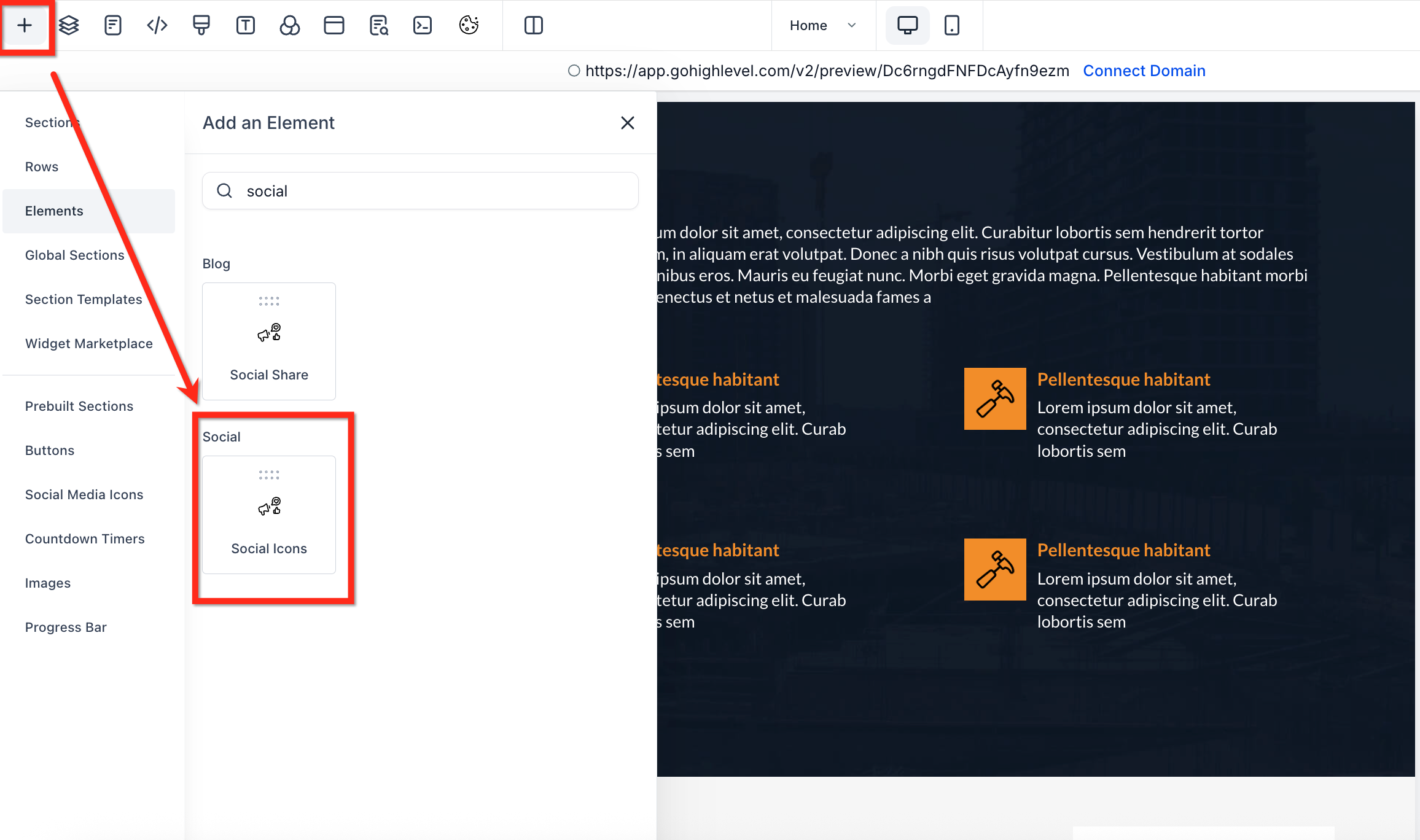
- Open the Website Builder and select the + Add Element button.
- Find the Social Icons option located in the Social group.
- Drag the widget into the page section where you want the icons to appear.
Customize social icons
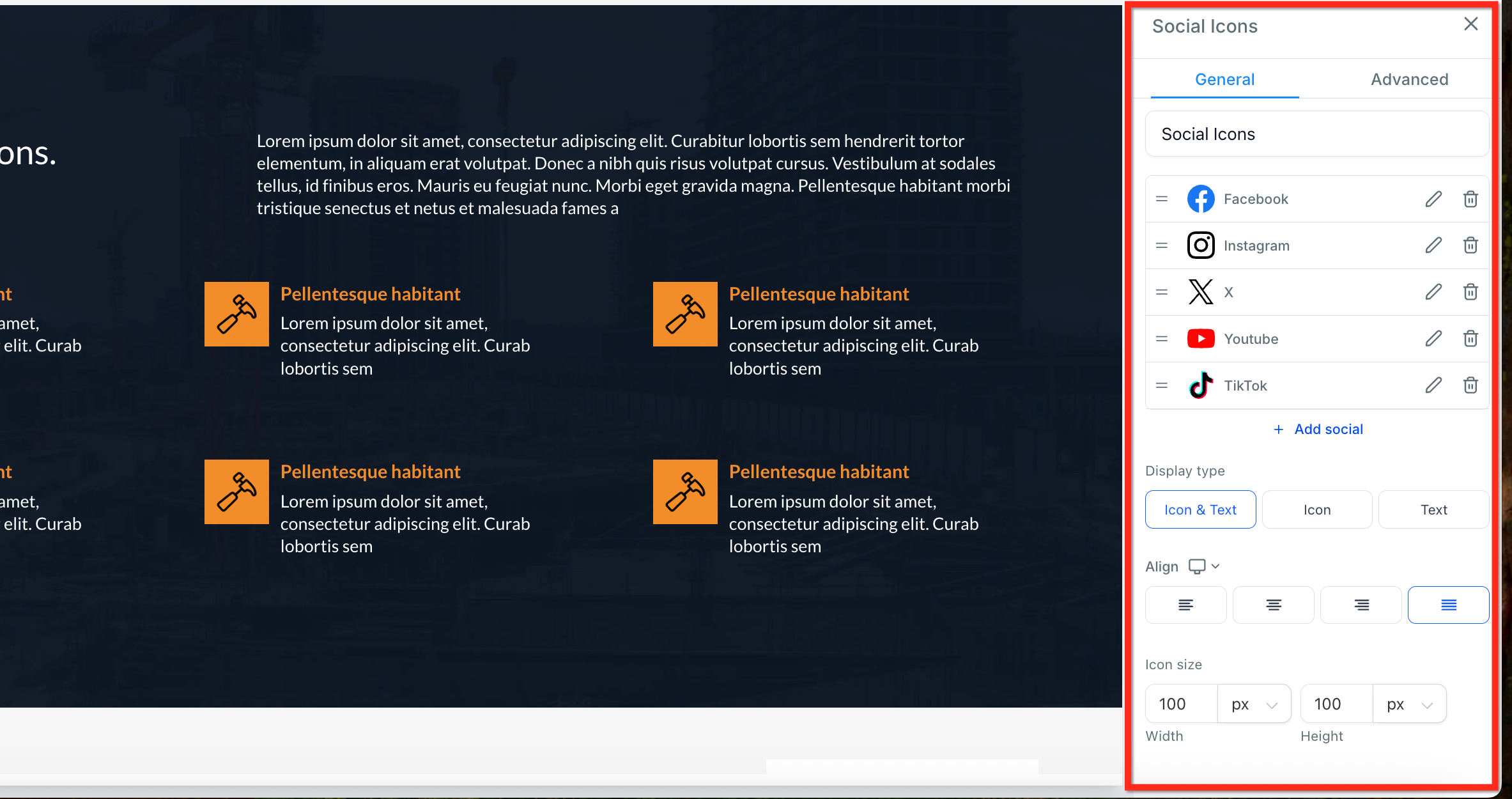
- Reorder the icons by dragging them using the three line handle.
- Click the pencil icon on an icon to edit its destination URL.
- Remove an unwanted icon by pressing the trash icon.
- Press + Add Social to insert additional platform icons or restore removed ones.
- Select the desired display mode, Icon Only, Text Only, or Icon & Text.
- Choose left, center or right alignment for the whole icon group.
- Enter pixel values for width and height to set the icon size.
06What it looks like in HighLevel
07Settings that matter
- Display Type. Controls whether each icon shows only the symbol, only the label, or both together.
- Alignment. Sets the horizontal placement of the icon group to left, center, or right.
- Icon Size. Defines the width and height of each icon in pixels.
08Things to know before you rely on it
- The widget includes icons for Facebook, Instagram, X, LinkedIn, YouTube, TikTok, Google Plus, WhatsApp, Mail, Website and Pinterest.
- Icons are not pre linked; you must manually enter the URLs for each social profile.
- The icons adjust automatically for mobile views, but you can fine tune size and alignment for optimal display.
09If something goes wrong
- An icon does not open the correct social profile.. Open the icon’s settings, click the pencil icon, and update the URL to the proper address.
10How it connects to the rest of HighLevel
- Learn how to create and style pages before adding social icons. Website setup guide
- Add click to call, text or email links that work alongside social icons. Click to call links
- Review plan options and pricing before enabling the Social Icons element. Pricing and plans
Michael's take

Wondering if you really need a separate social bar on your HighLevel site? You get the Social Icons element, which drops a ready made row of clickable icons onto any page without writing a line of code.
If I were building a new site, I’d pull the widget into the footer, link each icon to the proper profile, and tweak the size so it looks sharp on mobile.