
01Who this is for
- Real estate agents, give prospects a fast way to call or email a listing agent.
- Dental practices, let patients schedule appointments via one tap calls or texts.
- Online coaches, provide instant email contact for support or consultation.
02Click to actions, explained
These links use standard URL protocols (tel:, sms:, mailto:) that open the device’s dialer, messaging app, or email client. When a visitor clicks the link, the appropriate app launches with the phone number or email address already filled in. The feature lives inside the HighLevel funnel and website builder, where any text block, image, or button can become a clickable action. The builder offers a link icon for text elements and a Button Actions panel for button elements. Selecting the right protocol or using the Link to dropdown assigns the desired action. After saving, preview the page on a mobile device to confirm the link behaves as expected.
03How businesses use click to actions
- Real estate agency. Add a click to call link on property pages so buyers can right away reach an agent. Use a separate button for click to email to request more information. Each link opens the visitor’s phone or email app with the agent’s contact already entered.
- Dental practice. Place click to text buttons on appointment pages, allowing patients to send a prefilled message to the office. Include a click to email link for insurance documents. The links reduce the steps a patient must take to get in touch.
- Online coaching business. Embed click to email buttons on course landing pages for quick support requests. Add a click to call link on the contact section so prospects can speak directly with a coach. The one tap actions improve mobile user experience.
04Before you start
- A funnel or website must already exist in the HighLevel builder.
05How to set up and use click to actions in HighLevel
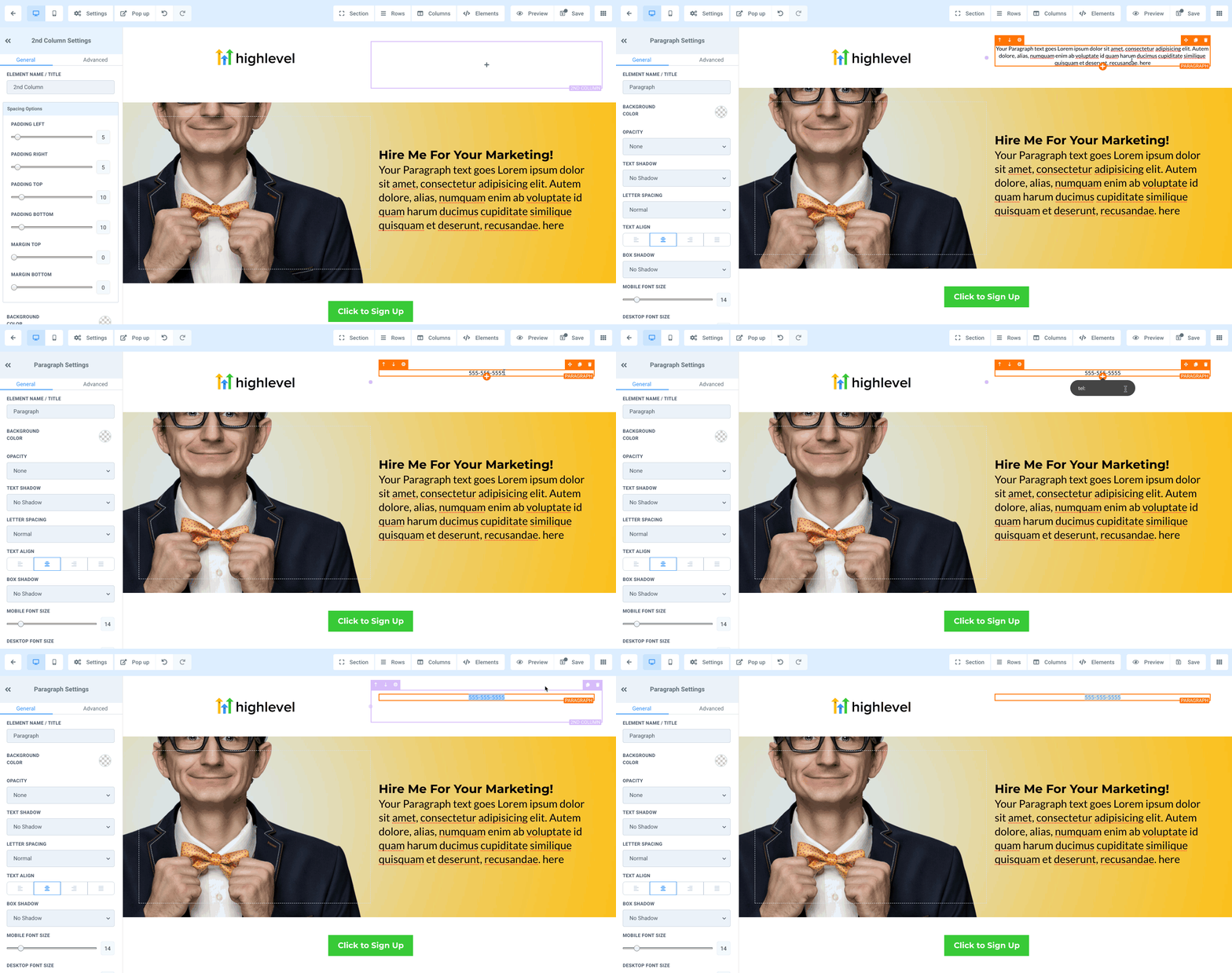
Add a click to call link to text
- Select the text you want to turn into a phone link in the builder.
- Press the link icon in the toolbar.
- Enter the link using the format tel:+1234567890.
- Save the change and preview the page on a mobile device.
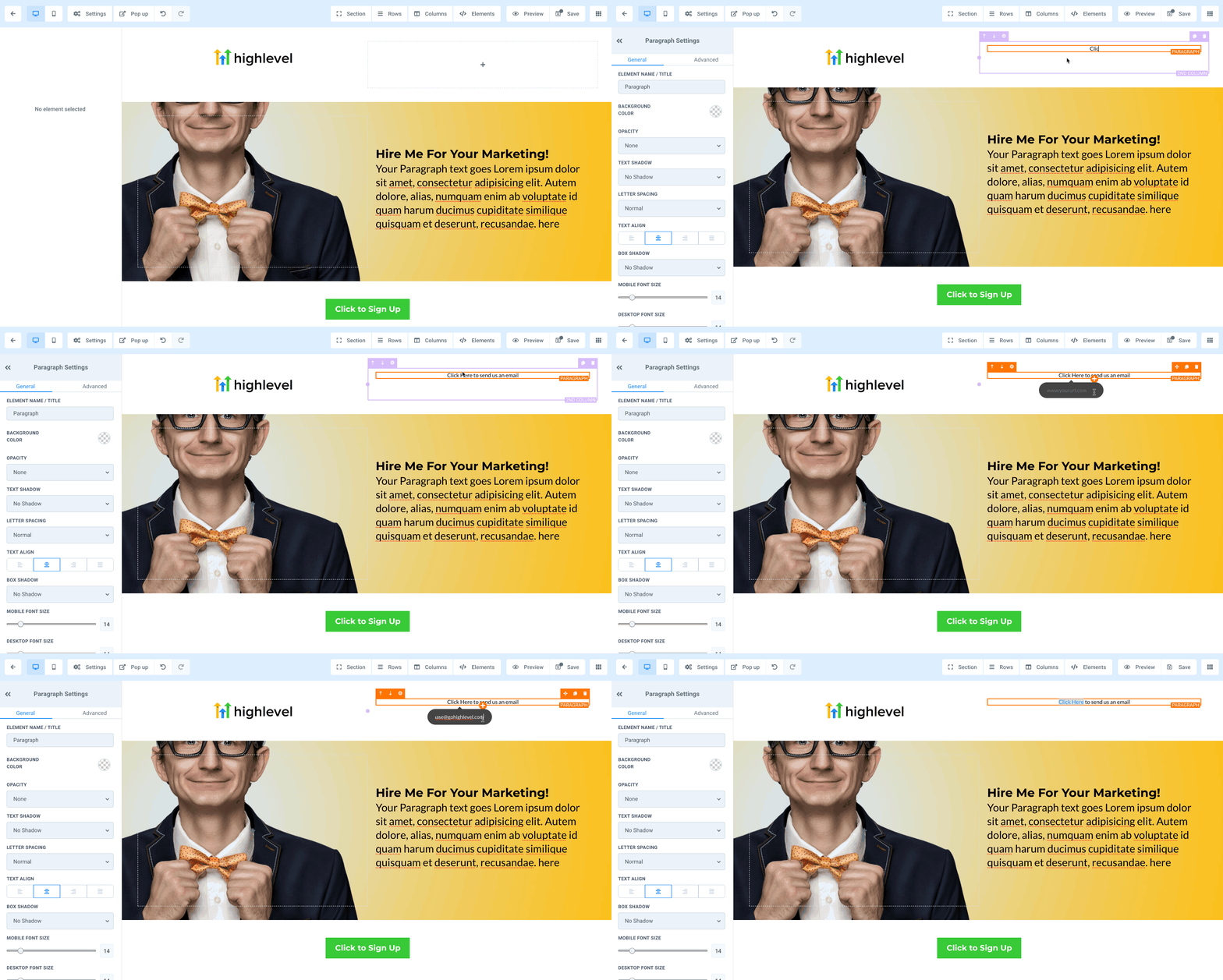
Add a click to email link to text
- Highlight the desired text in the builder.
- Click the link icon.
- Type the link as mailto:name@email.com.
- Save and test the link on a device.
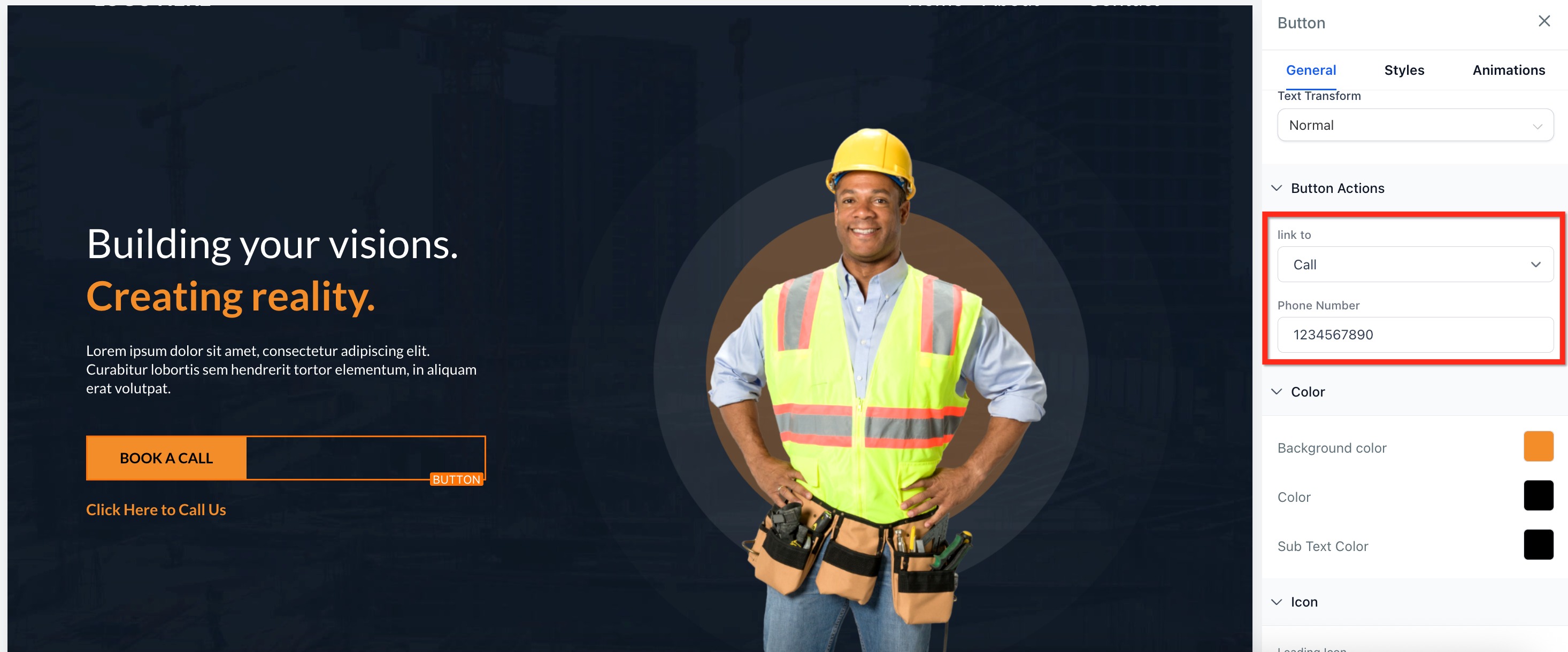
Add a click to call button
- Click the button element you want to configure.
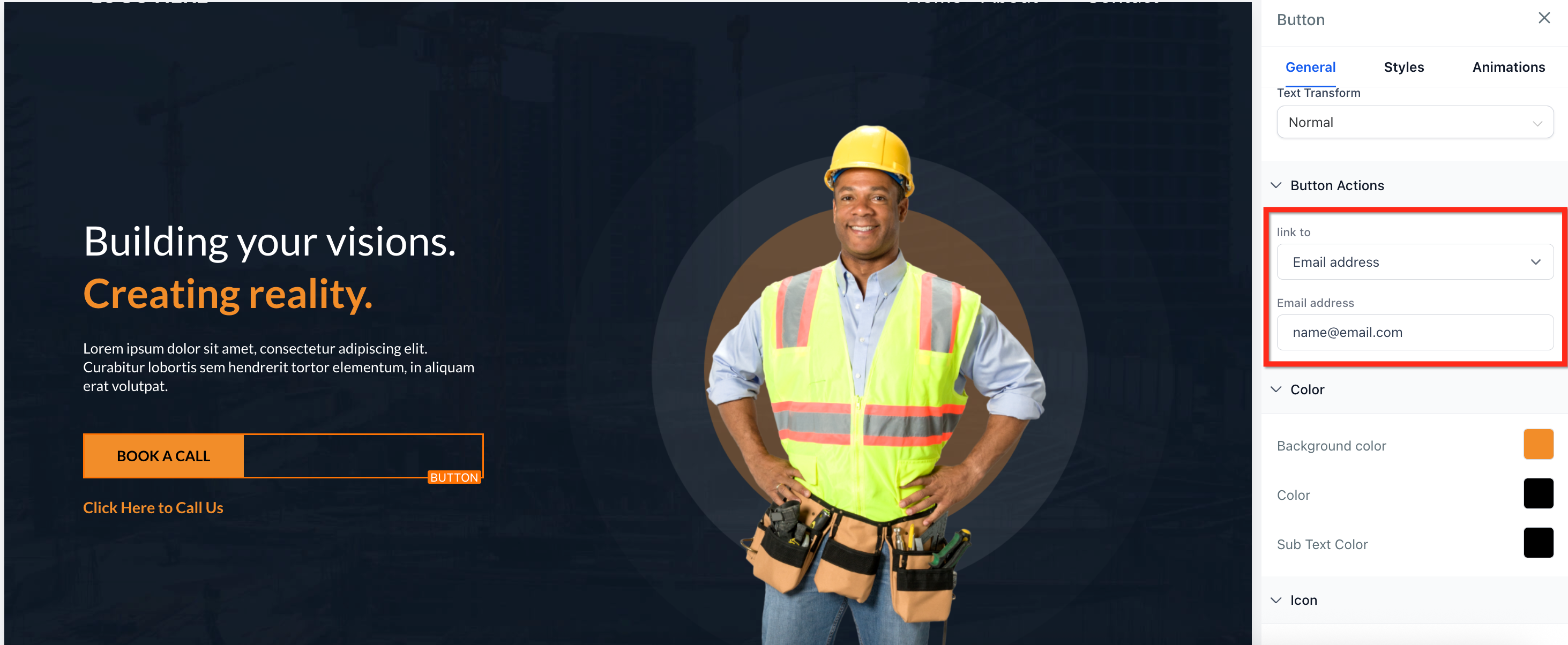
- In the right hand panel, find the Button Actions section.
- Choose Call from the Link to dropdown.
- Enter the phone number.
- Save and preview the button on a mobile device.
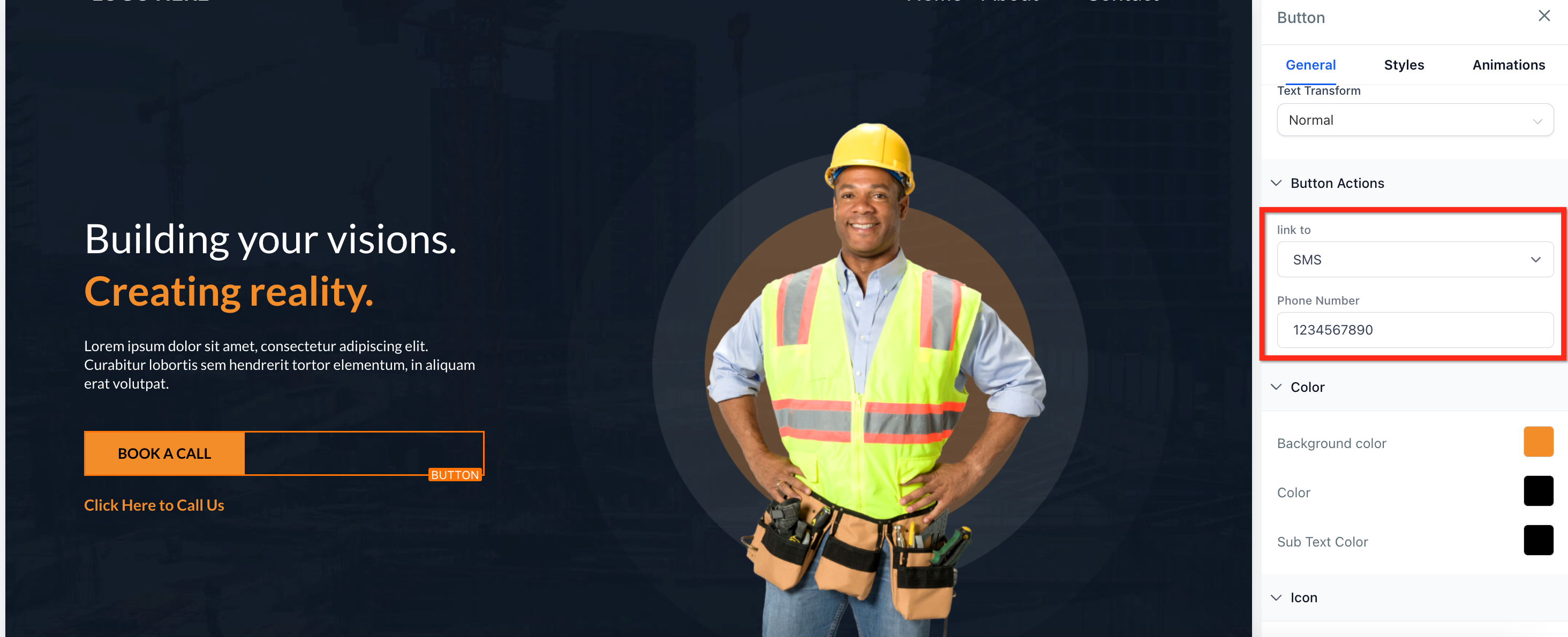
Add a click to text button
- Select the button you wish to edit.
- Under Button Actions, open the Link to dropdown and pick SMS.
- Enter the recipient’s phone number.
- Save the button and test it on a mobile device.
Add a click to email button
- Click the button you want to set up.
- In the Button Actions area, use the Link to dropdown to select Email.
- Provide the email address.
- Save and test the button on a mobile device.
06What it looks like in HighLevel
07Settings that matter
- Button Actions. Determines which type of click to action a button will perform, such as Call, SMS, or Email.
- Link to. Dropdown that lets you choose the protocol (Call, SMS, Email) for the button’s link.
08Things to know before you rely on it
- A single link can execute only one action; you cannot combine call and text in one URL.
- If a visitor’s device does not recognize the protocol, clicking the link will have no effect.
- These links work best on mobile devices; desktop behavior depends on the user’s applications.
09If something goes wrong
- Clicking the link does nothing on a desktop computer. Confirm the device supports the protocol. Provide fallback contact details on the page for users without compatible apps.
- Link opens the wrong app or leaves fields empty. Check the URL format. Use tel:+ for calls, sms:+ for texts, and mailto: for emails, ensuring the address or number follows the colon.
10How it connects to the rest of HighLevel
- Learn how to create and publish sites where click to links live. Websites overview
- Add tracking code to monitor how often click to links are used. Add tracking code
Michael's take

Click to actions are a quick win for any funnel that needs a simple way for visitors to reach you.
If you rely solely on manual copy and paste contact info or have a desktop only audience, you can skip this feature.