
Home/HighLevel/Features/Sites/Populate Custom Fields in HighLevel forms with custom HTML/JavaScript

Funnels, Websites and Forms

Populate Custom Fields in HighLevel forms with custom HTML/JavaScript

In short

Auto populating an existing custom field in a form or survey using custom HTML/JavaScript stores the value when the form is submitted.

AreaSites · Forms
Used forSites
Setup steps9 steps in 2 tasks
Last updatedNovember 3, 2026

01Populate Custom Fields, explained

Using custom HTML/JavaScript you can set the value of a custom field by assigning to its element and dispatching an input event.

When the form is submitted, the populated custom field is saved in the submission record.

02How to set up and use Populate Custom Fields in HighLevel

Retrieve the custom field ID

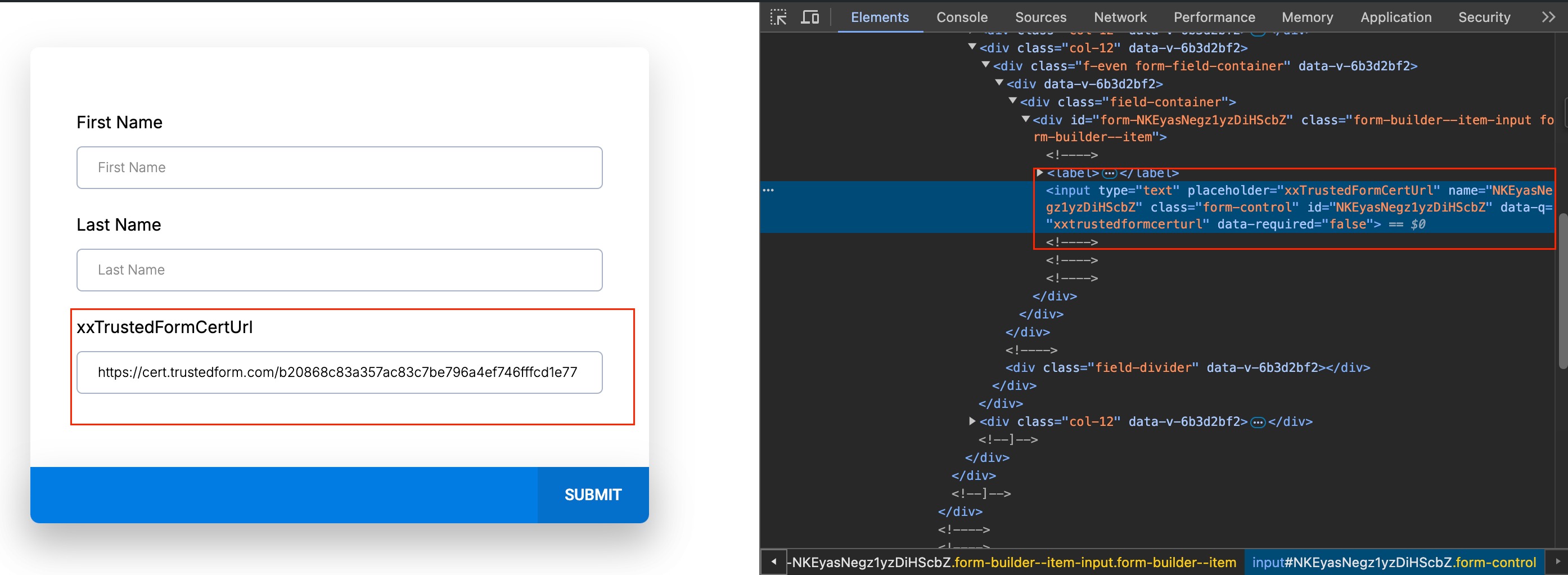
  1. Go to the Preview of the form.
  2. Right click on the page and select 'Inspect.'
  3. Select the mouse pointer tool.
  4. Click on the "Custom Field."
  5. Copy the ID from the name and ID properties.

Set the custom field value with JavaScript

  1. Replace myData with the variable or string that holds the data you want to capture.
  2. Insert the following code, using the actual custom field ID:.
  3. Document.getElementsByName('customFieldId')[0].value = myData;.
  4. Document.getElementsByName('customFieldId')[0].dispatchEvent(new Event("input"));.

03What it looks like in HighLevel
Michael's take

Michael Reimer
Michael ReimerFounder of CRM Pros, HighLevel Commander and Certified Admin

Be careful: Inserting custom JavaScript into a form can break the submission if the script targets the wrong element or fails to fire the input event. Double check the field ID and test the form before you go live.

Get More InformationOpens on HighLevelPublished November 2, 2026 · Updated November 3, 2026

Common questions

Common questions about Populate Custom Fields.

How do I find the ID of a custom field in a HighLevel form?

Open the form preview, inspect the page, use the pointer tool to click the custom field, and copy the ID shown in the name and ID attributes.

What JavaScript code sets a custom field’s value?

Use document.getElementsByName('customFieldId')[0].value = myData; then fire an input event with document.getElementsByName('customFieldId')[0].dispatchEvent(new Event("input"));.

Do I need to replace the placeholder myData with my own value?

Yes. The sample code uses myData as an example. Replace it with the variable or string that holds the data you want to capture.

Next step

Pick the features that matter. Then get the plan that unlocks them.

Explore the features you want, start with the five at the top, and upgrade through my link when you are ready. The bonuses and the team come with it.

The features directory explains every HighLevel feature in plain English. Browse it to see what the platform can do.

Back to the FeaturesSee the full details
⌃

Site preview

Explore the next page

This destination is reserved in the page inventory and is not built yet.