
01Who this is for
- Founders who need to keep legacy Campaigns running for existing clients while moving to Workflows.
- Agency account managers who must decide whether to expose subaccounts to deprecated modules.
- Support staff who need to know which features may generate unresolved bugs.
02Depreciated features, explained
Deprecated features are parts of the platform that the engineering team no longer updates or supports. Currently the only items in this group are Campaigns and Triggers. They are not offered to subaccounts automatically because newer Workflow automation has replaced them.
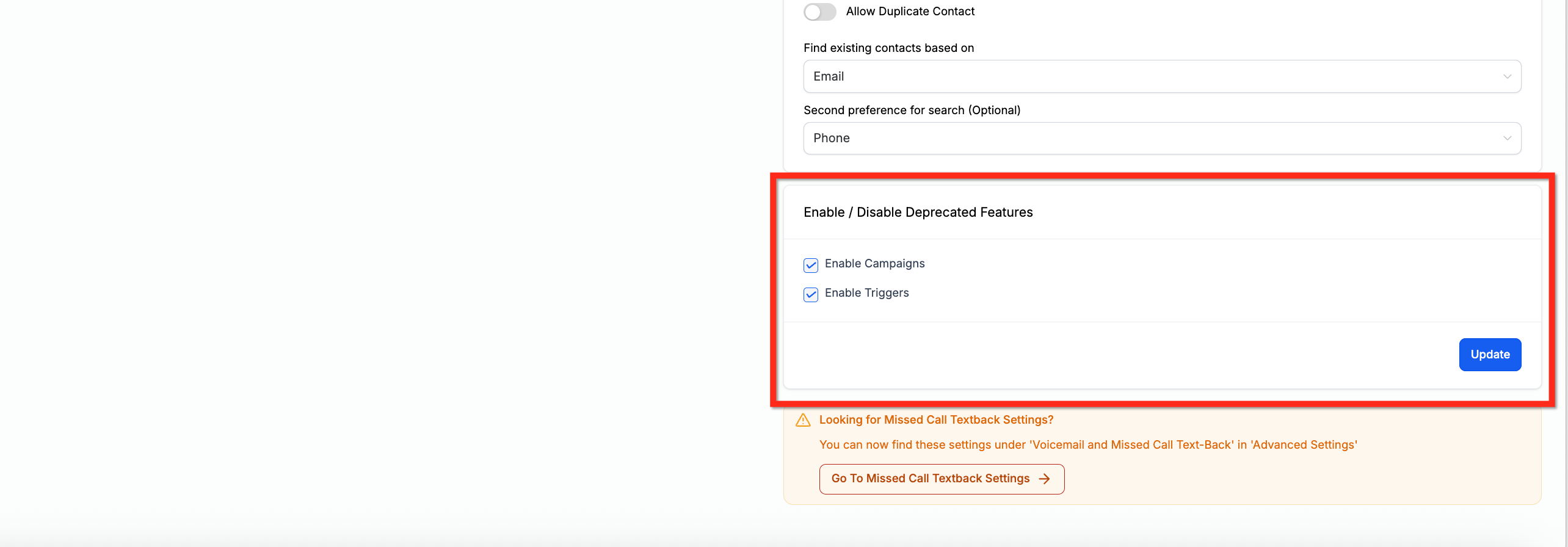
The Enable/Disable Deprecated Features setting provides checkboxes that let an administrator turn these legacy modules on for a customer. Activating a box grants access to the old Campaign or Trigger interface, but the features may still contain bugs that will not be fixed.
Because Workflows provide a more capable alternative, the deprecated modules are being phased out. Turning them on should be a temporary step while migrating processes to the newer automation tools.
03How businesses use depreciated features
- Dental practice. The practice can open the Business Profile settings and check the box for Campaigns to keep its existing email campaign system running while staff build equivalent Workflows.
- Real estate agency. The agency enables the Trigger option in the same settings area, allowing legacy lead routing to continue during the transition to modern Workflow automations.
- Ecommerce store. The store toggles the Campaign feature on, preserving seasonal promotional sequences until new Workflow based promotions are ready.
04Before you start
- Confirm that a suitable Workflow replacement exists for the legacy Campaign or Trigger you plan to keep active.
- Verify that the subaccount does not already have conflicting automation that could interfere with the deprecated module.
05What it looks like in HighLevel
06Settings that matter
- Enable/Disable Deprecated Features. Controls whether legacy modules such as Campaigns and Triggers are available to subaccounts.
07Things to know before you rely on it
- Deprecated features are no longer updated or supported by the engineering team.
- They are not offered to subaccounts by default and must be manually enabled.
- Enabling them may expose users to bugs that will never be resolved.
- These modules are being phased out of the platform.
08How it connects to the rest of HighLevel
- The deprecated features toggle lives within the Business Profile settings alongside other profile controls. Business Profile Settings
- Enabling deprecated Campaigns may affect contact deduplication preferences, which are managed in the Contact Deduplication settings. Contact Deduplication Preferences
- Access to the toggle is found in subaccount settings, requiring navigation through the Business Profile section. Subaccount Business Profile
Michael's take

Turning on a legacy module in HighLevel feels like a small convenience for teams still stuck on an old process. The shift comes when you decide whether the short term comfort outweighs the risk of bugs that won’t be patched.
A boutique marketing agency that has a handful of clients still using Campaigns would benefit from this toggle. They can keep the old workflow alive while gradually moving those clients to the modern Workflows engine.