
01Who this is for
- Agency owners who sell WhatsApp add ons, because they can quickly see each subaccount’s charge.
- Reselling managers handling Email IP subscriptions, for clearer net adjustments without reconciling multiple proration lines.
- SEO service providers, to identify which client’s subaccount caused a mid cycle change.
02Simplified invoice view, explained
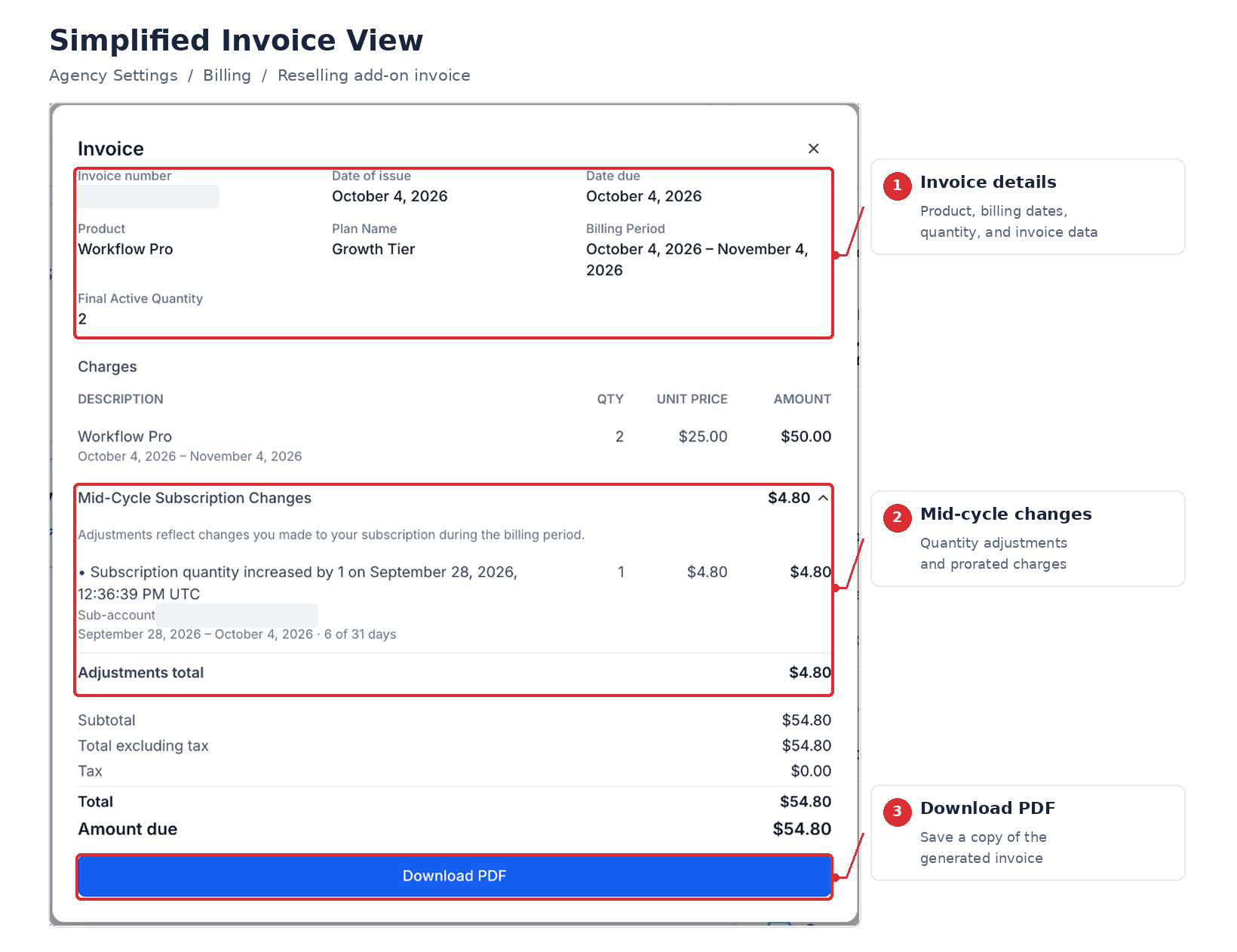
The simplified invoice view presents the latest generated invoice for a supported reselling add on in an easier to read panel. When a subaccount’s quantity changes during a billing cycle, the separate credit and debit entries are merged into one net adjustment row, keeping the Stripe calculated total the same.
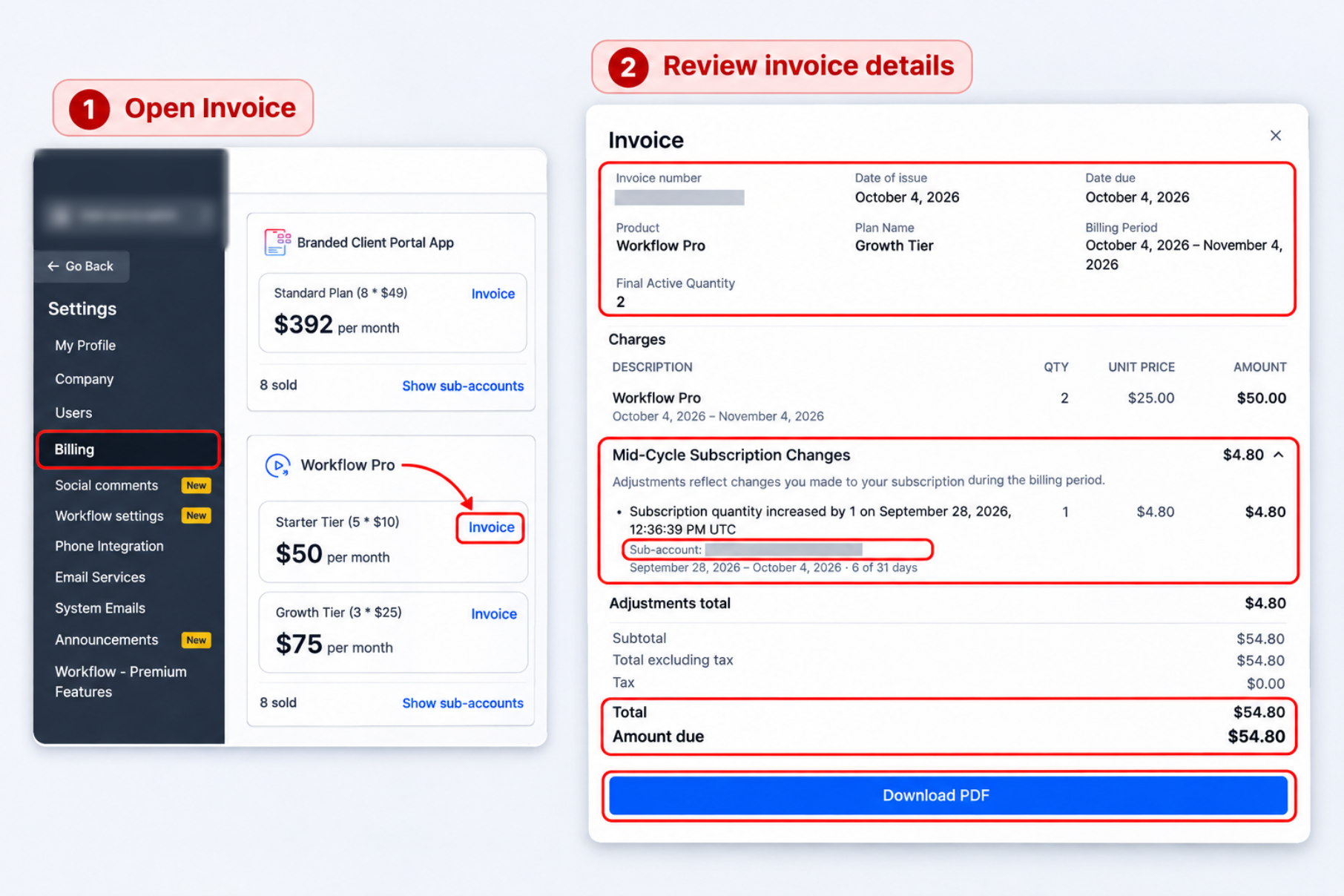
The view lives in Agency View under Settings > Billing. It displays the invoice header, regular subscription charges, net adjustments for mid cycle changes, any subaccount attribution, credit rows highlighted in green, and the total amounts. A PDF of the same layout can be downloaded for record keeping.
No extra configuration is needed; the feature is automatically available for supported products such as WhatsApp, Email IP, Prospecting, SEO, Conversation AI, AI Employee, Workflow, Yext, WordPress, Branded Client Portal App, and Ad Manager.
03How businesses use simplified invoice view
- Dental practice offering the Conversation AI add on. Open the simplified invoice, locate the net adjustment row that reflects a seat change, and download the PDF to keep a copy for the practice’s billing archive.
- Real estate agency reselling the Branded Client Portal App. View the latest invoice, identify the subaccount that generated a credit, and export the PDF for the agency’s accounting records.
- Marketing firm using the AI Employee add on. Inspect the net adjustment for a quantity change, verify the amount matches the Stripe total displayed, and save the PDF for audit purposes.
04The numbers and rules that matter
- Supported add ons: WhatsApp, Email IP, Prospecting, SEO, Conversation AI, AI Employee, Workflow, Yext, WordPress, Branded Client Portal App, Ad Manager.
05Before you start
- Access to Agency View in HighLevel.
- Permission to open Settings > Billing.
- A supported reselling add on must be active on the account.
06How to set up and use simplified invoice view in HighLevel
View and download a simplified invoice
- Switch to Agency View in HighLevel.
- Click Settings.
- Select Billing.
- Under Subscription, locate the Reselling section and open the supported add on product you want to review.
- Click Invoice to open the latest generated invoice for that product.
- Review the invoice details.
- Select Download PDF to save a copy.
- Note: The simplified product invoice panel shows only the latest invoice for the selected reselling subscription.
07What it looks like in HighLevel
08Things to know before you rely on it
- Only the most recent generated invoice is shown; earlier invoices are not listed in the panel.
- Charges slated for future renewals or changes made after the latest invoice are excluded until the next invoice is produced.
- Subaccount names may be missing on current or earlier invoices; attribution starts appearing on invoices generated in later billing cycles.
- The in app invoice panel supports multiple languages, but downloaded PDFs are provided only in English.
- The feature applies only to the supported reselling add ons listed in the article.
09How it connects to the rest of HighLevel
- Explore all reselling product capabilities in HighLevel. All Reselling Products features
- Review pricing and plan options for HighLevel. HighLevel pricing and plans
- Start a free 30 day trial of HighLevel. 30 day trial
Michael's take

This feature feels like a small convenience that can turn a confusing billing month into a clear snapshot.
Agencies that juggle many client subaccounts will appreciate seeing one line per change instead of hunting through multiple proration entries.
A marketing agency that adds a new WhatsApp add on midcycle can open the invoice panel, spot the net adjustment, and download a PDF to send to the client. If I were using it, I’d double check that the subaccount name appears before filing the invoice, just to be sure the attribution is showing up as expected.