
01Who this is for
- Founders launching a new agency benefit because the guided first action gives a clear starting point.
- Marketing managers in small firms benefit because they can quickly reach the feature they need without searching.
- SaaS entrepreneurs benefit because they can align onboarding with their product setup and see progress on Launchpad.
02Action selection during onboarding, explained
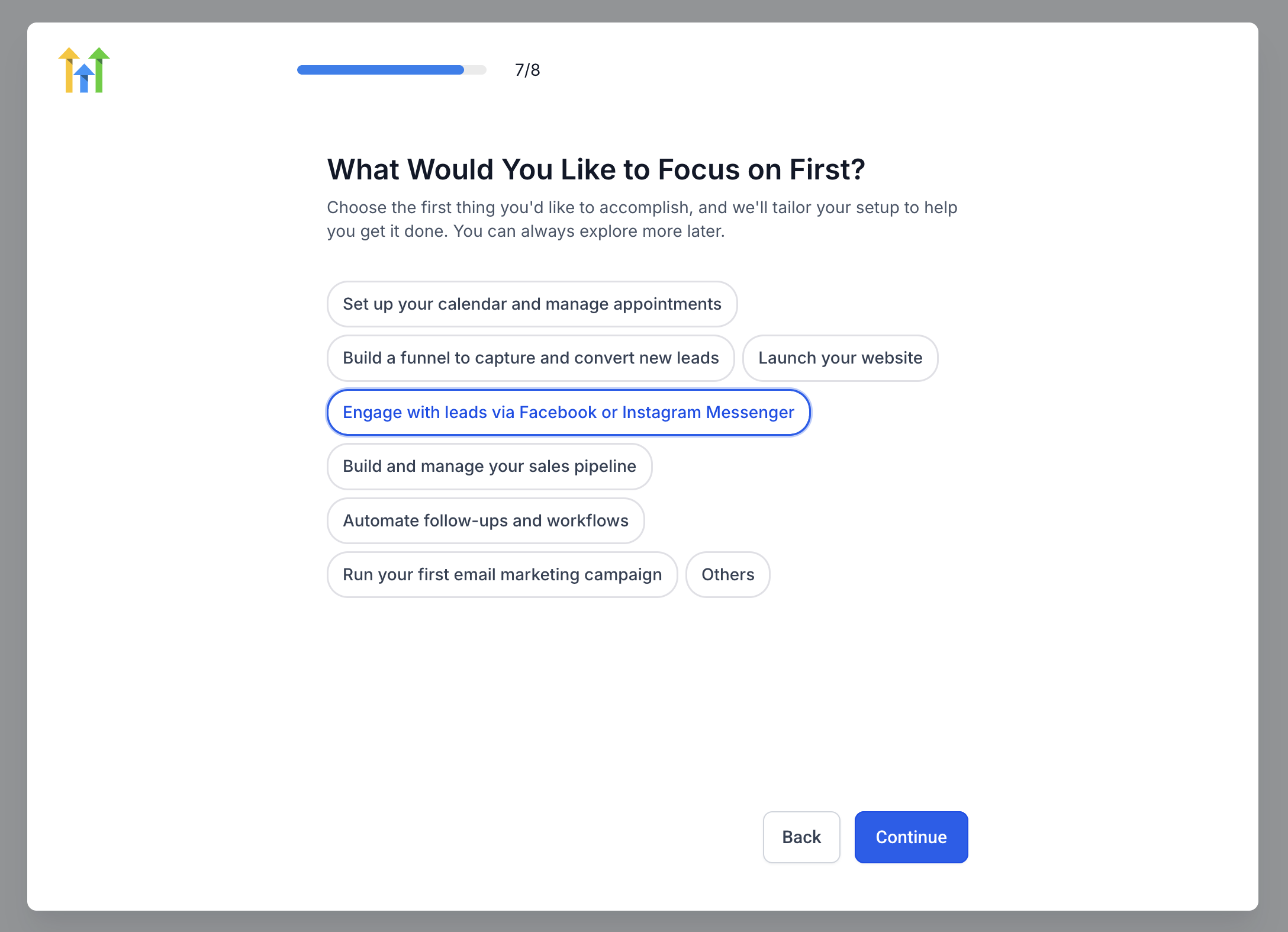
Action Selection is a personalized onboarding feature that appears when a new user reaches the first action step in the HighLevel onboarding flow. It shows a list of suggested tasks and a free text field for custom suggestions.
When a user picks an option, HighLevel automatically redirects them to the associated product page inside their subaccount. The page includes tutorial videos, an interactive product tour, and direct access to the tools needed to finish the task.
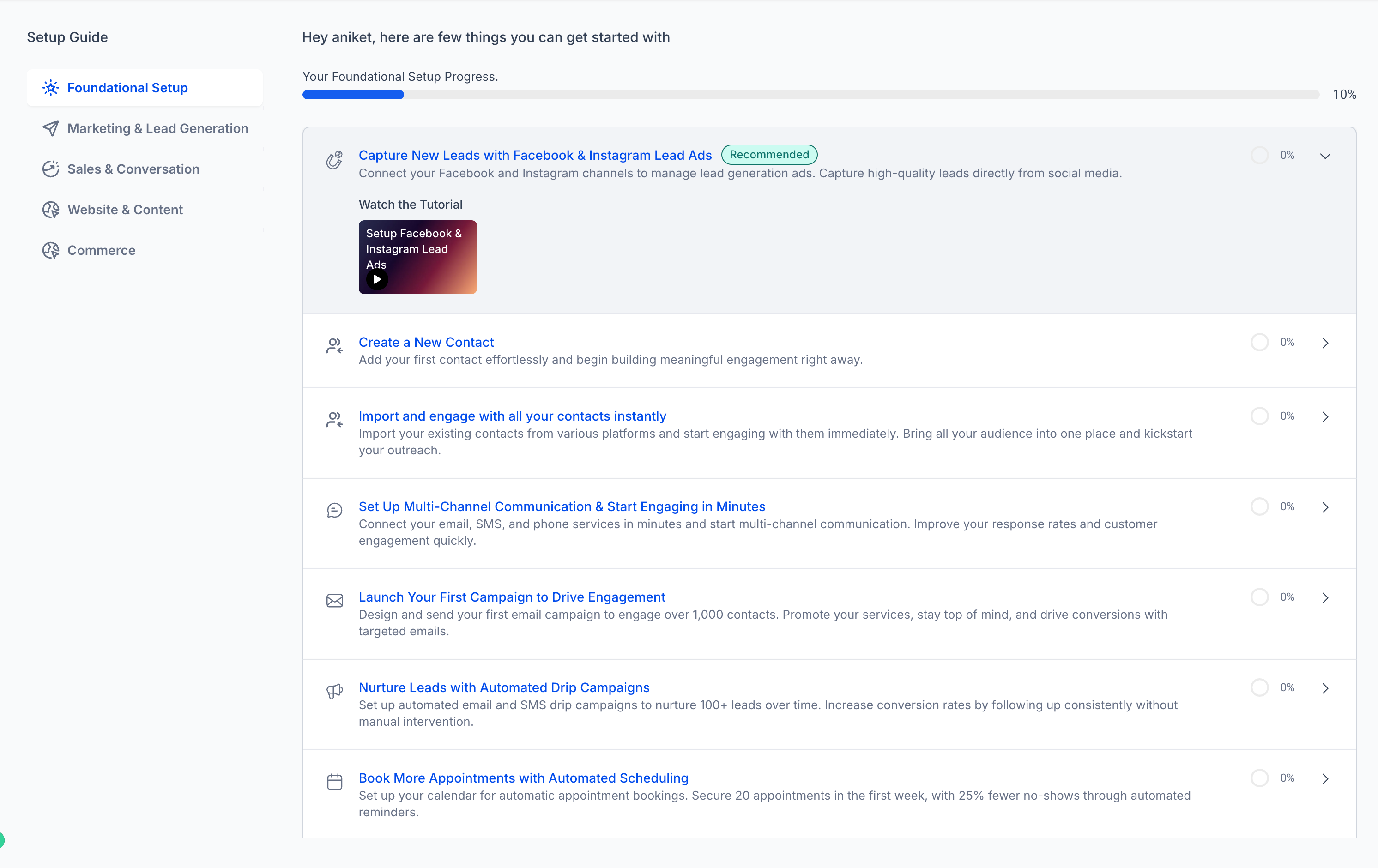
The chosen action is then displayed at the top of Launchpad with a Recommended label, allowing the user to monitor completion status and return to the task later.
03How businesses use action selection during onboarding
- Digital marketing agency. The agency selects an onboarding action to set up its first campaign feature. HighLevel redirects them to the campaign builder, where tutorial videos and a product tour guide them through configuration. They then track the task’s progress from Launchpad.
- SaaS startup. The startup chooses an onboarding action that matches its subscription billing setup. HighLevel takes them straight to the billing module, showing instructional videos and an on screen tour. Completion status appears on Launchpad as Recommended.
- Local SEO consultant. The consultant picks an onboarding action to activate Listings. HighLevel sends them to the Listings page, provides a short video and guided steps, and marks the action at the top of Launchpad for later review.
04The numbers and rules that matter
- $97 plan (per HighLevel's help center, checked November 2026).
- $297 plan (per HighLevel's help center, checked November 2026).
- $497 plan (per HighLevel's help center, checked November 2026).
05Before you start
- A new HighLevel account must be created and the onboarding flow must be started.
- The user must be on a plan where the first action selection is released (e.g., the $97 plan) (per HighLevel's help center, checked November 2026).
- Appropriate user permissions are required for the selected feature.
06How to set up and use action selection during onboarding in HighLevel
Begin your HighLevel onboarding
- Sign in to your new HighLevel account and proceed through the onboarding steps until the first action screen appears.
Review the suggested actions
- Read the list of suggested onboarding actions and pick the one that best fits your immediate business need.
Select your preferred action
- Click the chosen action; if none match, enter your own suggestion in the free text field and submit.
Access the corresponding product page
- After confirming the selection, HighLevel automatically opens the product page linked to that action inside your subaccount.
Follow the tutorial or product tour
- Use the provided tutorial video or interactive product tour to complete the required configuration or setup activity.
Return to Launchpad to review your progress
- Open Launchpad from the left navigation menu and verify that your selected onboarding action appears at the top with a Recommended label.
07What it looks like in HighLevel
08Things to know before you rely on it
- Custom suggestions are collected only as feedback and do not create a new onboarding action or tour.
- The first action selection screen is only shown to new accounts on eligible plans; existing customers may not see it.
- Product tours may stop if the user lacks the necessary permissions for the selected feature.
09If something goes wrong
- Cannot complete the action because of missing permissions. Ask your agency administrator to confirm that your user role includes access to the required feature.
10How it connects to the rest of HighLevel
- View pricing and plan eligibility for the onboarding feature HighLevel pricing and plans
- Start a free trial to experience onboarding and Launchpad Start a 30 day HighLevel trial
- Learn about the Founder Plan for dedicated onboarding support The HighLevel Founder Plan
Michael's take

Don’t ignore the feedback field and assume the platform will automatically create a custom tour for you.