
01Who this is for
- Founders who run paid social campaigns need reliable attribution to evaluate ad performance.
- Marketing managers overseeing multiple Facebook ad sets benefit from unique naming to prevent duplicate contacts.
02Facebook ad reporting, explained
The Facebook ad reporting feature pulls ad data into HighLevel dashboards. It links ad clicks to leads and shows which campaigns generated contacts. The integration lives under Subaccount > Settings > Integrations, where a Facebook ad account is linked.
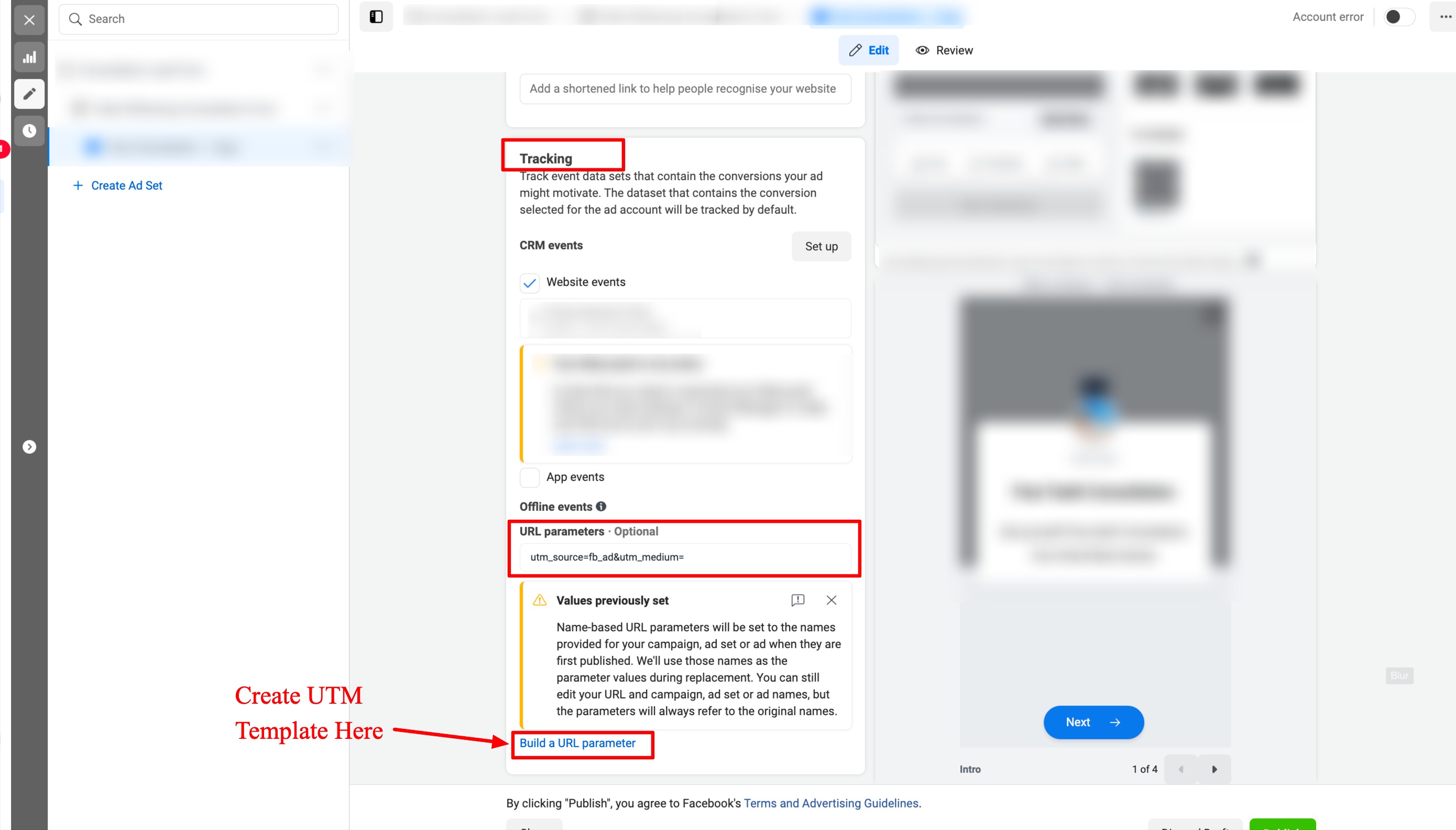
UTM parameters are added at the tracking level, not the destination URL. Those parameters travel with each click and allow HighLevel to match leads back to the original ad, ad set, and campaign.
Names for campaigns, ad sets, and ads must be unique across the account. Changing a name after the ad is live does not update the UTM values, so new objects are required for any rename.
03How businesses use Facebook ad reporting
- Restaurant chain. The chain creates a unique campaign for each new menu item. It adds a tracking template at the tracking section so each click records the dish name. The unique names prevent duplicate lead entries in the reporting view.
- Real estate brokerage. The brokerage maps Facebook lead forms to the correct Facebook page. It selects the active page in the lead form mapping to collect property inquiry leads directly into HighLevel.
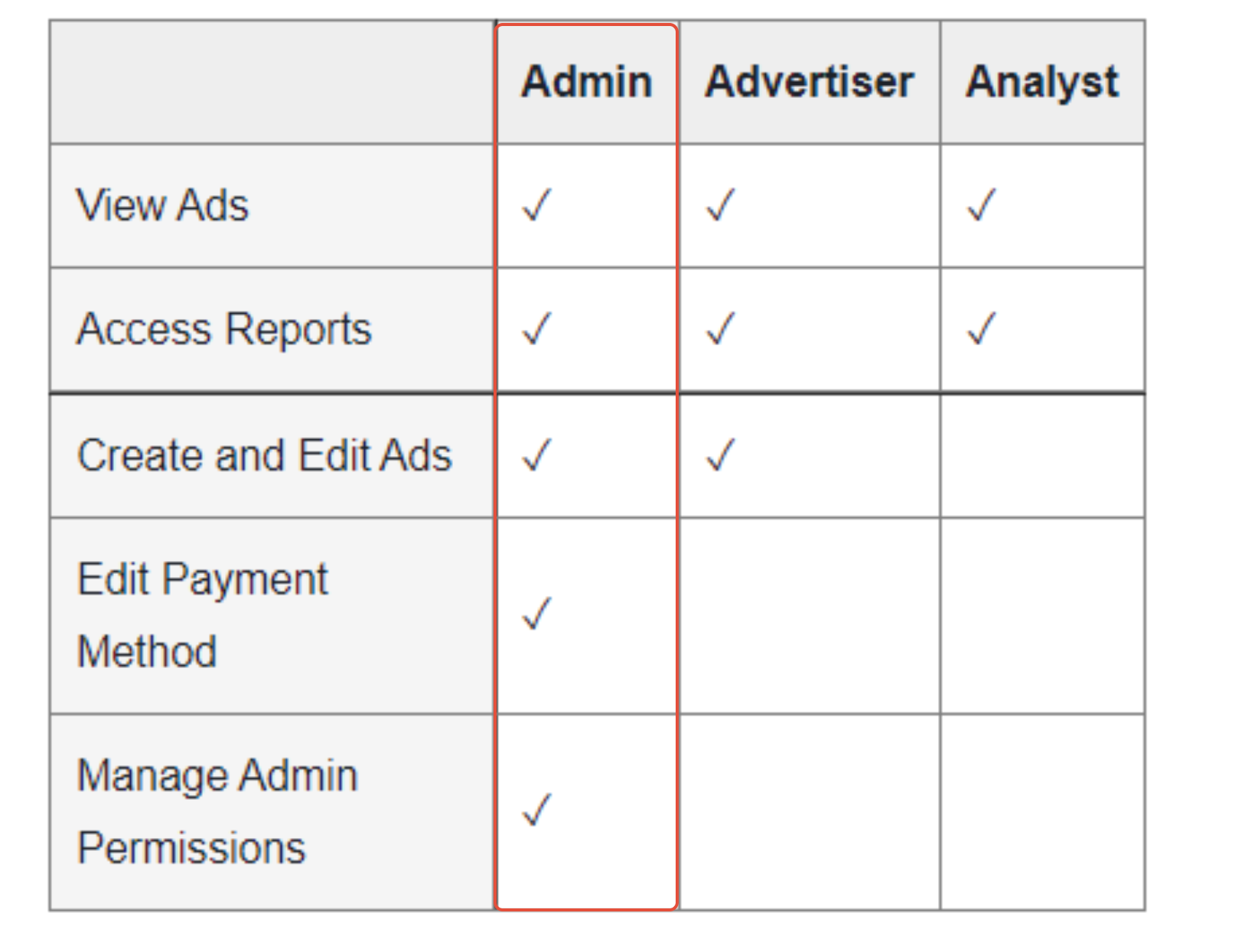
- Fitness studio. The studio verifies that its Facebook ad account has admin permissions in Subaccount > Settings > Integrations. This ensures the studio can view ad performance and leads inside HighLevel.
04Before you start
- You must have admin permission on the Facebook page attached to the ad account.
- The Facebook ad account must be linked in Subaccount > Settings > Integrations.
- A correct Facebook page must be chosen when mapping lead forms.
05How to set up and use Facebook ad reporting in HighLevel
Verify Facebook integration is active
- Open Subaccount > Settings > Integrations.
- Locate the connected Facebook ad account.
- Confirm the account shows admin permissions.
- If the page is missing, assign CRM access as described in the integration guide.
Add UTM tracking template
- Navigate to the Tracking section of the Facebook ad settings.
- Insert the UTM template into the tracking field.
- Leave the Destination URL field unchanged.
Ensure unique names for campaigns, ad sets, and ads
- Create distinct names for each campaign.
- Assign separate names to every ad set within a campaign.
- Give each individual ad a unique name.
Handle name changes safely
- Avoid renaming existing campaigns, ad sets, or ads because the name parameters cannot be changed during their lifetime.
- If a rename is required, duplicate the object and create a new campaign, ad set, or ad.
- Publish the new object so UTM parameters match the current names and reporting continues to attribute leads correctly.
Map Facebook lead forms to the correct page
- Open the Lead Form Mapping screen.
- Select the appropriate Facebook page from the dropdown list.
- Mark the mapping as active to start collecting leads.
06What it looks like in HighLevel
07Settings that matter
- Facebook Ad Account integration. Controls whether the Facebook ad account is linked and able to send data into HighLevel.
- UTM Tracking template. Specifies the UTM parameters that accompany each ad click for reporting.
- Name uniqueness. Ensures each campaign, ad set, and ad has a distinct identifier to prevent duplicate contact entries.
08Things to know before you rely on it
- Names must be unique; duplicate names cause duplicate contact rows in reporting.
- Renaming an existing campaign, ad set, or ad does not update its UTM values; create new objects instead.
- Radio style custom fields cannot be mapped from Facebook lead forms.
- Timezone fields cannot be mapped from Facebook lead forms.
09If something goes wrong
- Facebook page does not appear in the integration list. Check CRM access assignment and confirm you have page admin rights.
- Leads show old campaign names after a rename. Create a new campaign, ad set, or ad instead of renaming the existing one, because the data will keep referring to the original parameters.
10How it connects to the rest of HighLevel
- Add UTM parameters to Facebook ads UTM guide
- Understand attribution sources in HighLevel Attribution help
- Start a 30 day HighLevel trial Free trial
Michael's take

When your Facebook ads aren’t showing the right numbers in HighLevel, you need to verify the integration. Make sure the ad account is linked with admin rights and the correct page is selected.
If the integration is solid, double check that each campaign, ad set and ad has its own unique name and that the UTM template lives in the Tracking field. Those details keep the data clean and let you trust the ROI numbers you see each week.