
01Who this is for
- Founders who need insight into which marketing channels generate phone leads, so they can allocate budget.
- Call center managers who track agent performance and call outcomes across multiple numbers.
- Local marketers who want to match call volume with specific ad campaigns and referral sources.
02Call reporting, explained
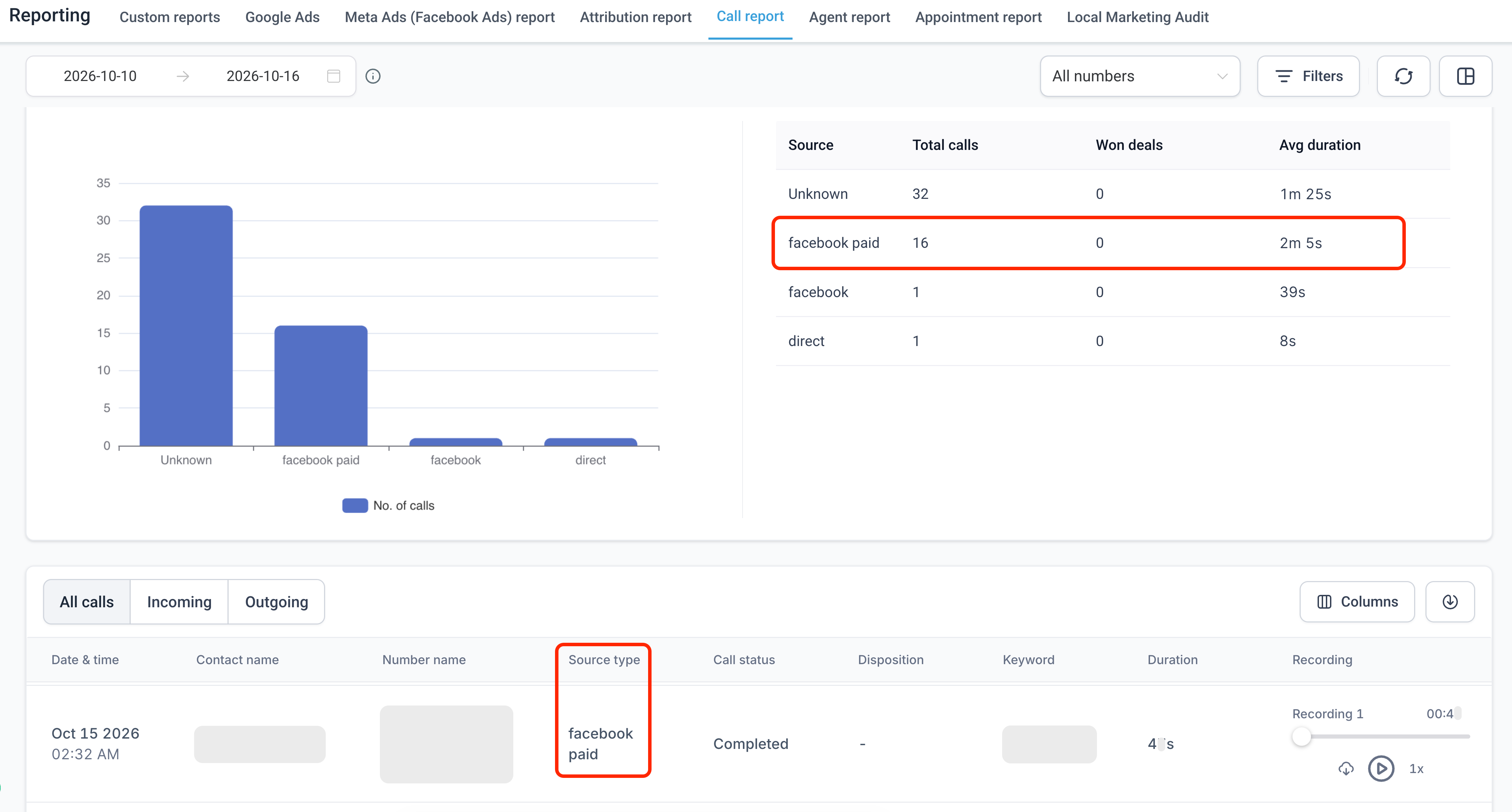
Call Reporting lives under the Reporting section of a HighLevel subaccount. It combines a dashboard of summary widgets with a detailed table of each call. The summary shows totals for incoming, first time, outgoing and source grouped calls, while the table lists individual records with date, contact, source type, status, duration and any available recordings.
Filters let users narrow the view. The date range selector limits the period, and the All numbers dropdown lets a specific phone line be examined or all lines together. Above the table, tabs let users switch between All calls, Incoming only, or Outgoing only. Columns can be chosen for CSV export, enabling deeper analysis outside the platform.
Source attribution is displayed in the Source summary and Source type column. When a call originates from a tracked ad, the label shows the platform and the word “Paid”, such as Facebook Paid or Bing Paid. AI driven referrals appear with distinct labels. Not every call receives a source label; attribution depends on available tracking data.
03How businesses use call reporting
- Digital marketing agency. The agency opens the client’s subaccount, selects Call report, filters by the ad specific phone number and the campaign date range, then reviews the Source summary to see which platforms delivered calls. They export the CSV to combine with other ad performance metrics.
- Dental practice. The practice staff accesses Call report, chooses the practice’s main number in the All numbers dropdown, and filters to the past month. They inspect missed versus answered calls and listen to recordings of IVR segments to improve the phone script.
- Ecommerce retailer. The retailer selects Call report, sets the date range to the latest promotion period, and filters to the checkout support line. They examine the Source type column to confirm that Google Paid clicks are generating phone inquiries and export the data for sales analysis.
04Before you start
- Report access requires a Founder Plan subscription.
- A number pool must be configured and its tracking snippet installed on any website whose calls you want to attribute.
05How to set up and use call reporting in HighLevel
Access call report
- Open the desired subaccount in HighLevel.
- Click Reporting in the left navigation menu.
- Select Call report from the top navigation bar.
- Choose the reporting period with the date range selector.
- Pick a specific phone number or All numbers from the dropdown.
- Review the summary widgets and then click All calls, Incoming, or Outgoing above the call table to focus the records.
06What it looks like in HighLevel

07Settings that matter
- All numbers dropdown. Controls which phone number’s calls are shown in the report, allowing a view of a single line or all lines together.
- date range selector. Sets the start and end dates for the call data displayed, letting users limit the report to a specific time window.
08Things to know before you rely on it
- Call Reporting is only available to accounts on the Founder Plan.
- Source attribution depends on the presence of referral information; some calls will appear as Direct because no tracking data is available.
- Improved source labels are applied only to new calls; historical records keep their original source values.
09How it connects to the rest of HighLevel
- Set up a number pool and install its tracking snippet to enable website attribution. All Reporting features
- Learn how to add UTM parameters to Facebook ads for better source tracking. Facebook ad reporting
- Review the pricing page to confirm access to the Founder Plan. HighLevel pricing
Michael's take

Wondering if the call reporting feature is worth the effort for your agency? It lets you see which ads, tags or AI tools are recorded as sources for calls.
If I were setting up a new campaign, I’d pull the CSV export after a short period and make sure the number pool tracking snippet is firing correctly before I rely on the data.