
01Who this is for
- Businesses that send appointment reminders
- Companies that run marketing campaigns
- Organizations that need two factor authentication messages
02A2P 10DLC message throughput, explained
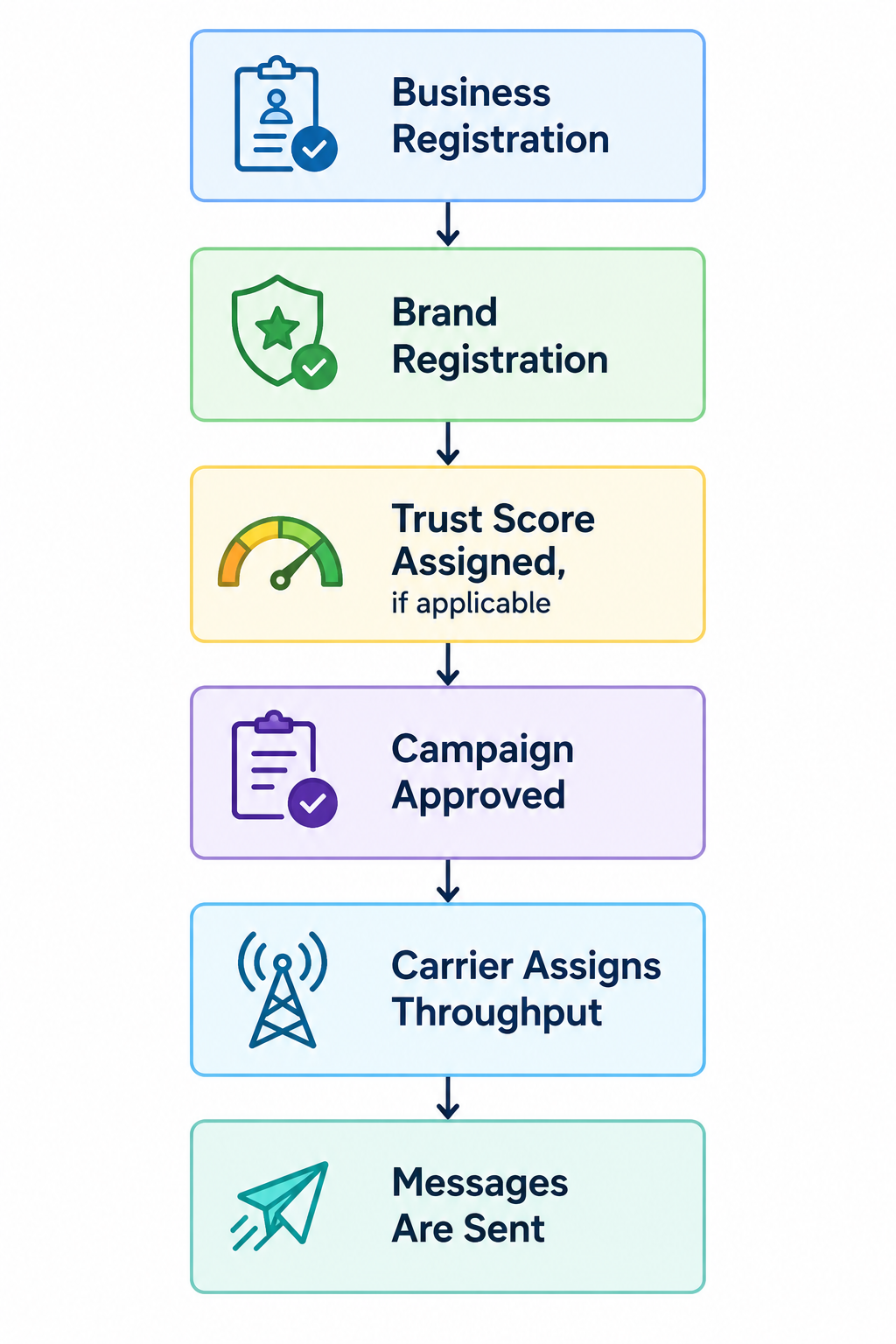
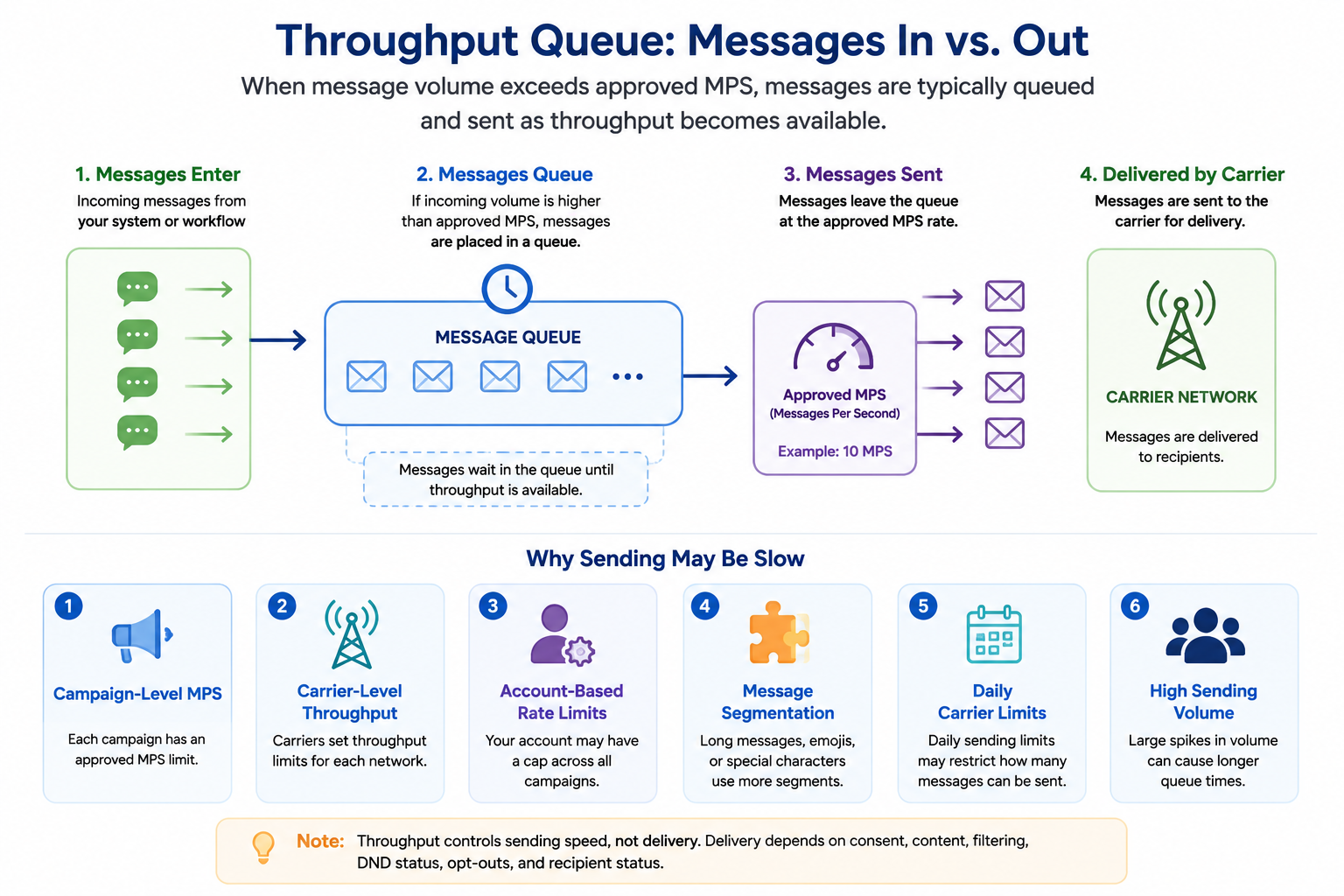
The feature defines how many SMS segments can be transmitted each second when using an approved A2P 10DLC campaign. Throughput is expressed in message segments per second (MPS) and differs by brand registration type and Trust Score. Higher Trust Scores can qualify a brand for faster sending rates.
Throughput rules apply to US registered 10 digit long code numbers. Toll Free, international, and Canadian routes follow separate models. The limits are enforced at the carrier level, with major networks sharing a combined cap and minor carriers receiving a lower per number rate. Account level rate limits may further restrict total send speed across all campaigns.
All settings related to throughput live within the Phone System area of HighLevel. Brand and campaign information, including Trust Scores and registration status, can be reviewed in the Trust Center and Brands & Campaigns sections.
03How businesses use A2P 10DLC message throughput
- Dental practice. The practice sends appointment reminders to many patients at once. Throughput determines how quickly those reminder texts leave the system, preventing long delays during peak scheduling periods.
- Gym or fitness center. The gym runs class schedule notifications and promotional offers. By understanding its brand Trust Score, it can estimate how many members can receive messages in a short window without queues.
- Online retailer. The retailer delivers order confirmations and time sensitive sale alerts. Throughput limits help gauge how many order related texts can be dispatched simultaneously during high traffic sales events.
04The numbers and rules that matter
- Throughput is measured in message segments per second (MPS).
- Standard Brand Trust Score 75 to 100: Total SMS MPS 225, AT&T 75, T-Mobile 75, Verizon 75.
- Standard Brand Trust Score 50 to 74: Total SMS MPS 120, AT&T 40, T-Mobile 40, Verizon 40.
- Standard Brand Trust Score 1 to 49: Total SMS MPS 12, AT&T 4, T-Mobile 4, Verizon 4.
- Low Volume Standard Brand: Total SMS MPS 12, AT&T 4, T-Mobile 4, Verizon 4.
- Low Volume Mixed Campaign: Total SMS MPS 3.75, AT&T 1.25, T-Mobile 1.25, Verizon 1.25.
- Sole Proprietor Brand: Total SMS MPS 2.25, AT&T 0.25, T-Mobile 1 per number, Verizon 1 per number.
- Messages to US Cellular are based on major network throughput up to 8 MPS.
- Messages to other minor U.S. carriers are 1 MPS per phone number.
05Before you start
- A registered A2P 10DLC brand and approved campaign must exist in the platform.
- Accurate business details such as legal name, EIN or Tax ID, address, website, privacy policy and terms should be provided during registration.
06How to set up and use A2P 10DLC message throughput in HighLevel
Check A2P brand and campaign information in HighLevel
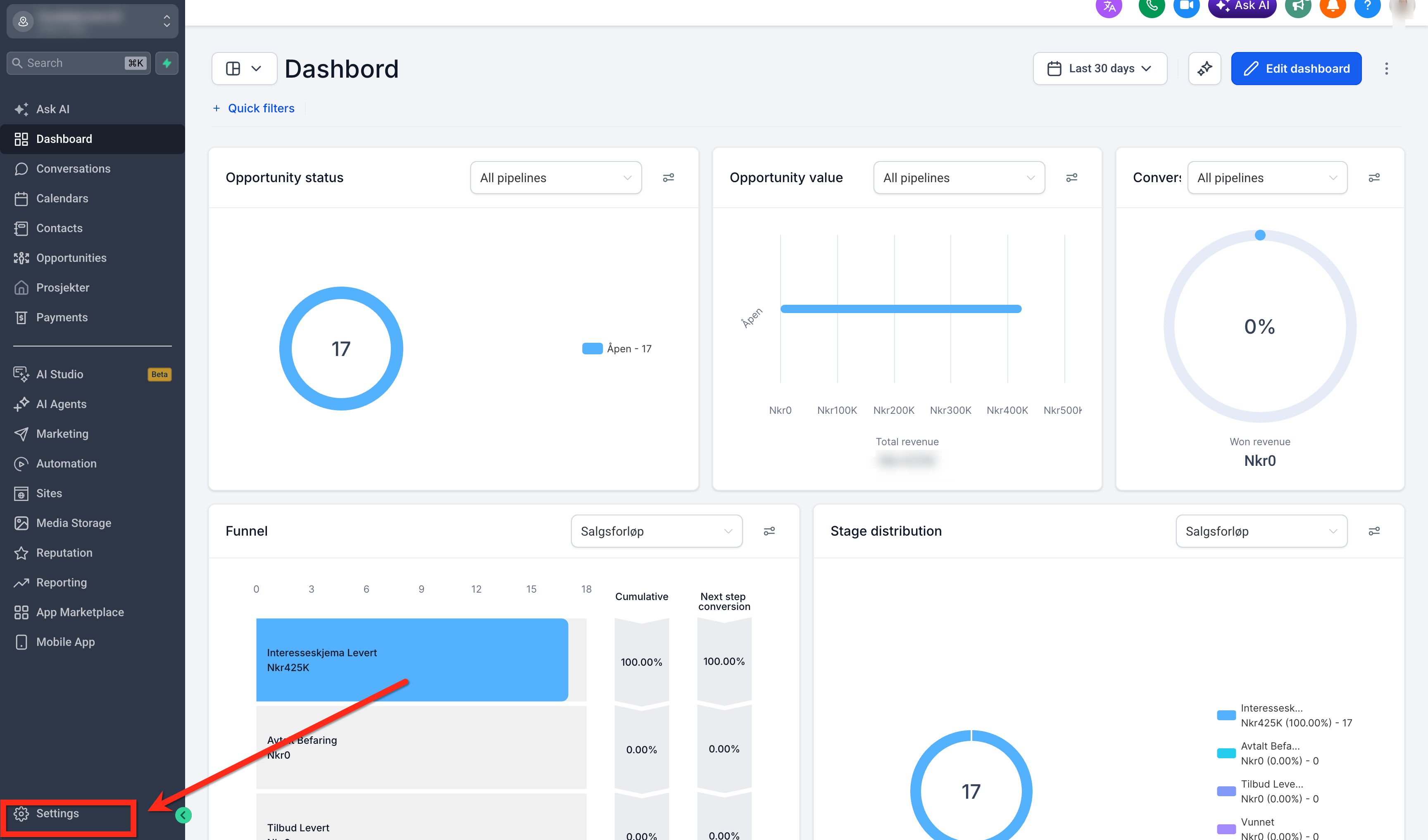
- Open Settings from the main navigation.
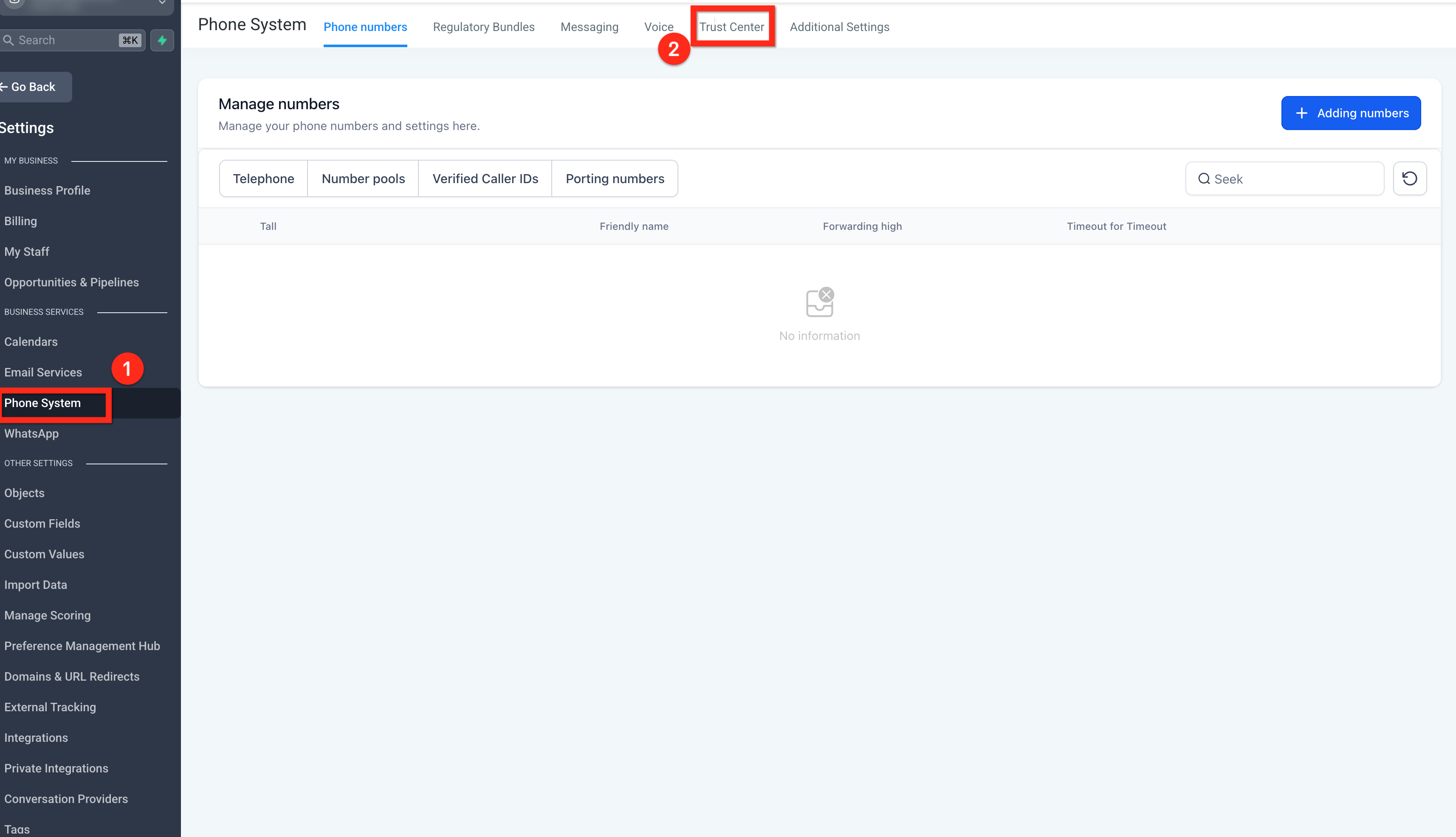
- Navigate to Phone System > Trust Center and review your A2P registration details.
- Open Brands & Campaigns to view brand status, campaign status, selected use case and any required fixes.
07What it looks like in HighLevel
08Settings that matter
- Trust Center. Shows the Trust Score, registration details and any issues that affect throughput eligibility.
- Brands & Campaigns. Displays the brand type, campaign type, use case and current approval status that determine the applicable MPS limits.
09Things to know before you rely on it
- Standard Brands receive up to 225 total MPS for Trust Scores 75 to 100, 120 MPS for scores 50 to 74, and 12 MPS for scores 1 to 49 or low volume status.
- Mixed and Marketing campaigns follow the same tiered limits, but low volume mixed campaigns are capped at 3.75 total MPS regardless of score.
- Low Volume Standard Brands have a fixed lower throughput and cannot achieve the higher tiers granted to fully vetted Standard Brands.
- Sole Proprietor Brands use fixed limits of 2.25 total MPS, with AT&T capped at 0.25 MPS, T Mobile at 1 MPS per number and Verizon at 1 MPS per number.
- Account based rate limits may restrict the combined sending speed of all campaigns, causing messages to queue if the limit is exceeded.
- Higher Trust Scores do not guarantee message delivery; carrier filtering, consent and content still affect outcomes.
- MMS messages may be processed differently and are not covered by the same MPS tables.
- Toll Free, international and Canadian 10DLC routes use separate throughput models and are not governed by these limits.
- If LC Phone sends SMS via A2P 10DLC long code routes, the same throughput rules apply.
10If something goes wrong
- Throughput lower than expected. Review brand registration details and improve accuracy to raise the Trust Score, which may increase the allowed MPS.
- Messages are queuing despite approved campaign limits. Check the account level rate limit in the Trust Center; if the account limit is lower than the sum of campaign limits, adjust or request a higher limit.
- Higher Trust Score does not improve delivery rates. Ensure all contacts have given proper consent, use approved content and avoid forbidden message categories.
11How it connects to the rest of HighLevel
- Best practices for brand approval to improve Trust Scores Brand approval guide
- Step by step A2P campaign registration walkthrough Campaign registration guide
- How to get your phone number A2P approved in 2026 Phone number approval
- Full pricing details for the HighLevel phone system Pricing guide
- Start a 30 day trial of HighLevel Free trial
Michael's take

Be careful: A2P 10DLC throughput limits are set by carriers and brand type, not by HighLevel. Even with a high Trust Score, you won’t magically beat carrier caps or sidestep filtering. Ignoring the limits can cause queues and delivery delays, especially during spikes.
The upside is clear. Knowing your exact MPS limits lets you plan campaigns that stay within approved rates, avoiding unexpected backlogs. Set realistic sending schedules, match your use case to the appropriate brand type, and keep registration details accurate to qualify for higher throughput when possible.