
01Who this is for
- Founders who need to send marketing or transactional texts from local numbers, because the process secures carrier approval.
- Agency owners managing client phone numbers, because each client must have an approved campaign to maintain deliverability.
02A2P campaign registrations, explained
The feature registers a new A2P 10DLC campaign in HighLevel. After a brand is approved, you create a campaign, pick a messaging volume tier, define the primary use case, and describe how contacts opt in. The platform then runs an AI compliance check before sending the information to carriers for review.
The registration lives under Settings > Phone System > Trust Center. From the Trust Center you can create multiple campaigns for an approved brand, link them to specific phone numbers, and track their status (Pending, Rejected, Approved). The process supports two paths: a guided Chat Widget flow that generates the consent widget automatically, or a Manual flow for businesses that collect consent elsewhere.
03How businesses use A2P campaign registration
- Dental practice. The practice selects a low volume option, uses the Chat Widget to gather patient consent for appointment reminders, and submits the campaign. The widget automatically creates separate consent boxes for promotional offers and health reminders.
- Retail clothing store. The store opts for manual setup, enters its website URL, describes a marketing use case, and uploads the opt in form URL used at checkout. It then runs the AI compliance review and submits the campaign for carrier approval.
- Real estate agency. The agency chooses the high volume option, provides sample messages for new listings and open house alerts, and records consent collected via QR codes at property tours before completing the registration.
04The numbers and rules that matter
- Low Volume Standard Brand: Up to 6,000 SMS segments per day, lower registration fees.
- High Volume Standard Brand: Up to 600,000 SMS segments per day, higher registration fees.
- HighLevel does not add a markup to A2P fees.
05Before you start
- An active HighLevel account must exist.
- The brand registration must already be approved.
- A publicly accessible business website is required for carrier verification.
06How to set up and use A2P campaign registration in HighLevel
Access campaign registration
- Navigate to Settings > Phone System > Trust Center.
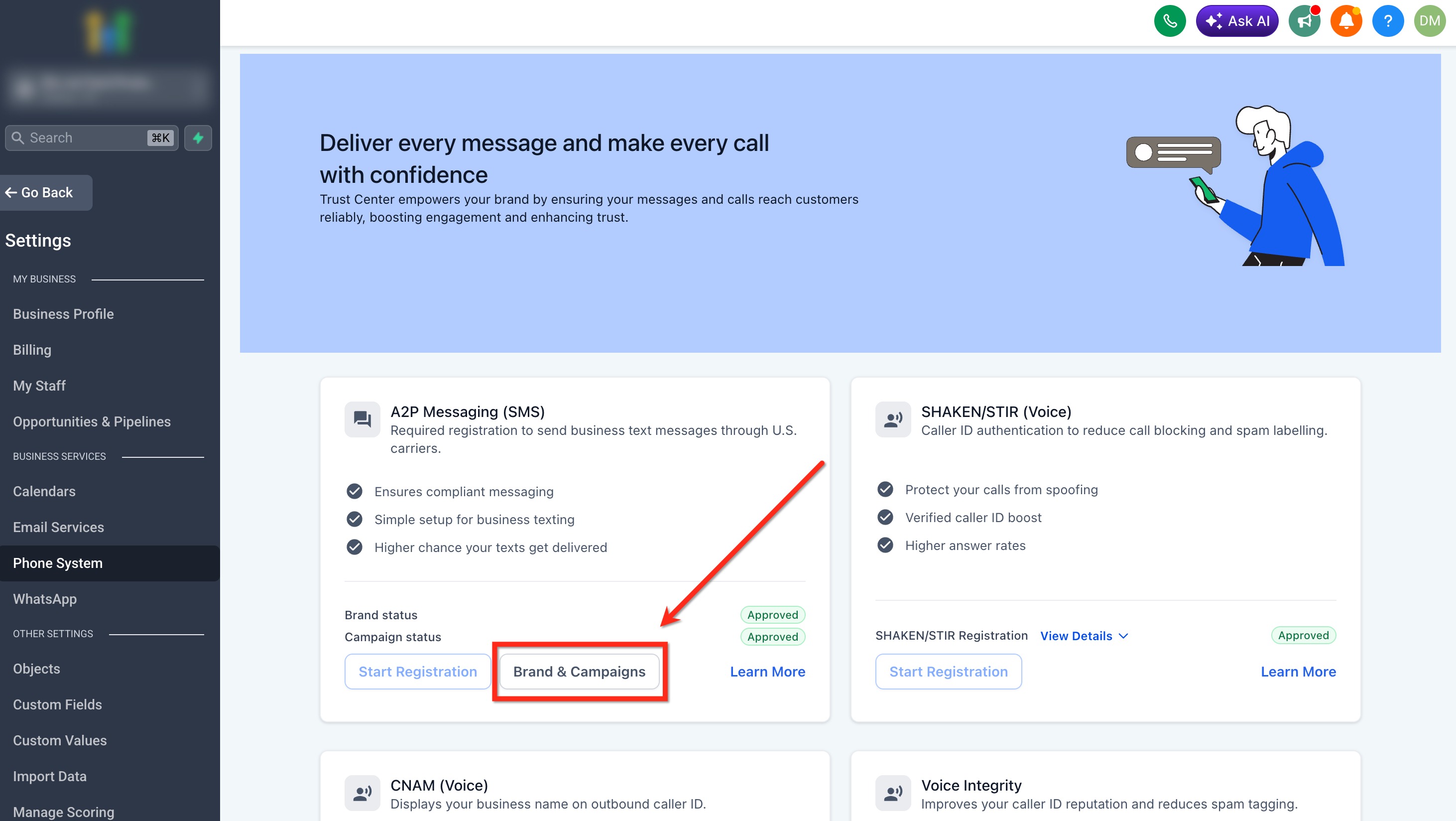
- In the A2P Messaging (SMS) card, click Brand & Campaigns.
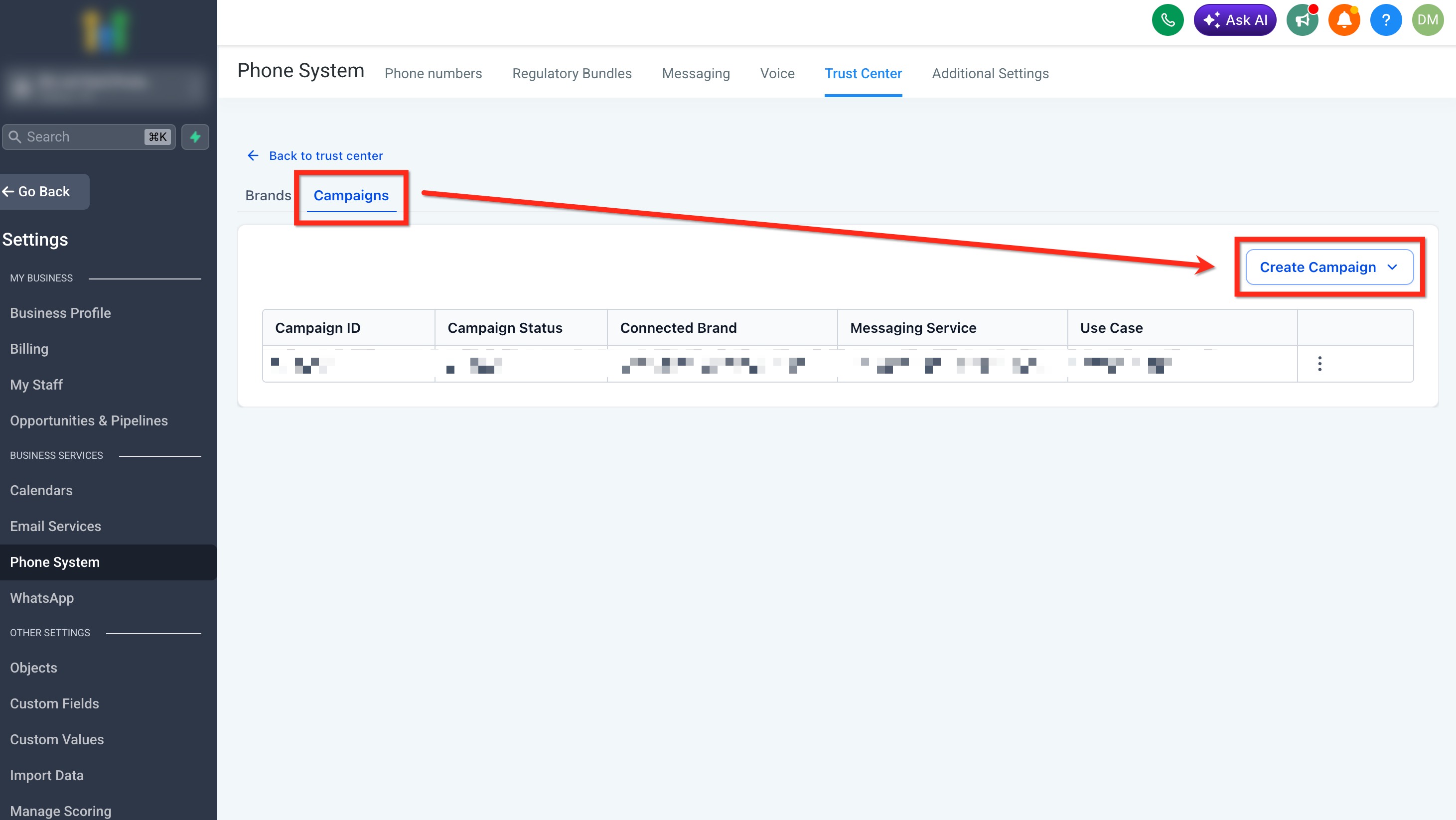
- Open the Campaigns tab.
- Click Create Campaign and select the approved Brand for the new campaign.
Register an A2P campaign, Chat Widget path
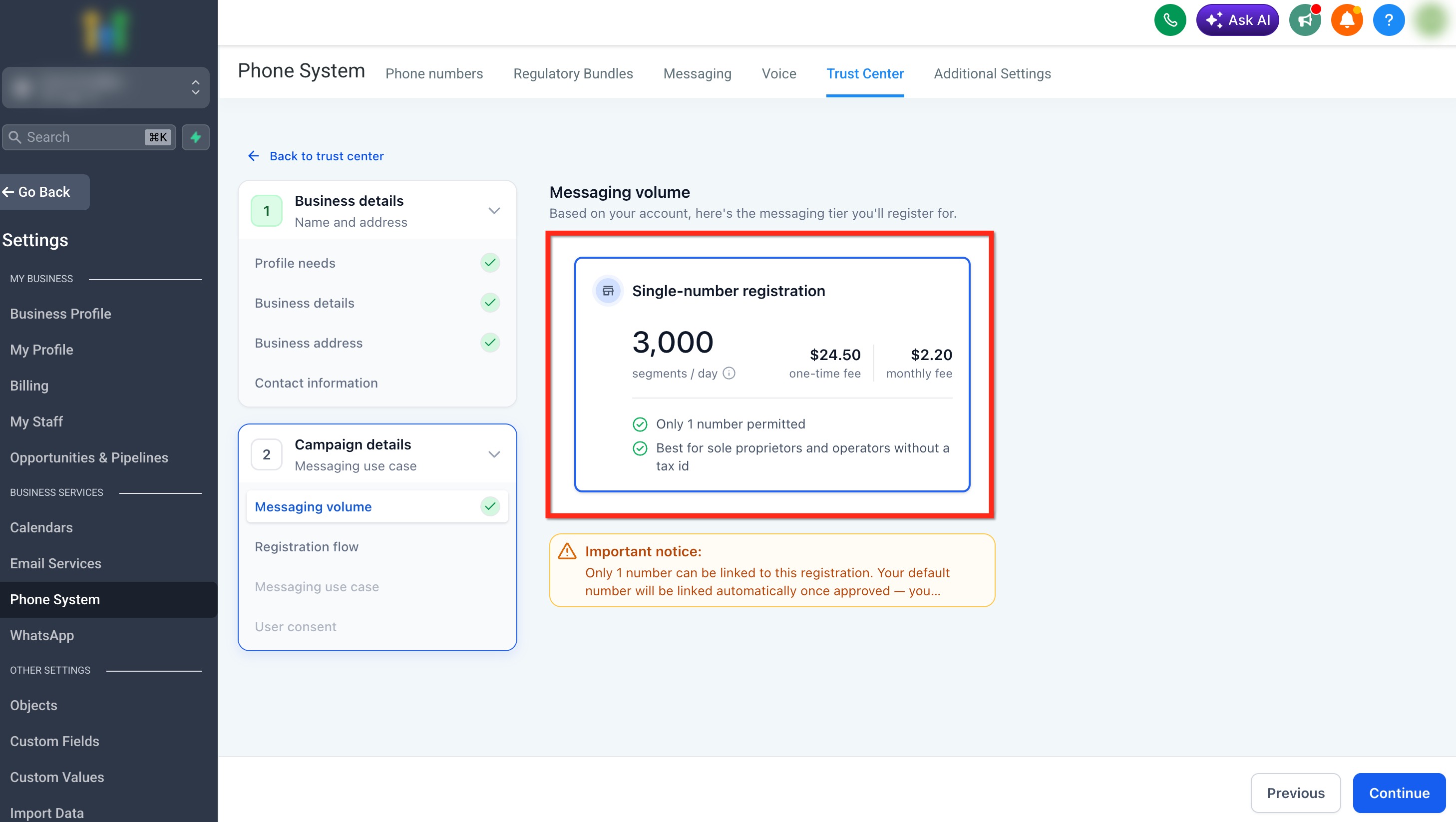
- Select your messaging volume option that matches your daily SMS needs.
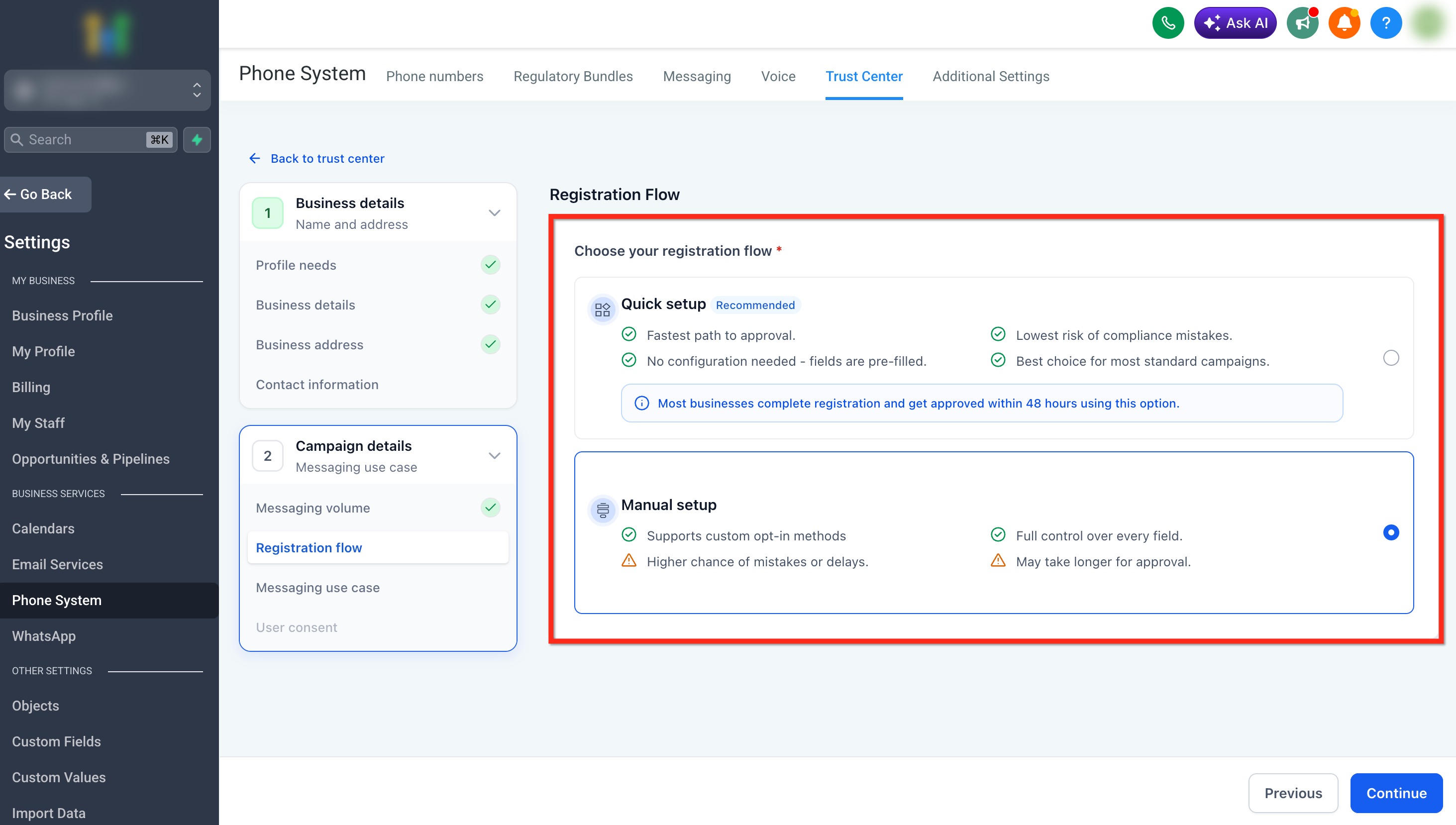
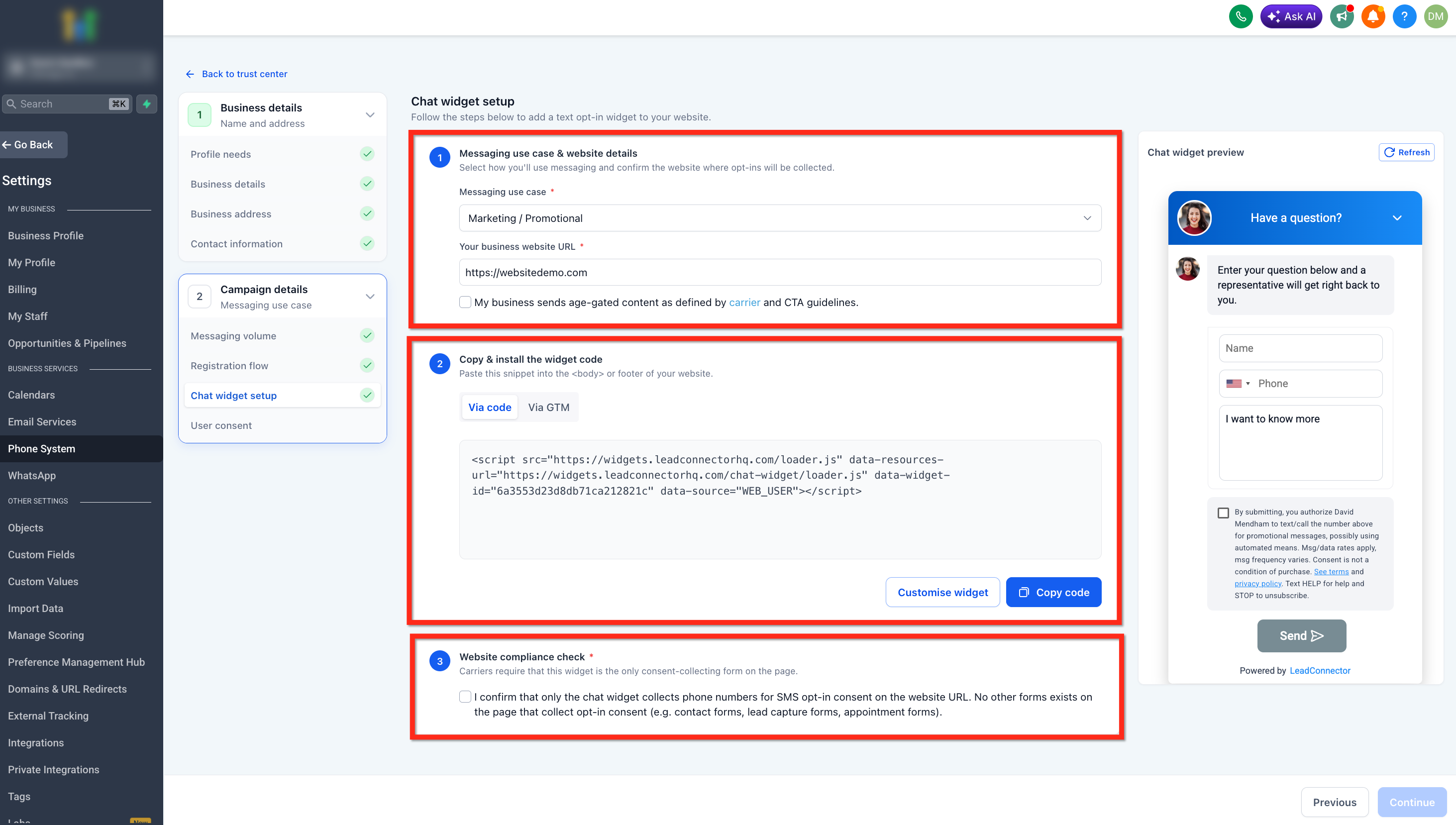
- Choose the default Chat Widget Setup and continue.
- Enter the messaging use case, provide your business website URL, and check the age gated content box if applicable.
- Copy the widget code displayed and paste it into the <body> or footer of your website.
- Make sure the widget is fully installed and visible before continuing.
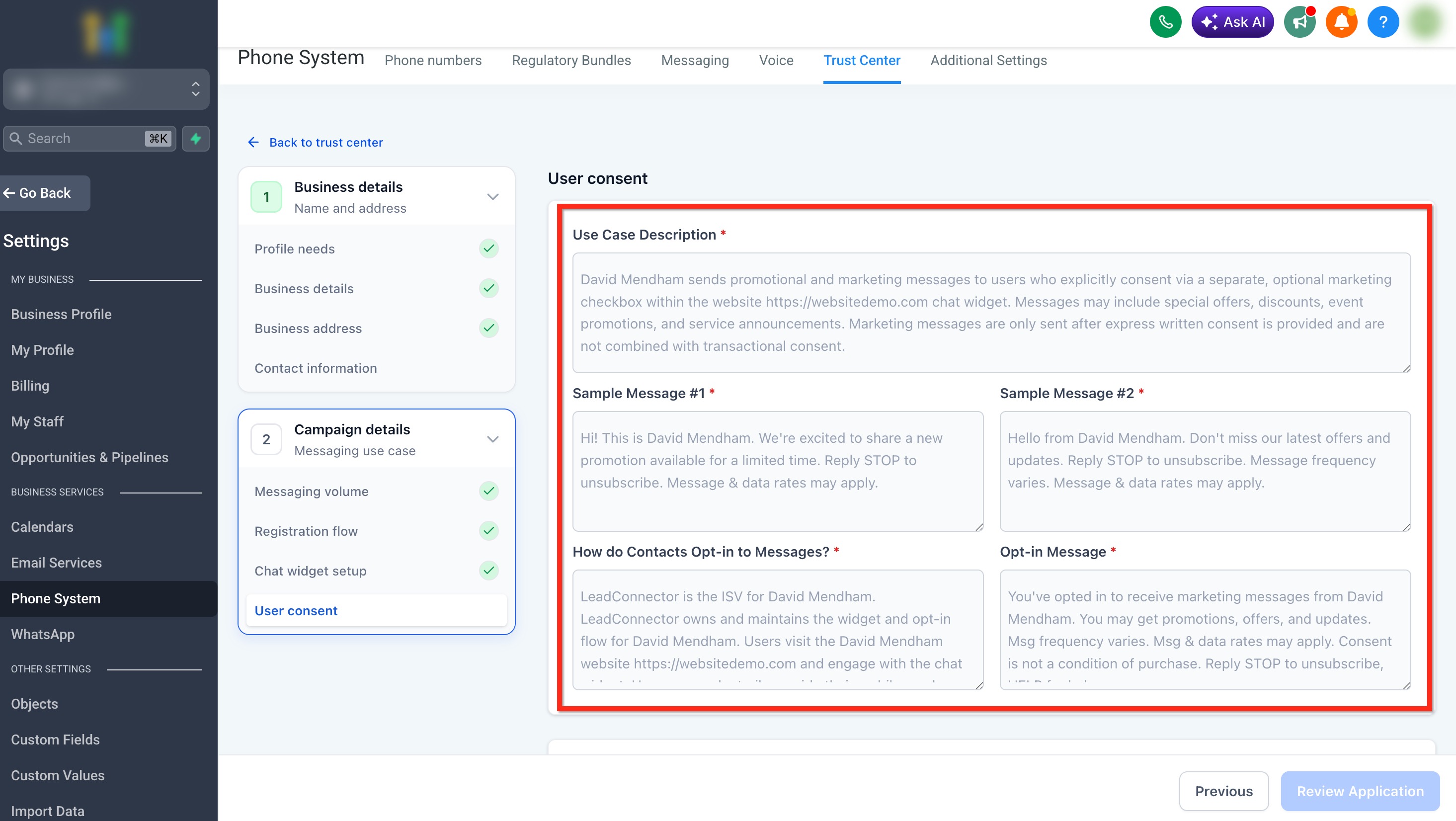
- Review the automatically filled consent fields to ensure accuracy.
- Complete the Business Website Compliance Checklist and click the Review Application button.
Register an A2P campaign, Manual setup path
- Select your messaging volume option that matches your daily SMS needs.
- Switch to Manual Setup from the Chat Widget screen.
- Enter campaign details: use case, website URL, description, sample messages, and any additional message options.
- Provide user consent information: opt in method, form URL, flow description, opt in message, privacy policy URL, and terms and conditions URL.
- Review the Business Website Compliance Checklist.
- Click the blue Review Application button to move to the compliance review stage.
Run AI compliance review and submit
- Click Review Application to start the AI compliance review.
- If any checks fail, correct the highlighted issues and click Review Again.
- When all checks pass, submit the campaign for carrier review.
07What it looks like in HighLevel
08Settings that matter
- Messaging Volume. Determines daily throughput capacity and the associated registration fees for the campaign.
- Messaging Use Case. Classifies the primary purpose of the SMS messages, such as marketing, informational, or mixed.
- Website URL. Specifies the publicly accessible site where contacts will provide consent for the campaign.
- Age, gated content. Indicates whether the messages contain content restricted to certain ages.
09Things to know before you rely on it
- Low Volume Standard Brand allows up to 6,000 SMS segments per day and has lower registration fees.
- High Volume Standard Brand allows up to 600,000 SMS segments per day and incurs higher registration fees.
- If no Tax ID is on file, only a single number registration is available and only one phone number can be linked.
- Do not place the Chat Widget on a page that also contains another SMS opt in form.
- Selecting Mixed in the Chat Widget automatically sets the Campaign Use Case to Low Volume Mixed.
- Passing the AI compliance review does not guarantee carrier approval.
10If something goes wrong
- Pending. Wait until the carrier review finishes. Do not create another campaign or resubmit while the status is Pending.
- Rejected. Open View required fixes, correct every listed issue, and then resubmit the campaign.
- Approved, but SMS still isn’t working. Verify that the sending phone number is linked to the approved campaign and shows the green A2P Verified label.
11How it connects to the rest of HighLevel
- Learn how to register a brand and campaign for A2P 10DLC Brand and campaign registration
- See the fees and monthly charges for A2P 10DLC messaging Messaging fees
- Review phone system pricing and billing details Phone system pricing
Michael's take

When you have a steady stream of SMS outreach. Whether for appointments, promotions, or alerts. The higher deliverability and compliance peace of mind are worth the registration effort for any business that relies on texting as a core channel.
If your texting volume is occasional or you only send a handful of messages per month, the registration overhead may outweigh the benefit. In those cases, toll free messaging or a different channel could be more cost effective.