
01Who this is for
- Founders of consumer focused SaaS companies need verified messaging to send account alerts without compliance interruptions.
- Marketing Directors at retail businesses use A2P 10DLC to run promotional SMS campaigns that must meet carrier consent rules.
- Customer service managers in health care clinics rely on approved campaigns to send appointment reminders that comply with opt in requirements.
02A2P 10DLC brand and campaign registration, explained
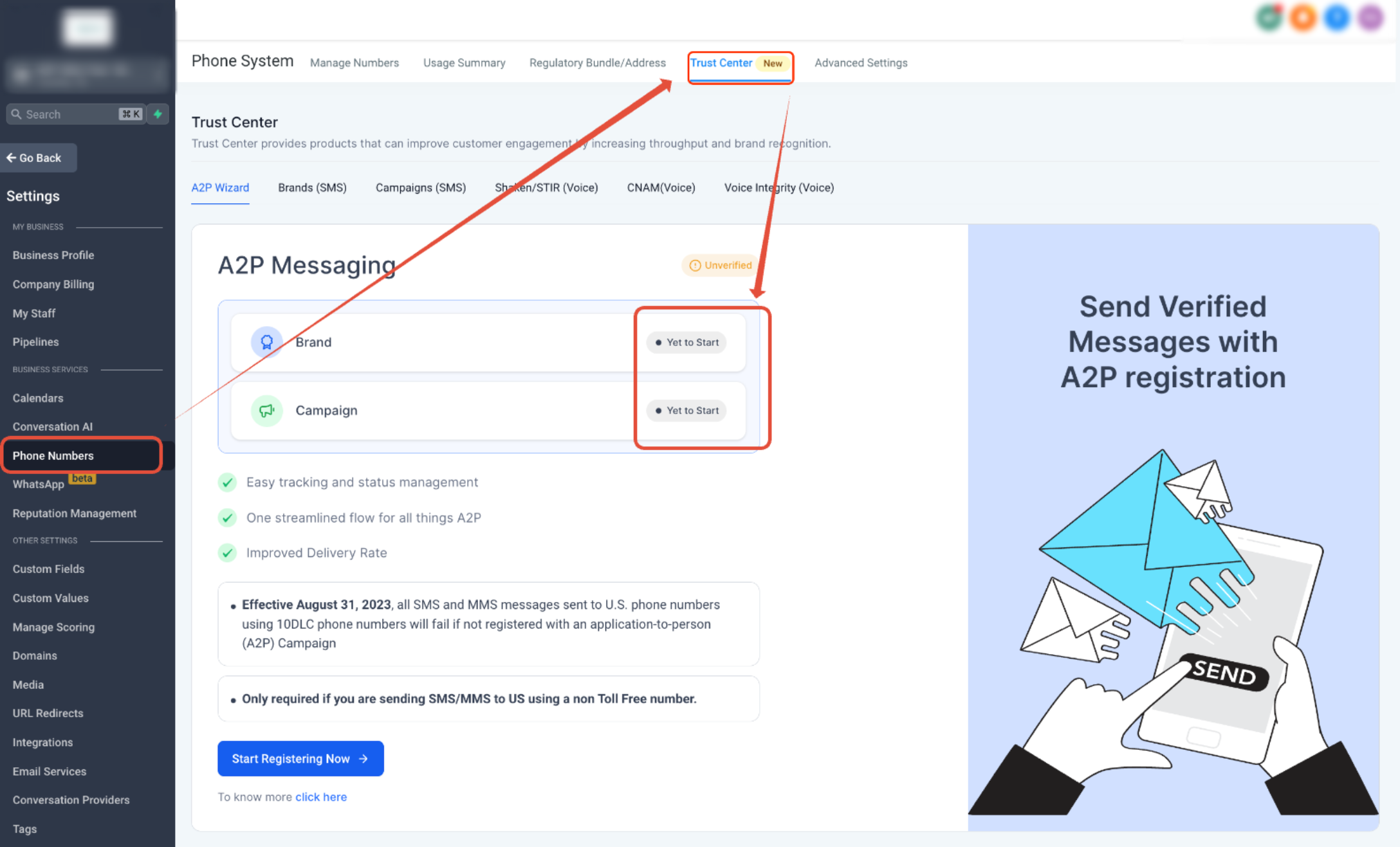
The A2P 10DLC feature lets you register a legal business entity (Brand) and a specific messaging purpose (Campaign) with carriers. The registration lives inside HighLevel’s Trust Center, accessed via Settings > Phone System > Trust Center. Once approved, each local 10 digit number can be linked to the Campaign and displays an A2P Verified label.
During registration you first choose the Brand type, Standard for entities with an EIN or Tax ID, Sole Proprietor for single person operations. After the Brand is accepted, you create a Campaign, select a messaging volume, and provide use case details, sample messages, and the exact opt in flow. HighLevel runs an AI compliance check before you submit the application to the carrier registry.
After submission the platform shows the Campaign status, Pending, Rejected, or Approved. Pending means you wait, Rejected provides a list of required fixes, and Approved allows you to link numbers and begin sending. The system does not automatically resend messages; you must confirm number linkage before any SMS or MMS dispatch.
03How businesses use A2P 10DLC brand and campaign registration
- Dental practice. The practice registers its clinic as a Standard Brand using its EIN, then creates a Campaign for appointment reminders. By entering the consent wording from its intake forms, the practice can link its office number and send reminder texts that carriers recognize as compliant.
- Ecommerce store. The online retailer sets up a Sole Proprietor Brand if it operates as a single owner shop, selects a Low Volume messaging option, and builds a Campaign describing promotional offers. The store includes the opt in language from its checkout page so that marketing messages pass carrier review.
- Fitness studio. The studio registers a Standard Brand and a Campaign for class schedule updates. It chooses Manual Setup because consent is collected on paper sign up sheets. After approval, the studio links its local number and can send class change alerts that display the A2P Verified badge.
04The numbers and rules that matter
- A2P stands for Application to Person.
- 10DLC stands for 10 Digit Long Code.
- Toll Free numbers use a separate verification process and do not use A2P 10DLC registration.
- Canadian numbers sent to the U.S. require A2P registration; Canadian only numbers have different rules based on purchase date.
- A2P registration can include initial registration and vetting charges, recurring campaign fees, and carrier messaging charges.
05Before you start
- Exact legal business name, registration number or Tax ID, business type, industry, address, and operating region.
- Authorized contact details: name, phone, email, job title, and position.
- A live public website that identifies the business and matches the Brand registration.
- Clear description of the messaging purpose and realistic sample messages.
- Documentation of the opt in method, consent language, frequency disclosure, HELP/STOP text, privacy policy, and terms.
06How to set up and use A2P 10DLC brand and campaign registration in HighLevel
Set up registration
- Open Trust Center by navigating to Settings > Phone System > Trust Center.
- Start the A2P registration within the A2P Messaging (SMS) area.
- Select the appropriate Brand path based on whether the business has a Tax ID or accepted registration number.
- Enter all Brand details exactly as they appear on official records, including address and contact information.
- Proceed to Campaign registration once the Brand is eligible and fill in the Campaign details.
- Choose the messaging volume; Standard Brands pick Low Volume or High Volume, while Sole Proprietor uses the single number option.
- Pick Chat Widget Setup if consent is gathered through the widget, or switch to Manual Setup for other consent methods.
- Provide Campaign information such as use case, description, sample messages, website URL, consent workflow, opt in language, privacy policy, and terms.
- Run the compliance review and click Review Application.
- If the AI compliance review flags an issue, correct the highlighted fields and run the review again.
- Submit the Campaign after all compliance checks pass.
- Do not correct only one visible field and resubmit; review the entire Campaign description, use case, sample messages, website, and consent process before re submission.
Post submission actions
- If the Campaign status shows Pending, wait for the carrier review to finish; do not create another Campaign meanwhile.
- If the status is Rejected, open each rejection reason and select View required fixes before making changes or resubmitting.
- If the status is Approved, go to Settings > Phone System > Phone Numbers and verify that the number shows the green A2P Verified label.
- If the number does not display the verified label, link the number to the approved Campaign.
- Allow several business days for carrier systems to fully process the updated registration before sending messages.
07What it looks like in HighLevel
08Things to know before you rely on it
- Standard Brands may select Low Volume or High Volume messaging options; Sole Proprietor registrations use a single number path.
- Locked Campaign fields, such as the use case or certain opt in details, cannot be edited in a resubmission and may require creating a new Campaign.
- Eligible rejected Campaigns can be corrected and resubmitted without incurring another vetting fee.
- Carrier systems may need several business days after approval before the verification is reflected on the number.
09If something goes wrong
- Brand rejected due to legal name, EIN, or address mismatch. Compare the submitted Brand details with official business records and correct any discrepancies before resubmitting.
- Campaign rejected because use case or consent information conflicts with the website or sample messages. Open the rejection details, view required fixes, and adjust the Campaign description, sample messages, and opt in workflow to match the live website and consent evidence.
10How it connects to the rest of HighLevel
- Step by step A2P campaign registration guide Campaign registration guide
- A2P 10DLC brand approval best practices Brand approval guide
- Current A2P 10DLC registration fees and monthly charges Pricing and fees
Michael's take

A2P 10DLC brand and campaign registration is essential for anyone sending business texts from a local 10 digit number in the U.S.
If you only use Toll Free numbers or never send SMS to U.S. recipients, you can skip this feature.