
01Who this is for
- Agency owners who manage multiple client toll free numbers need to prove each client’s identity to enable messaging.
- Small business Founders using a toll free line for appointment reminders must supply consent proof to avoid blocked messages.
- Marketing teams that send promotional texts from a toll free number must document opt in methods to meet carrier rules.
02Toll free number verification, explained
Toll free verification is a compliance record that links a toll free phone number to the business that sends SMS or MMS in the United States and Canada. The platform collects the business’s legal name, website, contact, physical address, messaging use case, policy links, opt in evidence and sample messages. Each verification is submitted individually and reviewed by carriers.
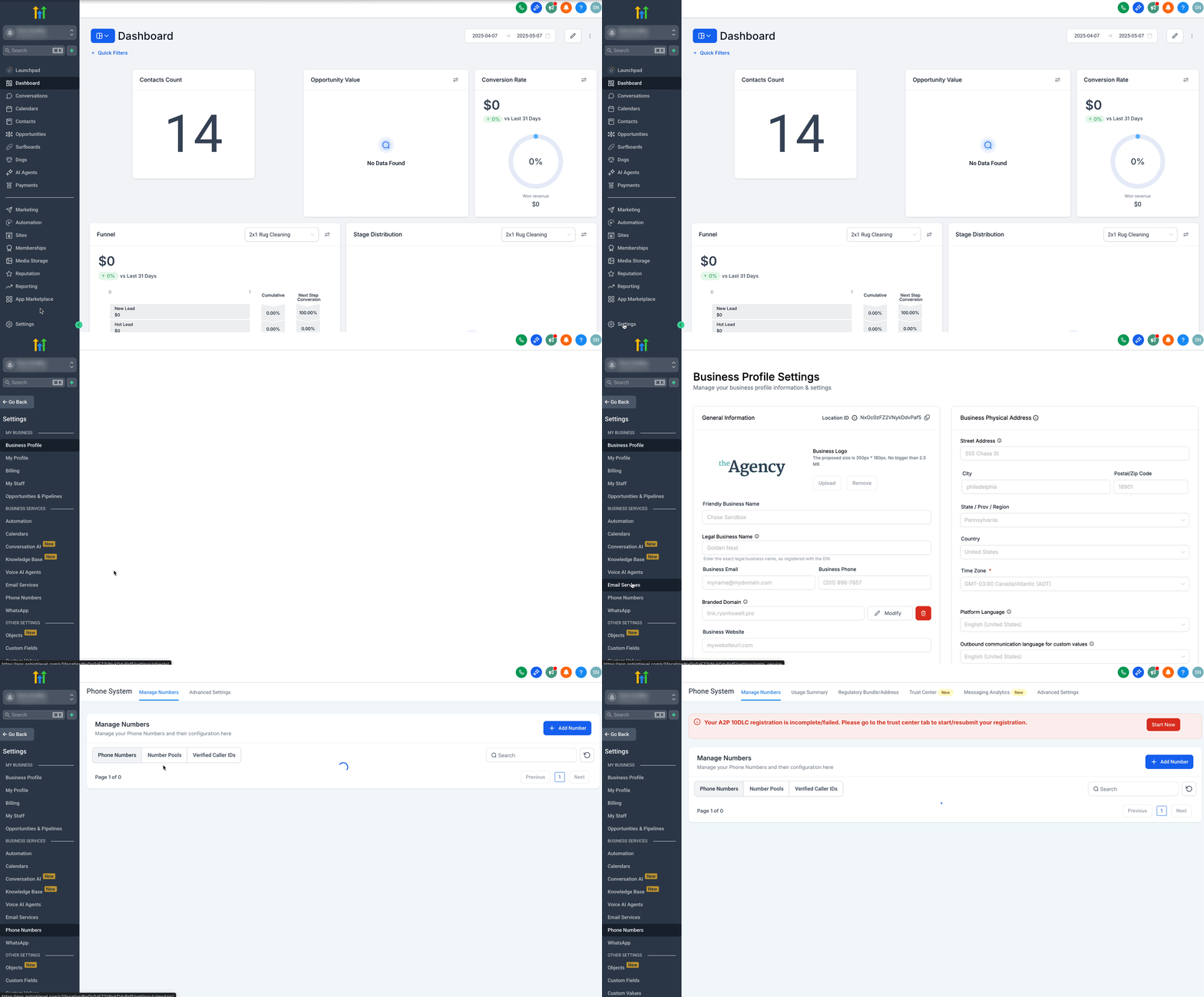
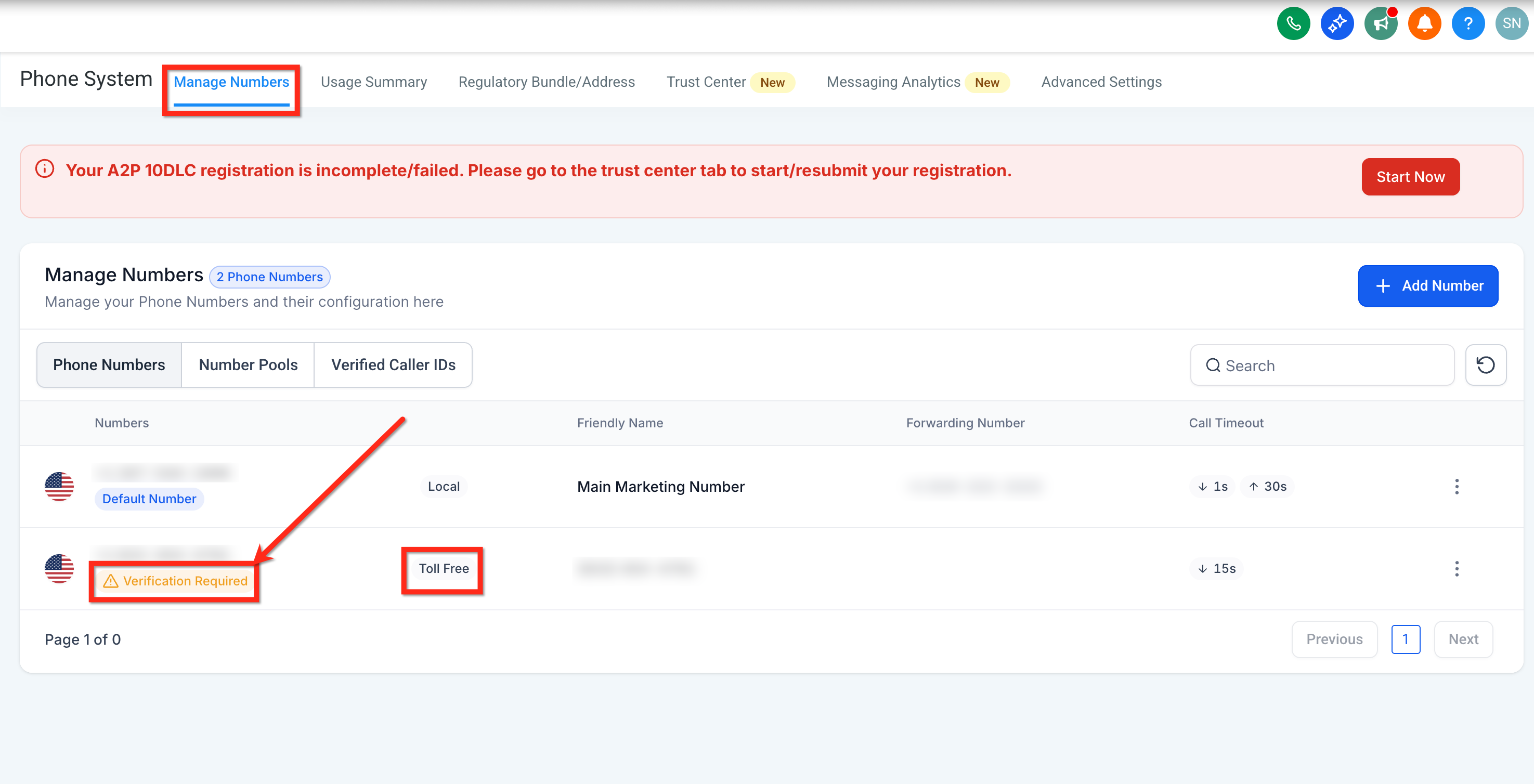
The verification flow lives inside a subaccount under Settings > Phone System > Manage Numbers. When a toll free number shows “Verification Required,” the user launches the form, fills out the required fields, and sends the information for carrier review. Until the status changes to Verified (Approved), the number cannot send SMS or MMS, though voice calls remain unaffected.
After submission, the status under the number updates to Restricted, Pending Verification, Verified or Rejected. Review can take four to six weeks. Approved numbers can then send compliant messages; rejected submissions must be corrected and resubmitted or appealed.
03How businesses use toll free number verification
- Dental practice. The practice enters its clinic name, website, and contact person, uploads a screenshot of the patient consent form, and provides policy URLs. After approval, the toll free number can send appointment reminders and post visit care messages.
- Ecommerce retailer. The retailer supplies its brand name, a product page URL, and a web form screenshot showing optional SMS marketing consent. Once verified, the toll free line delivers order confirmations and shipping updates.
- Political campaign team. The team fills out the verification form, includes a Campaign Verify Auth Token, and uploads a public image of the campaign’s opt in landing page. After carrier approval, the toll free number can send voter outreach texts.
04The numbers and rules that matter
- Both a Privacy Policy URL and a Terms & Conditions URL are required for new submissions as of September 15, 2026.
- Error 30032 indicates the toll free number is not Verified (Approved).
- Error 30007 indicates carrier filtering due to content, consent or other policy issues.
- Review can take up to four to six weeks, though some submissions finish sooner.
05Before you start
- Legal entity name that matches the public website or social profile.
- Live public website or business social page that is accessible without login.
- Privacy Policy and Terms & Conditions URLs that are publicly reachable.
06How to set up and use toll free number verification in HighLevel
Verify toll free number for SMS/MMS
- Open the subaccount that holds the toll free number.
- Navigate to Settings > Phone System.
- Select Manage Numbers.
- Click the “Verification Required” link under the desired toll free number.
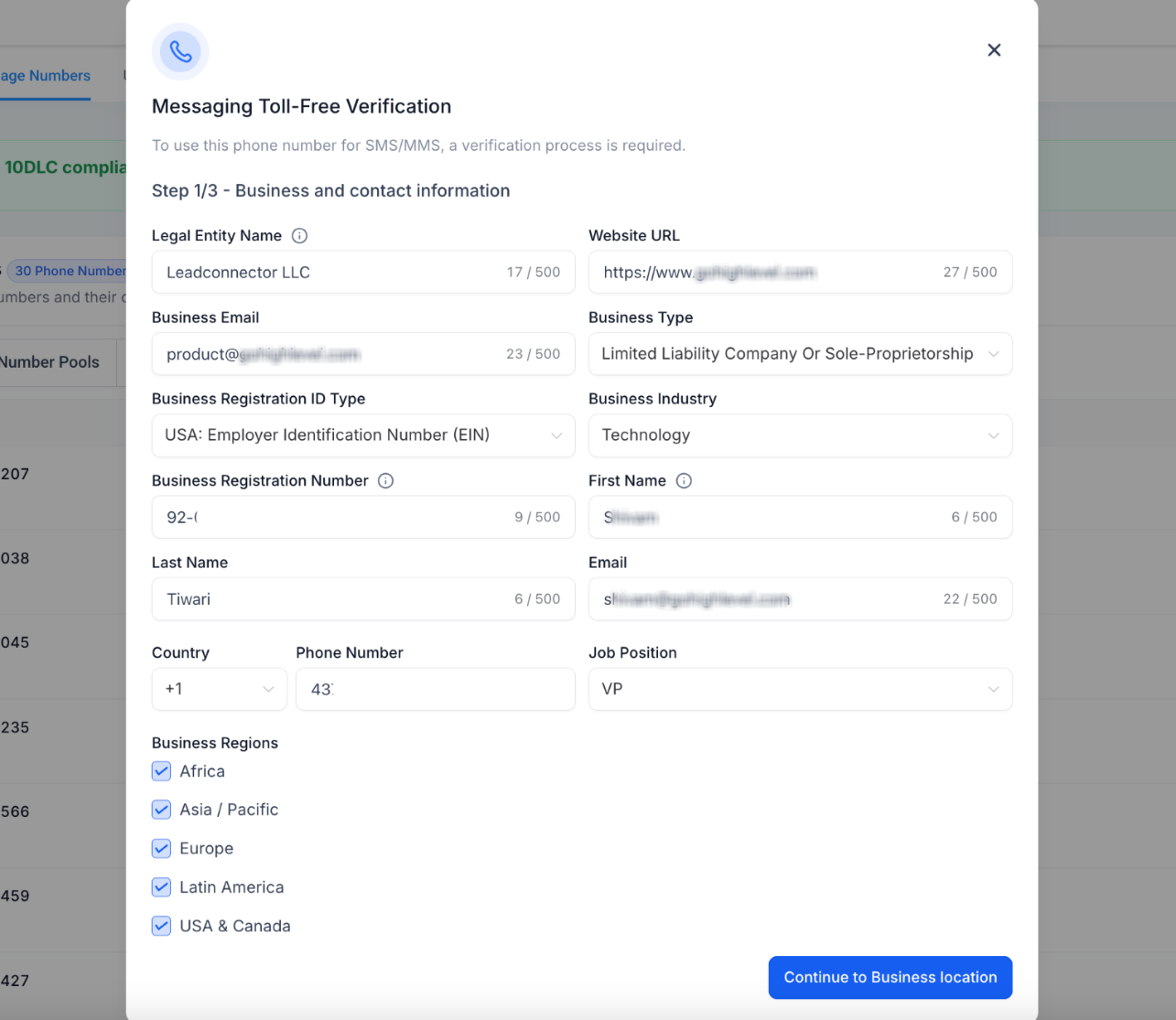
- Fill in the Legal Entity Name field with the business name shown on its public site.
- Enter the business’s Website URL (or public social profile) in the Website URL field.
- Provide the contact person’s first name, last name, email, country code and phone number.
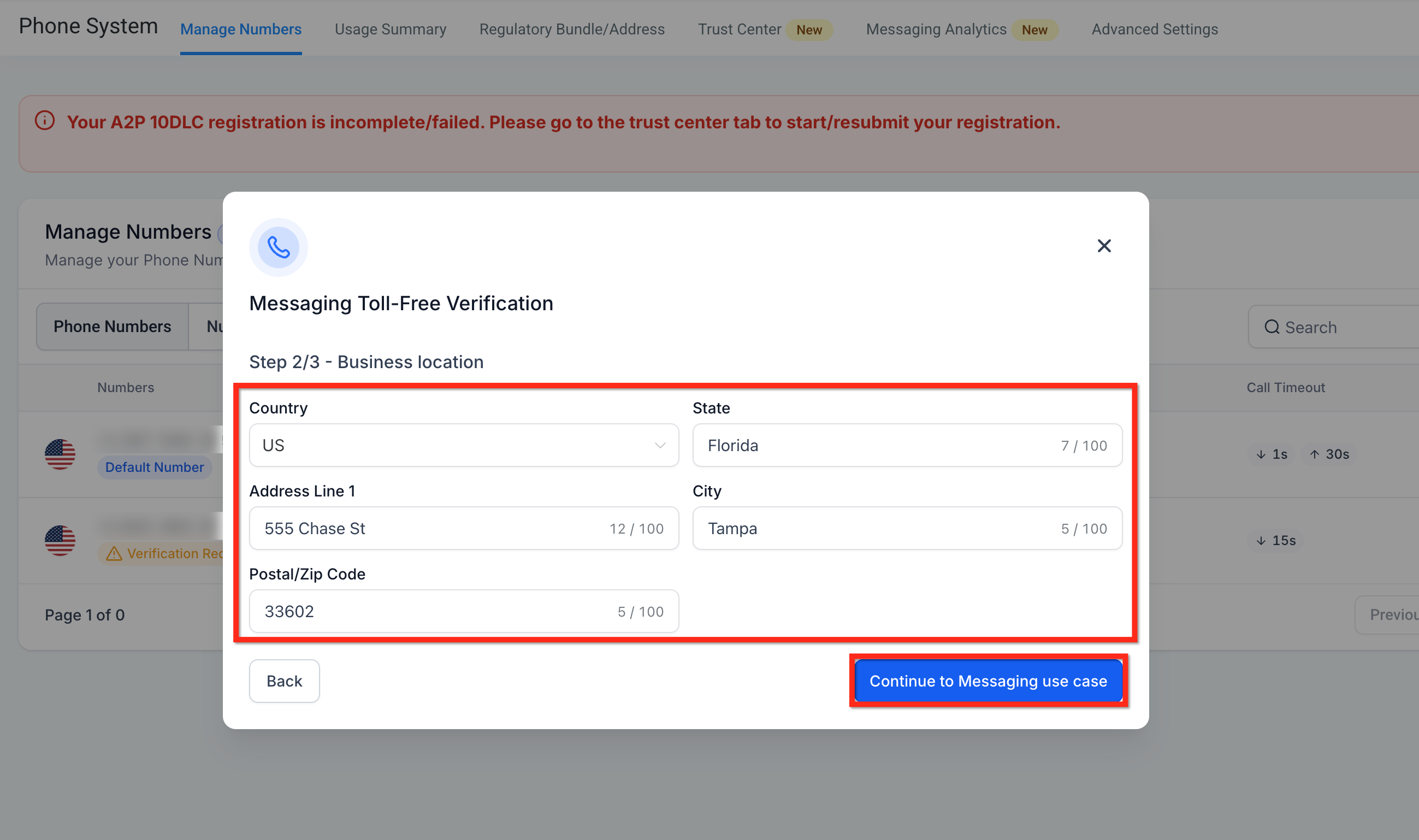
- Choose the Country for the business location.
- Enter State/Province/Region, Address Line 1, City and Postal/ZIP code, then click Continue.
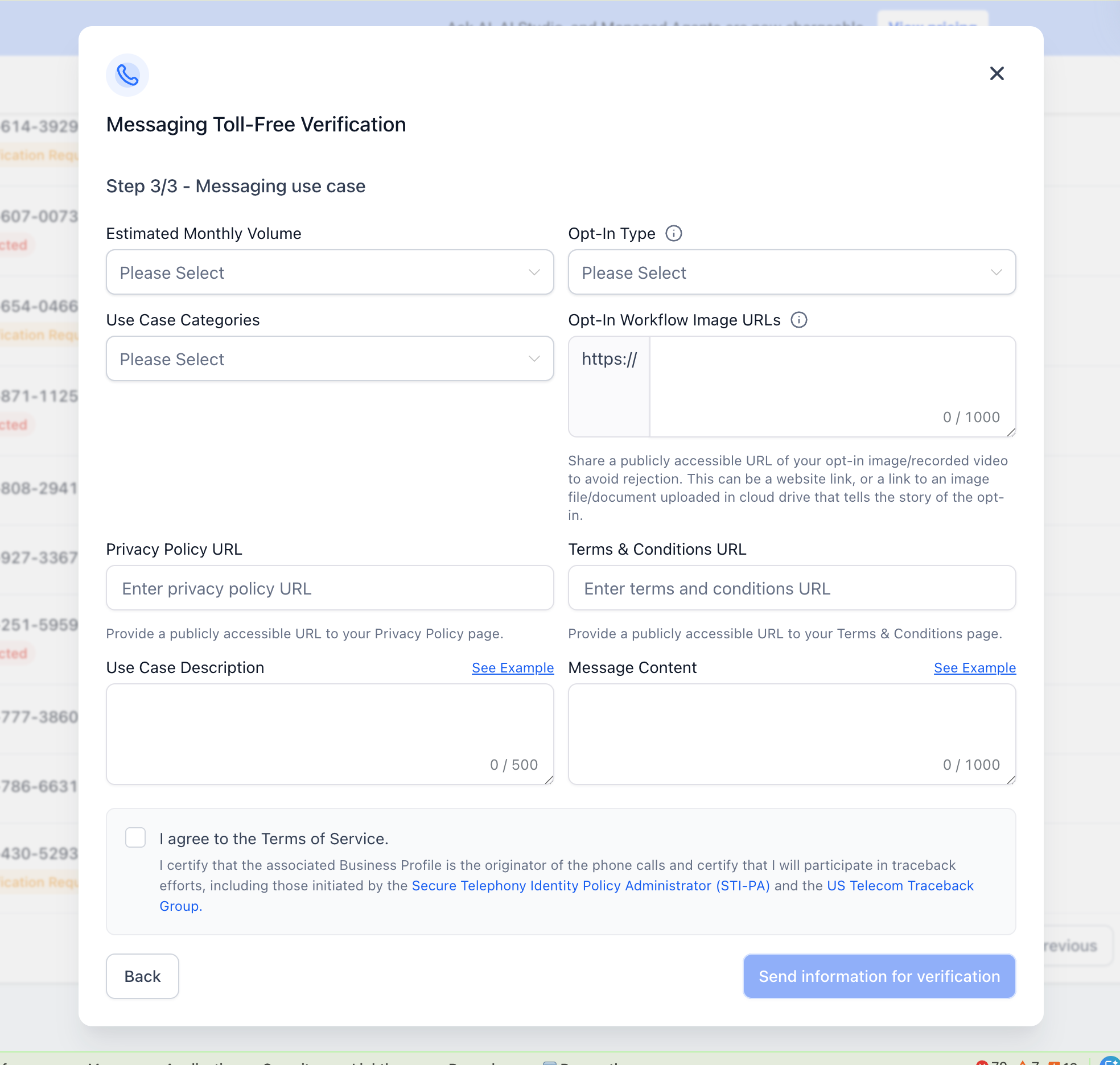
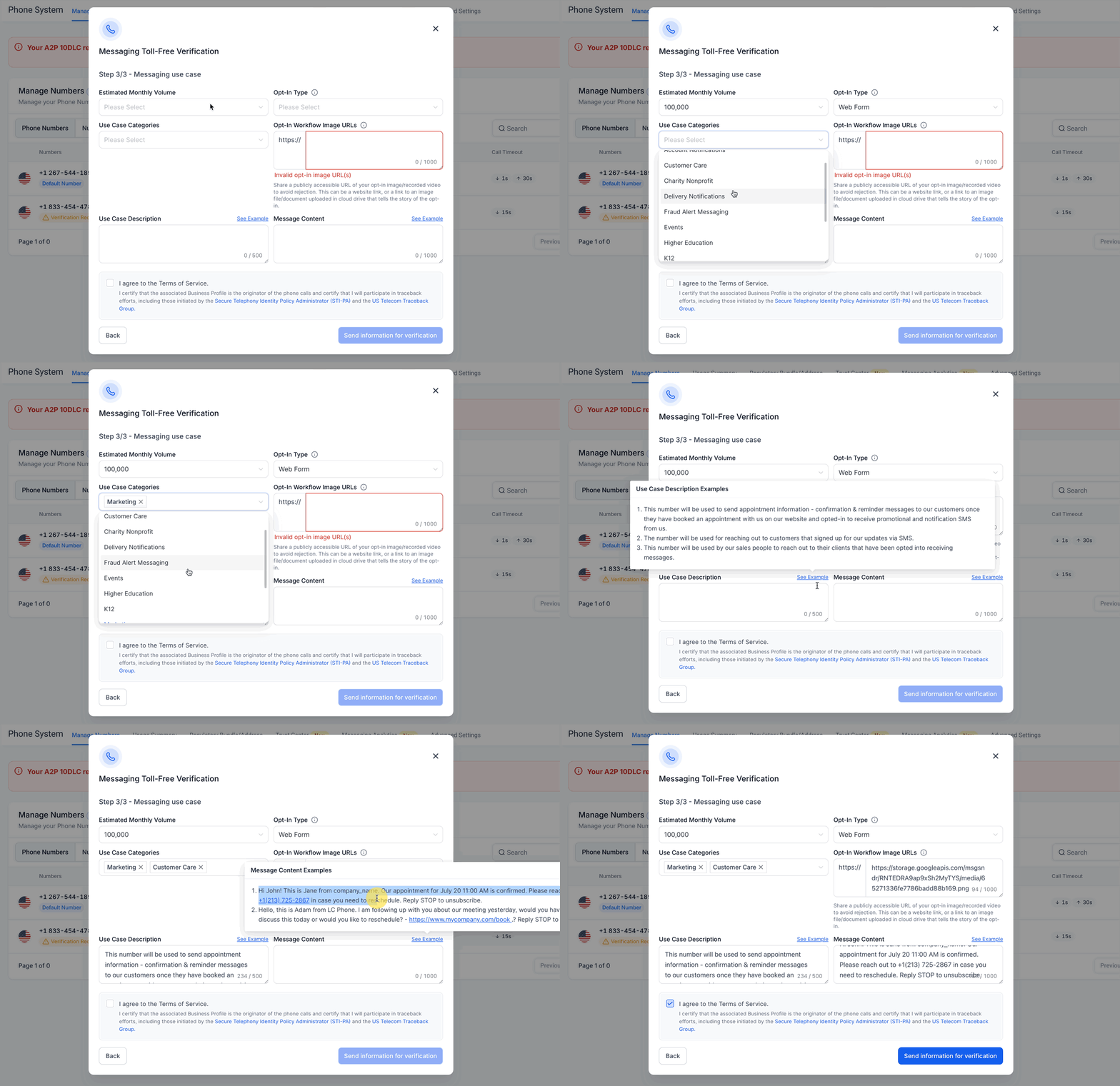
- Pick the Estimated Monthly Volume for the messaging program.
- Select the Opt In Type that matches the consent method.
- Choose every applicable Use Case Category.
- Supply a public Opt In Workflow Image URL, and fill in the Privacy Policy and Terms & Conditions URLs.
- Write a detailed Use Case Description and representative Message Content, review everything, agree to the Terms of Service and click Send Information for Verification (complete KYC if prompted).
07What it looks like in HighLevel
08Settings that matter
- Legal Entity Name. Specifies the business name that appears on the public website and will be recognized as the message sender.
- Website URL. Provides a live public link that demonstrates the business’s online presence.
- Contact. Collects the first name, last name, email, country code and phone number of the person responsible for the verification.
- Country. Identifies the country of the business’s physical address.
- State, province, or region. Part of the physical address required for verification.
- Address Line 1. The primary street address of the end business.
- City. City component of the business location.
- Postal or ZIP code. Postal code that completes the address details.
- Estimated Monthly Volume. Indicates the expected number of messages the toll free number will send each month.
- Opt, In Type. Describes how recipients give consent, such as Mobile/QR Code, Paper Form, Verbal, Via Text or Web Form.
- Use Case Category. Selects the categories (e.g., Marketing) that describe the type of messages to be sent.
- Opt, In Workflow Image URL. Public link to an image showing the full consent flow for reviewers.
09Things to know before you rely on it
- Only toll free numbers with a Verified (Approved) status can send SMS/MMS to US or Canada recipients; Restricted, Pending or Rejected statuses block messaging.
- Carrier review may take four to six weeks; timing is not guaranteed.
- Error 30032 occurs when the number is not Verified; Error 30007 indicates carrier filtering due to content or consent issues.
- Verification does not affect voice calling capability.
- Since September 15 2026, both Privacy Policy and Terms & Conditions URLs are mandatory for new submissions.
- Political Election Campaign use cases need a valid Campaign Verify Auth Token in addition to standard verification.
10If something goes wrong
- Verification Required is not visible. Confirm the subaccount owns a toll free LC Phone number, then refresh the Manage Numbers page.
- Website cannot be verified. Publish the site or use a public business social profile that is live and matches the business name.
- Opt in evidence URL is rejected. Upload a clear screenshot or document to Media Storage, copy its public link, and test it in incognito mode.
- Consent flow is not compliant. Ensure optional unchecked boxes, separate marketing and non marketing consent, include sender name, frequency, rates, HELP and STOP, and provide policy links.
- Use case and samples do not align. Rewrite the description and replace sample messages so they reflect the same program, sender identity and opt out language.
- Error 30032. Complete or correct toll free verification and wait for the status to become Verified (Approved).
- Error 30007. Review message content, sender identification, consent evidence and current messaging policy before resending.
- Rejected and resubmission is unavailable. Contact HighLevel Support with the specified details and request a Toll Free Verification rejection appeal.
11How it connects to the rest of HighLevel
- Buy a toll free number in HighLevel Buy toll free number
- HighLevel phone system pricing and rebilling guide Pricing guide
- Start a 30 day HighLevel trial Free trial
- The HighLevel Founder Plan Founder Plan
Michael's take

Toll free number verification is essential if you want to send SMS or MMS from a toll free line in the US or Canada.
Skip it only if you never intend to use that toll free number for messaging. Voice calls are unaffected.