
01Who this is for
- Founders who need consistent caller ID for outbound outreach and want calls to reach the right team member.
- Call center managers who must record conversations for compliance and route calls to multiple agents simultaneously.
- Agency owners who forward client calls to personal phones while keeping a professional front line number.
02Phone number configuration options, explained
Phone number configuration is a set of options that dictate the behavior of a specific number inside a HighLevel subaccount. It covers inbound routing, outbound caller ID, call recordings, timeout periods, and advanced prompts. The settings live under Settings > Phone System > Phone Numbers, where each number has its own edit screen.
When a call arrives, the platform follows the rules you define: it may forward to an external line, ring several users at once, play a whisper message, or drop into a voicemail after the timeout you set. Outbound calls can display a verified number and honor the Connect timing you choose. All options are independent per number, allowing granular control across the agency.
03How businesses use phone number configuration options
- Real estate brokerage. The office labels its main line as "Lead Line" and forwards inbound calls to agents' mobiles. It enables call recording for compliance and sets a 20 second inbound timeout so missed calls go to a pre recorded voicemail that captures lead details.
- Dental practice. The clinic assigns a verified number for outbound appointment reminders, activates Call Connect with a custom whisper, and limits outgoing ring time to 30 seconds to avoid voicemail drops. Recorded calls are stored for quality review.
- SaaS startup. The support team configures a toll free number, enables Ring Multiple Team members to have up to six agents ring together, and sets the backup to Voice AI when no one answers. A short inbound timeout directs callers straight to the AI.
04The numbers and rules that matter
- Call Recording costs $0.0025/min (per HighLevel's help center, checked November 2026).
- Storing a recording costs $0.0005/min/month (per HighLevel's help center, checked November 2026).
- Text to Speech is billed at $0.00084 per 100 characters (per HighLevel's help center, checked November 2026).
- Maximum 6 users can be assigned to ring for a single number.
- FAQ states up to 7 users can be assigned to a single number.
- System defaults to 60 seconds for both inbound and outbound timeouts if left blank.
- Since September 15, 2026 carriers reject toll free verification submissions missing policy URLs.
05Before you start
- A voicemail recording (MP3 or WAV) must be uploaded in the Business Info tab or the user profile before setting an inbound timeout that routes to CRM voicemail.
- The number must be verified if you intend to use it as the outbound caller ID.
06How to set up and use phone number configuration options in HighLevel
Edit phone configuration
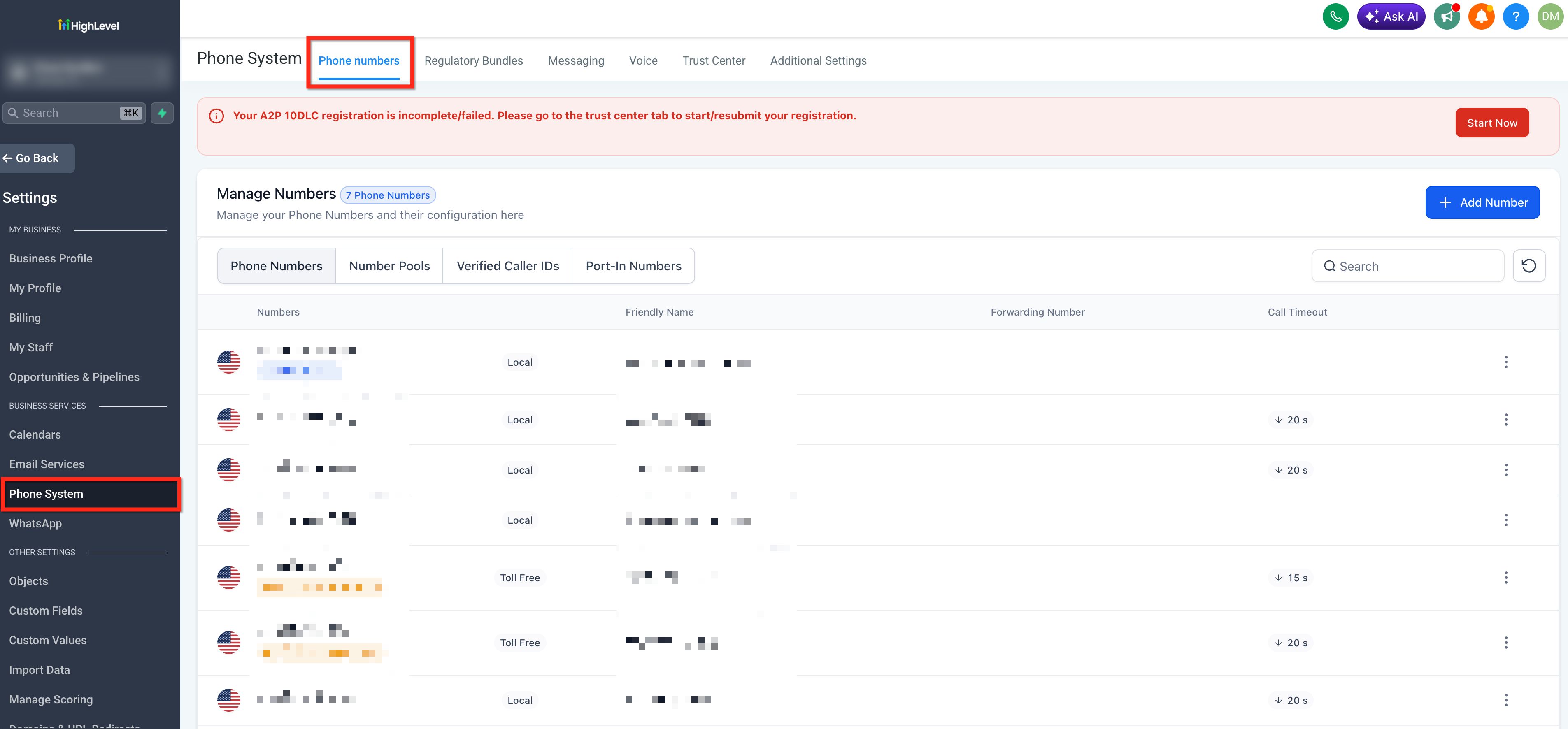
- Open Settings, then Phone System, then Phone Numbers in the subaccount.
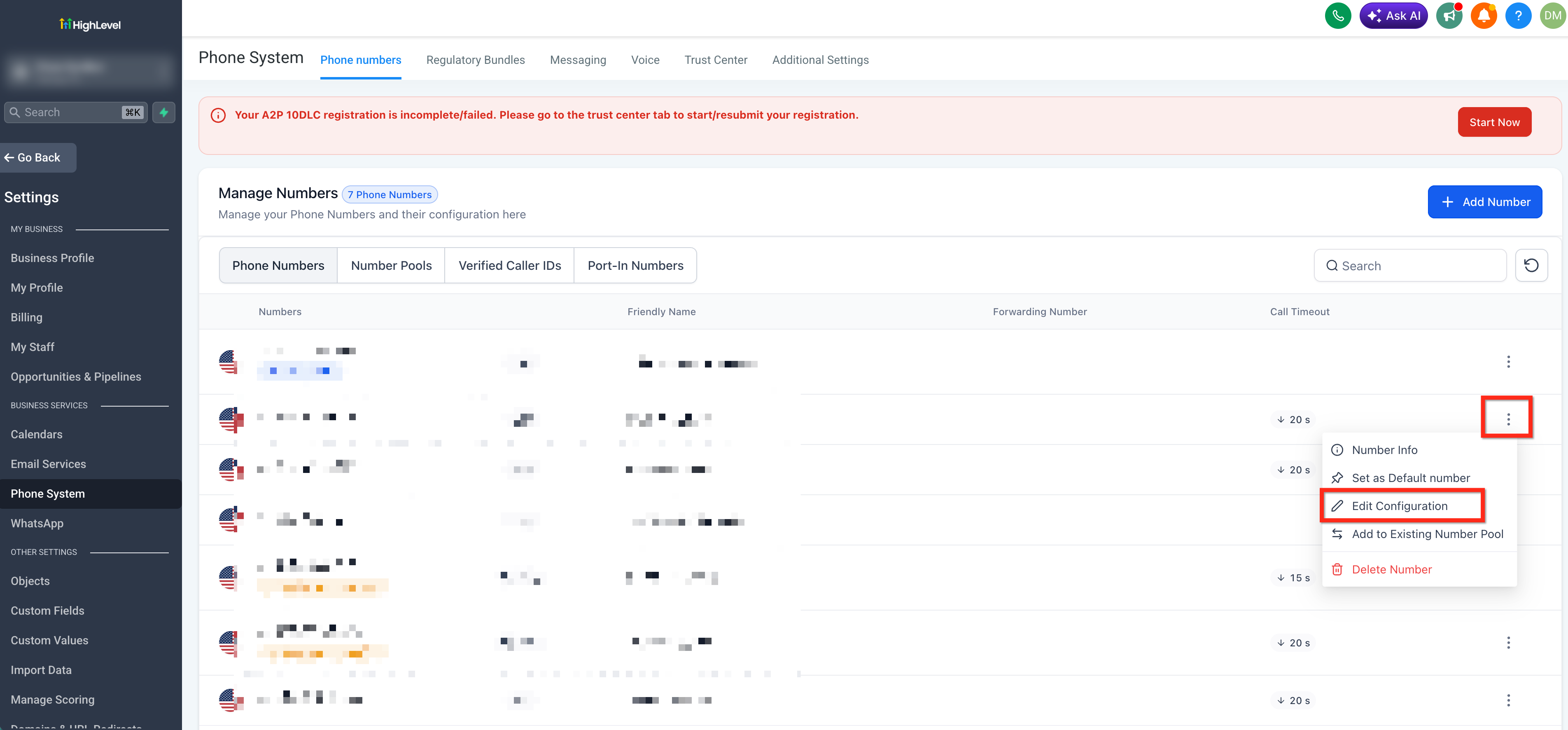
- Select the three dot menu beside the desired number and choose Edit Configuration.
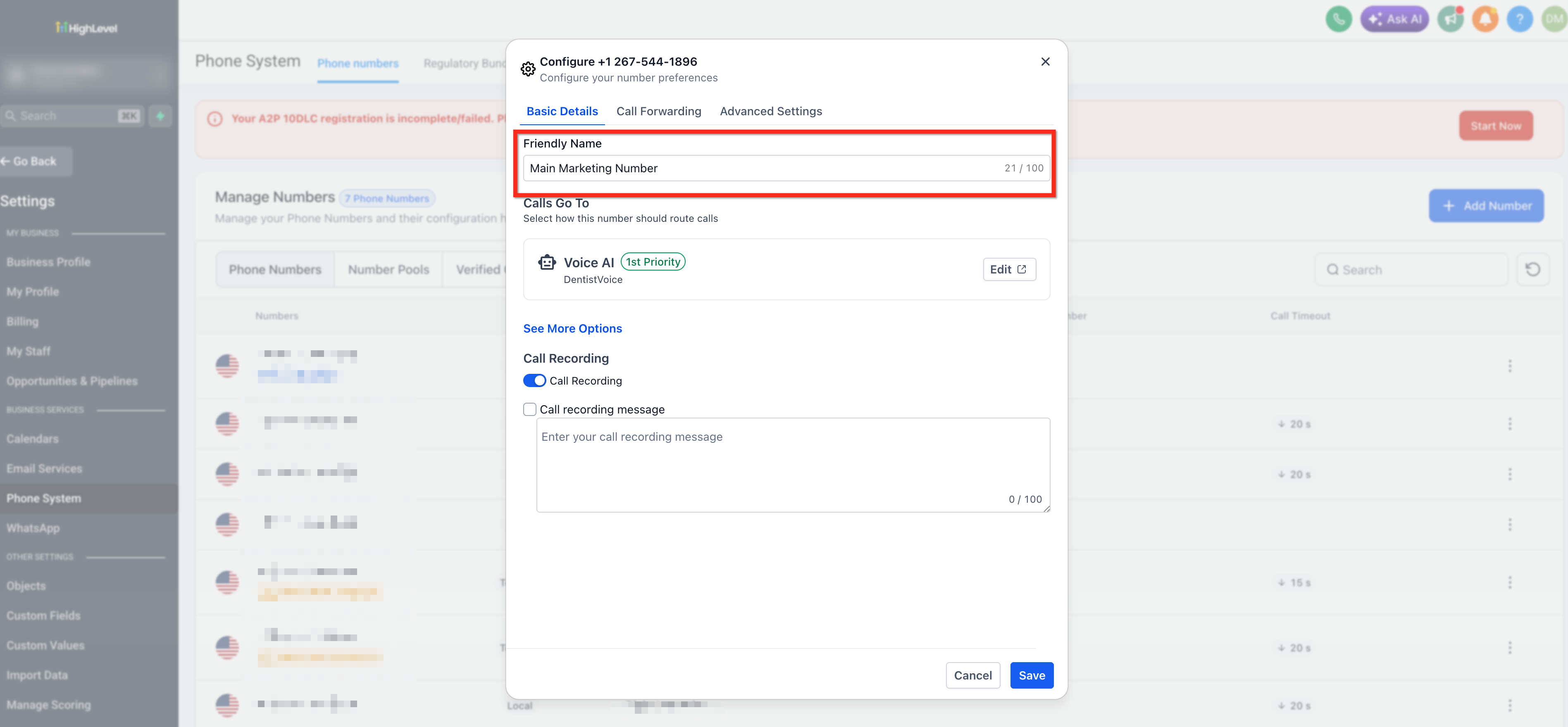
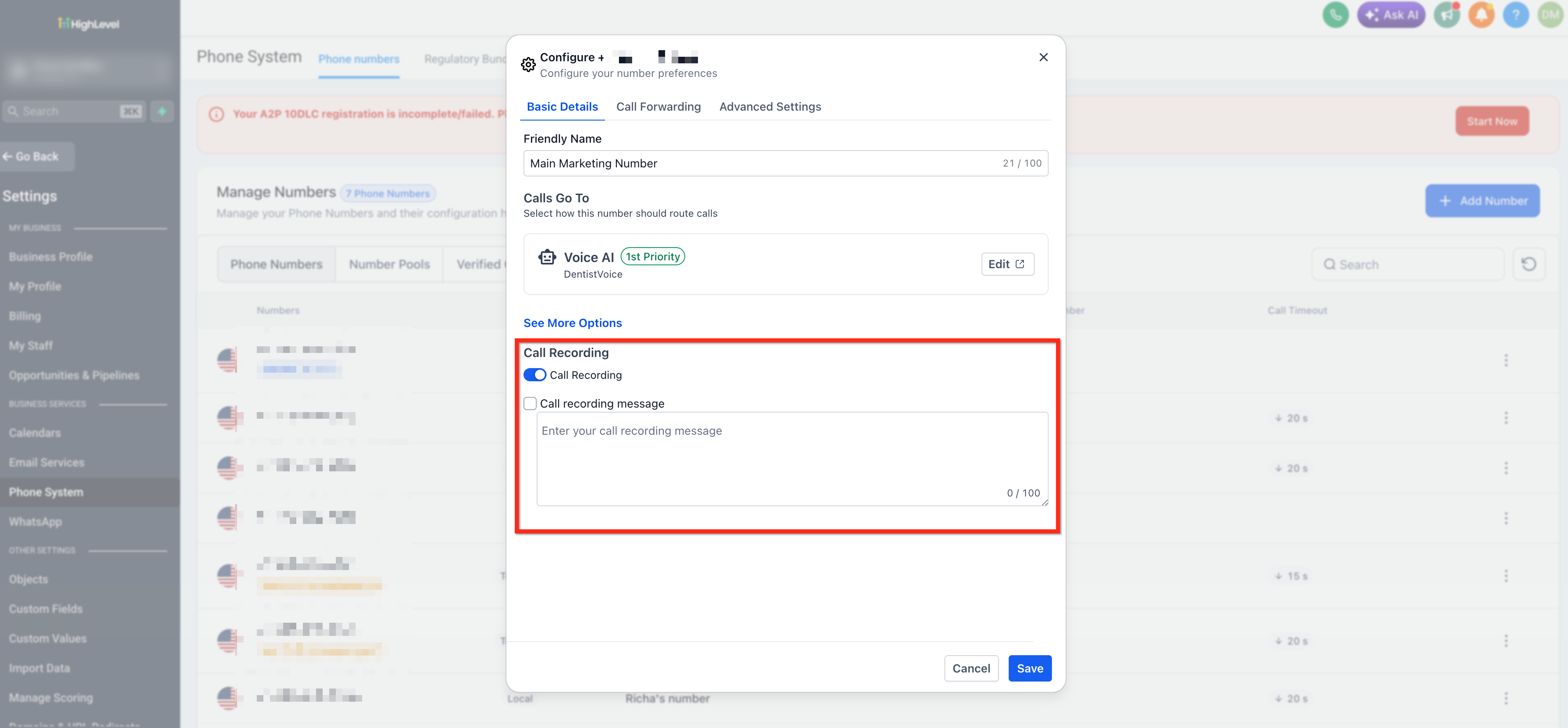
- Enter a descriptive label in the Name Your Number field.
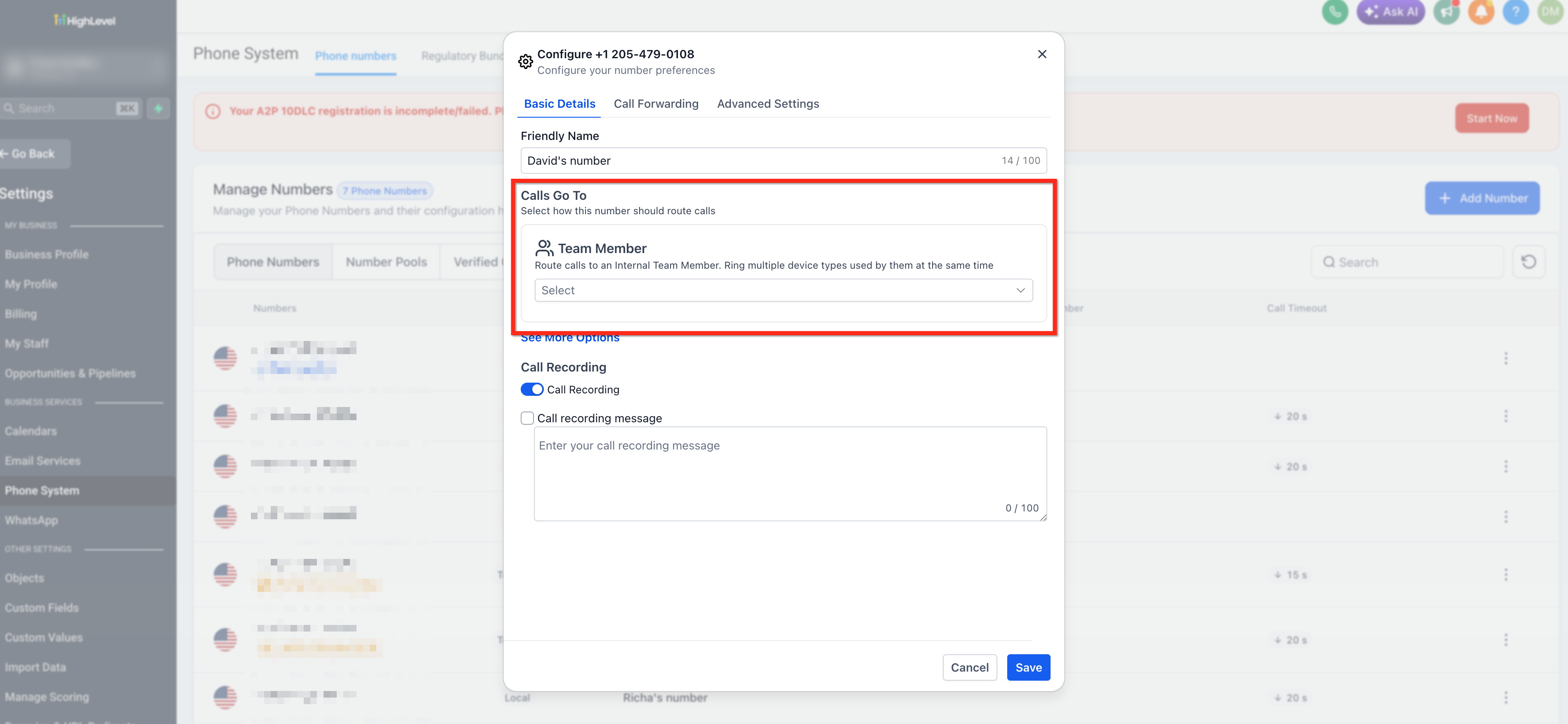
- Specify the destination phone number in the Calls Go To field.
- Turn on Call Recording and optionally add a Play Call Recording Message to announce the recording.
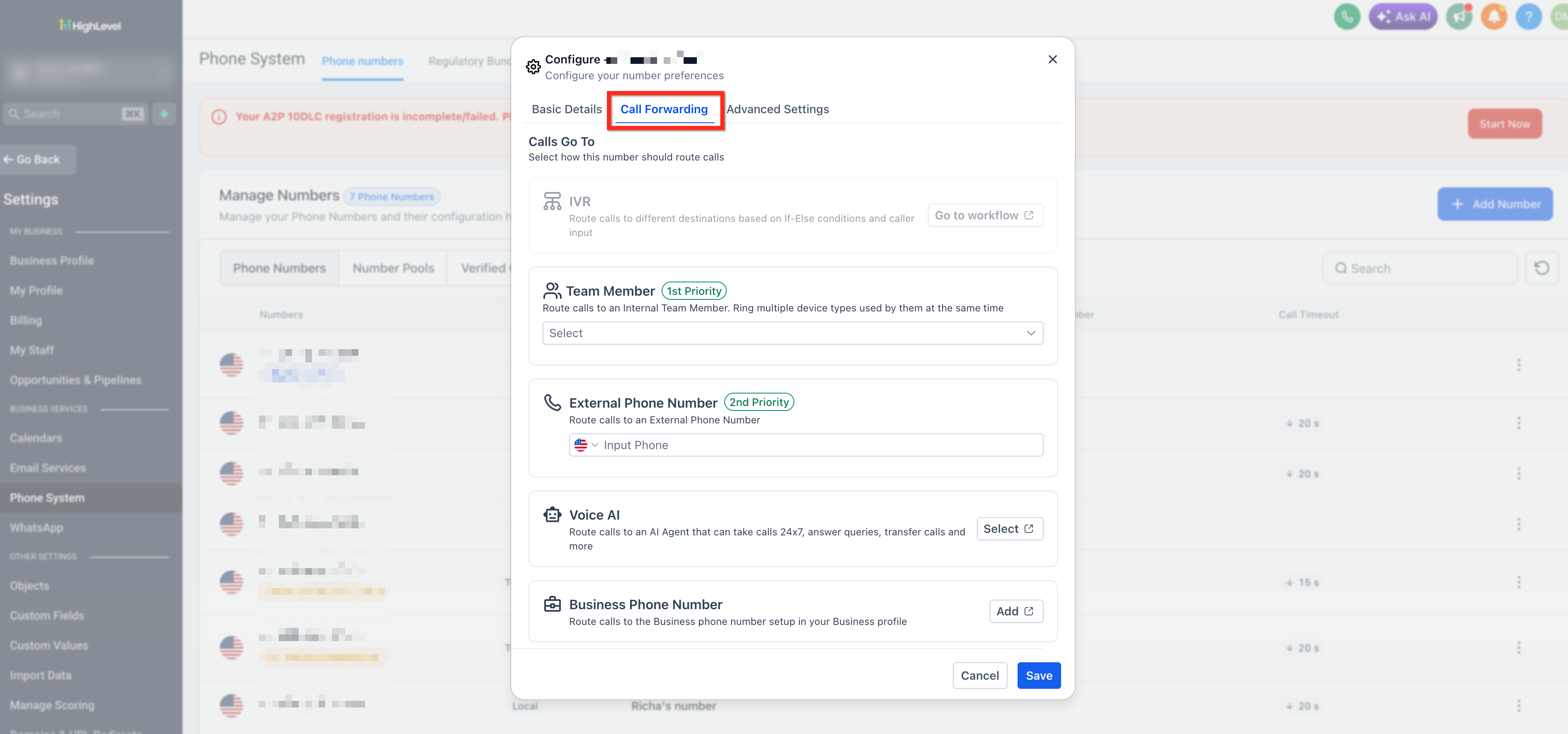
- Open the Call Forwarding tab and pick a forwarding option, external number, business number, Voice AI, or ring multiple team members (up to six).
- Set Incoming Call Timeout, Outgoing Call Timeout, and choose a Backup option of Voicemail or Voice AI.
- Switch to the Advanced Settings tab and adjust Call Connect, Whisper Message, Bring Your Own Number, caller ID display, preferred forwarding, and outbound connect timing.
07What it looks like in HighLevel
08Settings that matter
- Name Your Number. Provides an internal label for the phone number to simplify identification.
- Calls Go To. Defines the phone number that receives inbound calls after the configured number answers.
- Call Recording. Automatically captures each call; can be paired with a pre recording announcement.
- Play Call Recording Message. Plays a brief notice before the recording starts to meet legal requirements.
- External Phone Number (Call Forwarding). Routes incoming calls to an outside phone line.
- Business Phone Number (Call Forwarding). Sends calls to the business number set in the Business profile.
- Voice AI (Call Forwarding). Directs calls to an AI agent that can answer, transfer, or handle queries.
- Ring Multiple Team members. Makes the call ring several users at the same time, up to six users.
- Incoming Call Timeout. Controls how many seconds the system rings before sending the caller to voicemail or a backup.
- Outgoing Call Timeout. Limits the ringing period for outbound calls before the call is dropped.
- Backup (Voicemail or Voice AI). Specifies what the caller hears when no agent answers.
- Call Connect. Requires the recipient to press a key after hearing a whisper, confirming a human answered.
09Things to know before you rely on it
- Call Recording costs $0.0025 per minute; storage adds $0.0005 per minute per month (per HighLevel's help center, checked November 2026).
- Ring Multiple Team members can include a maximum of six users.
- Whisper messages are billed at $0.00084 per 100 characters using Text to Speech (per HighLevel's help center, checked November 2026).
- If inbound or outbound timeout fields are left blank, the system defaults to 60 seconds for each.
10If something goes wrong
- Whisper message does not play when calls are routed through an IVR workflow.. Verify the call is being forwarded to an external phone number; whisper messages are only played for external forwards.
- Outbound calls show the wrong caller ID.. Confirm the number is verified and enable the Use Verified Number as Caller ID option.
- Forwarded calls are ending up in personal voicemail.. Set a shorter inbound timeout (around 20 seconds) so calls are directed to HighLevel voicemail before reaching personal voicemail.
11How it connects to the rest of HighLevel
- Purchase a new phone number for use in a subaccount. Buy Phone Number
- Assign a purchased number to specific users within the agency. Assign Numbers
- Review pricing details and rebilling rules for the phone system. Phone System Pricing
Michael's take

Phone number configuration options can be a useful feature for small businesses that handle calls to capture leads or support customers.
Don’t forget to set a short inbound timeout if you want calls to hit a CRM voicemail instead of your personal voicemail.