
01Who this is for
- Agency owners can provide client subaccounts with richer messaging, enhancing brand presence.
- Marketing teams benefit from interactive cards and buttons that drive higher engagement.
- Customer support groups can use branded RCS for clearer, richer notifications.
02RCS messaging, explained
RCS is a messaging standard that lets businesses send branded, media rich messages with interactive buttons and delivery signals. The platform supports features such as images, carousels, suggested replies, and read receipts when the recipient’s device allows it. If a contact cannot receive RCS, the system can fall back to SMS, which is billed at the SMS rate.
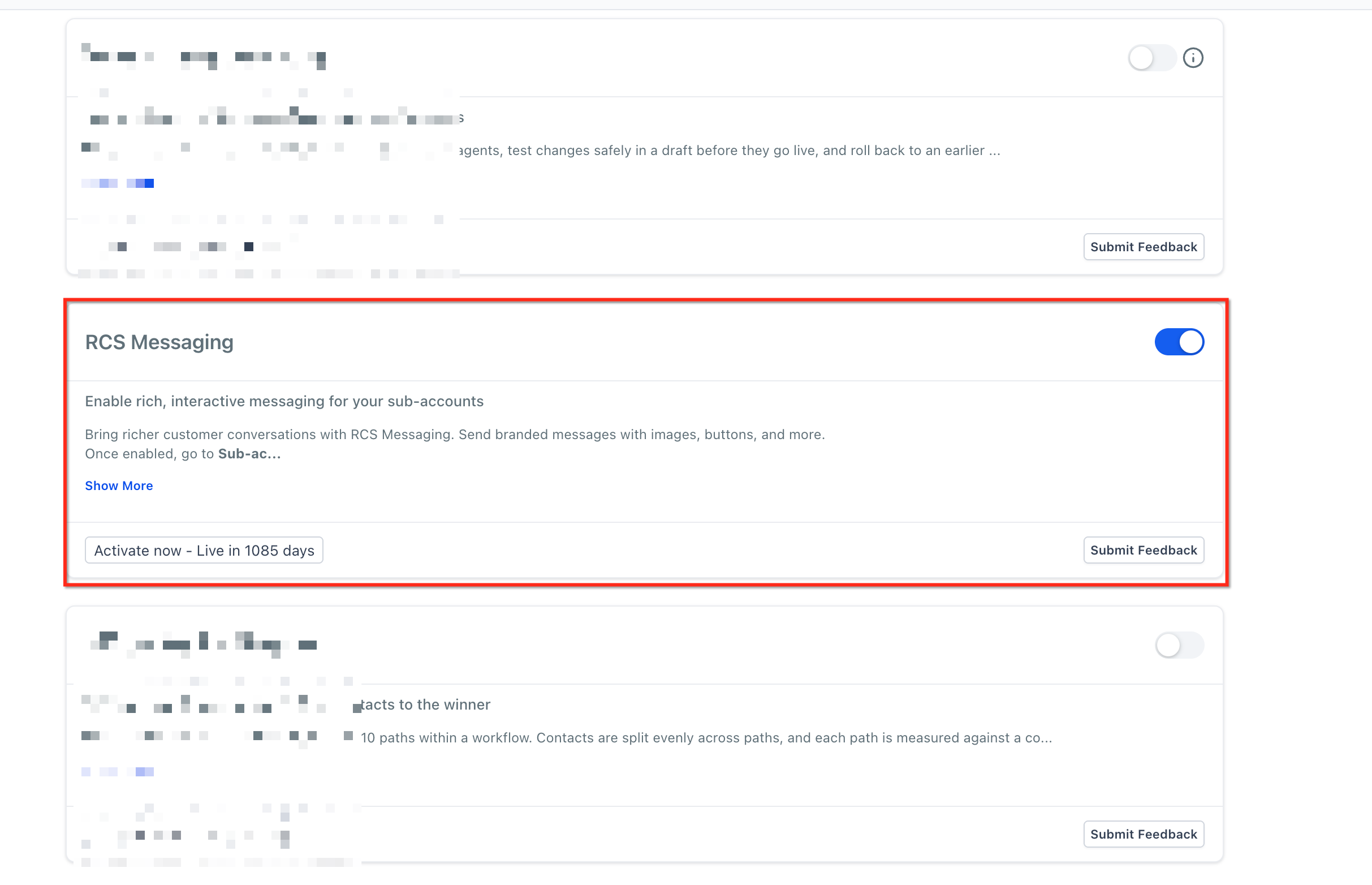
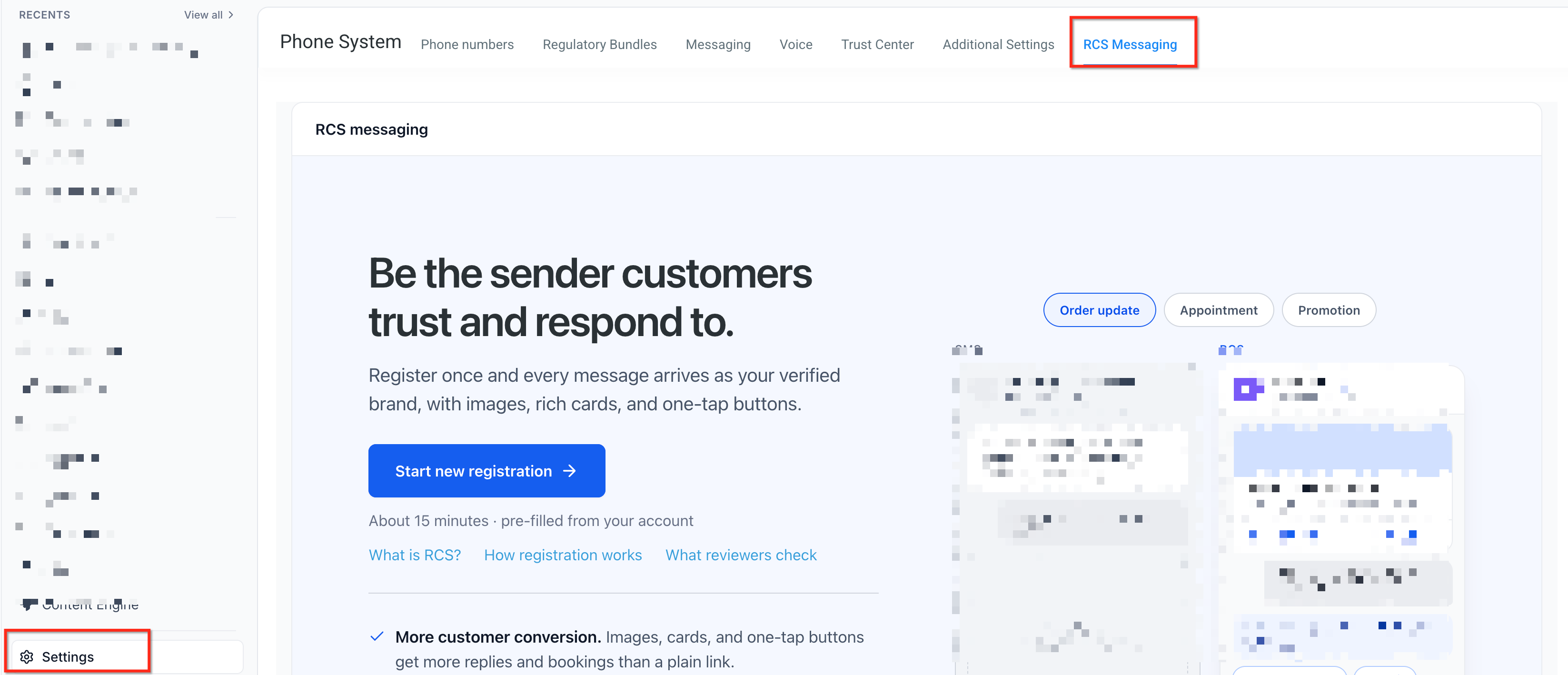
RCS access is controlled through HighLevel Labs. An agency enables the feature for chosen subaccounts, then the subaccount registers a sender inside Settings > Phone System > RCS Messaging. Approval from carriers and providers is required before the sender becomes live. Once live, RCS can be used in Conversations, Bulk Actions, Workflows, and reusable RCS Snippets.
03How businesses use RCS messaging
- Dental practice. The practice registers a branded RCS sender and sends appointment reminders with a clickable "Reschedule" button. The message includes the clinic logo and a carousel of available time slots. If a patient’s phone cannot receive RCS, the fallback SMS still delivers the reminder text.
- Real estate agency. Agents create an RCS snippet that showcases a property with images, a brief description, and a "Schedule Tour" call button. The snippet is sent to leads via a bulk action, and the agency tracks delivery and opened signals to gauge interest.
- Online retailer. The retailer registers its brand name as the RCS sender and uses a rich card to announce a flash sale, including a "Shop Now" URL button. Customers who can receive RCS see the interactive card, while others receive a plain SMS with the sale details.
04The numbers and rules that matter
- Brand Verification fee: $200 annual (Aegis) (per HighLevel's help center, checked November 2026).
- Carrier onboarding fee: $500 one time per new RCS sender (US carriers) (per HighLevel's help center, checked November 2026).
- Basic RCS Text outbound: $0.0083 per segment (US) (per HighLevel's help center, checked November 2026).
- Basic RCS Text inbound: $0.0083 per message (US) (per HighLevel's help center, checked November 2026).
- Rich RCS inbound: $0.0165 per message (US) (per HighLevel's help center, checked November 2026).
- Rich RCS outbound: $0.0220 per message (US) (per HighLevel's help center, checked November 2026).
05Before you start
- Collect business details: brand name, website, address, logo, and intended use cases.
- Confirm the subaccount uses LC Phone, as RCS is only available with that phone system.
06How to set up and use RCS messaging in HighLevel
Enable RCS in Labs
- In Agency View, open Settings > Labs, locate RCS Messaging and turn it on for the desired subaccounts.
- Use the Subaccount tab and Manage to assign RCS access to each chosen subaccount.
- If needed, open the subaccount’s Settings > Labs and enable RCS there as well.
Register RCS sender
- Open an enabled subaccount and go to Settings > Phone System > RCS Messaging.
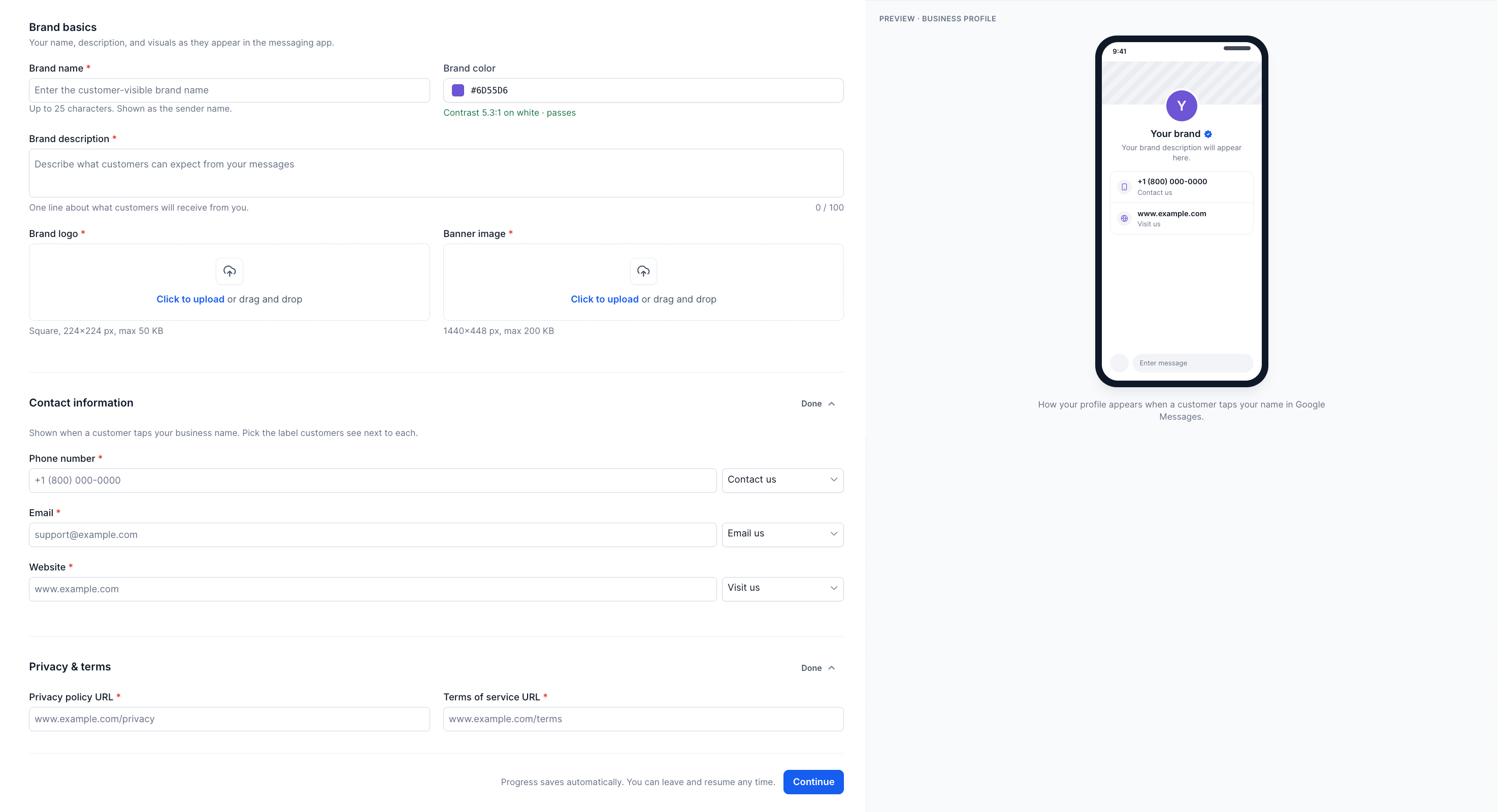
- Start the guided onboarding process for a new sender.
- Enter Brand Identity information such as brand name, website, and logo.
- Provide Countries, Sender Details, and US carrier registration information when required.
- Review the entered data and submit the registration request.
Track approval and go live
- Return to Settings > Phone System > RCS Messaging to view the sender’s status.
- Respond to any additional information requests from carriers or providers.
- When the status changes to Live, the sender is approved for live messaging.
Test and send messages
- Add supported test devices in the RCS Messaging area to verify delivery.
- Send a test RCS message from a Conversation or using an RCS Snippet.
- After the sender is Live, send real messages through Conversations, Bulk Actions, Workflows, or Snippets, confirming consent and compatibility.
07What it looks like in HighLevel
08Settings that matter
- RCS Messaging (Labs). Controls whether a subaccount can access the RCS feature while it is in Labs rollout.
- RCS Messaging (Phone System). Opens the sender registration workflow and shows approval status for the RCS sender.
09Things to know before you rely on it
- RCS is only available through HighLevel Labs and not enabled by default for every account.
- The feature works only for customers using LC Phone; other phone providers must switch to LC Phone first.
- A sender must receive carrier and provider approval before live RCS messaging is possible.
- Recipient devices must support RCS; otherwise SMS fallback is used if configured.
- Read or Opened signals appear only when the recipient’s device and app support them, and recipients can disable them.
10If something goes wrong
- Test message arrives as SMS instead of RCS. Verify that the recipient’s device, messaging app, carrier, and RCS settings meet the requirements. If they do not, SMS fallback will be used.
11How it connects to the rest of HighLevel
- Check SMS delivery issues that may affect fallback behavior SMS delivery troubleshooting
- Review pricing details for RCS and SMS messages Pricing and billing guide
- Start a 30 day trial to explore RCS capabilities Free trial
Michael's take

Many agencies struggle with bland SMS that get ignored. RCS lets you put your brand front and center with images, buttons and read receipts, so contacts actually engage. The first thing I would get right is enabling RCS in Labs for the right subaccount and finishing the sender registration with accurate branding details.
Once the sender is Live, I’d test on a few real devices to see the rich experience and make sure fallback works. That gives confidence before you send any customer facing campaigns.