
01Who this is for
- Agency owners who manage multiple client subaccounts can shift numbers without purchasing new ones, preserving client branding.
- Business leaders with several locations can centralize phone management by moving numbers to the appropriate subaccount.
- Service providers using a connected provider phone service can reallocate numbers across subaccounts when both belong to the same provider parent.
02Move numbers, explained
The Move Numbers tool is an account level feature that reassigns eligible phone numbers from a source subaccount to a destination subaccount under the same parent account. It works for platform managed numbers and for connected provider numbers when both subaccounts share the same provider parent. The workflow supports United States and Canada numbers only.
When a number is moved, only the ownership of the number changes. Messaging registration, contacts, conversations, analytics, and historical call recordings stay with the original subaccount. After the transfer you must review routing, compliance, and automation settings in the destination subaccount before traffic resumes.
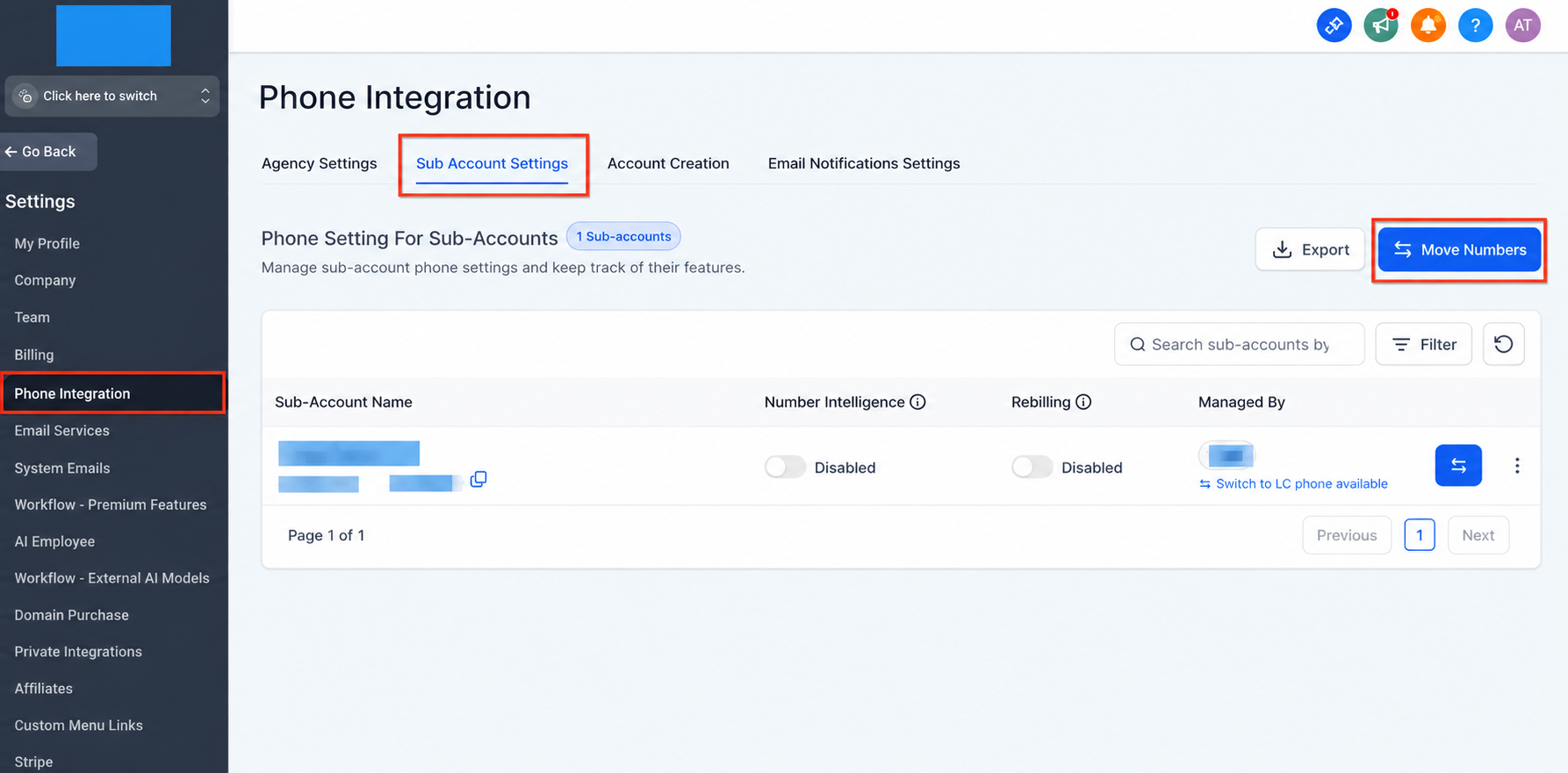
The tool is accessed from Settings > Phone Integration > Subaccount Settings > Move Numbers. From there you select the source and destination subaccounts, choose up to ten eligible numbers, and initiate the move.
03How businesses use move numbers
- Digital marketing agency. The agency can move a client’s advertising phone number from one client subaccount to another when the client changes account managers, preserving the number's public presence while the agency updates routing and campaign settings in the new subaccount.
- Medical clinic with multiple locations. When a clinic opens a new location, it can shift the existing main line to the new location’s subaccount, then adjust call forwarding and voicemail settings in the destination to match the new office workflow.
- Real estate brokerage. A brokerage can reassign an agent’s direct line from a former agent subaccount to the new agent’s subaccount, keeping the number active for existing listings while updating the destination’s user assignments and automation triggers.
04The numbers and rules that matter
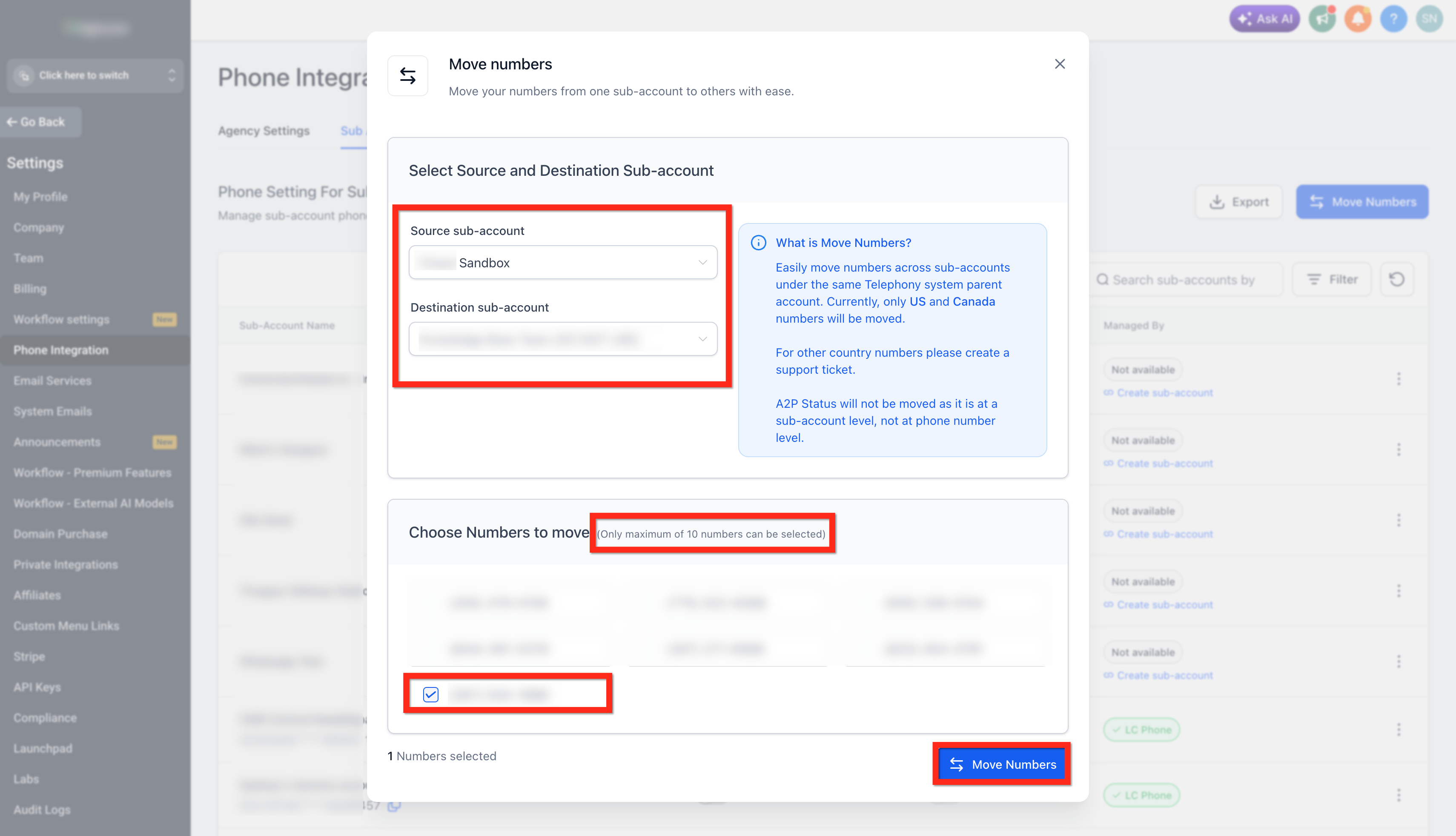
- Up to 10 phone numbers can be selected per move.
- Moves do not transfer A2P 10DLC registration, Toll Free verification, contacts, conversations, analytics, or historical recordings.
05Before you start
- Secure administrative access to both the source and destination subaccounts.
- Confirm both subaccounts belong to the same parent account.
- Identify whether the numbers use the platform managed service or a connected provider.
- If using a connected provider, verify both subaccounts share the same provider parent account.
- Ensure the phone numbers are from the United States or Canada.
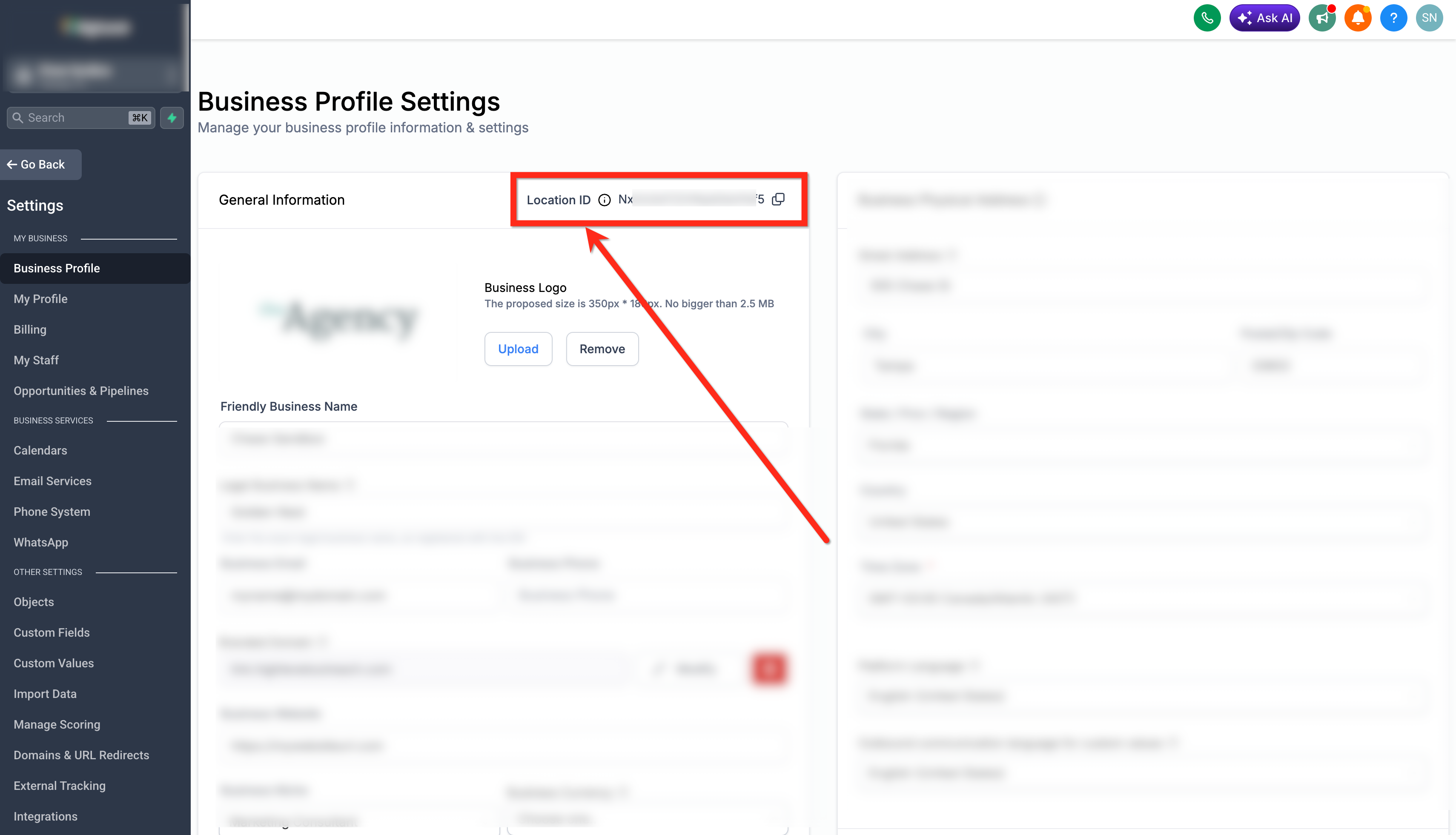
- Locate the destination Location ID to avoid selecting the wrong subaccount.
06How to set up and use move numbers in HighLevel
Move numbers between subaccounts using the Move Numbers tool
- Open Settings from the main navigation.
- Select Phone Integration.
- Open the Subaccount Settings tab.
- Click the Move Numbers button.
- Choose the source subaccount from the dropdown list.
- Choose the destination subaccount from the dropdown list.
- Confirm the selected source and destination subaccounts.
- Tick the checkboxes next to each phone number you want to move (up to ten).
- Press the Move Numbers button to start the transfer.
- Open the destination subaccount and verify the numbers appear in its phone number list.
07What it looks like in HighLevel
08Settings that matter
- Location ID. A unique identifier for a subaccount that helps confirm the correct destination when moving numbers.
09Things to know before you rely on it
- The tool only supports United States and Canada phone numbers; other countries require a different migration process.
- A maximum of ten phone numbers can be moved in a single operation.
- Only compatible platform managed or same provider connected provider environments are eligible.
- Moving a number does not transfer A2P 10DLC registration, toll free verification, contacts, conversations, analytics, or historical recordings.
10If something goes wrong
- Move Numbers option is unavailable or the number does not appear for selection.. Verify that both subaccounts share the same parent account, use compatible phone environments, and that the number is from the United States or Canada.
- Numbers under different connected provider parent accounts cannot be moved.. Contact the connected provider's Support team for assistance with moves between different provider parent accounts.
- Attempting to move a number between a connected provider and the platform managed service.. Use the appropriate provider migration process instead of Move Numbers.
- Need to move more than ten numbers at once.. Perform additional moves, each transferring up to ten eligible numbers.
- An eligible move still fails after confirming all requirements.. Contact Support and provide the source Location ID, destination Location ID, and the affected phone number(s).
11How it connects to the rest of HighLevel
- Review phone system pricing and rebilling options for number ownership costs. Phone system pricing guide
- Learn how to create regulatory bundles and address SIDs required for international migrations. Regulatory bundle guide
- Explore the migration process for agencies and subaccounts moving to LC Phone. LC Phone migration guide
Michael's take

Moving numbers between subaccounts helps a small business keep its branding while shifting phone ownership to the right team or location without buying a new line.
Don’t assume the move also copies messaging registration or historic call data.