
01Who this is for
- Agency owners who manage client phone numbers and need to move them into LC Phone.
- Support teams handling international helplines that require number migration.
02International number migrations, explained
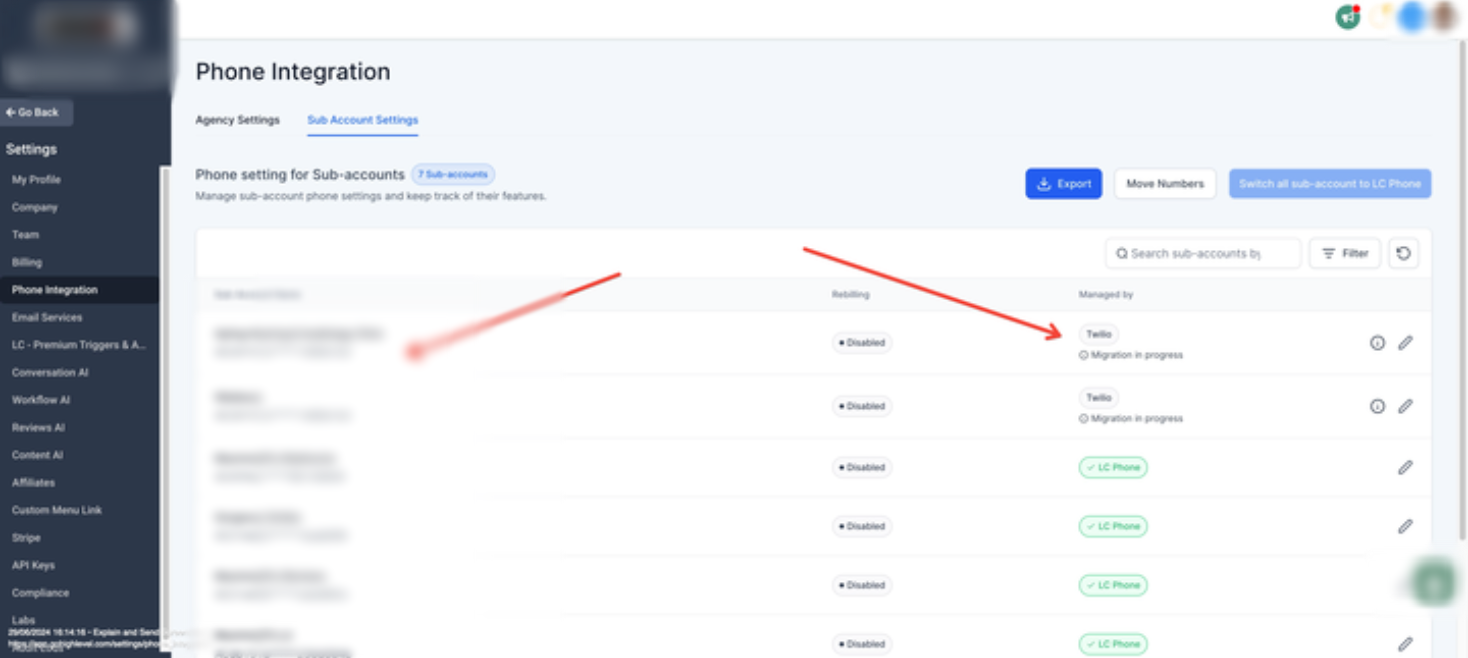
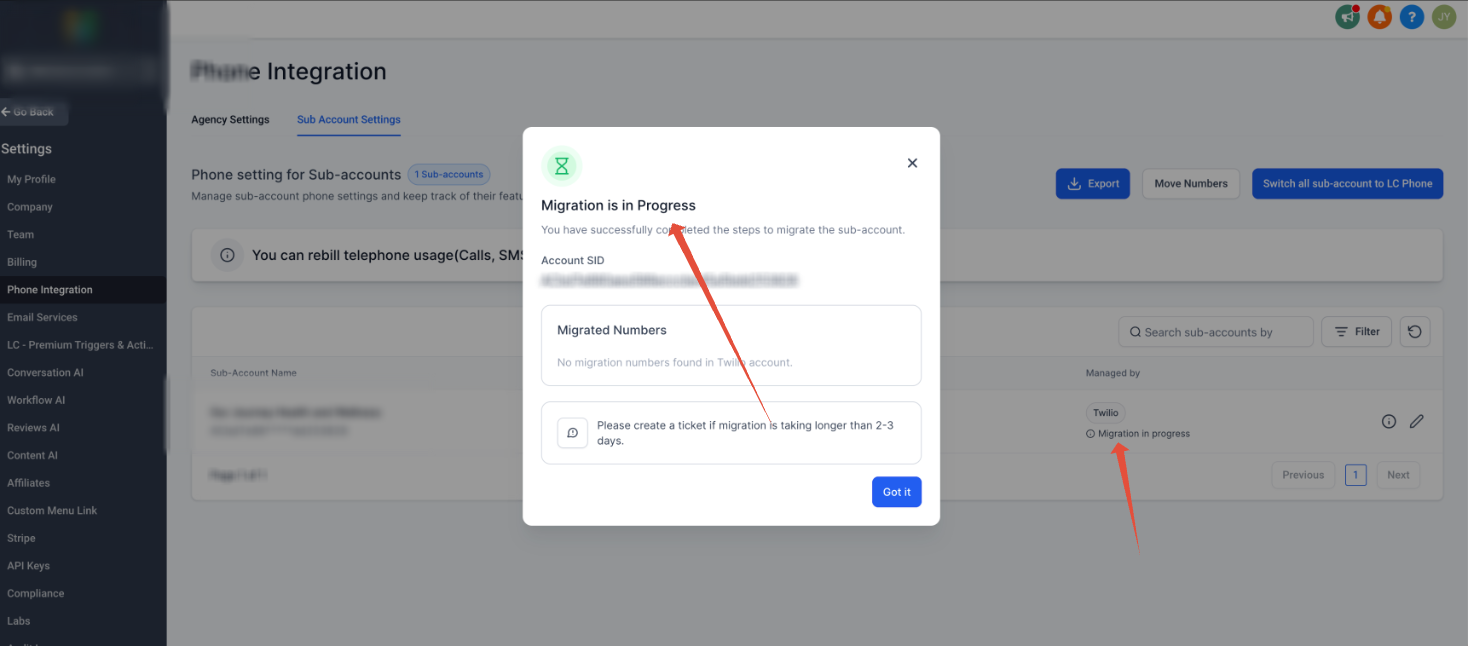
The manual migration process moves an international Twilio number into the LC Phone system inside HighLevel. It begins by starting the migration in the Phone Integration settings, which shows a “Migration in Progress” status. If that status does not clear, the user follows additional compliance steps.
Compliance involves creating a regulatory bundle and address in the Twilio Console that matches the number’s country and type. After the bundle is approved, the user requests the Gaining Account SID, Regulatory Bundle SID, and Regulatory Address SID from HighLevel support. Finally, a Twilio support ticket is opened to transfer the number, copying migration@leadconnectorhq.com and attaching the required IDs and LOA.
All actions occur within the HighLevel platform (Phone Integration settings) and the Twilio Console. The process is temporary until an upgraded migration feature is released.
03How businesses use international number migrations
- Marketing agency. The agency creates the required regulatory bundle in Twilio for each client’s international number, requests the needed IDs from HighLevel support, and submits a Twilio support ticket to move the numbers into LC Phone. This ensures the agency can manage client numbers within the platform.
- International ecommerce store. The store builds a compliant bundle for its overseas support line, obtains the bundle and address SIDs from HighLevel, and files a Twilio ticket to transfer the number. After migration, the store can send SMS and handle calls directly from HighLevel.
- Non profit organization with a global helpline. The organization follows the manual steps to create a regulatory bundle matching its toll free number, secures the required IDs from HighLevel, and initiates a Twilio ticket to bring the helpline number into LC Phone, allowing unified communication handling.
04How to set up and use international number migrations in HighLevel
Manual migration process
- Start the migration from the Phone Integration settings in the HighLevel account.
- If the status remains “Migration in Progress”, continue with the manual steps.
- Open the Twilio Console and create a Regulatory Bundle for the number’s country or region.
- Add a Regulatory Address linked to the newly created bundle.
- Confirm the bundle is approved for the correct number type such as Mobile, Local, or Toll Free.
- Contact HighLevel Support or your partner to obtain the Gaining Account SID, Regulatory Bundle SID, and Regulatory Address SID.
- In the Twilio Console, open a support ticket requesting the number transfer, CC migration@leadconnectorhq.com, and include the LOA, Bundle SID, and Address SID.
05What it looks like in HighLevel
06Settings that matter
- Phone Integration settings. Controls the initiation of the LC Phone migration and displays the migration status within HighLevel.
07Things to know before you rely on it
- The manual process is temporary and will be replaced by an upgraded migration feature.
- A migration can remain stuck if regulatory requirements are incomplete.
- The regulatory bundle must be fully approved before the manual transfer begins.
- The bundle’s number type must match the type of the phone number being moved.
08If something goes wrong
- Migration in Progress stuck. Verify that the regulatory bundle is approved and matches the correct number type.
- Missing Regulatory Approval. Complete the bundle approval process in Twilio before starting the manual migration.
- Wrong Number Type on Bundle. Create or adjust the bundle so its type (Local, Mobile, Toll Free) matches the phone number.
09How it connects to the rest of HighLevel
- Guidance on moving phone numbers across accounts in HighLevel Moving numbers across accounts
- Instructions for purchasing a new phone number in HighLevel Buy a phone number
- Overview of HighLevel phone system pricing and rebilling rules Phone system pricing
Michael's take

If the numbers aren’t critical, I sometimes leave them in Twilio until the automated migration improves.