
01Who this is for
- Small Australian ecommerce business, needs functional local numbers for customer contact.
- Australian law firm, must demonstrate legitimate use of phone numbers under KYC requirements.
- Marketing agency managing client subaccounts, creates bundles using each client’s business details.
02Regulatory bundles, explained
A Regulatory Bundle is a collection of identity and address documents that proves a business is a legitimate user of an Australian local phone number. The bundle is created once per subaccount and, once approved, can be attached to every Australian local number in that subaccount.
The bundle lives under Settings > Phone System > Regulatory Bundles. After approval, the bundle is linked to numbers from Settings > Phone System > Phone Numbers using the AU Regulatory Bundle to Link option. The same approved bundle may be reused for any number in the same subaccount.
03How businesses use regulatory bundles
- Ecommerce store. Upload the business registration, ABN extract, physical address proof and authorised representative ID within the bundle creation flow. After approval, link the bundle to each Australian local number so the store can continue receiving calls and SMS for order confirmations.
- Law firm. Gather the firm’s ASIC registration, lease agreement and a director’s photo ID. Create a Business bundle in the firm’s subaccount, submit for review, and once approved attach it to the firm’s AU local numbers to stay compliant with KYC rules.
- Marketing agency. Inside each client’s subaccount, the agency creates a Business bundle using the client’s company details, uploads the required documents, and links the approved bundle to the client’s Australian local numbers, ensuring the agency’s campaigns remain operational.
04The numbers and rules that matter
- Deadline: 1 July 2026 for Australian local numbers.
- Review typically takes 1 to 3 business days.
- Each uploaded document must be PDF, JPG, or PNG under 5 MB.
05Before you start
- Have a client subaccount ready in HighLevel.
- Collect all required documents listed in the article.
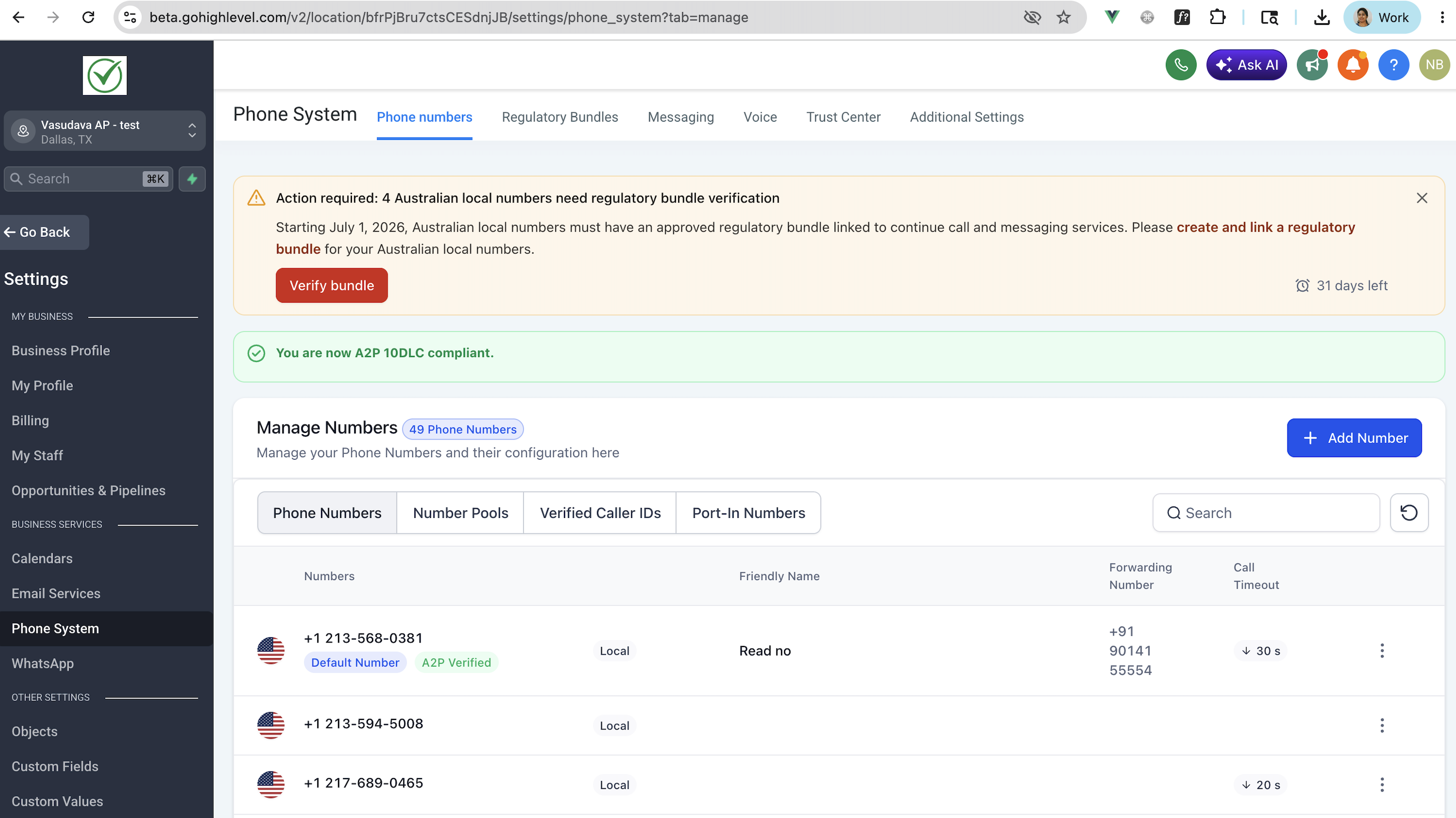
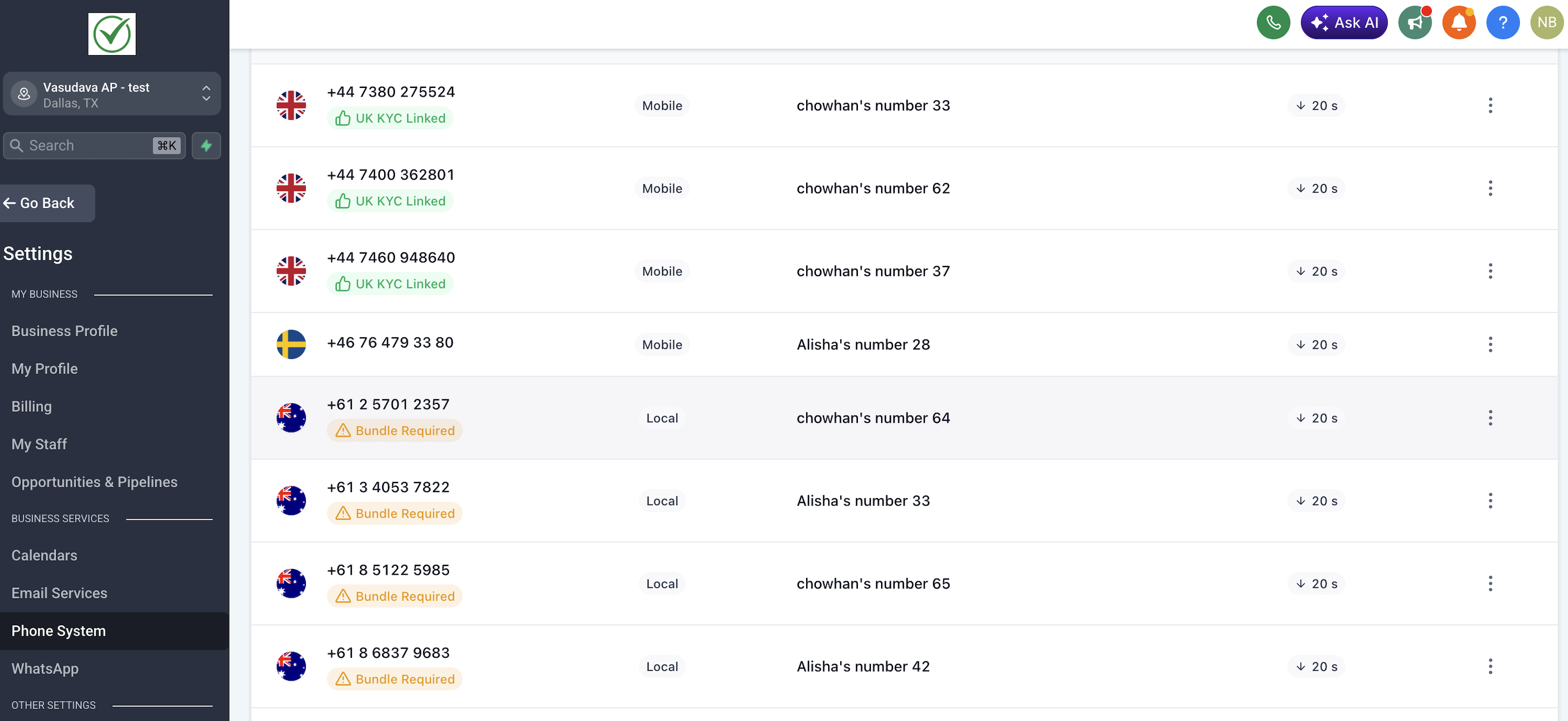
- Identify which Australian local numbers show the Bundle required tag.
06How to set up and use regulatory bundles in HighLevel
Create a Regulatory Bundle
- In the client subaccount, open Settings > Phone System > Regulatory Bundles.
- Click the Create Bundle button.
- Select Country: Australia and Number type: Local.
- Select Bundle type: Business.
- Enter each required field, copying the information exactly from the documents.
- Upload each supporting document (PDF, JPG or PNG under 5 MB).
- Save the bundle as a draft if you need to pause before submitting.
- When ready, review the summary screen and click Submit for review.
- The bundle status will change to In review; review typically takes 1 to 3 business days.
- You can close the tab; you will receive an in app notification and an email when the bundle is Approved or Rejected.
Link an approved bundle to Australian local numbers
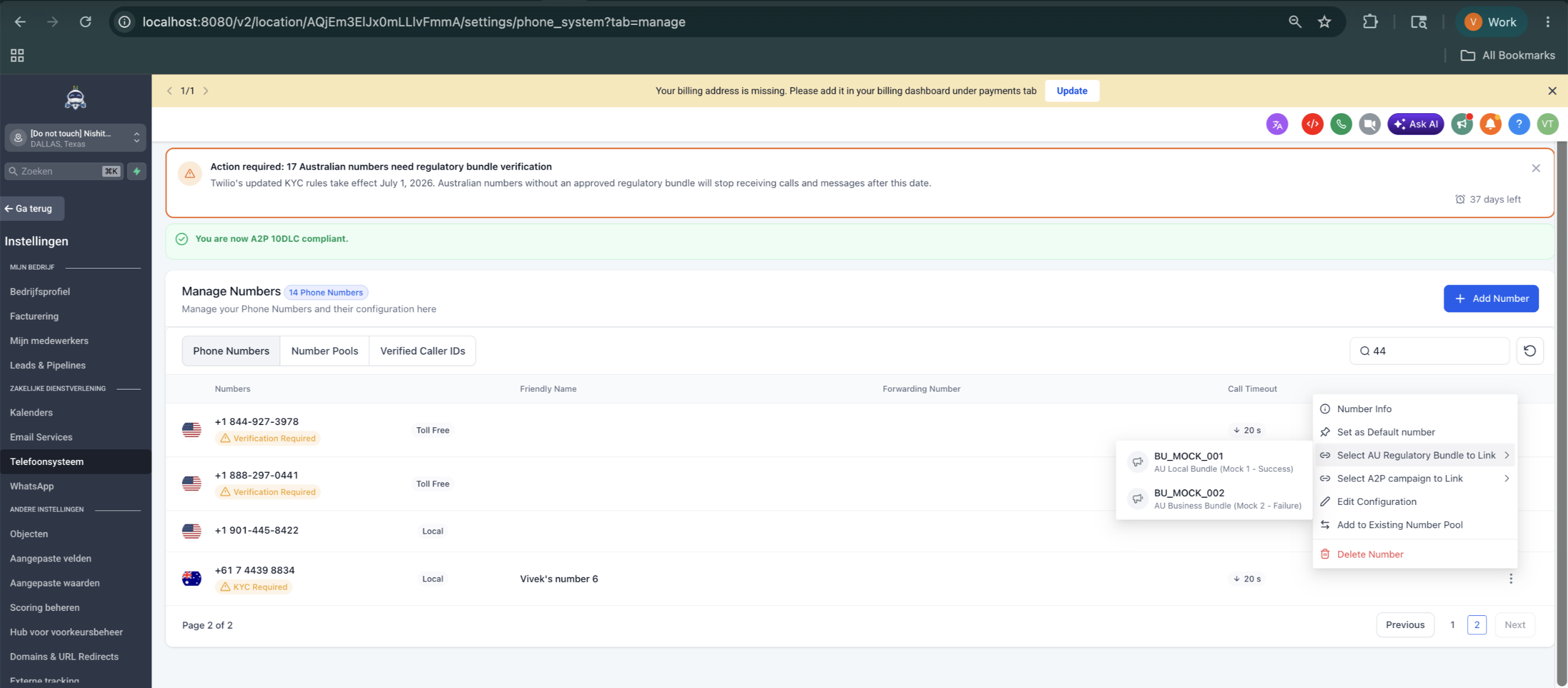
- Go to Settings > Phone System > Phone Numbers.
- Locate the Australian number that displays the Bundle required tag.
- Open the options menu (⋯) next to the number and choose AU Regulatory Bundle to Link.
- Select the approved bundle from the list.
- Repeat the process for any other Australian numbers that still need the bundle.
07What it looks like in HighLevel
08Settings that matter
- Regulatory Bundles. Controls the creation, drafting, and submission of business document bundles that verify ownership of Australian local numbers.
09Things to know before you rely on it
- All Australian local numbers must have an approved bundle linked by 1 July 2026; there is no grace period.
- Only Business bundles are supported; Individual bundles cannot be created.
- A single approved bundle can be linked to any number of Australian local numbers within the same subaccount.
- Each uploaded document must be PDF, JPG, or PNG and under 5 MB.
10If something goes wrong
- Bundle was rejected. Open the rejected bundle, review the reviewer’s note, correct the highlighted issue such as blurry scans or mismatched details, then click Resubmit.
- The orange compliance banner remains after linking. Refresh the Phone Numbers page and verify that no other Australian local numbers still show the Bundle required tag.
- Missing bundle before the deadline. Ensure a Business bundle is created and approved for each subaccount before 1 July 2026 to keep numbers active.
- Banner will not disappear even after linking all numbers. Confirm every Australian local number shows a green KYC Linked tag; if any still show Bundle required, link the approved bundle to those numbers.
11How it connects to the rest of HighLevel
- Full guidance on creating and managing regulatory bundles Regulatory bundle guide
- Pricing details for the phone system features Phone system pricing
- How agencies can migrate subaccounts to LC Phone Agency migration guide
Michael's take

When the bundle fully protects every Australian number, the risk of losing phone service disappears. That alone can cover the cost of the time spent building it, especially for agencies handling many clients. Once the bundle is approved, you can attach it to all numbers in the subaccount without further effort.
If you only have a single AU number or your client’s compliance is already covered elsewhere, the extra steps may not add value. The process requires precise documents and a review window, so for a tiny operation the effort can outweigh the benefit.