
01Who this is for
- Ecommerce owners benefit from Store order confirmation emails that include order details and digital delivery links.
- Coaches and service providers gain a standard receipt automatically after calendar or invoice payments.
- Subscription businesses receive consistent documentation for recurring payments while still being able to add custom onboarding steps.
02Purchase and order confirmations, explained
Automatic Sales Receipts are a built in feature that sends a PDF receipt by email after any supported successful payment, such as order forms, subscriptions, calendar appointments or invoices. The receipt contains standard transaction data and is sent without creating a workflow.
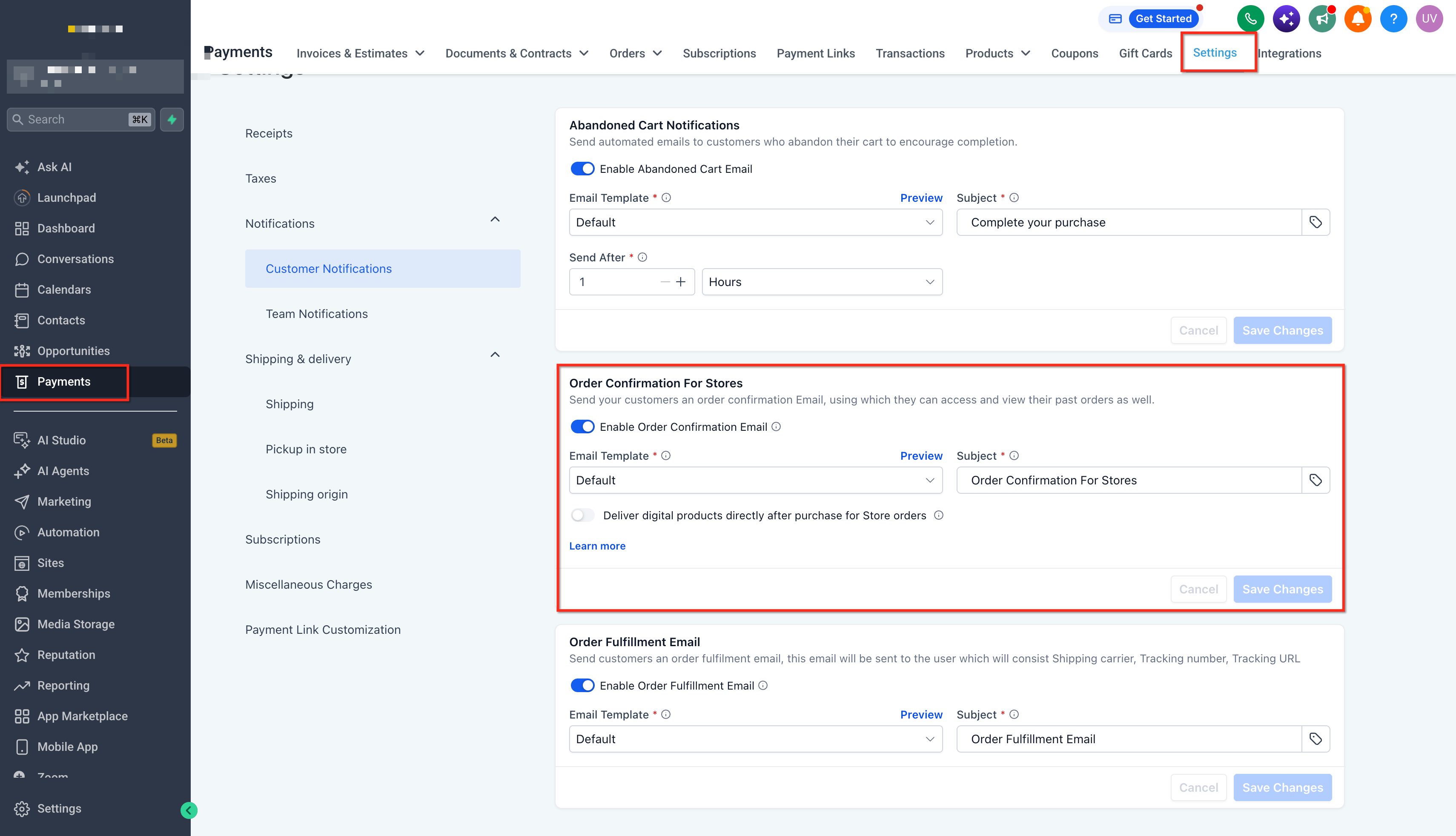
Store Order Confirmation Emails are specific to purchases made through the HighLevel Store. They are configured in the Payments settings and can include a link for customers to view their order or download digital products when applicable.
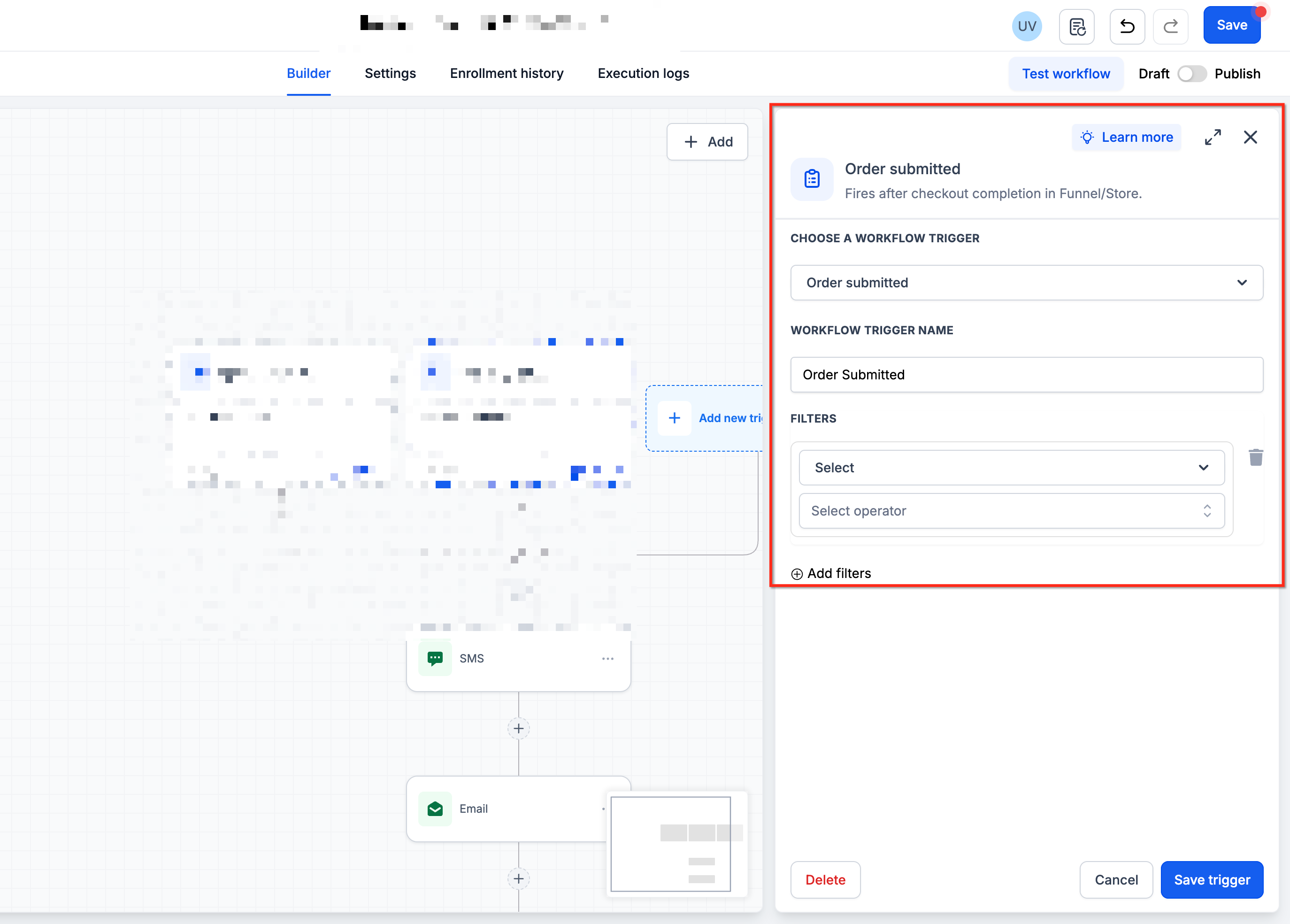
The Order Submitted workflow trigger lets you design a completely custom post purchase experience. By adding the trigger to a workflow, applying filters, and inserting email actions with order custom values and the Shopping Cart element, you can tailor messages, internal alerts, tag applications, and external automations for each purchase.
03How businesses use purchase and order confirmations
- Ecommerce store. Configure the Store Order Confirmation Email in Payments > Settings > Notifications. The email will be sent after each store checkout and can include a view order link or downloadable files.
- Coaching business. Enable Automatic Sales Receipts globally so that after a client books a calendar appointment and pays, HighLevel automatically emails a receipt PDF with the payment details.
- SaaS subscription service. Create a workflow with the Order Submitted trigger, filter for the subscription product, and send a custom email that contains onboarding instructions and the subscription order ID.
04The numbers and rules that matter
- Automatic Sales Receipts apply to 1 step and 2 step order form purchases, bump purchases, upsells, subscriptions, calendar appointment payments, and invoice payments.
05Before you start
- Automatic Sales Receipts must be enabled in the payment settings before they can be sent.
- Access to Payments > Settings is required to configure the Store Order Confirmation Email.
06How to set up and use purchase and order confirmations in HighLevel
Send an automatic sales receipt
- Confirm the purchase type (order form, subscription, calendar appointment, or invoice) is one of the supported payment methods.
- Make sure Automatic Sales Receipts are turned on in the global payment settings.
- When a supported payment succeeds, HighLevel automatically emails the receipt with a PDF attachment.
Configure store order confirmation email
- Navigate to Payments > Settings.
- Open the Notifications tab.
- Find the setting called Order Confirmation Email for Stores.
- Adjust the options to define the Store order confirmation experience you want to deliver.
Create a custom confirmation with Order Submitted trigger
- Go to Automation > Workflows.
- Create a new workflow or open an existing one.
- Add Order Submitted as the workflow trigger.
- Note that Order Submitted differs from Order Form Submitted; it fires on the purchase event, not merely a form submission.
- Add Order Filters to limit which purchases enter the workflow.
- Review the Allow Multiple option and set it according to whether repeat purchases should re enroll the contact.
- Add a Send Email action and design the confirmation message.
- Insert order related custom values (order ID, total, customer name, etc.) into the email body.
- Place the Shopping Cart element in the email template to show the purchased products dynamically.
Test your purchase confirmation
- Complete a representative test purchase using the same source and conditions as real customers.
- Confirm the correct workflow is triggered.
- Verify any product or order filters are applied as intended.
- Check that the customer receives the intended email or receipt.
- Review the content for correct custom values and product display.
- Ensure no unintended duplicate notifications (sales receipt, store email, or other workflows) are sent.
07What it looks like in HighLevel
08Settings that matter
- Automatic Sales Receipts. When turned on, HighLevel automatically emails a standard receipt PDF after any supported successful payment.
- Order Confirmation Email for Stores. Controls the email that Store customers receive after checkout, including order view links and digital delivery options.
- Allow Multiple. Defines whether a contact can be enrolled in the same workflow more than once for additional eligible orders.
- Sales Receipt settings. Provides options to customize the content and email presentation of automatic sales receipts.
09Things to know before you rely on it
- Automatic Sales Receipts apply globally to all supported payment types; they cannot be set per product or order source.
- Store Order Confirmation Emails are only sent for purchases made through the HighLevel Store.
- The Order Submitted workflow does not automatically deliver digital products; you must configure the Store digital delivery experience separately.
- Order Submitted and Order Form Submitted are distinct triggers; the former fires on a completed purchase, the latter on a form submission.
10If something goes wrong
- Customer receives more than one purchase confirmation. Review all active receipt and notification settings, Automatic Sales Receipt, Store Order Confirmation Email, invoice or calendar notifications, and any workflow emails, to ensure each message serves a unique purpose.
11How it connects to the rest of HighLevel
- Manage automatic sales receipts for order forms, calendars and invoices automatic sales receipts
- Customize email and SMS notifications for invoicing store email setup
- All Payments features overview payments overview
Michael's take

Wondering whether you really need a separate email after a sale? The short answer is yes if you want to go beyond a plain receipt and give buyers the next steps they need. HighLevel lets you pull off that with an automatic receipt for the paperwork and a custom workflow for onboarding, instructions, or internal alerts.
I’d first set up the Order Submitted workflow so you can tailor the postpurchase message to each product. Then I’d double check the receipt and Store email settings so you don’t end up sending duplicate notes that confuse the customer.