
01Who this is for
- SaaS Founders can limit discount periods to match trial offers and avoid unlimited reductions.
- Fitness studio owners can run limited time membership promos that stop after a few months.
- Online course creators can give a discounted first few payments without affecting later renewals.
02Coupon application on subscription products, explained
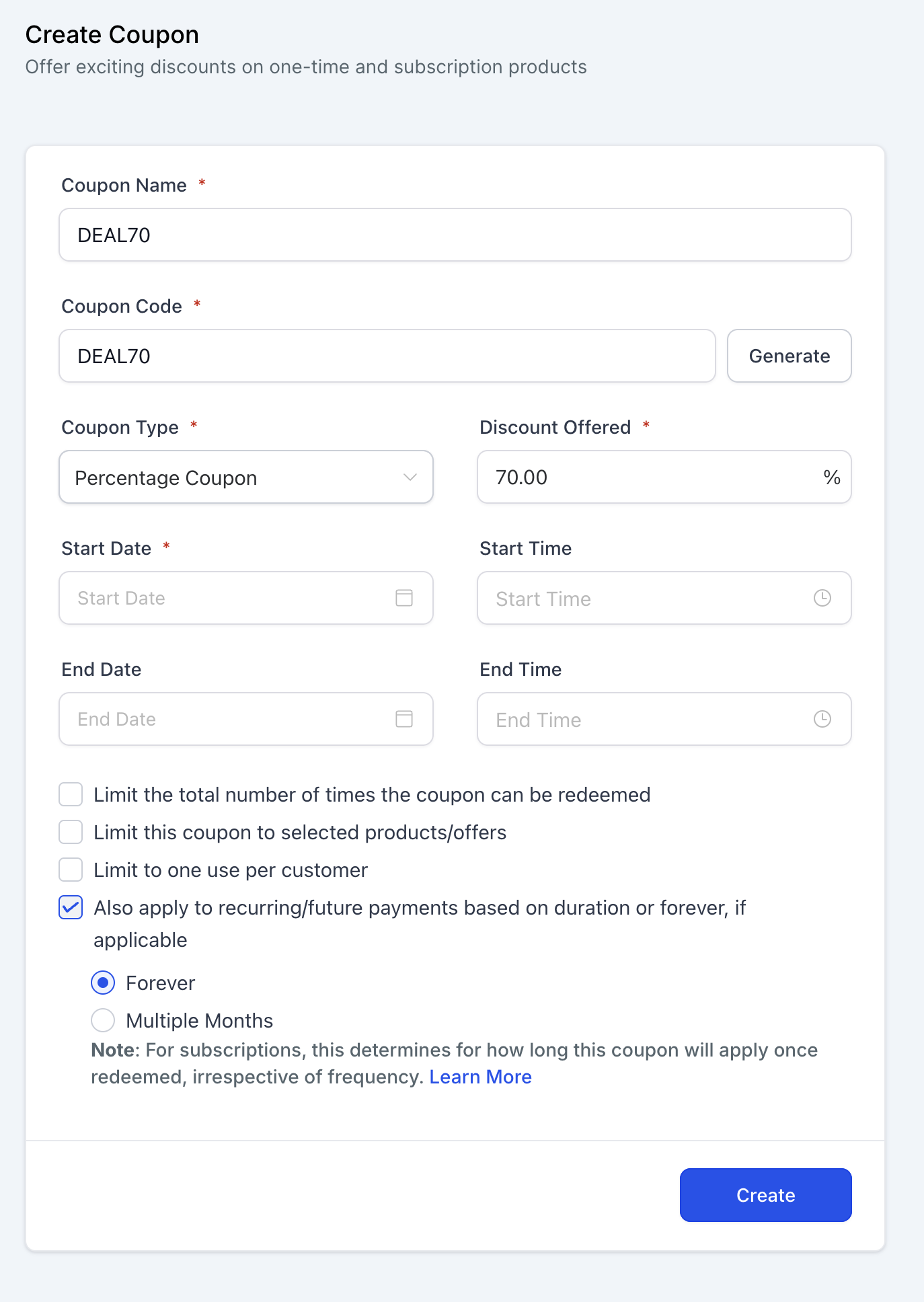
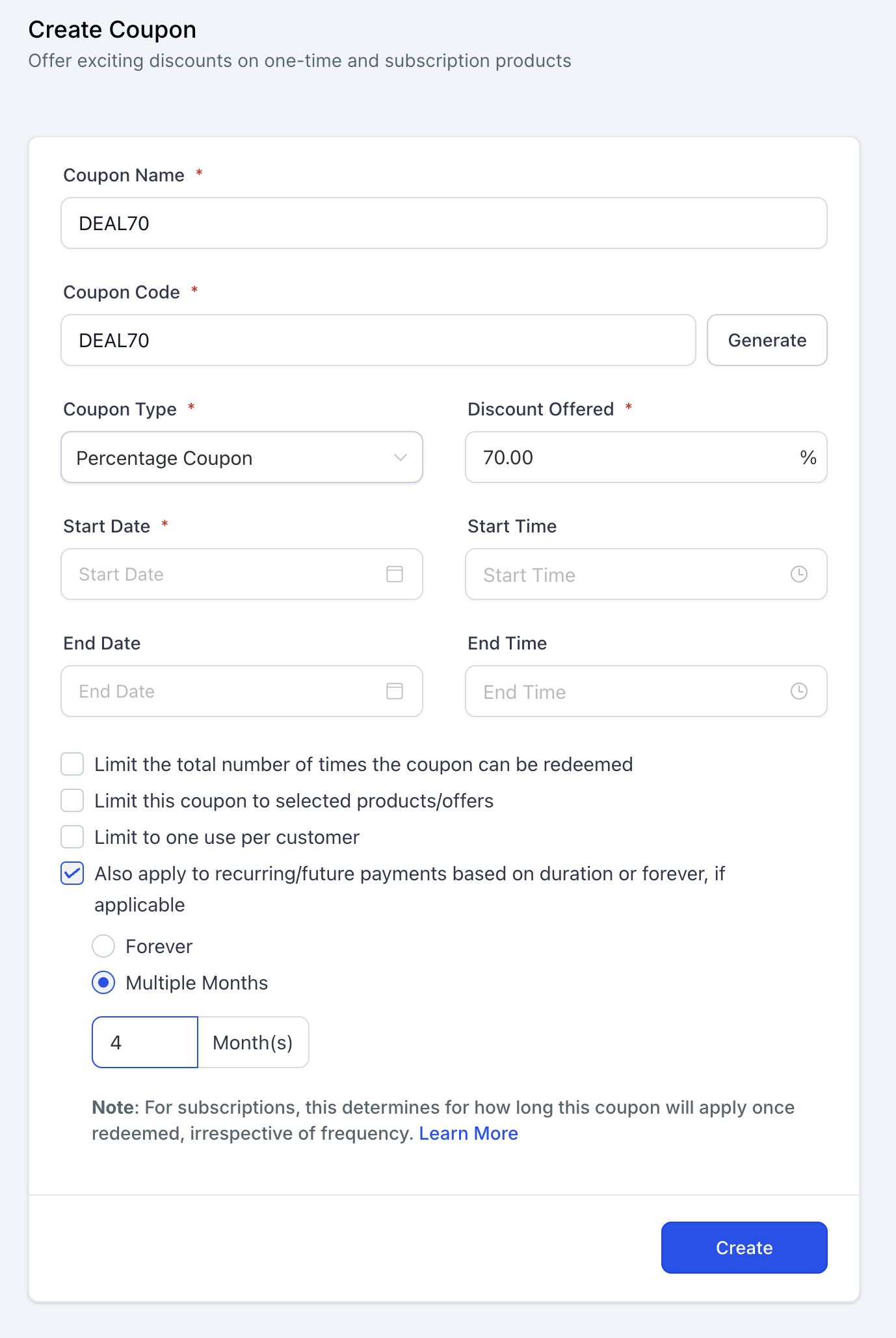
The feature adds a checkbox to the coupon creation screen. When selected, it lets you choose between a perpetual discount, a discount that lasts a specific number of months, or the default single payment discount.
The chosen duration is stored with the coupon and displayed on the subscription and order detail pages. It does not depend on the billing frequency, weekly, monthly, quarterly or yearly subscriptions all respect the month count you entered.
03How businesses use coupon application on subscription products
- SaaS startup. Create a coupon, check the duration box, select Multiple Months, and enter 3. When a new subscriber uses the coupon, they receive the discount for the first three months only, after which the regular price resumes.
- Gym membership provider. When setting up a promotional coupon, choose Forever so that every monthly payment during a member’s active period includes the discount, ensuring a consistent reduced rate for the entire membership.
- Online retailer with subscription boxes. Add a coupon to a weekly subscription product, pick Once, and the discount applies only to the initial order, leaving all subsequent weekly payments at full price.
04How to set up and use coupon application on subscription products in HighLevel
Create or edit a coupon with duration
- Open the Coupons section and choose either Create Coupon or Edit Coupon.
- In the discount area, tick the box labeled “Also apply to recurring/future payments based on a duration or forever, if applicable.”
- Select the Once option to apply the discount only to the first payment.
- Select the Forever option to have the discount apply to every recurring payment.
- Select Multiple Months to limit the discount; an input field will appear.
- Enter the number of months the discount should remain active in the provided field.
Apply a coupon to a subscription product
- Choose the desired coupon while configuring the subscription product.
- Verify that the product is marked as a subscription, not a one time item.
- Save the product; the discount will follow the duration you set (Once, Forever, or Multiple Months).
View applied coupon details
- Open the Subscription Details page or Order Details page.
- Locate the discount line that shows the coupon description, such as “10% off for first 4 months” or “$10 off for all payments” (per HighLevel's help center, checked November 2026).
05What it looks like in HighLevel
06Settings that matter
- Also apply to recurring/future payments based on a duration or forever, if applicable.. Enables the coupon to affect recurring invoices according to the selected duration option.
07Things to know before you rely on it
- If the checkbox was previously selected, the default duration becomes Forever; if it was not selected, the default is Once.
- The defined month count applies regardless of subscription frequency; only the number of payments within that period receives the discount.
- For scheduled subscriptions, the duration starts from the subscription’s start date, whether active immediately or after a trial.
08How it connects to the rest of HighLevel
- Learn how to sell products on order forms with different payment providers. Selling products on order forms
- Import your Stripe subscription products so they can use coupons in HighLevel. Import Stripe products
- Review plan options and pricing for access to coupon features. HighLevel pricing
Michael's take

Michael ReimerFounder of CRM Pros, HighLevel Commander and Certified Admin
A small convenience that can become a real shift for any business that relies on recurring revenue.
A yoga studio that sells month to month memberships could use a “first month free” code that expires after the initial month.
Get More InformationOpens on HighLevelPublished November 2, 2026 · Updated November 17, 2026