
01Who this is for
- Agency owners who deliver custom white label apps and need iOS WhatsApp call support for client apps.
- Agencies that already have a published white label mobile app and want to enable WhatsApp inbound calling.
02WhatsApp inbound calling, explained
The feature adds a WhatsApp call button inside the white label mobile app for iOS users. When a user taps the button, the app opens a voice call through WhatsApp. The capability is only active after the app is built with release 4.18.0 or later.
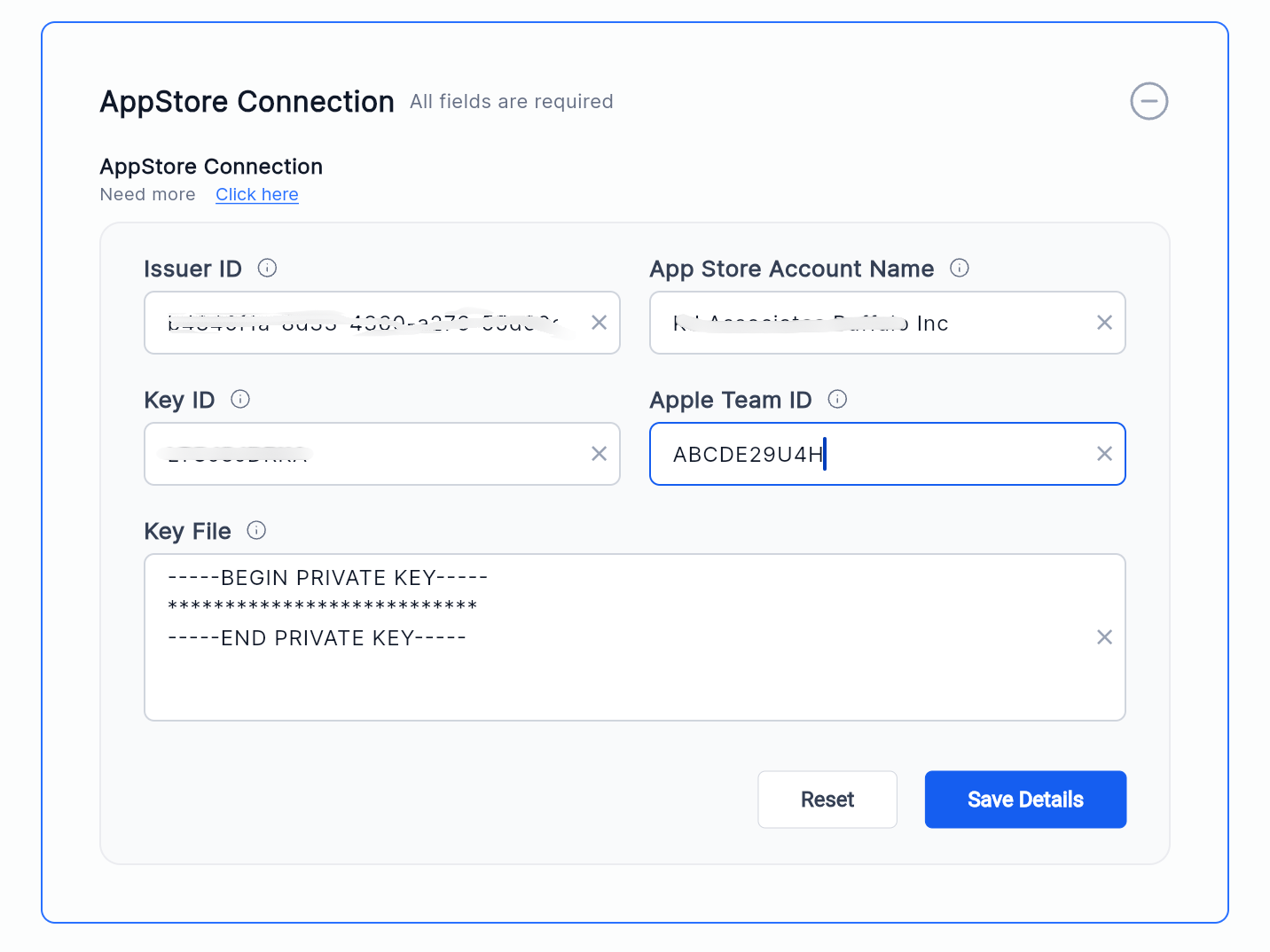
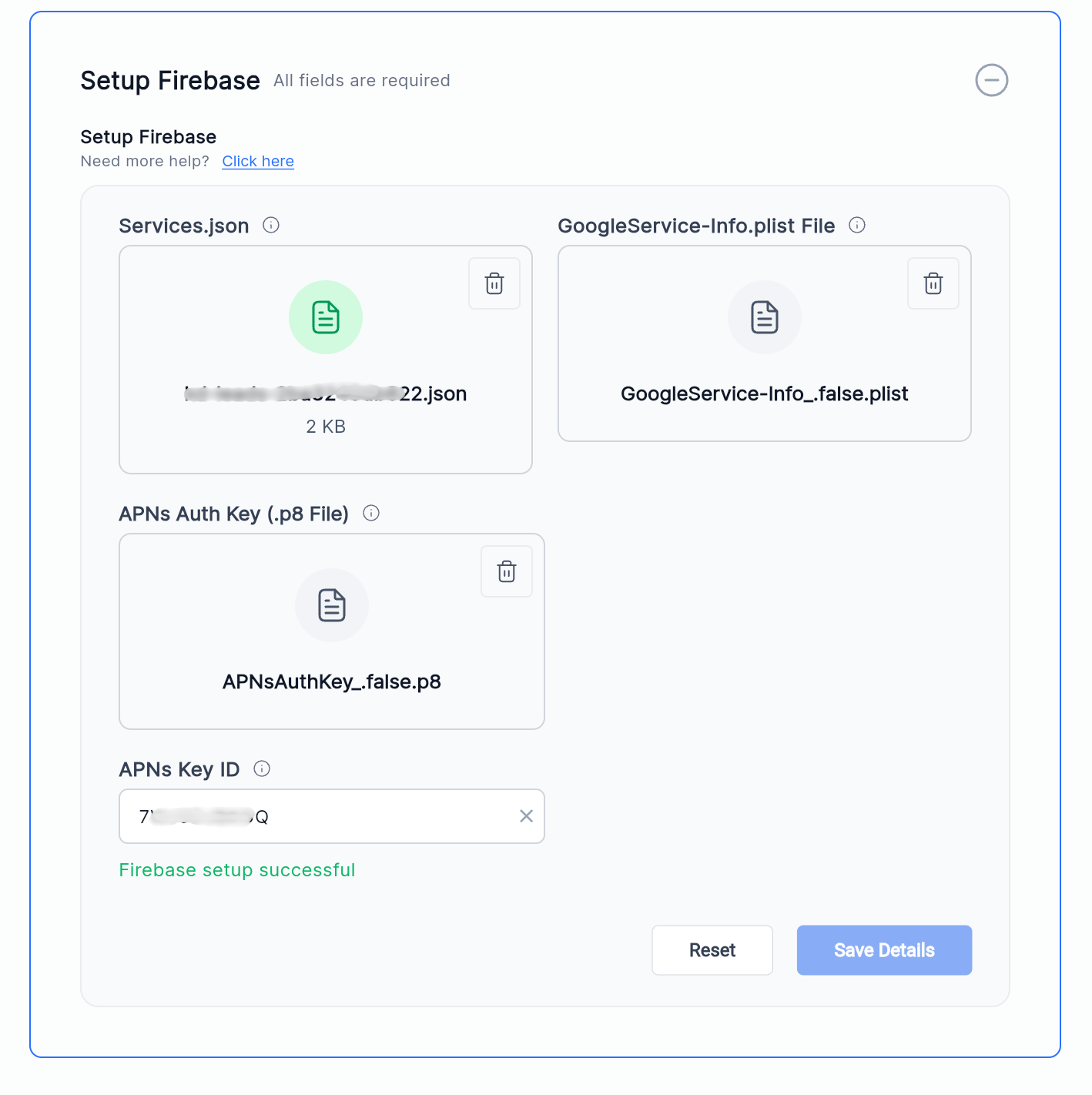
Configuration lives in the White Label Mobile App Customizer. Agency users enter the Apple Team ID and the APNs Key ID in the App Store Connection and Setup Firebase sections. Once saved, a new build is generated and submitted to the App Store. After approval, the WhatsApp inbound call option appears for end users without requiring a reinstall.
03How businesses use WhatsApp inbound calling
- Dental practice. The practice updates the Apple Team ID and APNs Key ID in the customizer, then publishes a new app version. Patients can call the office directly from WhatsApp inside the practice’s app, streamlining appointment questions.
- Real estate agency. Agents enter the required Apple credentials, rebuild the app, and submit it for review. Prospects can initiate a voice call via WhatsApp from the property listing app, improving response speed.
- Food delivery service. The service adds the Apple Team ID and APNs Key ID, releases an updated app build, and pushes it through the App Store. Customers can call the support line through WhatsApp without leaving the delivery app.
04The numbers and rules that matter
- Apple Team ID appears as a 10 character alphanumeric value.
- APNs Key ID appears as a 10 character alphanumeric value.
- Required files: Services.json, GoogleService Info.plist, APNs Authentication Key (.p8).
- App must be built using Release 4.18.0 or later.
05Before you start
- A white label mobile app must already be published in the App Store.
- An Apple Developer account with access to Team ID and APNs keys is required.
06How to set up and use WhatsApp inbound calling in HighLevel
Update Apple Team ID
- Open Agency View > Mobile app > Customisation > Distribution > Channels > App store settings > App Store Connection.
- Find the Apple Team ID field and paste your 10 character Team ID.
- Click Save Details.
Verify APNs configuration
- Navigate to Agency View > Mobile app > Customisation > Distribution > Channels > App store settings > Setup Firebase.
- Confirm Services.json, GoogleService Info.plist, the APNs Authentication Key (.p8) and APNs Key ID are present.
- If the APNs Key ID is missing, enter the 10 character identifier.
- If you already have a valid .p8 file, you do not need to generate a new APNs key.
- Click Save Details.
Publish app update
- Save all edited settings.
- Generate a new mobile app build using release 4.18.0 or later.
- Submit the new build to Apple for review.
- Await App Store approval.
Verification checklist
- Confirm Apple Team ID is populated.
- Confirm APNs Authentication Key (.p8) is uploaded.
- Confirm APNs Key ID is entered.
- Confirm Firebase configuration files are present.
- Confirm the app is built with Release 4.18.0 or later.
- Confirm the updated version has been submitted to Apple.
07What it looks like in HighLevel
08Settings that matter
- Apple Team ID. Specifies the 10 character identifier of the Apple developer team and enables iOS push services.
- APNs Key ID. Identifies the existing APNs authentication key (.p8) used for push notifications on iOS.
09Things to know before you rely on it
- The WhatsApp inbound calling feature works only on iOS devices.
- The app must be built with release 4.18.0 or a later version to include the feature.
10If something goes wrong
- WhatsApp inbound calling does not work after update. Confirm Apple Team ID, APNs Key ID, and APNs .p8 file are correctly entered and that the latest build was approved by the App Store.
11How it connects to the rest of HighLevel
- Customize your white label mobile app App Customizer
- Enroll an Apple Developer account Apple Developer Setup
- Review HighLevel pricing and plans Pricing
Michael's take

Clients often report that they can’t receive WhatsApp calls in their branded app, which forces them to use a separate phone. Adding the Apple Team ID in the white label customizer addresses that gap.
The first setting I would lock down is the Apple Team ID field. Copy the 10 character ID from your developer account and paste it into the App Store Connection section. Once that’s saved, the rest of the flow follows the platform’s expected steps.