
01Who this is for
- Founders of ecommerce stores who want to capture leads directly from TikTok without using separate ad tools.
- Marketing agencies that manage multiple client ad accounts and need a single workspace for TikTok, Meta and Google campaigns.
02TikTok ads, explained
The feature adds a TikTok tab inside the HighLevel Ad Manager. From there you can link a TikTok Business Center, create Lead Generation campaigns, set budgets, schedules and audience targeting, and design carousel or video ads. The platform also stores instant form or Direct Message destinations so leads flow straight into HighLevel.
All campaign steps, campaign, ad group and ad, are built inside the same builder used for other platforms. After publishing, the campaign appears in the Campaigns table where you can edit, pause, resume or duplicate it, and you can view TikTok performance in the Statistics view.
Only Lead Generation campaigns are supported in this release. Instant Forms must exist in TikTok Ads Manager before they can be selected, and each HighLevel subaccount can hold one active TikTok Business Center and ad account at a time.
03How businesses use TikTok ads
- Fitness studio. The studio links its TikTok Business Center, creates a Lead Generation campaign with an Instant Form, and sets the audience to local ages 18 to 35. Prospects fill the form directly on TikTok, and the information lands in the studio’s HighLevel contacts for follow up.
- Real estate brokerage. The brokerage selects Direct Messages as the lead destination, configures a greeting template, and runs a video ad targeting specific zip codes. Interested viewers click the ad, start a TikTok conversation, and the broker captures contact details through the guided chat.
- Online education platform. The platform creates a carousel image ad that promotes a free webinar, chooses an Instant Form published in TikTok, and sets budget and schedule to run during peak enrollment weeks. Registrations flow into HighLevel where they trigger an email nurture sequence.
04Before you start
- Instant Forms must be created and published in TikTok Ads Manager before they can be selected in HighLevel.
- Only one active TikTok Business Center and ad account can be linked per HighLevel subaccount.
05How to set up and use TikTok ads in HighLevel
Connect TikTok ad account
- Log into the appropriate HighLevel subaccount.
- Navigate to Marketing > Ad Manager.
- Open Settings > TikTok > Ad Accounts.
- Click the Connect Account button.
- Sign in to TikTok when prompted.
- Approve the requested permissions.
- Select the Business Center you want to use.
- Choose the ad account and click Save.
Create a TikTok campaign
- Open the Campaigns view inside Ad Manager.
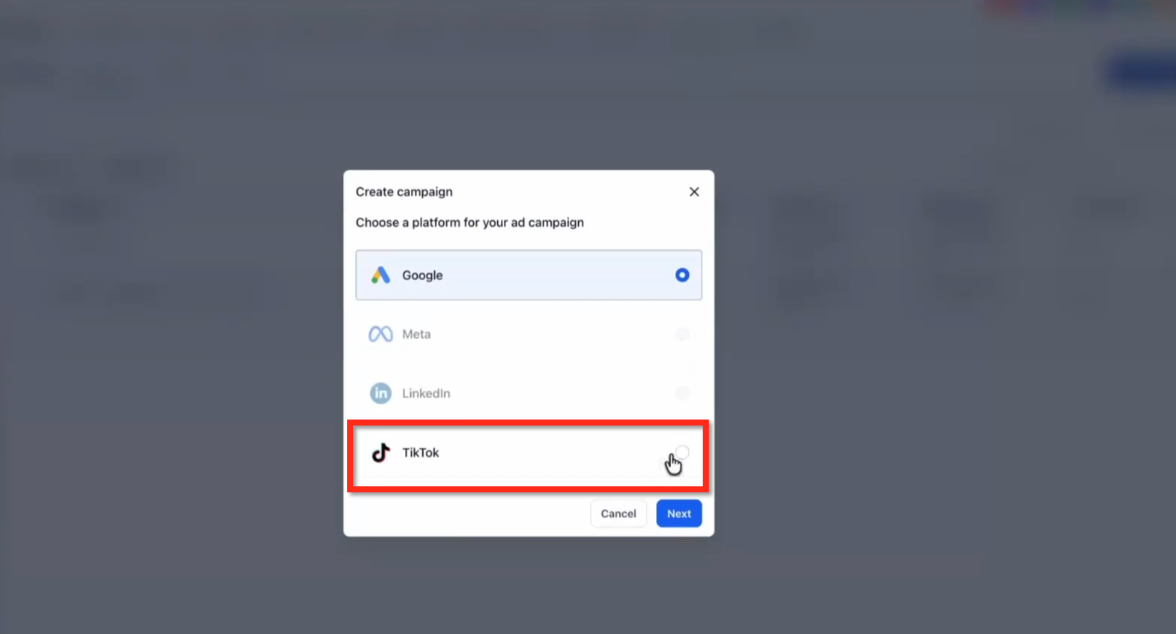
- Click Create Campaign.
- Pick TikTok as the advertising platform.
- Select Start from Scratch.
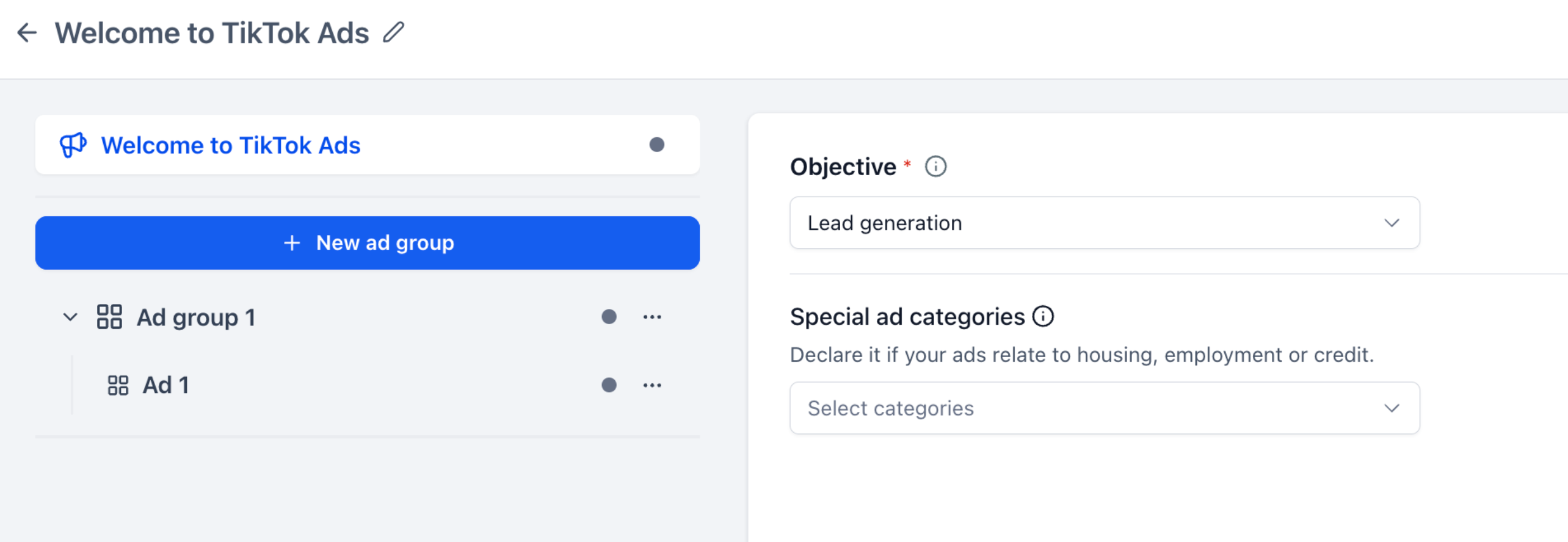
- Enter a descriptive campaign name.
- Confirm Lead Generation is the objective.
- Choose any required Special Ad Categories.
Configure the Ad Group
- Select Ad Group 1 or add a new Ad Group.
- Choose the lead generation destination (Instant Form or Direct Messages).
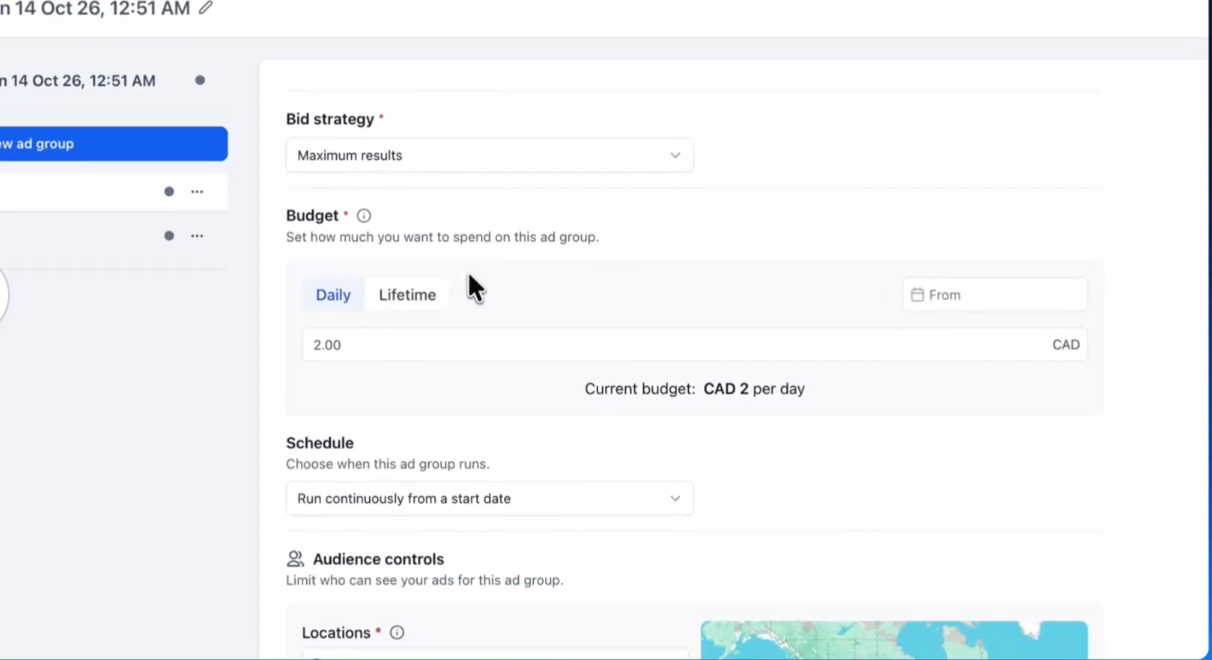
- Set the budget amount.
- Define the schedule for delivery.
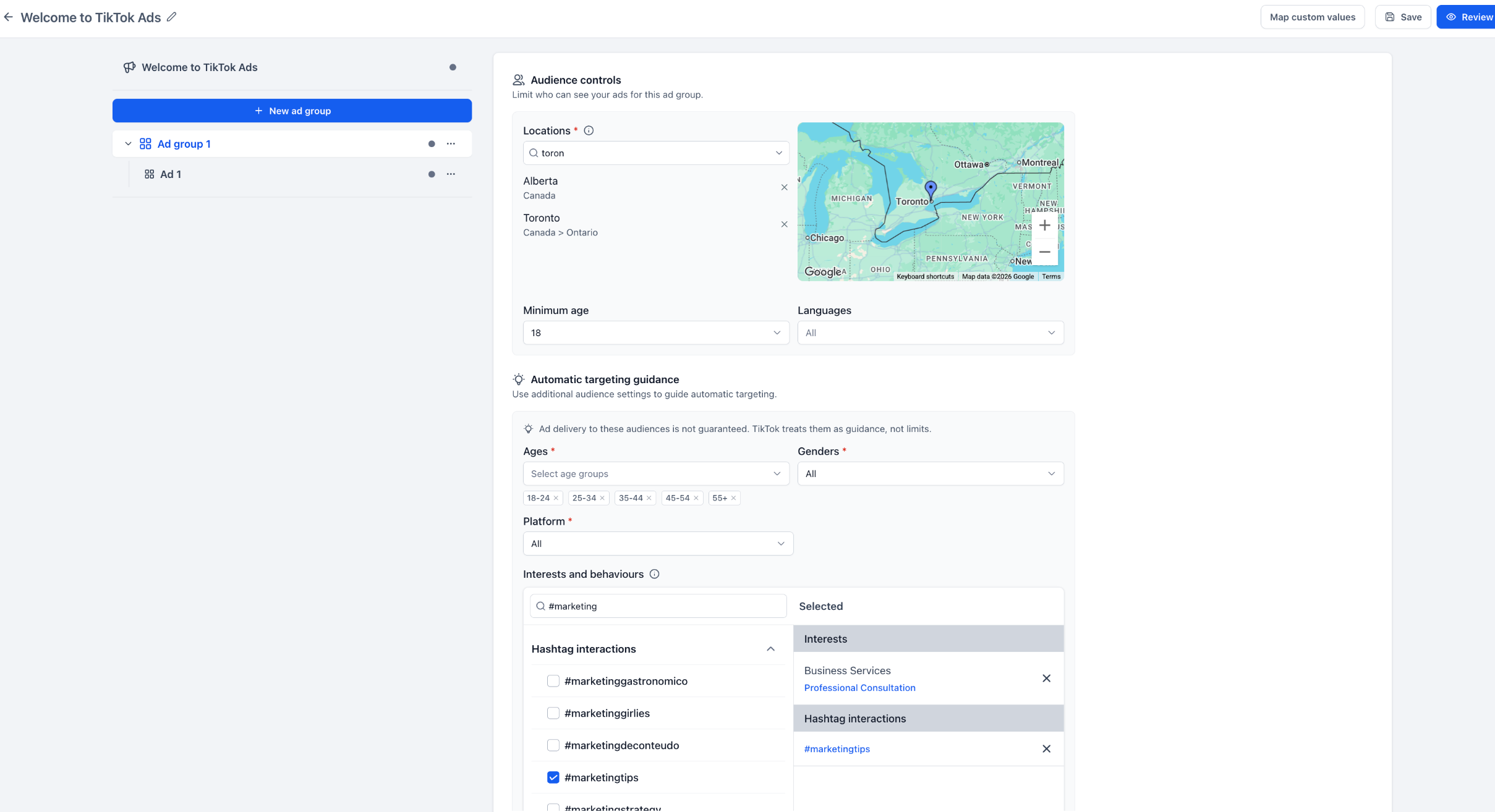
- Select locations, minimum age and languages.
- Add automatic targeting preferences such as age groups, gender, platform, interests or behaviors.
Configure the Lead Destination
- Open the ad configuration panel.
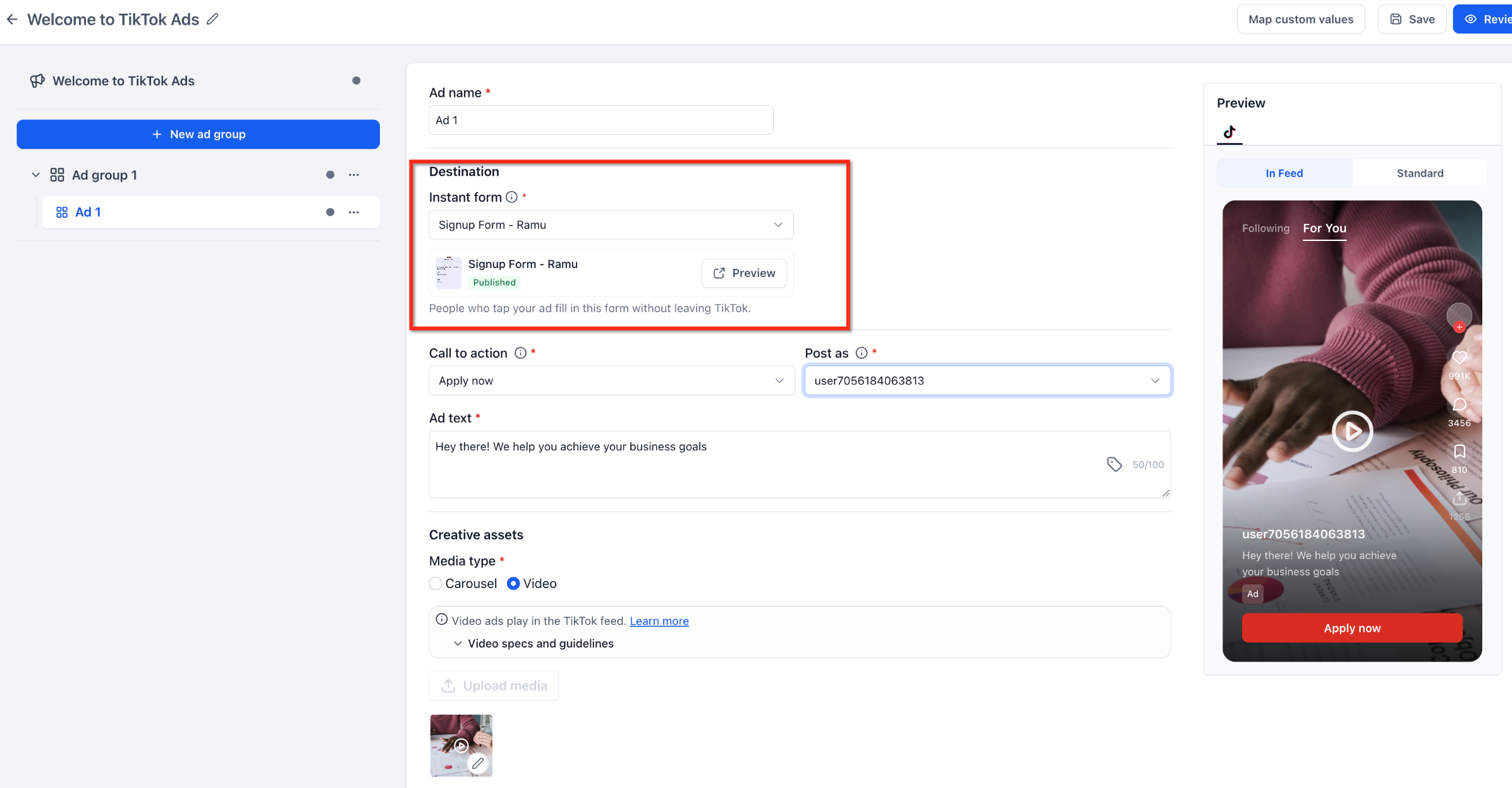
- Find the Destination field.
- Select Instant Form or Direct Messages as the destination type.
- If using Instant Form, choose a published form from the dropdown.
- If using Direct Messages, set up a message template or automated chat.
Create the TikTok advertisement
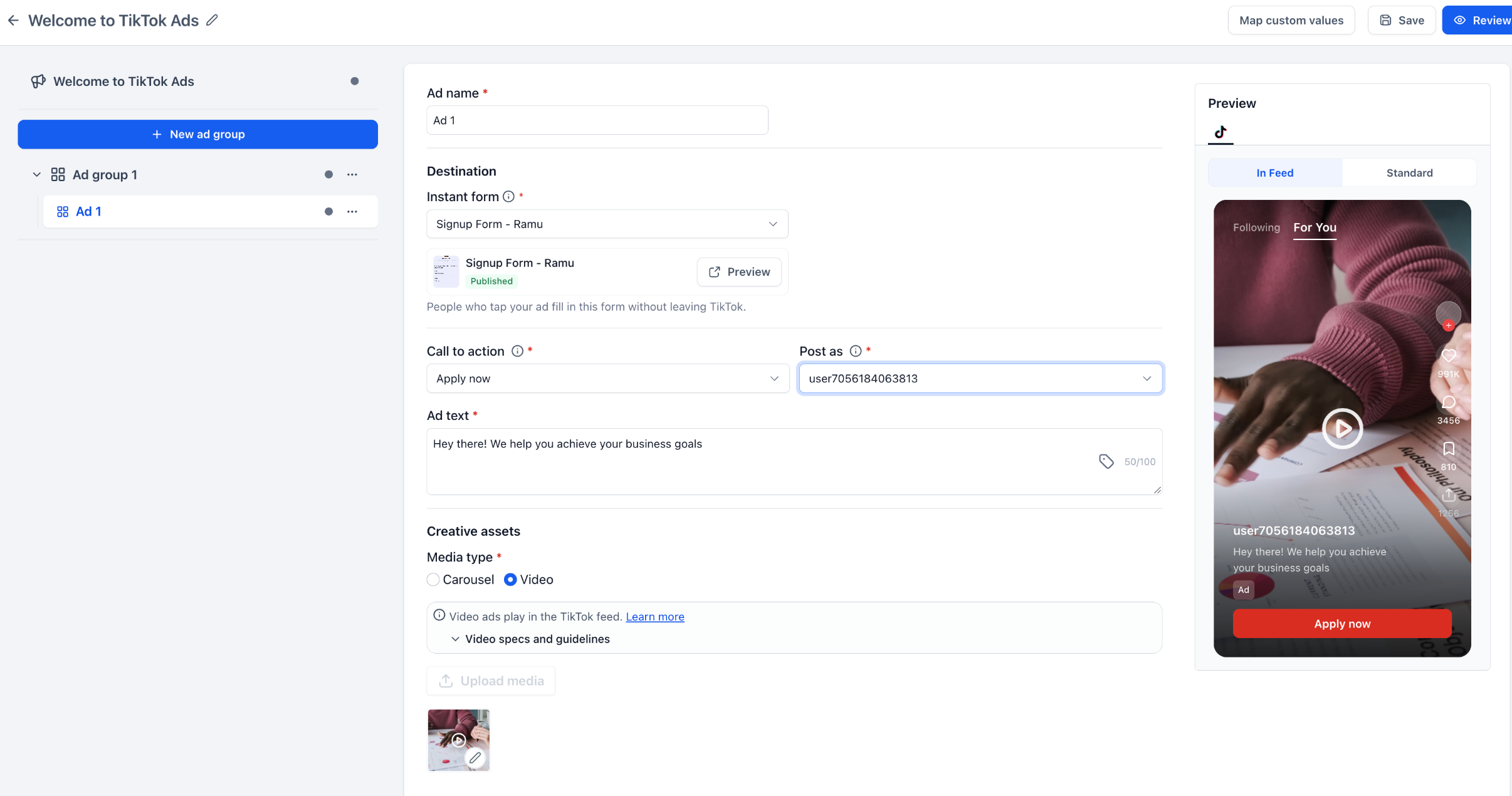
- Select Ad 1 within the Ad Group or add a new ad.
- Enter an ad name.
- Confirm the chosen lead destination and its settings.
- Pick a Call to Action button.
- Select the TikTok account identity under Post As.
- Write the ad text.
- Upload carousel images or a single video.
- Review the live preview of the ad.
Review and publish the campaign
- Open the Review screen in the campaign builder.
- Look for missing required fields or validation alerts.
- Fix any account, form mapping or budget issues identified.
- Confirm all selections for ad account, budget, schedule, targeting, destination and creative assets.
- Click Publish to submit the campaign.
Manage and monitor the campaign
- Return to Marketing > Ad Manager > Campaigns.
- Locate the TikTok campaign in the table.
- Use the action menu to edit, pause, resume or duplicate the campaign.
- Open Statistics to view performance data.
- Adjust supported settings based on the results.
06What it looks like in HighLevel
07Settings that matter
- Budget. Controls how much money the ad group can spend during its schedule.
- Schedule. Defines the start and end dates for the ad group’s delivery.
- Locations. Specifies the geographic areas where the ads may be shown.
- Minimum Age. Sets the lowest eligible age for the target audience.
- Languages. Limits ad delivery to users who have the selected language setting.
- Automatic Targeting Guidance. Provides audience preferences such as age groups, gender, platform, interests or hashtag interactions that TikTok may use to guide delivery.
- Call to Action. Chooses the button label that appears on the ad, such as Apply Now.
- Post As. Selects which TikTok account identity the ad will appear from.
- Ad Text. The message displayed alongside the creative assets.
- Creative Assets. Uploads either a carousel of images or a single video for the ad.
08Things to know before you rely on it
- Only Lead Generation campaigns are supported in this release.
- Instant Forms must be created in TikTok Ads Manager before they can be selected.
- Each HighLevel subaccount can hold only one active TikTok Business Center and ad account at a time.
- Automatic Targeting Guidance is advisory; TikTok may deliver ads beyond the specified preferences.
- Only campaigns created through HighLevel can be managed and reported on inside the platform.
- Templates, Snapshots and Social Planner posts cannot be used to create TikTok campaigns yet.
09If something goes wrong
- Instant Form does not appear in the destination dropdown. Confirm the form is published in TikTok Ads Manager and that the correct TikTok ad account is selected.
- Campaign fails validation before publishing. Check for missing required fields, unmapped forms or incomplete account authorization, then resolve the highlighted issues.
10How it connects to the rest of HighLevel
- Explore all marketing capabilities in HighLevel All Marketing features
- View HighLevel pricing and plan options HighLevel pricing and plans
- Start a free 30 day trial of HighLevel Start a 30 day HighLevel trial
Michael's take

I find having TikTok lead gen ads inside HighLevel convenient because everything is in one place.