
01Who this is for
- Marketing managers can control timing of bulk sends to align with promotions.
- Founders of small businesses can prevent unwanted emails if a plan changes.
- Agency owners can manage client campaigns by pausing or canceling pending sends.
02Scheduled email campaigns, explained
The pause, resume, and cancel controls affect pending email deliveries. Pausing a campaign puts it on hold; the campaign can later be resumed. Resuming before the original send time follows the existing schedule, while resuming after that time triggers an immediate send. Canceling stops the scheduled delivery permanently and the campaign cannot be brought back.
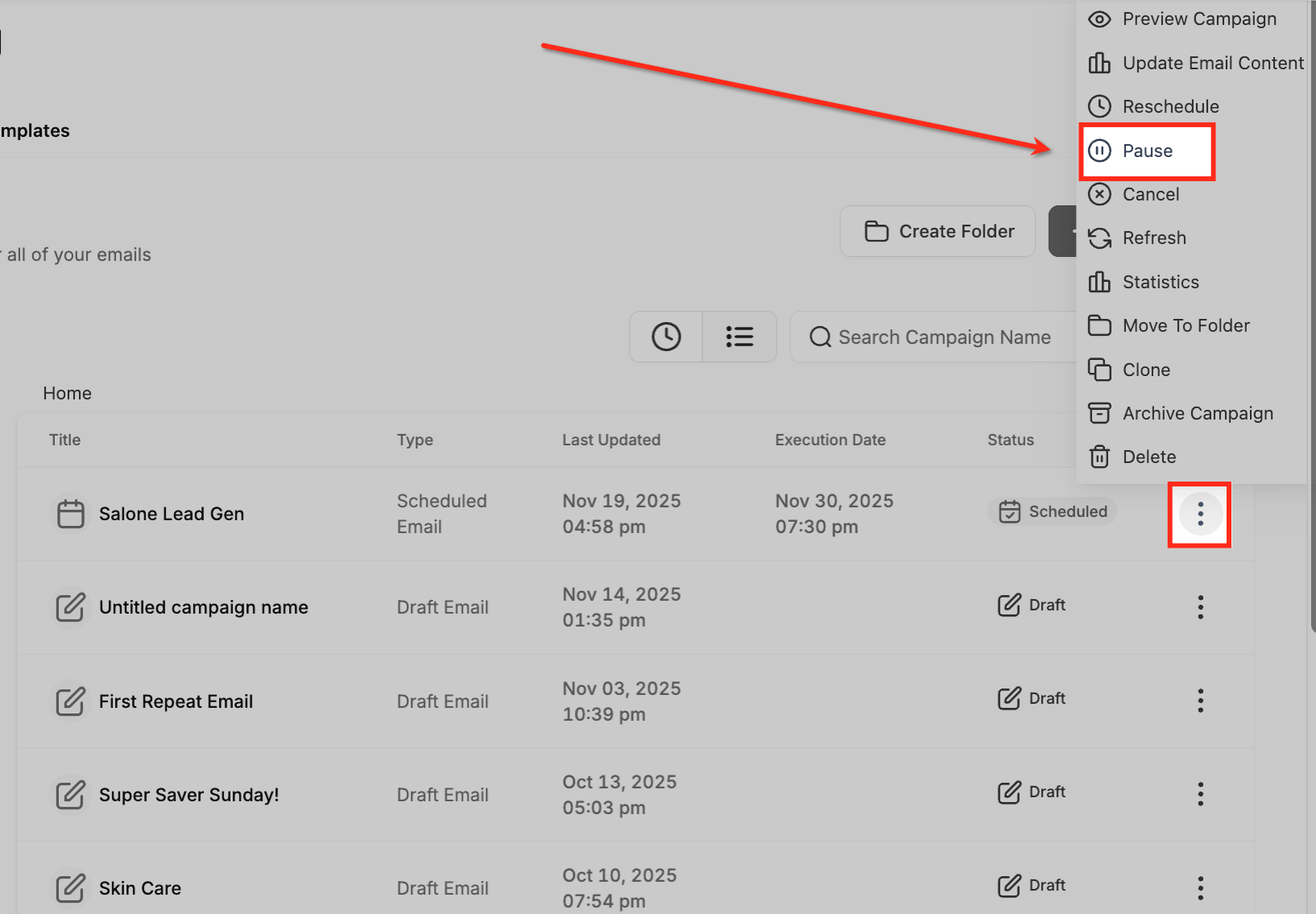
These options are available on the Email Campaigns page under Marketing > Email > Campaigns. The three dot actions menu next to each scheduled campaign contains the Pause, Resume, and Cancel choices. The feature works for Schedule, Batch Schedule, and RSS Schedule campaigns.
03How businesses use pause, resume, or cancel a scheduled email campaign
- Real estate agency. When a property listing changes, the agency can pause a scheduled newsletter to avoid sending outdated information. Later they resume the campaign to reach subscribers with the updated listing.
- SaaS startup. If a product launch is delayed, the startup can cancel the scheduled email to prevent premature communication. The cancelled campaign remains in the system for future reference.
- Nonprofit organization. During a fundraising event, the nonprofit may pause a scheduled reminder email if the event time shifts, then resume it so donors receive the updated schedule.
04The numbers and rules that matter
- Pause or Cancel is supported for Schedule, Batch Schedule, and RSS Schedule campaigns.
- Rescheduling must be completed at least 60 minutes before the execution time for supported scheduled campaigns.
05Before you start
- The email campaign must already be scheduled and not yet finished delivering.
06How to set up and use pause, resume, or cancel a scheduled email campaign in HighLevel
Pause, resume, or cancel a scheduled email campaign
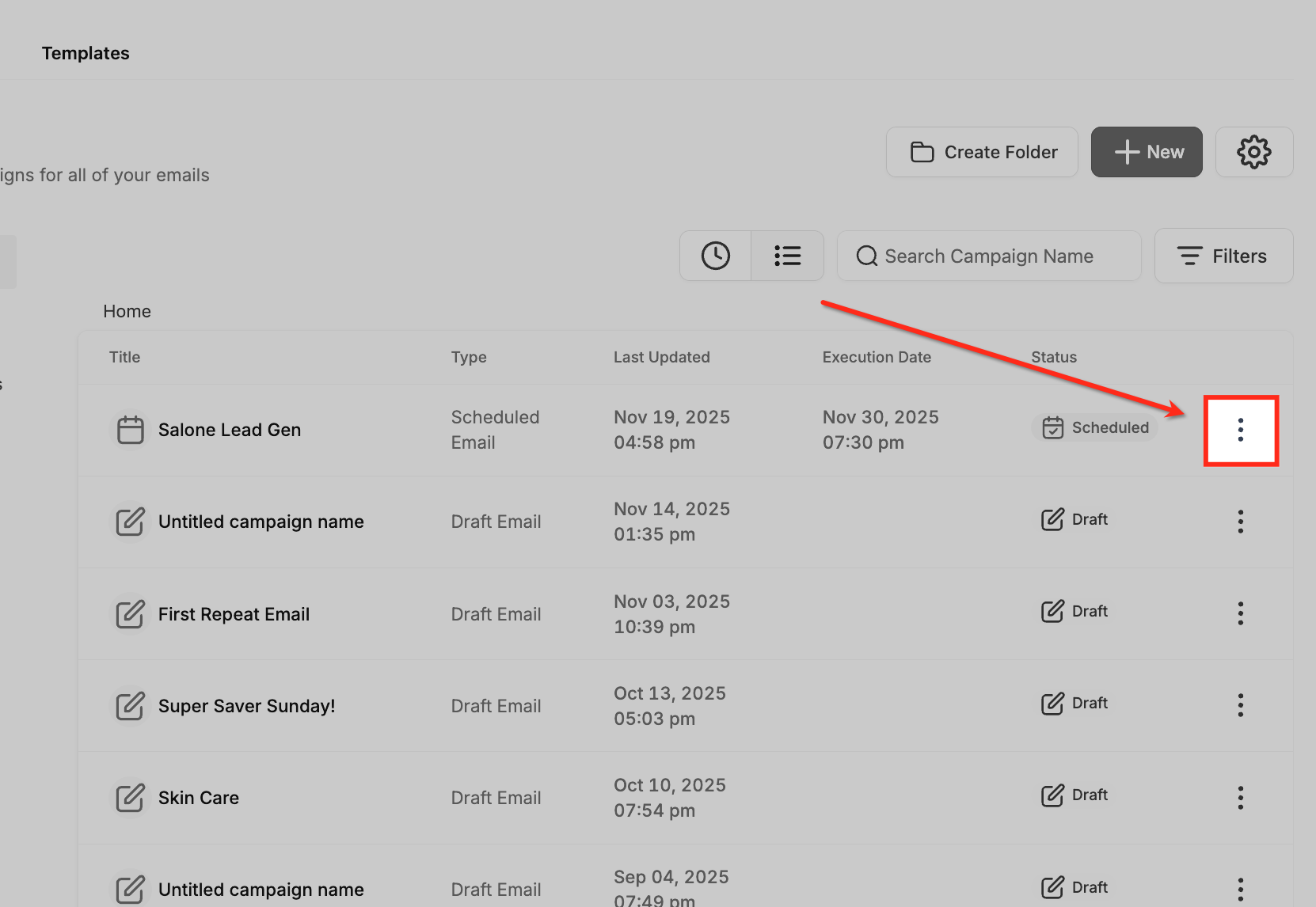
- Open Marketing > Email > Campaigns.
- Find the scheduled campaign you want to modify.
- Click the three dot menu (⋮) beside the campaign.
- Choose Pause, Resume, or Cancel based on the current status.
07What it looks like in HighLevel
08Things to know before you rely on it
- Pause or Cancel works only for Schedule, Batch Schedule, and RSS Schedule campaigns.
- A cancelled campaign cannot be resumed.
- Rescheduling must be done at least 60 minutes before the original execution time for supported scheduled campaigns.
09How it connects to the rest of HighLevel
- Send or schedule an email campaign Send or schedule email
- Batch schedule email campaigns Batch schedule
- How to reschedule an email campaign Reschedule guide
Michael's take

Pausing, resuming, or canceling scheduled email campaigns feels like a small convenience that can keep a launch on track when timing shifts.
A local boutique that runs weekly newsletters can use Pause when a holiday changes their promotion schedule, then Resume once the new date is set. It’s a tidy way to stay in control without recreating the whole campaign.