
01Who this is for
- Email marketers who need control over how quickly contacts are removed from lists can select the appropriate flow.
- Compliance officers can enforce a confirmation step to meet policy requirements for unsubscribes.
- Small business owners can simplify the unsubscribe experience for their audience while still collecting feedback.
02Unsubscribe flows, explained
The unsubscribe flow is an account level setting that governs the behavior of every email sent from the account. It determines whether a contact is removed from the list right away or must confirm the action.
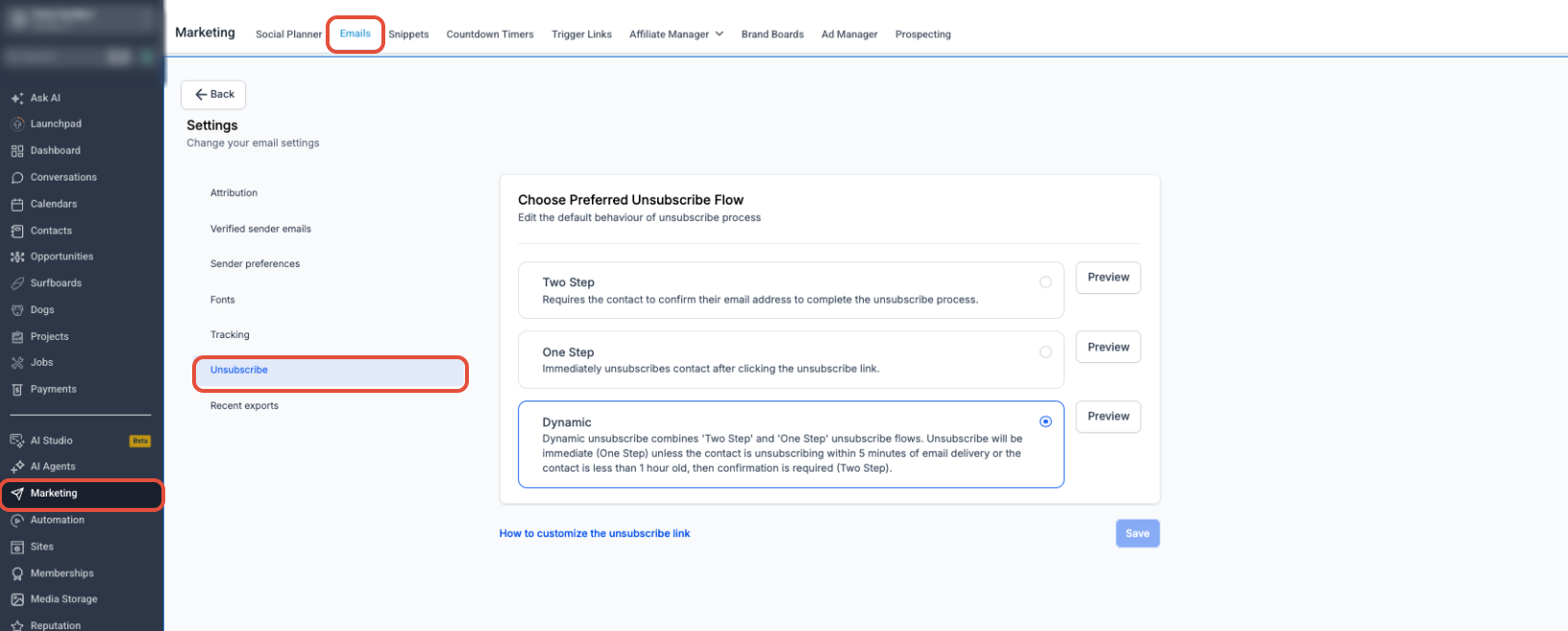
Three flow types exist. One Step unsubscribes the contact right away and optionally asks for feedback. Two Step requires the contact to confirm before the status changes. Dynamic merges the two: it unsubscribes immediately unless the click occurs within five minutes of delivery or the contact record is newer than one hour, in which case confirmation is required.
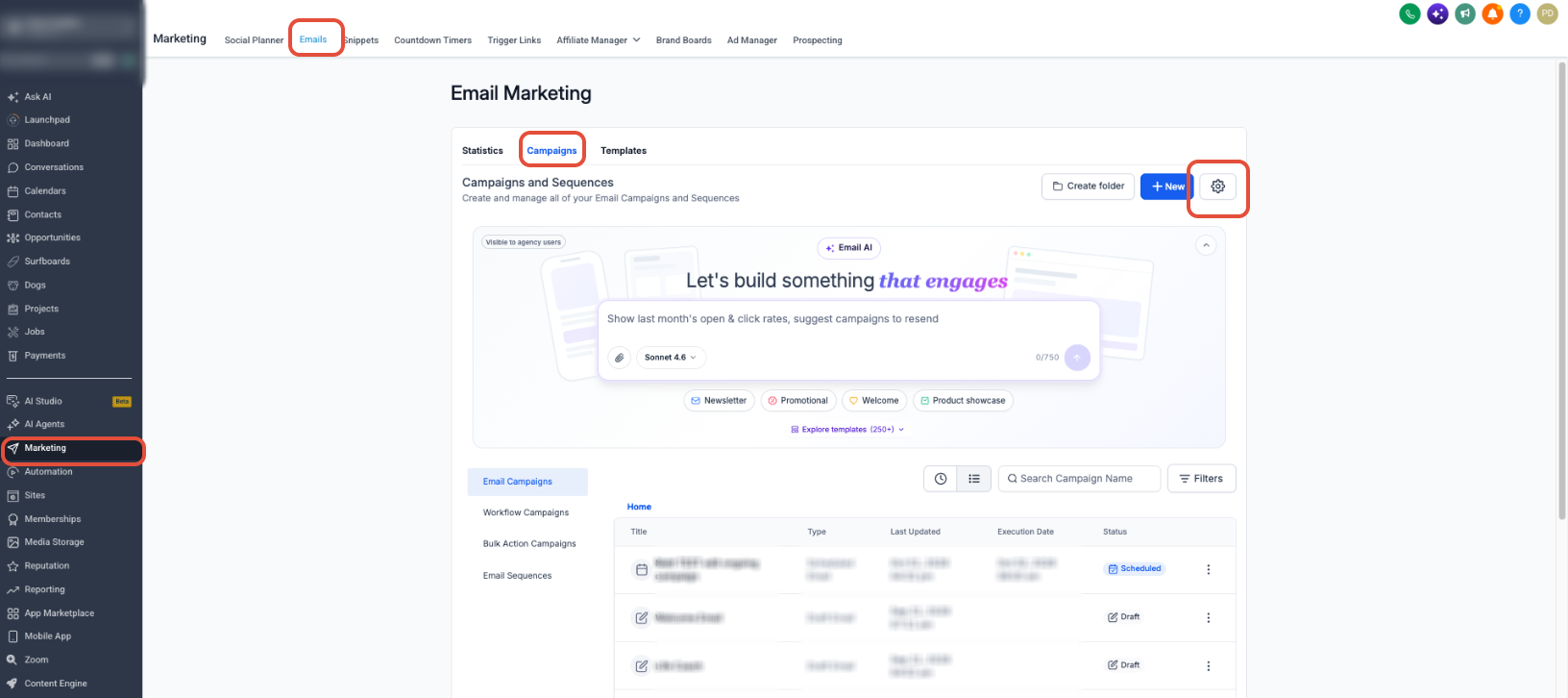
The setting is found under Marketing > Emails > Campaigns, then the Settings gear, Unsubscribe option; once chosen it remains active for all future campaigns until you change it.
03How businesses use unsubscribe flows
- SaaS startup. The team selects the Dynamic flow so that recent leads have a chance to confirm their unsubscribe, reducing accidental removals while older contacts are unsubscribed right away.
- Local retail store. The owner chooses One Step to immediately stop messages to customers who click the link, and then uses the optional feedback form to learn why they opted out.
- Healthcare clinic. The clinic opts for Two Step, ensuring patients must confirm before their email address is removed, which helps maintain compliance with communication regulations.
04The numbers and rules that matter
- Dynamic flow requires confirmation if the contact clicks the unsubscribe link within 5 minutes of email delivery.
- Dynamic flow requires confirmation if the contact record is less than 1 hour old.
05How to set up and use unsubscribe flows in HighLevel
Configure the account level unsubscribe flow
- Open the Marketing menu, then go to Emails and select Campaigns.
- Press the Settings gear icon.
- Choose the Unsubscribe option.
- Pick One Step, Two Step, or Dynamic as the desired flow.
- Open the Preview function to view the unsubscribe experience.
- Press Save to apply the setting.
06What it looks like in HighLevel
07Settings that matter
- Unsubscribe. Selects the type of unsubscribe flow that will be applied to all emails sent from the account.
- One Step. Unsubscribes the contact immediately after the link is clicked, with optional feedback.
- Two Step. Requires the contact to complete a confirmation step before the unsubscribe is final.
- Dynamic. Provides immediate unsubscribe unless the link is clicked within five minutes of delivery or the contact record is less than one hour old, in which case confirmation is required.
08Things to know before you rely on it
- Changing the flow does not modify data for contacts who have already unsubscribed.
- The selected flow is applied to every email sent from the account until it is changed.
- Dynamic flow requires confirmation for clicks made within five minutes of email delivery or for contacts created less than one hour ago.
09How it connects to the rest of HighLevel
- Send or schedule a regular email campaign in HighLevel Send email campaign
- Preview and test email campaigns in HighLevel Preview email
- HighLevel pricing and plans Pricing
Michael's take

I like the flexibility of choosing between the three unsubscribe flows depending on my audience.
If I prefer a simple process, I often stick with the One Step flow.