
01Who this is for
- Marketing agencies benefit because they can craft distinct audience groups for multiple clients without overlap.
- SaaS Founders gain control over the professional roles and industries that view their ads, improving relevance.
- B2B consultants use the feature to narrow outreach to decision makers in specific company sizes or sectors.
02Audience targeting, explained
The audience targeting feature lives inside the LinkedIn section of HighLevel Ad Manager. It lets you set a mandatory geographic filter, then layer optional professional attributes such as company industry, job title, education, and interests. Each attribute can be marked as Include to reach those profiles or Exclude to filter them out.
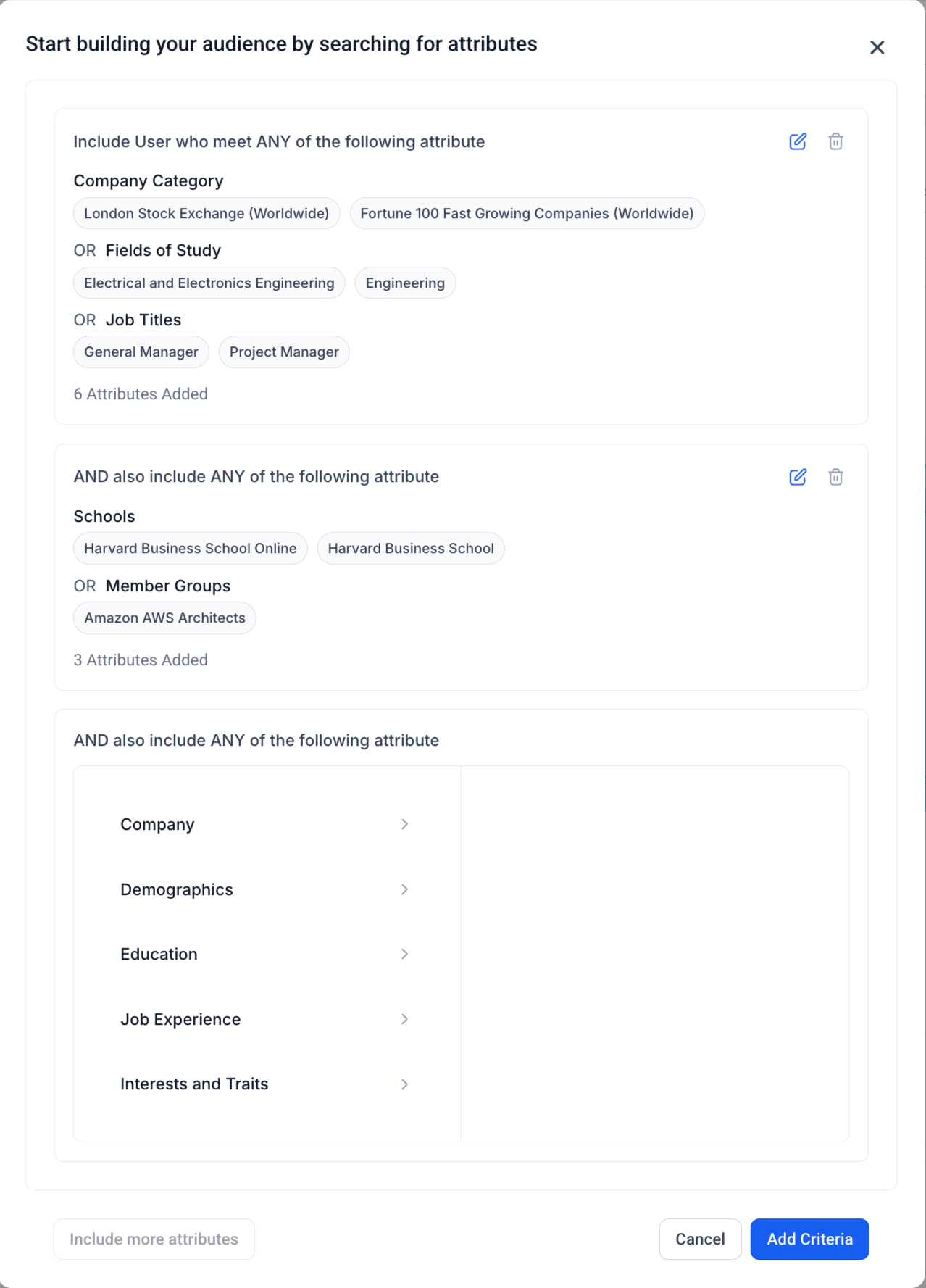
Attributes are organized into up to three groups. Within a group, the system applies OR logic, meaning any attribute in that group qualifies a user. Between groups, AND logic is used, so a user must match at least one attribute in each group to be eligible. This structure provides flexibility while keeping the configuration straightforward.
All settings are accessed while building a LinkedIn campaign, and the audience definition is saved with the campaign. The platform validates that at least one location chip is present before the campaign can be launched.
03How businesses use audience targeting
- SaaS company. The company selects the United States as a location, includes job titles like Product Manager OR Engineer, and adds the technology industry attribute. This group ensures the ad reaches tech focused professionals in the target geography.
- Recruitment firm. The firm includes the Education attribute for degrees in Human Resources and excludes Interns. It also adds a second group with the company size attribute for firms with 200+ employees. The combined groups narrow candidates to experienced HR professionals at larger companies.
- Training provider. The provider adds a group that includes the field of study "Business Administration" and a second group that includes the school "Harvard Business School". Using AND across groups, the ads reach alumni who studied business at that institution.
04The numbers and rules that matter
- Supports up to 3 attribute groups.
- Aim for at least 50,000+ audience size for optimal LinkedIn delivery.
05Before you start
- A LinkedIn campaign must have at least one geographic location selected before audience rules can be saved.
06How to set up and use audience targeting in HighLevel
Build an audience for a LinkedIn campaign
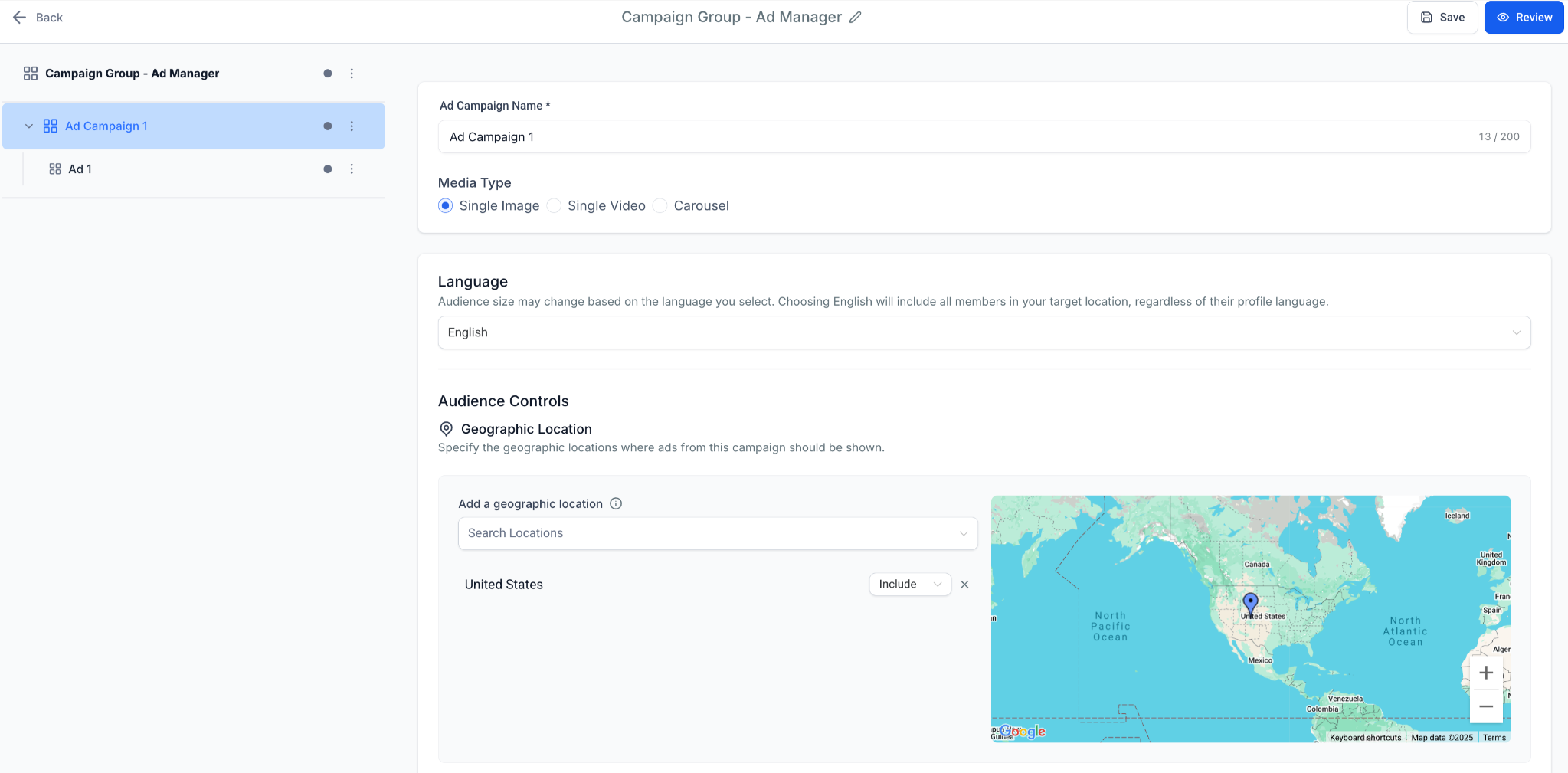
- Enter a geographic location in the location field and add it as a chip.
- Use the dropdown on each location chip to set it as Include or Exclude.
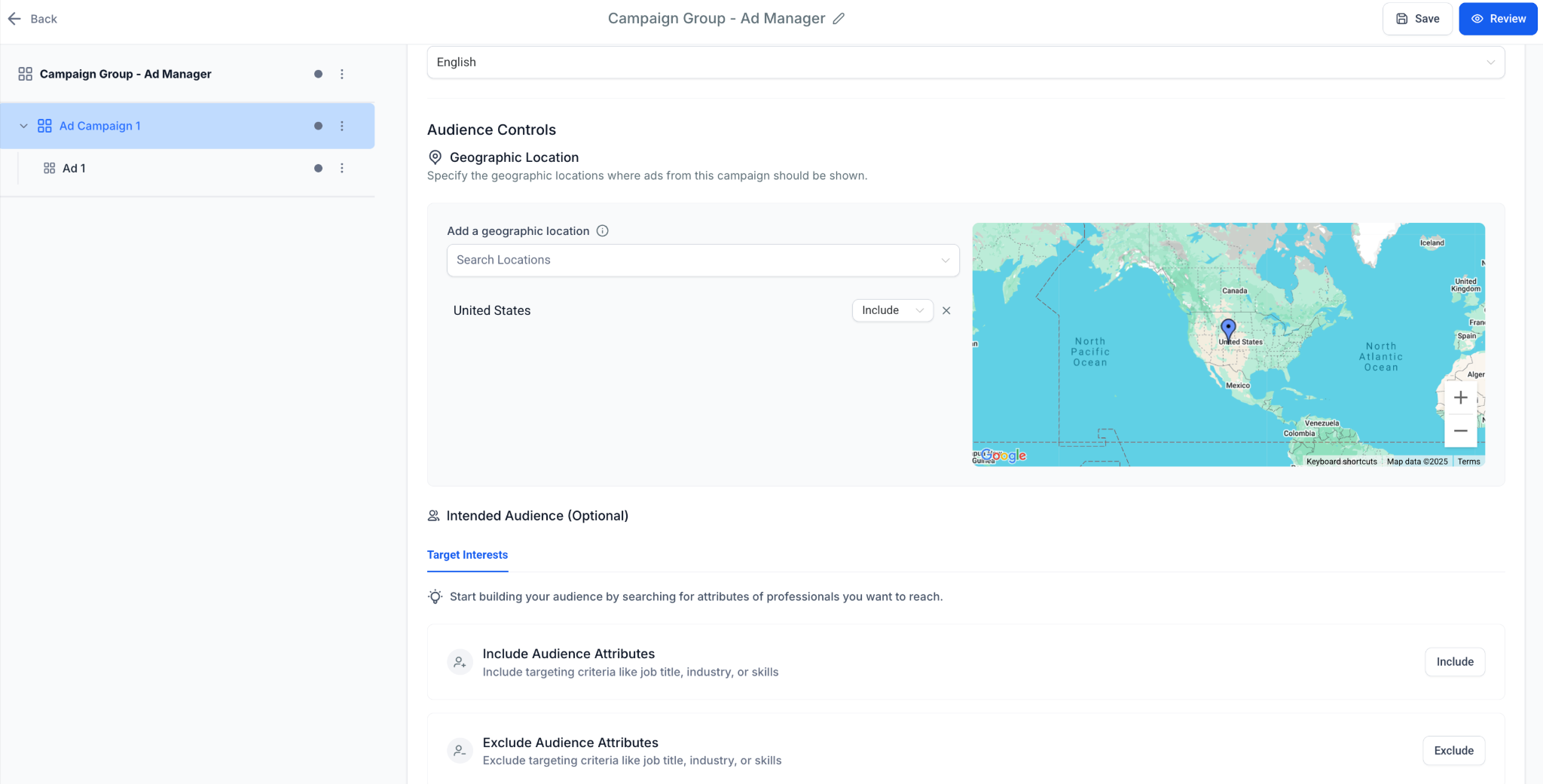
- Open the Intended Audiences section and choose professional attributes such as industry, job title, or education.
- Mark each chosen attribute as Include to target or Exclude to filter out those profiles.
- Create up to three attribute groups and place the selected attributes into the appropriate groups.
- Apply OR logic within each group and AND logic between groups according to the desired rule set.
- Review the constructed audience to ensure it meets the minimum size recommendation and that a location is set.
07What it looks like in HighLevel
08Settings that matter
- Geographic Targeting. Controls which countries, states, regions, or cities are included or excluded from the campaign.
- Include & Exclude. Determines whether selected attributes add people to the audience (Include) or remove them (Exclude).
- Attribute Groups and Logic. Defines up to three groups where attributes inside a group use OR logic and groups themselves combine with AND logic.
- Intended Audiences. Optional section for adding professional attributes such as company size, job function, education, and interests.
09Things to know before you rely on it
- You can create a maximum of three attribute groups for a single audience.
- Every LinkedIn campaign must contain at least one geographic location; otherwise the campaign will not run.
- The platform recommends an audience size of at least 50,000 people for optimal delivery.
- Overusing Exclude rules may shrink the audience pool excessively.
10How it connects to the rest of HighLevel
- How to set up LinkedIn ads in HighLevel Ad Manager LinkedIn ad setup guide
- How to build a LinkedIn lead form in HighLevel LinkedIn lead form guide
- How to view LinkedIn statistics in HighLevel Ad Manager LinkedIn stats overview
- HighLevel pricing and plans Pricing page
- Start a 30 day HighLevel trial Free trial sign up
Michael's take

Audience targeting feels like a small convenience that can become a real shift when you need to speak to a precise professional segment on LinkedIn. The ability to layer location with job titles, schools, and industry gives you control over who sees your ads.
A boutique B2B consulting firm that sells to senior leaders in healthcare can use a Group for “Director” OR “Vice President” and a second Group for “Healthcare” industry. The AND between groups lets you target people who match attributes in both groups. I’d start by setting the geographic area, then add the role and industry groups, and aim for an audience of at least 50,000 before launching.