
01Who this is for
- Marketing managers can quickly generate targeted lists, keeping campaigns aligned with brand goals.
- Small business owners gain a single place to upload customer data for retargeting without leaving the platform.
- Digital ad agencies benefit from consistent audience governance across multiple client accounts.
02Audience Segments for Google Ads, explained
Audience segments are collections of users built from uploaded customer lists, website behavior, interest criteria, or similarity to high performing audiences. They serve as the basis for remarketing, prospecting and audience expansion in Google Ads. HighLevel centralizes segment creation and selection, allowing you to stay inside the platform while configuring targeting.
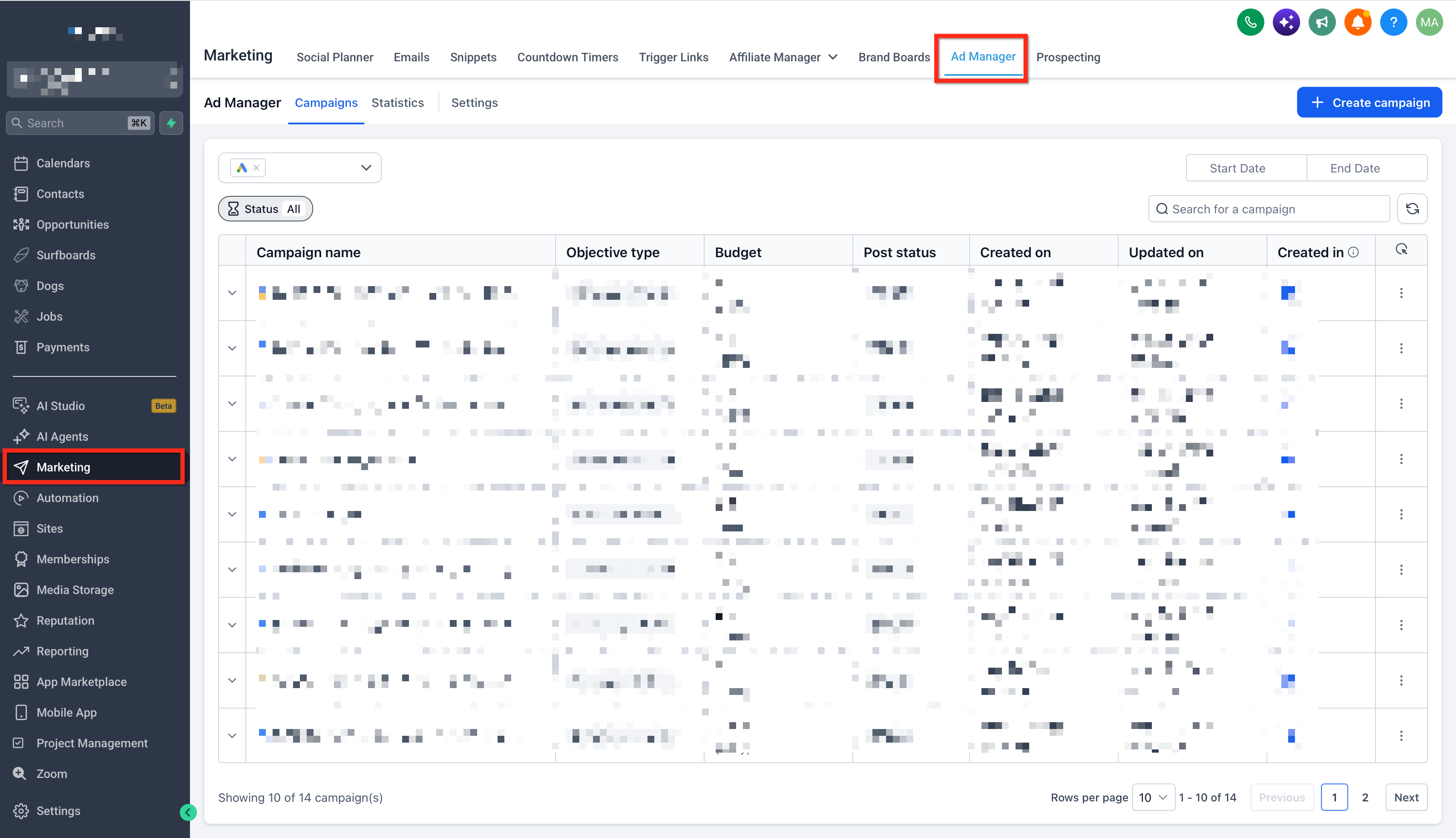
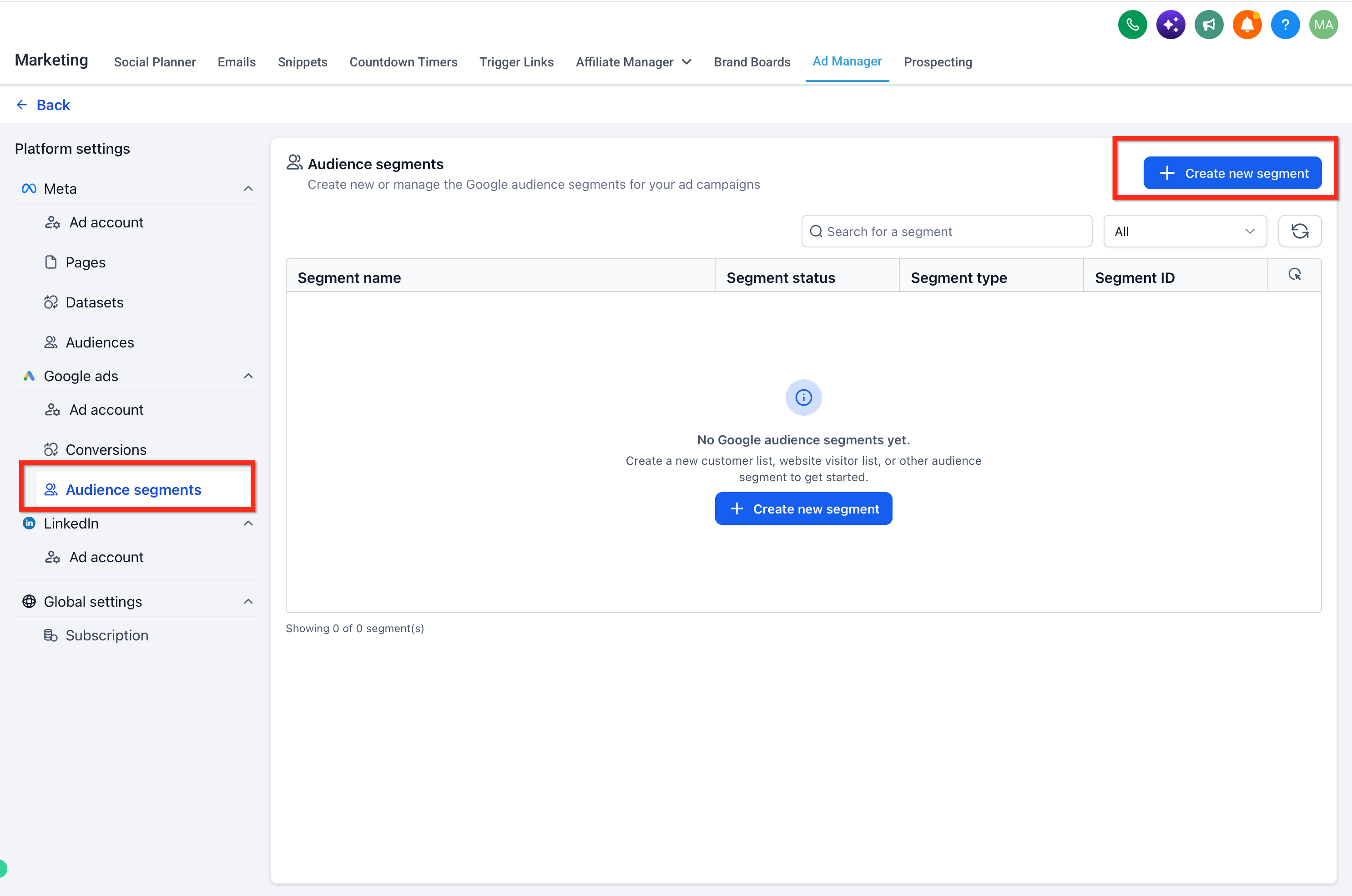
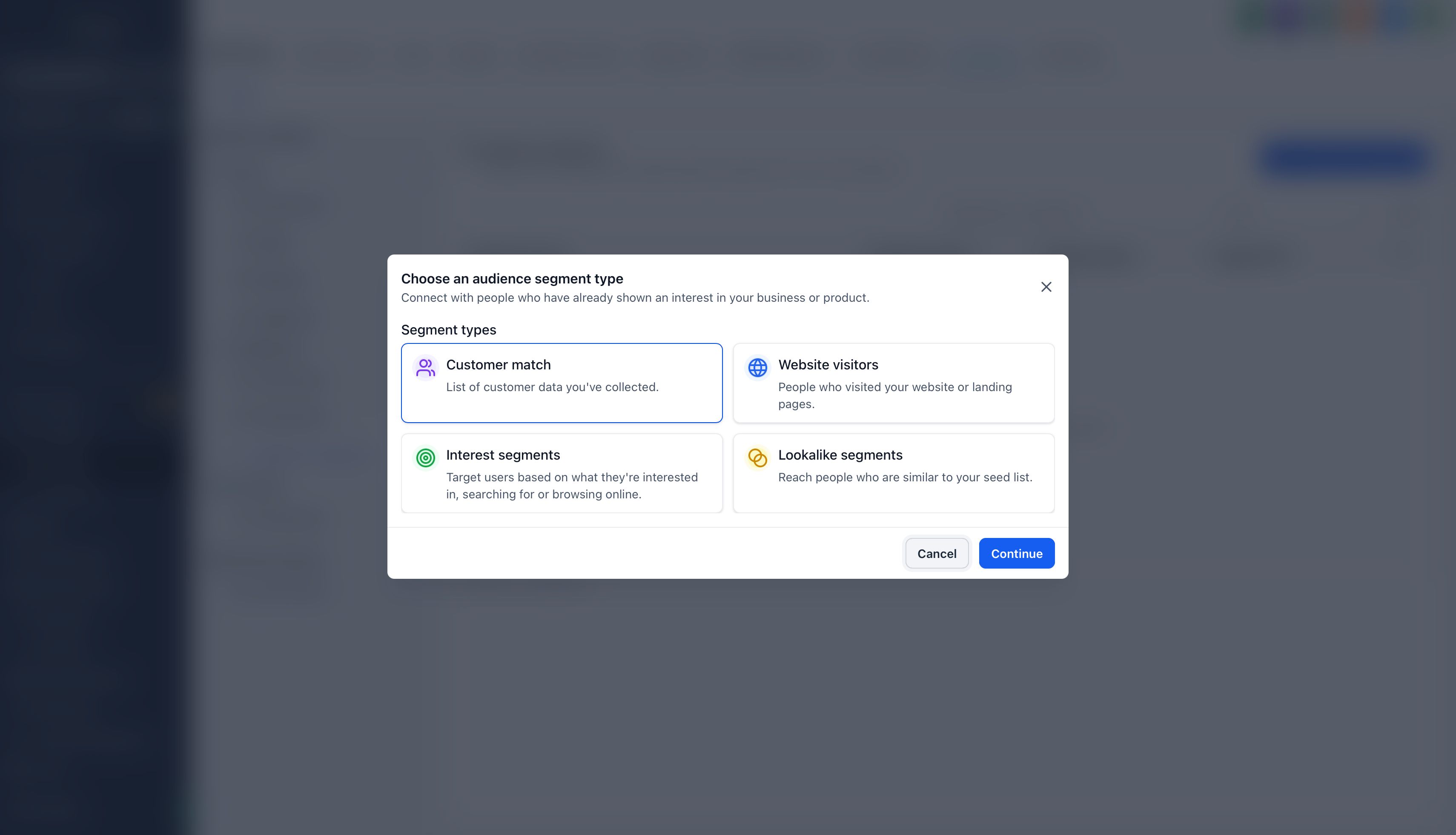
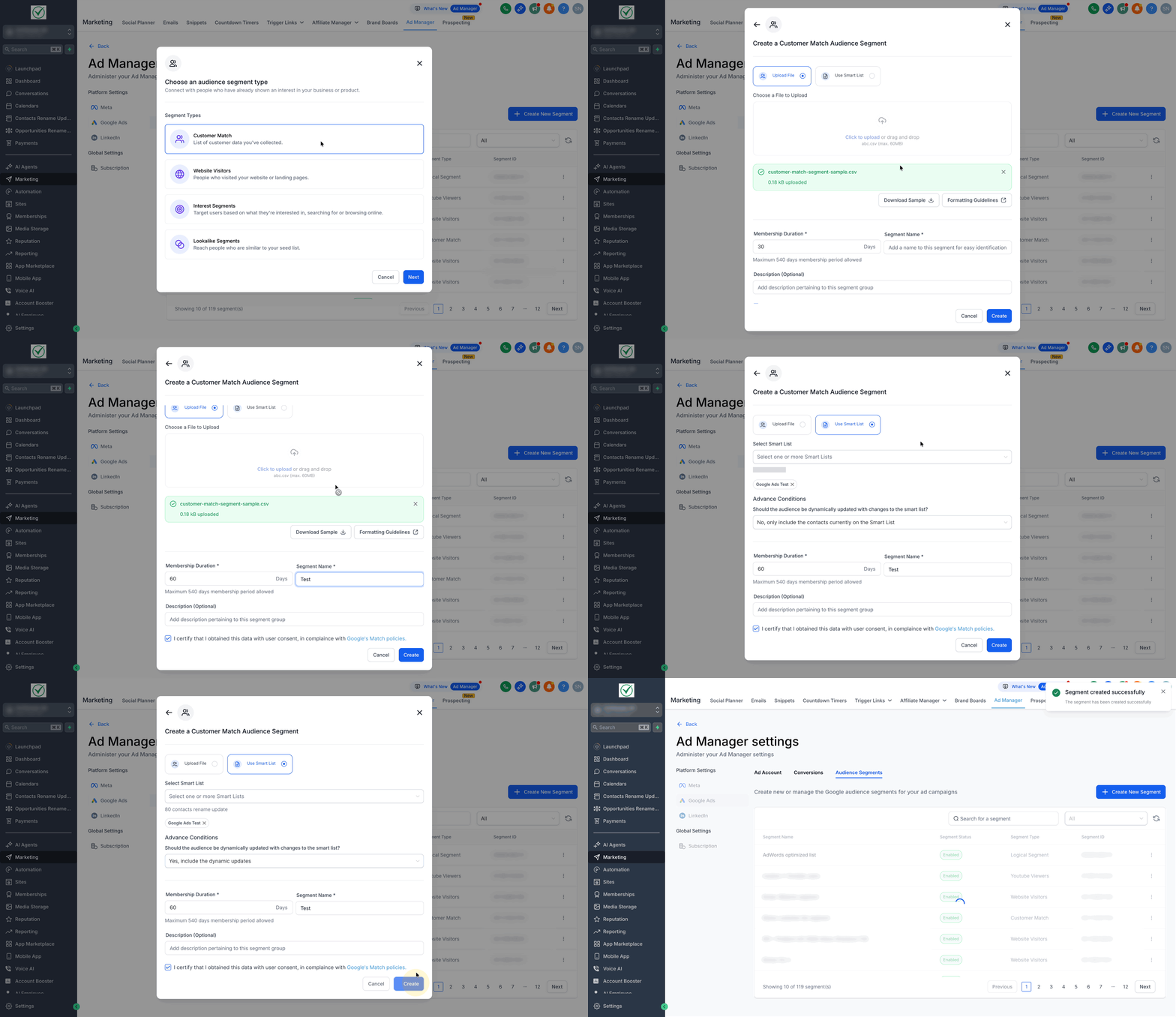
The feature lives under Marketing > Ad Manager > Settings > Google Ads > Audience Segments. You can create four segment types: Customer Match, Website Visitors, Interest and Lookalike. Customer Match and Website Visitor segments can be built inline while setting up a campaign; Interest and Lookalike segments are created first and then selected.
After a segment is saved, it syncs to Google and may take up to 48 hours before it appears in the campaign builder. Once available, you attach the segment through the audience controls of the chosen Google campaign type.
03How businesses use Audience Segments for Google Ads
- Ecommerce store. Upload a CSV of past purchasers as a Customer Match segment. When building a Google Shopping campaign, select the saved segment to retarget those buyers with follow up ads.
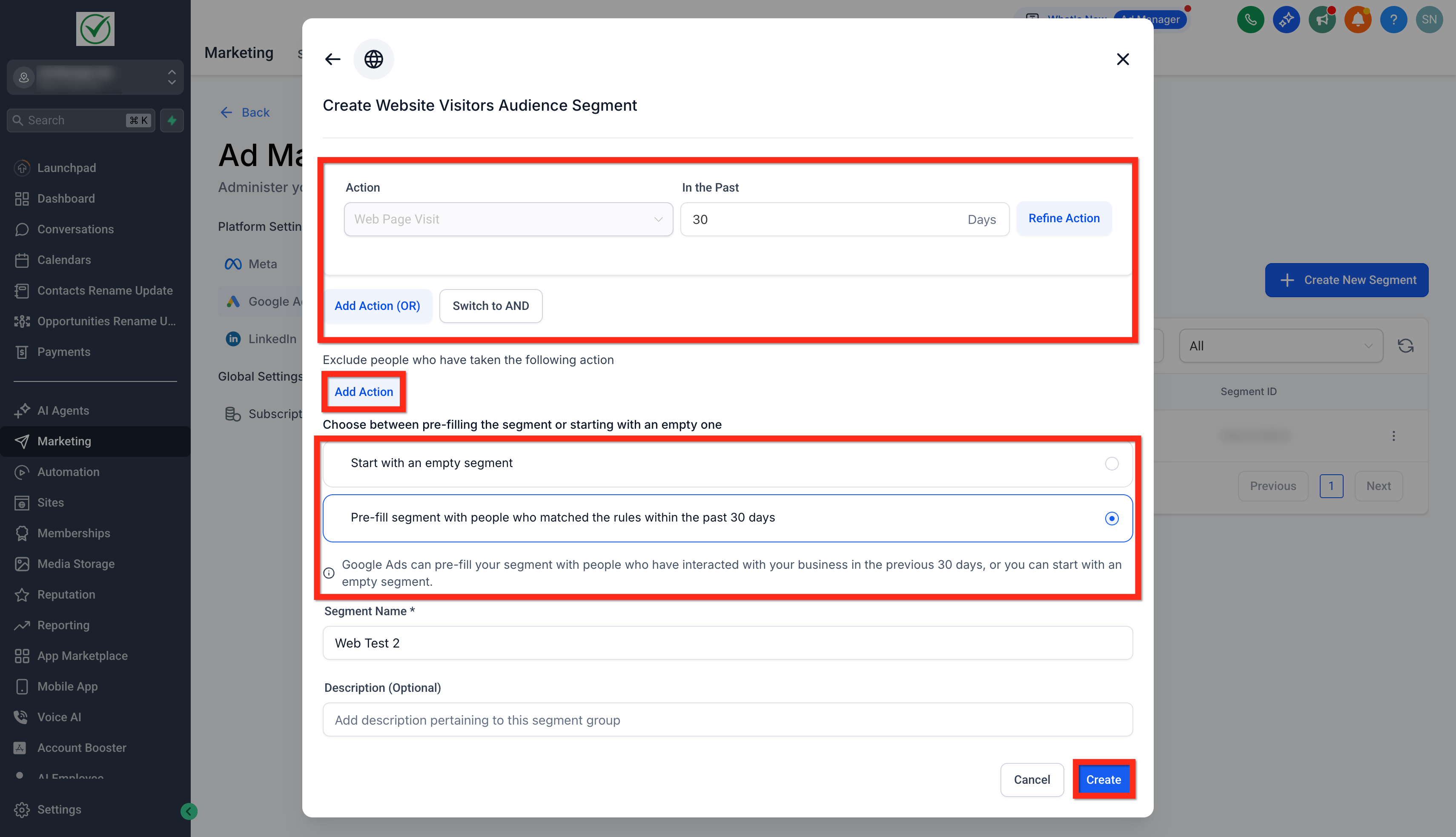
- SaaS startup. Define a Website Visitor segment that captures visitors to the pricing page in the last 30 days. Attach that segment to a Google Demand Gen campaign to reach users who have shown recent interest.
- Local fitness studio. Create an Interest segment by entering keywords like "home workout" and the bundle IDs of popular fitness apps. Add the segment to a Google Display campaign to attract new prospects.
04The numbers and rules that matter
- Membership Duration for Customer Match: Up to 540 days.
- Audience creation or syncing may take up to 48 hours.
- Minimum size thresholds apply for serving ads.
- Reach size options for Lookalike: Narrow (2.5%), Balanced (5%), Broad (10%).
- Seed lists for Lookalike: Up to 10.
05Before you start
- Connect a Google Ads account to HighLevel first.
- Work within a subaccount that has Ad Manager access.
06How to set up and use Audience Segments for Google Ads in HighLevel
Create an audience segment
- Open Marketing > Ad Manager from the subaccount.
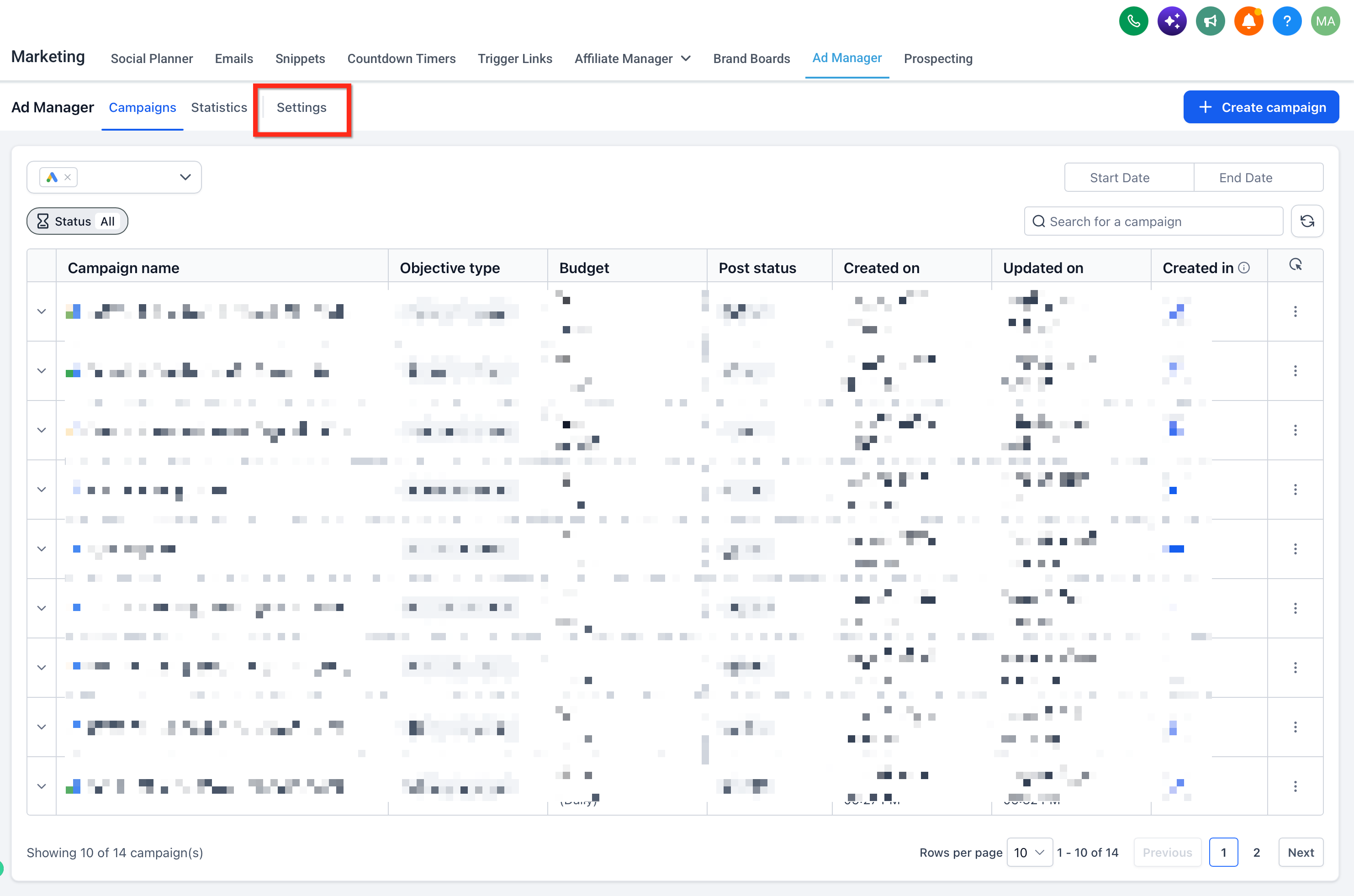
- Select the Settings button.
- Navigate to Google Ads > Audience Segments and click the + Create New Segment button.
- Pick the desired Segment Type, Customer Match, Website Visitors, Interest or Lookalike.
- Press Continue.
- Enter the required details for the chosen segment type.
- Click Create to save the segment.
Add an audience segment to a Google ad campaign
- Open Marketing > Ad Manager and click + Create Campaign.
- Choose Google as the platform and click Next.
- Select either a Scratch campaign or a Template.
- Find the audience controls that appear for the chosen Google campaign type.
- Open Audience Segments or Audience Signals where the option is shown.
- Select an eligible existing segment.
- If the builder allows, click + Create a New Audience Segment to create a supported segment.
07What it looks like in HighLevel
08Settings that matter
- Segment Type. Determines whether the audience is built from customer data, website behavior, interests or lookalike similarity.
- Membership Duration. Sets how many days a user remains in a Customer Match list, up to 540 days.
- Time window. Specifies the number of days back to consider when defining Website Visitor rules.
- Target countries. Limits a Lookalike segment to the selected geographic locations.
- Reach size. Chooses the audience breadth for Lookalike segments: Narrow (2.5 %), Balanced (5 %) or Broad (10 %).
09Things to know before you rely on it
- Lookalike and custom Interest Segments cannot be used in Search campaigns through this workflow.
- Audience creation or syncing may take up to 48 hours before the segment is selectable.
- Google enforces minimum audience size thresholds for serving ads.
- Customer data uploads must have user consent and follow Google’s Customer Match policy.
10If something goes wrong
- Newly created segment does not appear in the campaign builder. Confirm the segment was saved, verify the Google Ads connection is active for the subaccount, refresh the audience controls and check that the segment is eligible for the chosen campaign type.
11How it connects to the rest of HighLevel
- Connect your Google Ads account to Ad Manager Connect Google Ads
- Create a Google Search campaign inside Ad Manager Google Search campaign
- View performance statistics for your Google Ads campaigns Campaign statistics
Michael's take

Audience Segments for Google Ads are a solid addition for anyone building Google campaigns inside HighLevel.
Teams that rely solely on manual audience uploads or have no need for integrated targeting should skip it.