
01Who this is for
- Founders who need a smoother onboarding experience for new team members, because nudges give immediate help without leaving the platform.
- Agency owners managing multiple subaccounts, as nudges disappear for the whole subaccount once any user finishes the task, preventing repeated prompts.
- Small business operators who lack dedicated IT support, because the dynamic links supply self service resources at the moment they are needed.
02Contextual in app nudges, explained
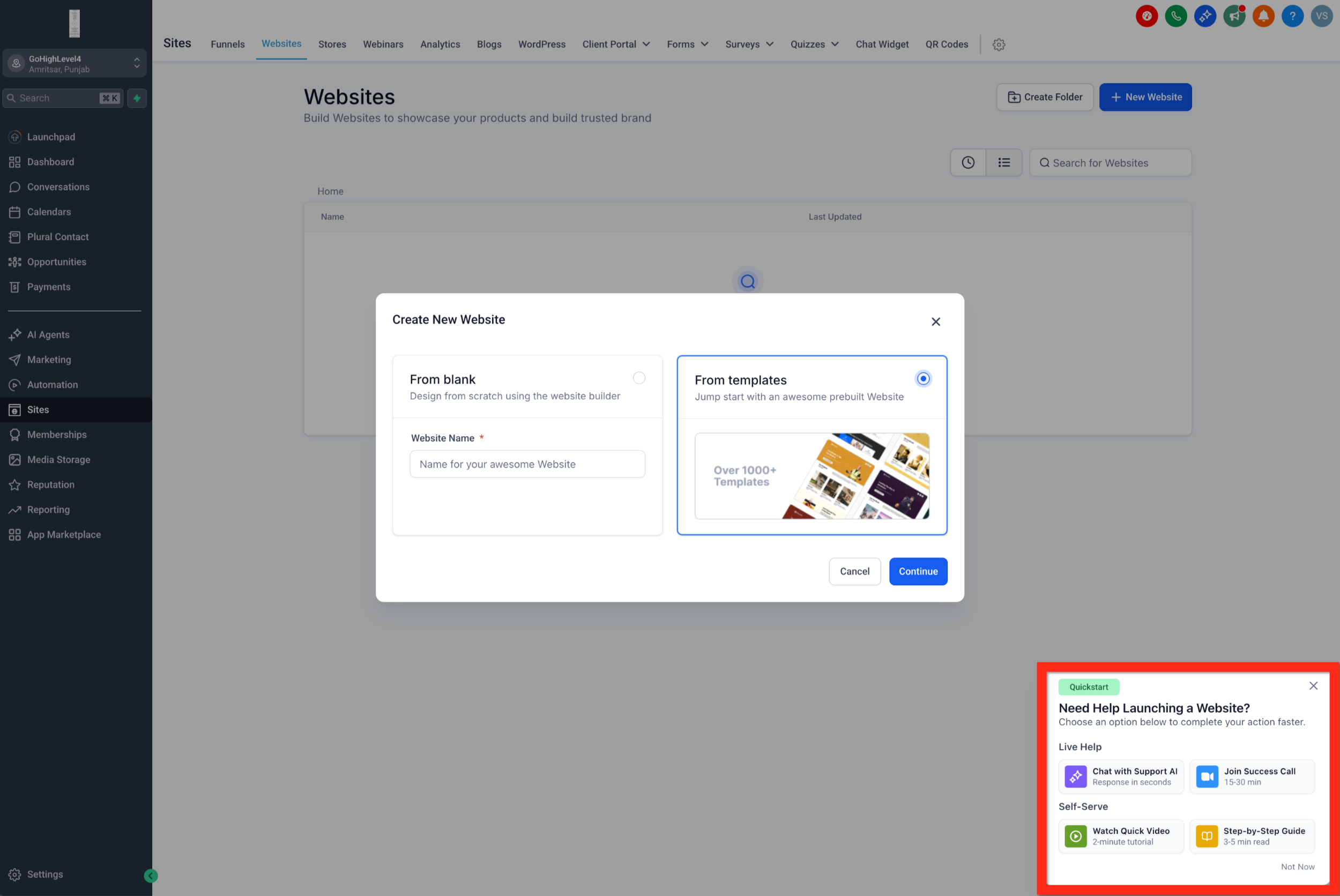
Contextual in app nudges are generated by the platform when it detects that a user has started an onboarding or LaunchPad action but has not completed it. The system monitors pauses, abandoned steps, or extended time on a task and then displays a small overlay with one or more support resources.
The overlay can contain a support article, a tutorial video, a link to schedule a kickoff or implementation call, or a chat with Support AI. Clicking any link opens the chosen resource directly, keeping the user within the workflow.
These nudges live inside the LaunchPad area of HighLevel. They are automatically rolled out for every plan and are suppressed for all users in a subaccount once any member completes the associated action, ensuring relevance and minimizing distraction.
03How businesses use contextual in app nudges
- Digital marketing agency. An agency team member begins a new client onboarding flow in LaunchPad. When the team member pauses, a nudge appears offering a tutorial video on setting up a funnel. The member clicks the video link and follows the step by step guide without leaving the platform.
- SaaS startup. A Founder launches the product demo setup in LaunchPad. After lingering on a configuration screen, a nudge shows a support article about integrating the API. The Founder opens the article directly from the nudge and completes the integration.
- Fitness studio. The studio owner starts the calendar setup in LaunchPad. While configuring hours, a nudge appears with a link to schedule an implementation call. The owner clicks the link, books a call, and receives personalized assistance.
04Before you start
- LaunchPad must be available for the current plan, subaccount, and user role.
- The user must be logged in to HighLevel and be in the LaunchPad section.
05How to set up and use contextual in app nudges in HighLevel
Observe a contextual nudge
- Log in to HighLevel and open the LaunchPad section.
- Start an onboarding activity such as a guided tour or a setup flow.
- Pause, abandon, or spend extra time on the activity.
- Watch for a contextual nudge that appears with dynamic resource links.
- Click any displayed link, support article, tutorial video, call scheduler, or AI chat, to access help.
06What it looks like in HighLevel
07Settings that matter
- Automatic Nudge Suppression. Controls whether nudges for a completed action are hidden for all users in the same subaccount.
- Dynamic Contextual Link Options. Determines which types of help links (article, video, call, AI chat) can be shown within a nudge.
08Things to know before you rely on it
- Nudges are only shown when LaunchPad is enabled for the account.
- If another user in the same subaccount finishes the related task, the nudge is suppressed for everyone.
- A nudge may display one or more resource links, but not necessarily all four types each time.
09If something goes wrong
- No nudge appears during onboarding. Confirm that LaunchPad is available for your plan, subaccount, and role, and ensure the onboarding step has not already been completed or suppressed by another user.
- Nudge disappears before the task is finished. Check whether another user in the subaccount completed the same action, which automatically suppresses the nudge for all members.
10How it connects to the rest of HighLevel
- Start a HighLevel funnel to begin onboarding tasks Launch a funnel
- Read a support article directly from a nudge Support article
- View HighLevel pricing to verify LaunchPad eligibility Pricing
Michael's take

Contextual in app nudges can feel noisy if you expect an onboarding experience without any prompts. The system only surfaces them when it thinks you’re stuck, and they disappear once the task is done, so they won’t linger forever.
When they do appear, they drop the exact help you need. An article, a video, a call link, or AI chat. Right where you are.