
01Who this is for
- Marketing agencies that send client newsletters benefit because the sender field shows their own brand, not an email service name.
- SaaS companies running automated onboarding emails gain consistent branding and higher trust when the company name appears as sender.
- Ecommerce retailers sending order confirmations improve perceived legitimacy by showing their store name in the sender field.
02Reverse DNS white labeling, explained
Reverse DNS translates an IP address back to a hostname. When a mailbox provider looks up the IP used to send your email, the returned hostname determines what appears in the technical sender details. Setting up a PTR record therefore lets your company name show instead of a third party service.
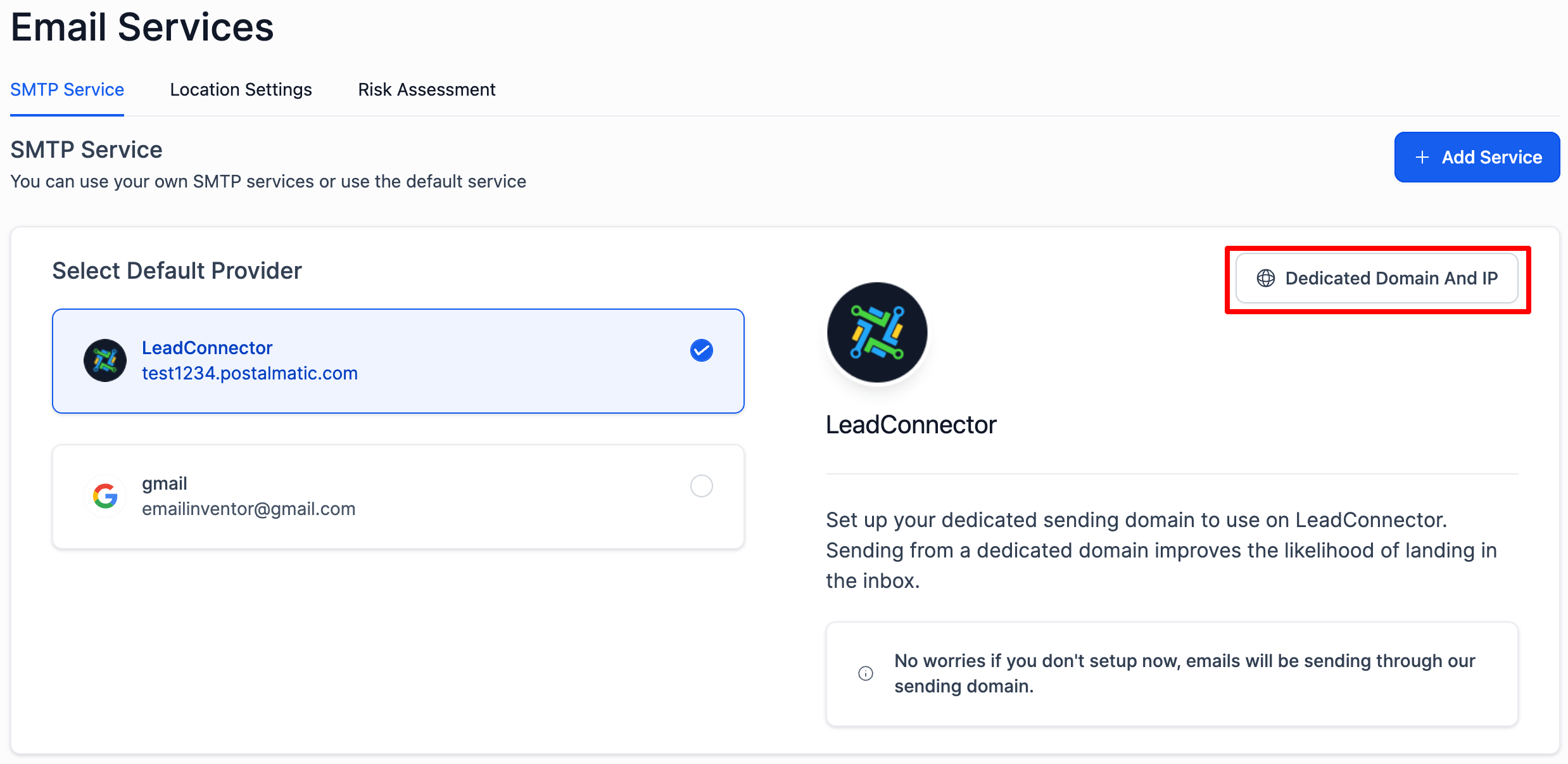
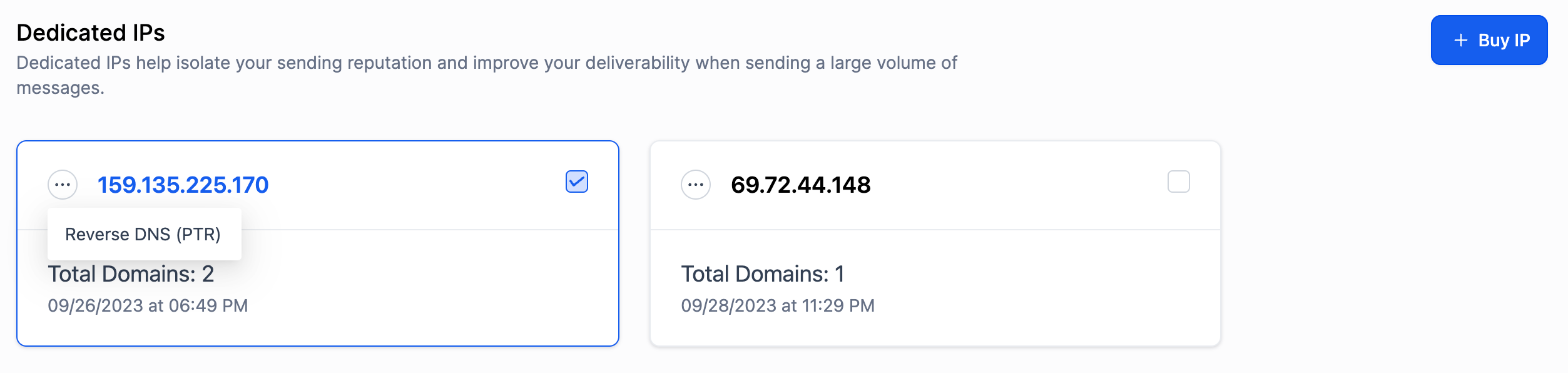
In HighLevel the rDNS feature is available only for dedicated IPs. You access it through Agency Settings > Email Service, then open the Dedicated Domain And IP panel in the SMTP Service tab. From the list of dedicated IPs you choose the three dot menu and select Reverse DNS (PTR) to enter your hostname.
The result is consistent branding across all campaigns. Recipients see your own domain or subdomain as the sender, which can increase trust and improve inbox placement.
03How businesses use reverse DNS white labeling
- Digital marketing agency. The agency creates an A record for a subdomain like mail.agency.com pointing to its dedicated IP. Then it follows the HighLevel steps to add that hostname as the PTR record, ensuring client newsletters show the agency’s name as sender.
- SaaS startup. The startup adds an A record for mail.appdomain.com that resolves to its dedicated IP. Inside HighLevel it navigates to the Reverse DNS (PTR) setting and enters mail.appdomain.com, so onboarding emails display the app’s brand.
- Online retailer. The retailer sets up an A record for mail.shopdomain.com targeting its dedicated IP. Using the Dedicated Domain And IP screen in HighLevel, it configures the PTR with that hostname so order confirmations carry the store’s name.
04The numbers and rules that matter
- Shared IPs do not support rDNS because they resolve to only one hostname per IP address.
- Propagation of PTR updates can take from a few minutes up to 48 hours depending on TTL.
05Before you start
- A dedicated IP must be assigned to your account in HighLevel.
- Access to your DNS hosting provider to create an A record that points a hostname to the dedicated IP.
06How to set up and use reverse DNS white labeling in HighLevel
Configure reverse DNS (PTR) for a dedicated IP
- Add an A record at your DNS hosting provider that points the chosen hostname to your dedicated IP address.
- Open Agency Settings and select Email Service.
- In the SMTP Service tab click Dedicated Domain And IP in the LeadConnector section.
- Click the three dot menu next to your dedicated IP and choose Reverse DNS (PTR).
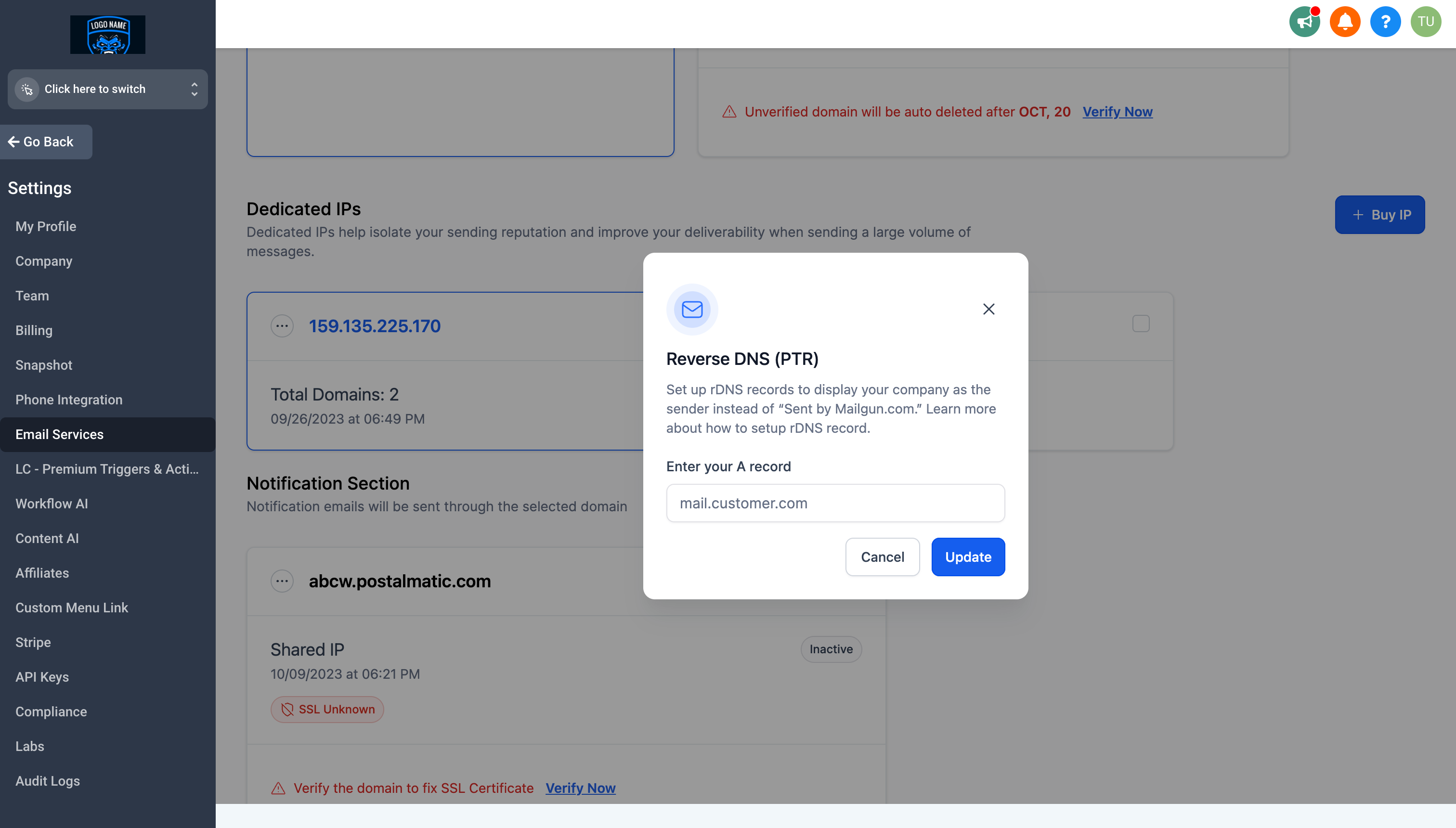
- Enter the hostname you used in the A record and save the PTR configuration.
07What it looks like in HighLevel
08Settings that matter
- Reverse DNS (PTR). Specifies the hostname that the dedicated IP will resolve to when mailbox providers perform a reverse DNS lookup.
- Dedicated Domain And IP. Opens the panel where you manage the domain and IP pair, including access to the reverse DNS (PTR) option.
09Things to know before you rely on it
- rDNS can only be set on a dedicated IP; shared IPs do not support it.
- The PTR record must return a valid hostname, and that hostname’s A record must resolve back to the same IP.
- If the hostname does not resolve, mailbox providers may flag the email as suspicious.
10If something goes wrong
- Incorrect or missing PTR record. Create a correct PTR record that points the dedicated IP to a valid hostname.
- Mismatched hostname (forward confirmed rDNS failure). Ensure the hostname returned by the PTR resolves back to the same dedicated IP.
- Hostname does not resolve. Verify the A record for the hostname exists and correctly points to the dedicated IP before submitting the PTR.
11How it connects to the rest of HighLevel
- Email warm up and DMARC guide for reliable delivery Warm up & DMARC
- HighLevel LC Email: built in sending, limits and upgrades LC Email overview
- HighLevel pricing and plans Pricing
Michael's take

Reverse DNS white labeling feels like a small convenience that can quickly shift how your emails are perceived. By moving the sender name from a generic service to your own brand, you get a cleaner inbox presence without changing your workflow.
A boutique agency that sends client newsletters will see the benefit. The agency can point a subdomain like mail.myagency.com to its dedicated IP, set the PTR record, and let every client email carry the agency’s name instead of the service provider’s tag.