
01Who this is for
- Ecommerce store owners who need rates from carriers not listed in HighLevel, because the integration expands shipping options.
- Subscription box businesses that ship regularly and want automated label creation and tracking updates inside HighLevel.
- Wholesale distributors requiring real time freight pricing and automatic order fulfillment without manual entry.
02Custom shipping carrier integrations, explained
The integration works as a marketplace app that registers a new shipping carrier inside HighLevel. During checkout HighLevel calls a callback URL you provide, receives live rates from your carrier’s API, and shows them to the buyer. After an order is placed, HighLevel sends webhooks that your backend uses to create shipments with the carrier and store the carrier’s order ID.
All configuration lives in the HighLevel app settings and a custom page where users enter their carrier credentials. The backend stores OAuth tokens, carrier keys, and maps HighLevel order IDs to carrier shipment IDs. Fulfillment records with tracking numbers are created in HighLevel via its API, keeping customers informed within the platform.
03How businesses use custom shipping carrier integrations
- Online apparel retailer. The retailer installs the custom carrier app, adds their regional carrier API keys on a custom page, and enables live rates. When a shopper checks out, HighLevel fetches current shipping costs from the carrier and displays them right away.
- Handmade crafts shop. The shop owner saves their preferred carrier credentials through the embedded custom page. As orders complete, the backend creates shipments with the carrier automatically and records tracking numbers in HighLevel.
- Furniture store. The store receives carrier webhook notifications for tracking updates, matches them to the corresponding HighLevel order, and triggers a fulfillment record so customers receive shipping notifications.
04The numbers and rules that matter
- Create shipping rate placeholder amount: 0.
05Before you start
- A backend service that can handle OAuth redirects, HighLevel webhooks and carrier webhooks.
- A database to store OAuth tokens, carrier credentials and order mappings securely.
- Basic knowledge of REST APIs and OAuth 2.0 authorization flow.
06How to set up and use custom shipping carrier integrations in HighLevel
Initial setup
- Open the HighLevel Marketplace developer portal and start a new app.
- Select Subaccount as the app type.
- Enter the OAuth redirect URI that points to your backend endpoint.
- Provide the webhook URL that will receive HighLevel events.
- Enable OrderCreate and OrderStatusUpdate webhook types.
- Add the required scopes: orders.readonly, orders.write, shipping.readonly, shipping.write.
Frontend UI configuration
- Create a custom page that collects the carrier API key, secret and account ID.
- Add the page to HighLevel via a custom menu link and retrieve the location context token.
- Send the entered credentials to your backend, validate them with the carrier, and store them linked to the locationId.
Live shipping rates implementation
- Call the HighLevel API to create a shipping carrier record, supplying the carrier name and callbackUrl.
- Confirm that the callbackUrl points to an endpoint that can accept POST requests at the /rates path, because HighLevel will append /rates.
- Save the returned shippingCarrierId for later use.
- Deploy an endpoint at the callbackUrl that accepts POST requests for live rate calculations.
- Translate the incoming rate request to the carrier’s API format, request rates, and return them in HighLevel’s response structure.
- Add a carrier rate to each relevant shipping zone via the HighLevel API, marking it as a carrier rate with a placeholder amount of zero.
Order syncing and fulfillment
- Enable OrderCreate and OrderStatusUpdate webhooks in the app configuration, pointing to your HighLevel webhook listener.
- When a webhook arrives, verify the payload signature (important for security) and confirm the order status is completed.
- Retrieve the full order details from the HighLevel API.
- Use the stored carrier credentials to create a shipment with the carrier API and record the carrier shipment ID.
- Validate carrier webhook authenticity when notifications arrive, match them to the HighLevel order using the stored mapping, and extract tracking information.
- Send a fulfillment request to HighLevel that includes the tracking number, carrier name and notification preference.
Disconnection and uninstallation
- Listen for the App Uninstalled webhook from HighLevel.
- When received, look up the shippingCarrierId associated with the location.
- Delete the shipping carrier record via the HighLevel DELETE /shipping carrier endpoint.
- Remove stored carrier credentials and any registered carrier webhooks from your system.
07What it looks like in HighLevel
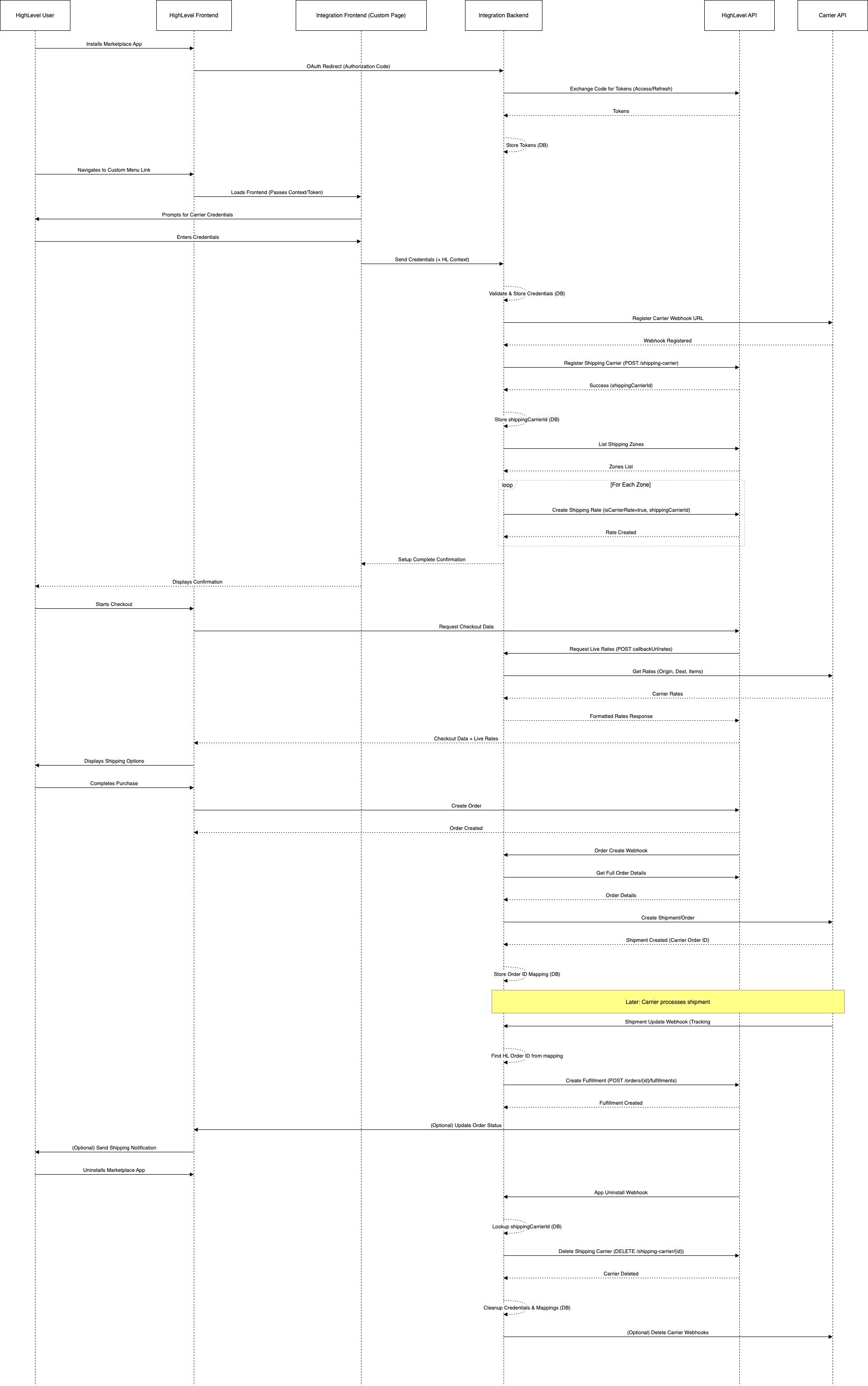
08Settings that matter
- App Type. Determines whether the app can be installed on individual location accounts; set to Subaccount.
- Redirect URI. The URL where HighLevel sends the OAuth callback after a user authorizes the app.
- Webhook URL. The endpoint that receives HighLevel event webhooks such as OrderCreate and OrderStatusUpdate.
- Required Scopes. Permissions the app needs to read and write orders and shipping data; includes orders.readonly, orders.write, shipping.readonly, shipping.write.
- isCarrierRate. Flags a shipping zone rate as a live carrier rate, causing HighLevel to request rates from the callback URL.
09Things to know before you rely on it
- The callbackUrl must point to an endpoint that can accept POST requests at the /rates path.
- Carrier rates added to zones use a placeholder amount of zero because the actual cost is fetched live.
- All credential data must be stored securely; the integration does not handle encryption automatically.
- The integration requires custom backend development; no built in HighLevel UI replaces these steps.
10How it connects to the rest of HighLevel
- Configure shipping zones and ZIP limits for your store Shipping zones setup
- Set up live shipping and delivery rates in HighLevel ecommerce stores Live rates guide
- Review HighLevel pricing and plan options Pricing plans
Michael's take

I find that building a custom carrier integration extends HighLevel's ecommerce capabilities, but it adds complexity around OAuth authentication, webhook handling, and secure data storage.