
01Who this is for
- Coaches who run community groups and need to stay connected with members while traveling.
- Course creators who want students to access lessons and materials from any device.
- Agency staff who manage client portals and require mobile access for quick updates.
02Kollab mobile apps, explained
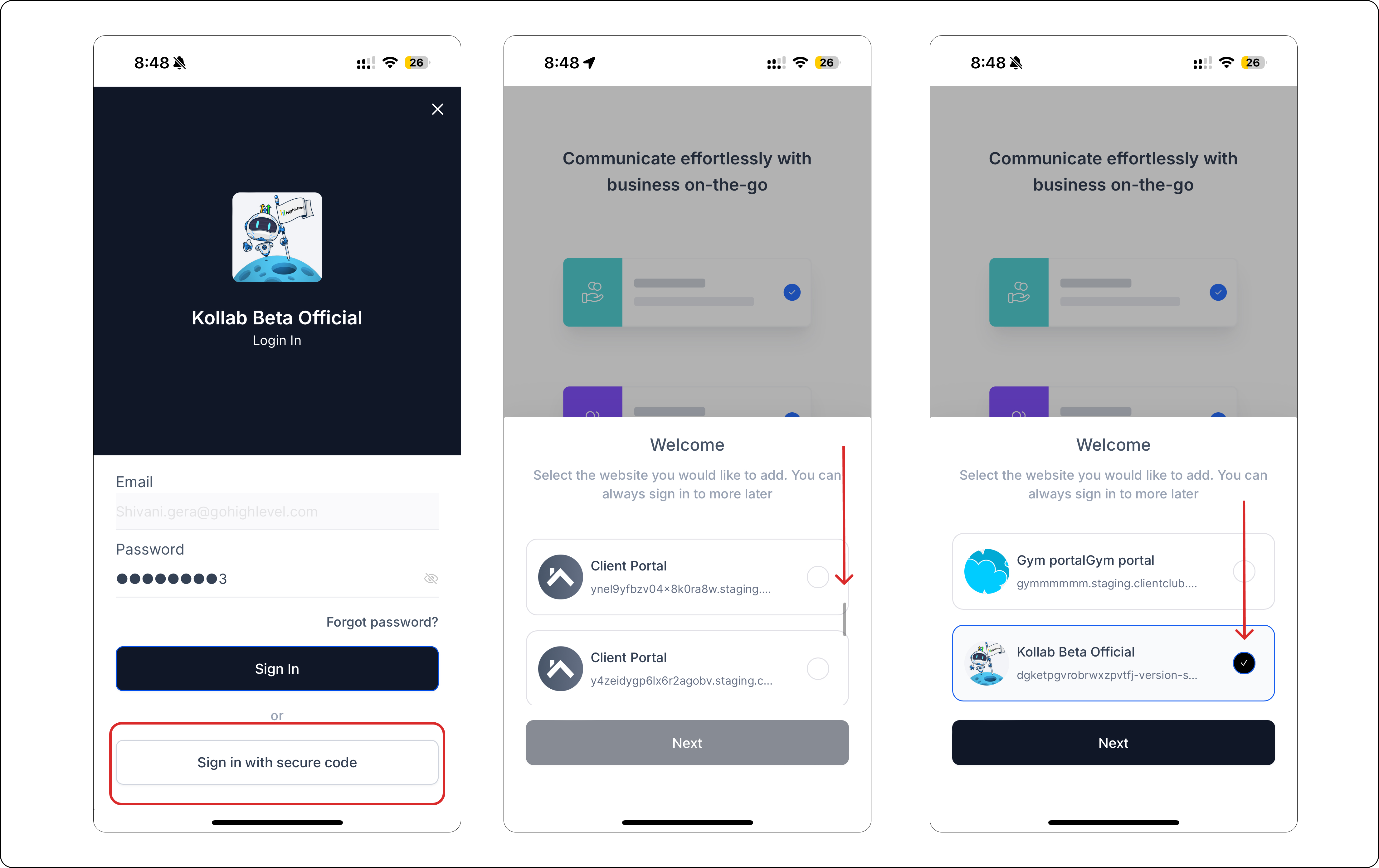
Kollab is a mobile application for iPhone and Android that provides access to HighLevel community groups, courses, and client portals. Users download the app from the App Store or Google Play, then sign in with the same email and password they use on the web. If the password is forgotten, an OTP option appears. When a user belongs to multiple HighLevel domains, the app presents a list so they can pick the correct one before completing sign in.
03How businesses use Kollab mobile apps
- Fitness trainer offering class groups. The trainer downloads Kollab on their phone, signs in with the same credentials used for the HighLevel community, and accesses the class group roster while traveling.
- Online education platform delivering courses. Instructors install Kollab, log in with their course creator account, and open the course dashboard on the app to review lesson materials and respond to student questions.
- Marketing agency managing client portals. Agency staff install Kollab, sign in using the client portal credentials, and navigate to each client’s portal within the app to check project updates and communications.
04Before you start
- Be signed up with a Community group, Course, or Client Portal within HighLevel.
05How to set up and use Kollab mobile apps in HighLevel
Sign in to the app
- Confirm you are enrolled in a Community group, Course, or Client Portal.
- Enter the same email address and password you use for HighLevel.
- If you cannot recall your password, select the option to sign in with an OTP.
- If you belong to several domains, scroll the list, pick the appropriate domain, and confirm the selection.
06What it looks like in HighLevel
07How it connects to the rest of HighLevel
- HighLevel client portal: step by step setup guide Client portal setup
- How customers access the HighLevel client portal Customer access
- HighLevel client portal dashboard: manage invites and magic links Dashboard overview
Michael's take

Michael ReimerFounder of CRM Pros, HighLevel Commander and Certified Admin
Kollab’s mobile apps let users access their courses and groups while on the go.
Don’t forget to test the domain selector if you belong to more than one account. It’s easy to end up in the wrong space.
Get More InformationOpens on HighLevelPublished November 2, 2026 · Updated November 16, 2026