
01Who this is for
- Founders who need to launch new team members quickly, because they can copy an existing calendar’s settings.
- Small business owners running multiple service locations, as duplication ensures each location starts with identical availability and notifications.
- Coaches managing class schedules, because they can clone a class calendar for each new class without reentering details.
02Duplicate calendars, explained
Duplicating a calendar produces a brand new calendar that contains the same configuration as the source calendar. All meeting details, availability rules, form and payment setups, notification preferences and visual customizations are carried over.
The new calendar receives its own name, ID and URL. The name is prefixed with "Copy of" and can be edited immediately. The system generates a unique calendar ID and adds random characters to the booking link.
This feature is found under Calendars in the subaccount dashboard. From there, open Calendar Settings, locate the desired calendar and choose the Duplicate option.
03How businesses use duplicate calendars
- Dental practice. A dental office can duplicate an existing dentist’s calendar to create a matching schedule for a new clinician. The cloned calendar includes the same appointment lengths, buffer times and reminder emails, so the practice maintains a uniform patient experience.
- Fitness studio. When adding a new class type, the studio duplicates a current class calendar. All availability slots, class duration and registration forms are replicated, allowing the new class to launch without rebuilding its schedule from scratch.
- Consulting agency. Each consultant can receive a copy of a master consulting calendar. The duplicate preserves the same meeting colors, consent checkbox and payment settings, ensuring consistent booking terms across all consultants.
04The numbers and rules that matter
- Availability copied: Weekly Available Hours; Look Busy Settings; Recurring Meeting Options; Slot Interval; Meeting Duration; Minimum Scheduling Notice; Date Range Restrictions; Maximum Bookings Per Day; Maximum Bookings Per Slot; PreBuffer Time; PostBuffer Time.
05How to set up and use duplicate calendars in HighLevel
Duplicate a calendar
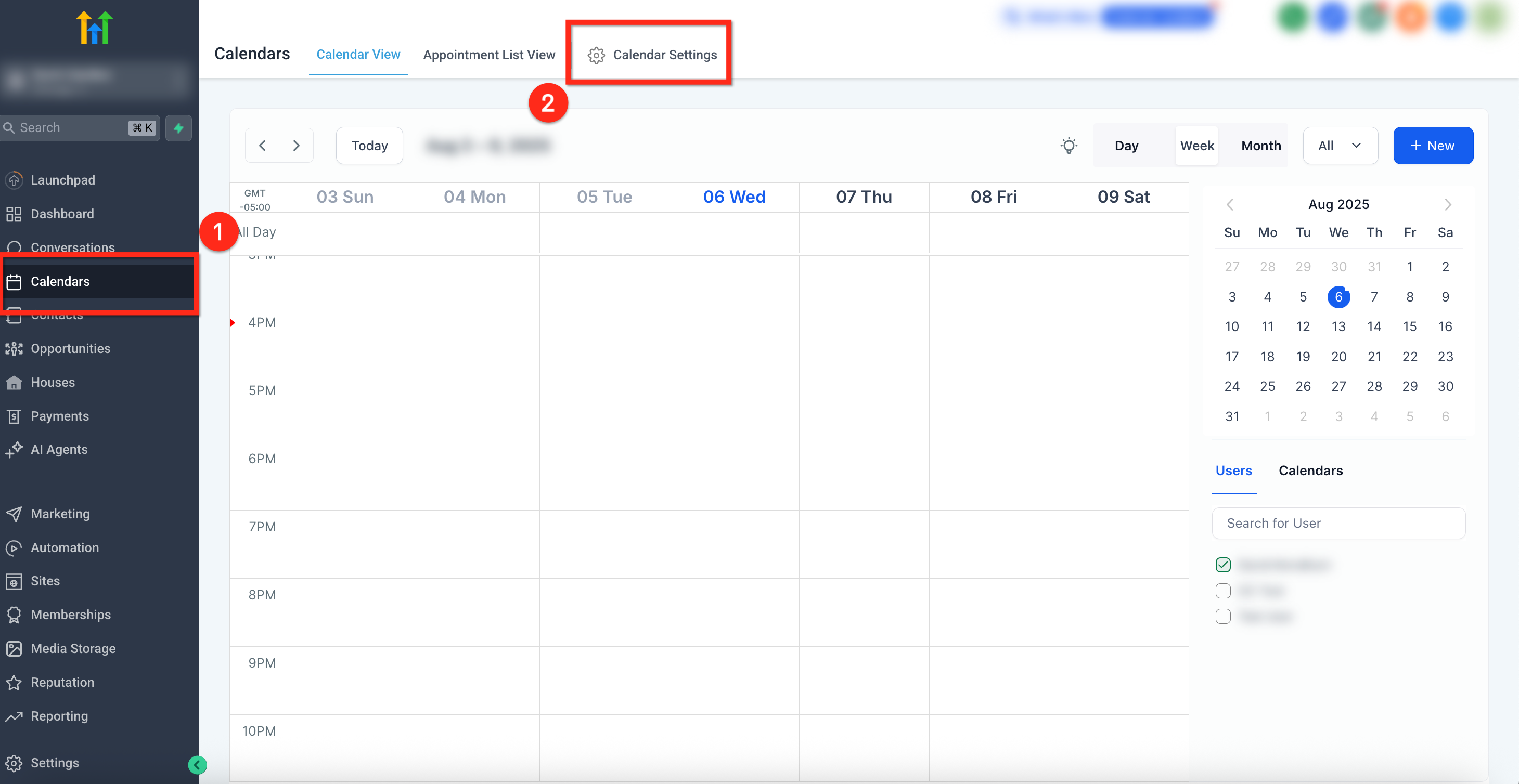
- From the subaccount dashboard, click Calendars in the left navigation.
- In the top ribbon, select Calendar Settings.
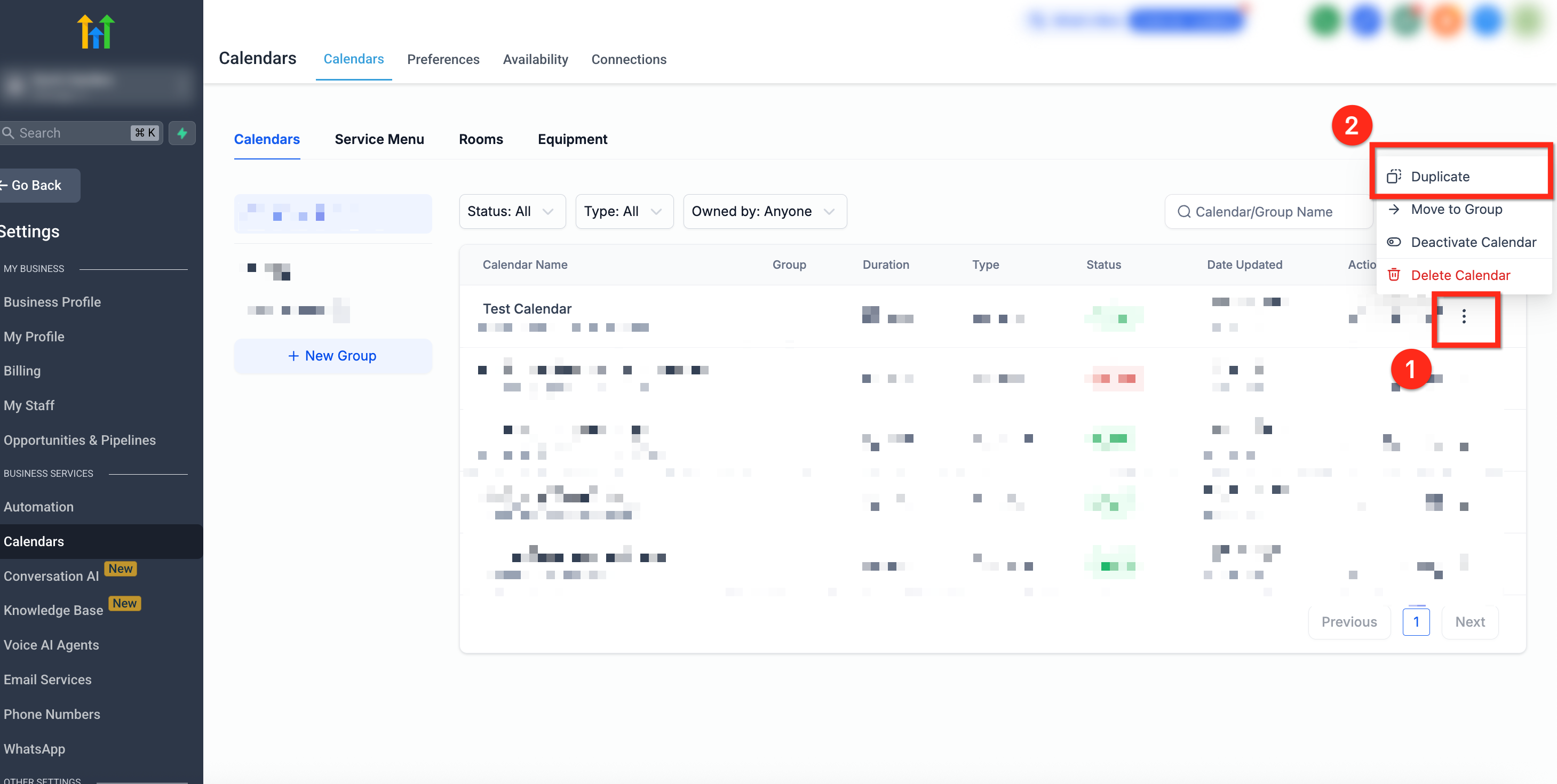
- Click the three dot icon beside the calendar you want to copy.
- Choose Duplicate from the menu that appears.
- Confirm the duplication in the popup dialog.
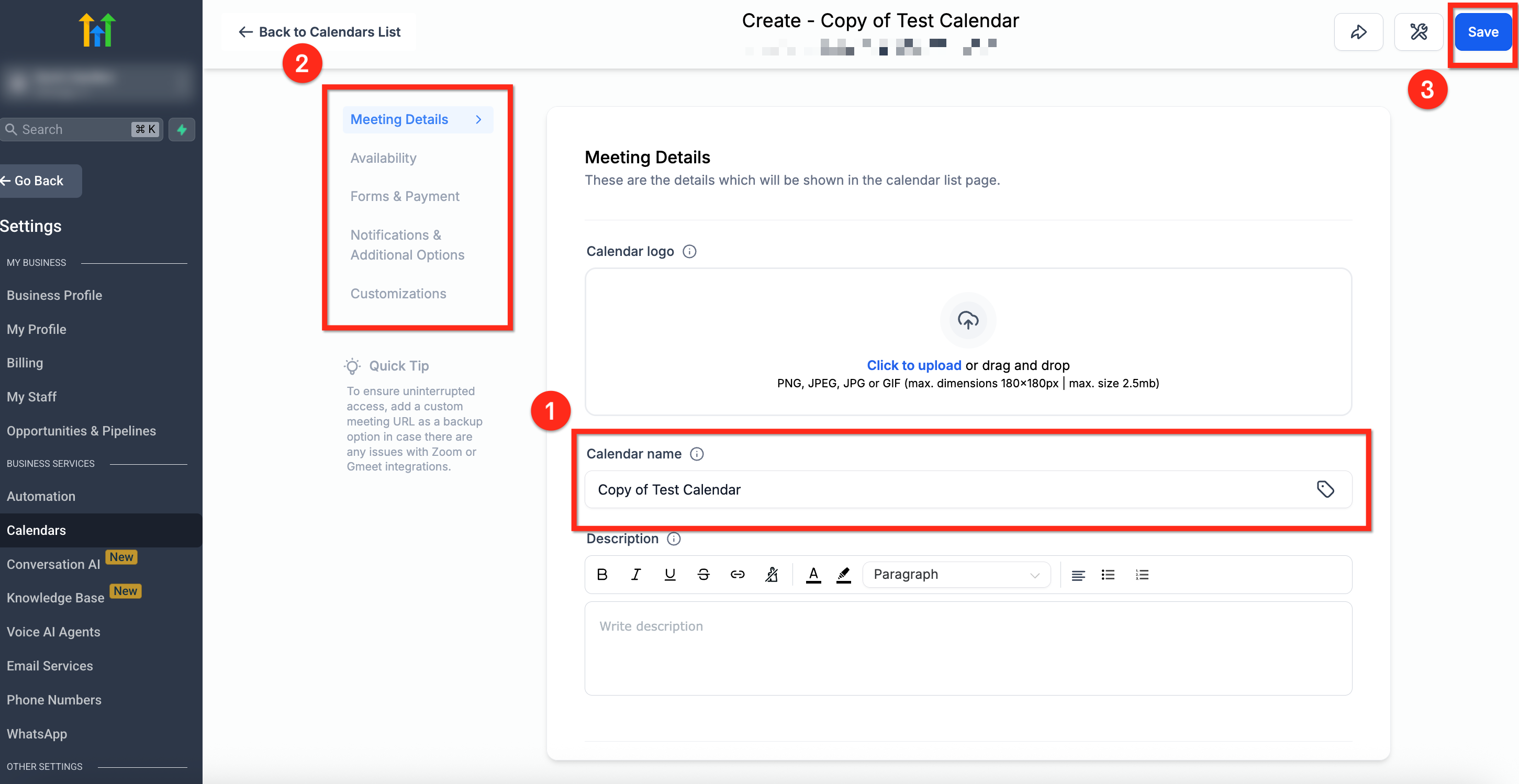
- Review the automatically created name "Copy of [Original Name]" and edit it if needed.
- Verify the duplicated settings such as availability windows, buffer times and notification templates.
- Click the blue Save button in the upper right corner.
06What it looks like in HighLevel
07Settings that matter
- Meeting Details. Controls the calendar logo, name, description, group, invite title, assigned team member, meeting location and calendar color.
- Availability. Defines weekly available hours, busy look settings, recurring options, slot interval, meeting duration, minimum notice, date range limits, booking caps and buffer times.
- Forms & Payments. Specifies the intake form, widget order, sticky fields, consent checkbox, guest addition, confirmation page, meta pixel, auto confirm setting and payment options.
- Notifications & Additional Options. Sets email and in app alerts, Google or Outlook invites, contact assignment rules, rescheduling and cancellation permissions, and invite notes.
- Customizations. Manages the calendar cover image, widget style, primary and background colors, button text, title, description and any custom code.
08Things to know before you rely on it
- The duplicated calendar is automatically named "Copy of [Original Name]"; rename it to avoid confusion.
- A new unique Calendar ID is created for the copy.
- The copy’s URL adds random numbers to the original link, producing a distinct booking link.
- Workflow automations linked to the original calendar are not duplicated and must be set up again.
- All calendar types such as Round Robin, Class and Event support duplication.
09How it connects to the rest of HighLevel
- Customize the appearance of your calendar widget Calendar widget customization
- Set weekly and date specific availability for calendars Calendar availability settings
- View calendar appointments in a user’s timezone User timezone view
Michael's take

A small convenience that can become a real shift for any operation that runs multiple calendars. Instead of rebuilding each schedule, you clone a solid foundation and spend minutes, not hours, getting new staff or services online.
A boutique spa that adds a new therapist each month will love this. Duplicate the master therapist calendar, rename it, assign the new team member, and you have a ready to use booking page without missing any buffer or cancellation rules.