
01Who this is for
- Anyone who can access Calendar Settings can embed a calendar on an external site.
- Users can place the embed code on any website that supports custom HTML elements.
02Calendar embeds, explained
The embed feature creates a small HTML block that renders a calendar view on any site. You locate the embed option inside Calendar Settings, choose the specific calendar, copy the generated snippet, and paste it into a custom code element on the target website. For pages built inside HighLevel, the Calendar element can be used instead of manual code.
03How businesses use calendar embeds
- Fitness studio. The studio selects its class calendar, copies the embed snippet, and places it on its public website's class schedule page. Visitors can view available class times and complete bookings directly from the site.
- Legal consultancy. The consultancy copies the embed code for its intake appointment calendar and inserts it into the firm's landing page. Prospective clients can select a free consultation slot without navigating away.
- Ecommerce store. The store adds the embed snippet to a product page that includes a service appointment option. Shoppers can schedule installation or setup appointments right after checkout.
04How to set up and use calendar embeds in HighLevel
Embed a HighLevel calendar using HTML code
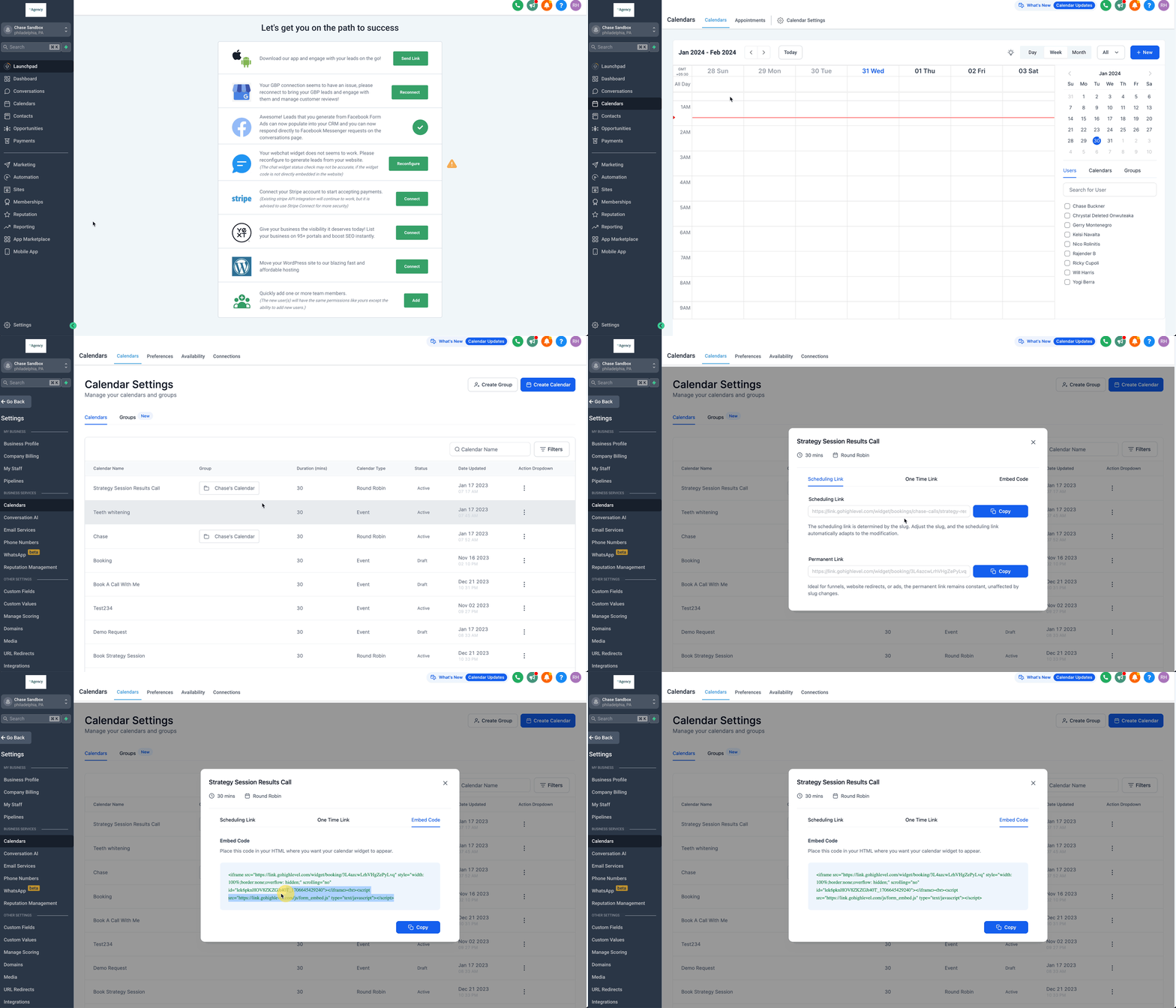
- Open the platform, go to Calendars then Calendar Settings.
- Find the calendar you want, click its three dot menu and choose Share.
- In the pop up, switch to the Embed Code tab.
- Press the Copy button to place the snippet on your clipboard.
- Paste the copied code into a custom code block on the external site.
05What it looks like in HighLevel
06Settings that matter
- Embed Code. Controls the HTML snippet that renders the selected calendar on an external page.
07Things to know before you rely on it
- The embed code works only on sites that allow custom HTML elements.
- For pages built inside HighLevel, using the Calendar element is recommended instead of manual code.
08How it connects to the rest of HighLevel
- Adjust how calendars appear with view settings Calendar view settings
- Create group calendars for multiple team members Group calendar setup
- Start a 30 day trial of HighLevel 30 day trial
Michael's take

Michael ReimerFounder of CRM Pros, HighLevel Commander and Certified Admin
I copy the code straight from the Share > Embed Code modal and drop it into a custom code block that accepts raw HTML.
Get More InformationOpens on HighLevelPublished November 2, 2026 · Updated November 16, 2026