
01Who this is for
- Coaches who want to signal limited availability to encourage quick sign ups.
- Service providers who aim to manage perception of demand without restricting actual calendar capacity.
- Consultants using round robin calendars who wish to balance appointments across team members while appearing busier.
02Look busy, explained
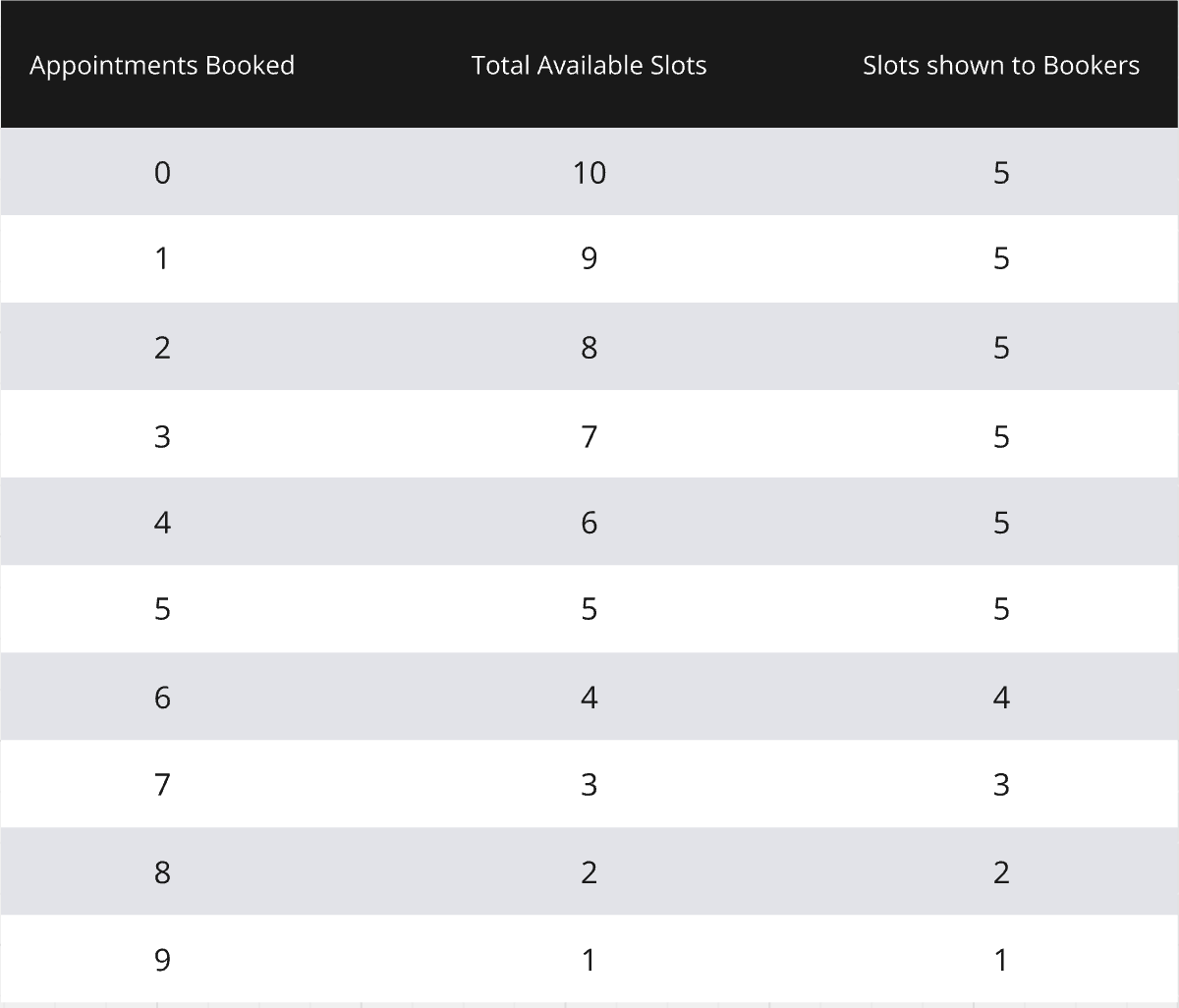
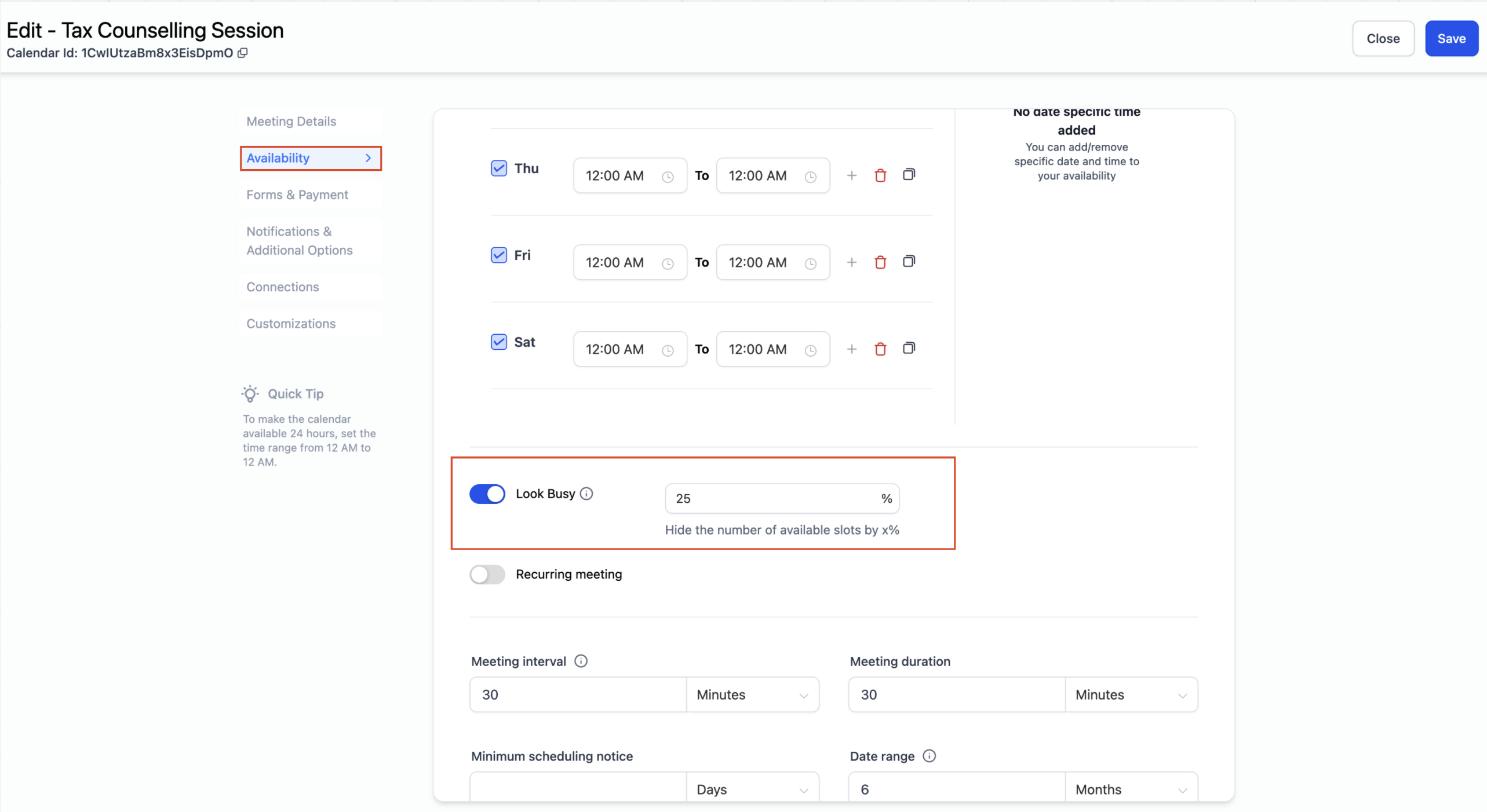
Look Busy is a toggle inside each calendar’s Availability tab. When turned on, you enter the percentage of total slots you want hidden from the public booking widget. The platform randomly removes that share of slots from the widget view.
The hidden slots are only omitted from the widget; the full set of times stays accessible in the in app appointment modal. As clients book, the widget keeps showing the same number of visible slots until the real availability drops to match the displayed count, at which point the actual slots appear.
The feature works for Event, Personal, Round Robin, Collective, and Service calendars. It does not apply to class bookings or service menu items.
03How businesses use look busy
- Fitness studio. The studio enables Look Busy on its personal calendar and sets a hide rate. When prospects view the widget, they see fewer appointment windows, prompting quicker reservations while the studio can still fill all slots through the internal modal.
- Legal consulting firm. The firm activates Look Busy on its round robin calendar, choosing to hide a portion of its attorneys’ slots. Potential clients see limited openings, creating a sense of urgency, yet the firm can schedule any slot via the app.
- Home repair service. The service sets Look Busy on its collective calendar. The public widget displays fewer appointment windows, while the full schedule remains bookable for dispatchers inside the platform.
04The numbers and rules that matter
- Supported calendar types: Event Calendar, Personal Calendar, Round Robin Calendar, Collective Calendar, Service Calendar.
05How to set up and use look busy in HighLevel
Enable look busy
- Open Calendar Settings and pick the calendar you wish to modify.
- Select the Availability tab within that calendar.
- Find the Look Busy option in the list of settings.
- Toggle the option on and type the percentage of slots to hide.
- Press Save to apply the changes.
06What it looks like in HighLevel
07Settings that matter
- Look Busy. Controls the proportion of total available slots that the booking widget will conceal.
08Things to know before you rely on it
- The feature does not affect class bookings or service menu items.
- All slots appear unchanged in the in app appointment modal regardless of the Look Busy setting.
- For recurring appointments, a future slot may be hidden by Look Busy, but the booking follows the original recurrence pattern.
09How it connects to the rest of HighLevel
- Customize the appearance of your booking widget Calendar widget customization
- Set weekly and date specific hours for calendar availability Calendar availability guide
- View appointments in a user's personal timezone User timezone view
Michael's take

Look busy can make a boutique appear fully booked, which may influence client perception.
Don’t hide too many slots, or you’ll frustrate potential customers who can’t find an opening.