
01Who this is for
- Agency admins can leave reviews for any installed app without needing subaccount access.
- Users who have permission to use an installed app may submit a rating or optional written review.
02App reviews, explained
The review feature lets platform users give a star score and optional commentary on apps they have installed. A star rating can be submitted at any point after the app is installed. If the app is later removed, a written or star review can still be submitted, but only within fifteen days of the uninstall. Each installation is limited to one review, whether the reviewer is an agency admin or a regular user.
The functionality is accessed through the Marketplace section of HighLevel where users open the app’s details page and use the rating control to record feedback.
03How businesses use app reviews
- Marketing agency. The agency opens the Marketplace, selects an installed app used for client campaigns, chooses a star rating, optionally adds comments about performance, and submits the review.
- SaaS startup with internal tools. Team members who use a third party integration installed from the Marketplace open the app’s page, provide a rating reflecting reliability, add observations if desired, and submit the review.
- Consulting firm. Consultants who have installed a reporting add on go to the Marketplace, rate the app based on usefulness, optionally write feedback, and submit the review within the allowed time frame after any uninstall.
04The numbers and rules that matter
- Reviews after uninstalling an app must be submitted within 15 days.
- Agency level apps > one review per agency.
- Subaccount apps > one review per subaccount.
05How to set up and use app reviews in HighLevel
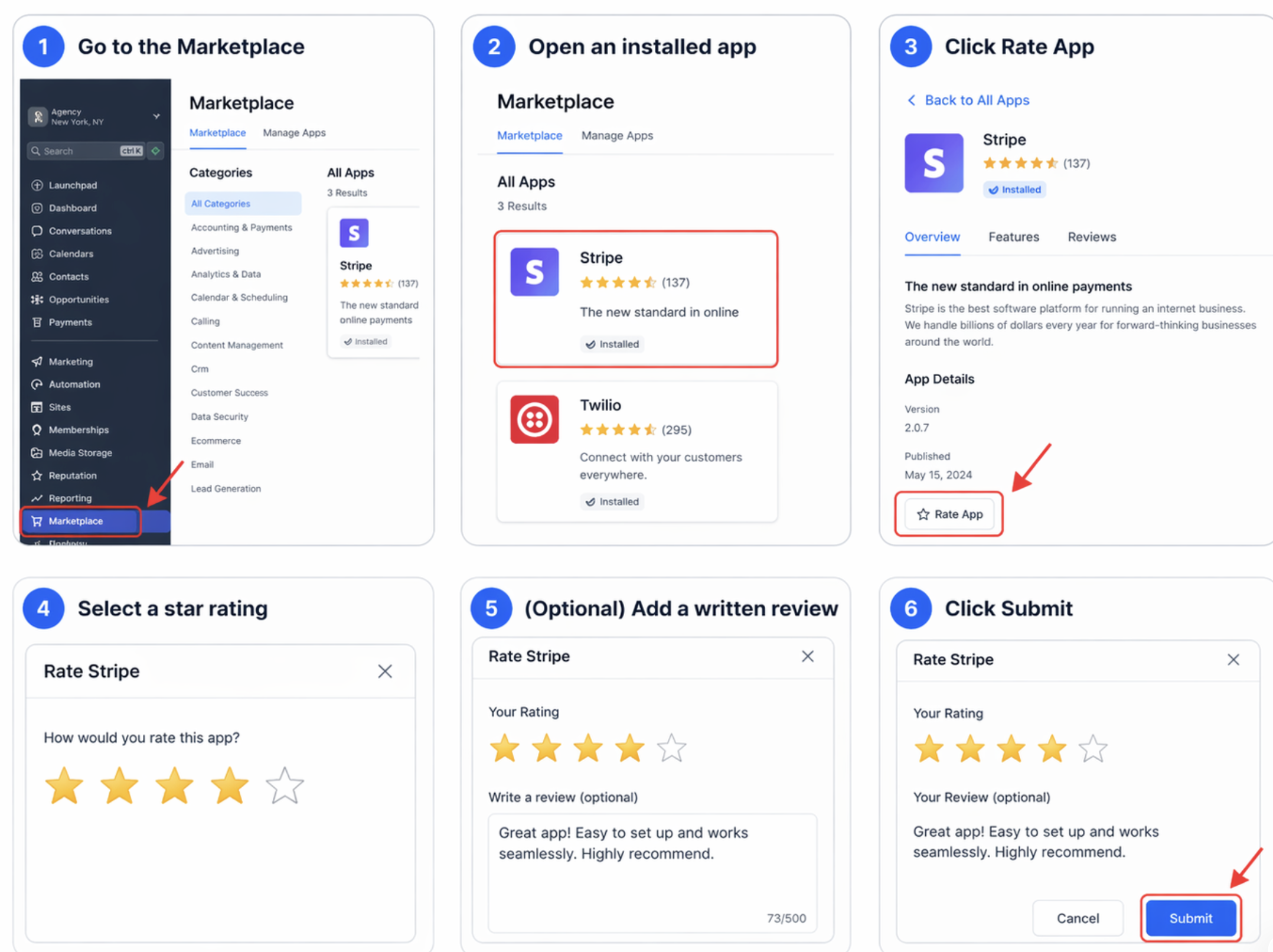
Submit a rating or review for an installed Marketplace app
- Navigate to the Marketplace area in HighLevel.
- Select the app that is already installed.
- Click the button labeled Rate App.
- Choose the number of stars to represent your rating.
- If desired, type a written comment in the provided field.
- Press the Submit button to record your feedback.
06What it looks like in HighLevel
07Things to know before you rely on it
- Only users who have access to an installed app may provide a rating or review.
- One review is allowed for each installation; agency wide apps allow one per agency, subaccount apps allow one per subaccount.
- Sandbox accounts cannot submit any feedback.
- A review must be posted within fifteen days after the app is uninstalled.
08How it connects to the rest of HighLevel
- Explore all capabilities of the App Marketplace All App marketplace features
- Review HighLevel pricing and plan options HighLevel pricing and plans
- Learn how agencies install and manage Marketplace apps Agency app marketplace guide
Michael's take

Wondering if you should bother rating the apps you use in HighLevel? The review feature is there to let you share what worked and what didn’t, without any extra setup.
If I were fresh on the platform, I’d drop a rating as soon as I’ve had a solid run with a new app. It’s a simple way to give back to the community and give the developer a clear signal about real world performance.