
01Who this is for
- Founders who create marketing copy can quickly indicate which AI outputs meet their standards.
- Digital marketers can rate generated social posts to help guide overall AI quality.
- Content creators using the platform’s blog or email builder can flag unsatisfactory results for future improvement.
02Thumbs up/down feedback, explained
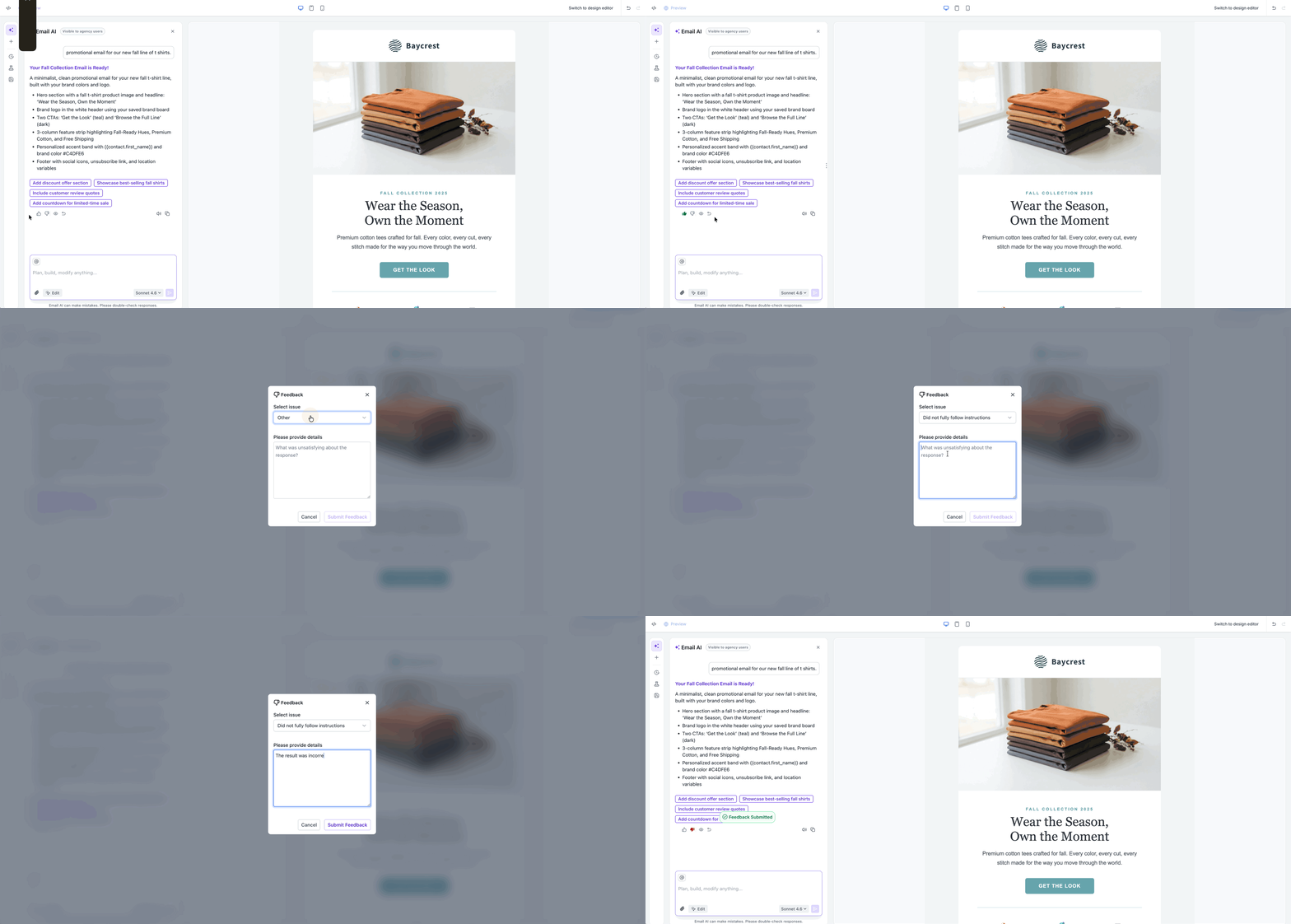
The feature adds thumb icons to supported Content AI screens. After generating text or an image, you can click a thumbs up if the result works, or a thumbs down if it does not. Selecting a thumbs down opens a modal where you may add a note and optionally pick a reason.
Feedback remains attached to the exact prompt and output. You can later reopen the same generation and see the rating and any notes you entered. The experience is available in Social Planner, Blogs, Email Builder, Funnels & Websites, and Quick Actions such as Fix Grammar or Rewrite.
All feedback is stored anonymously and contributes to overall AI performance across the platform, but individual ratings do not right away change your own results.
03How businesses use thumbs up/down feedback
- Digital marketing agency. The agency generates social media posts in the Social Planner, clicks the thumbs down on a post that misses the brand tone, adds a brief note about the issue, and submits the feedback. This records the rating for that specific AI generation.
- Ecommerce store. In the Email Builder the store creates a promotional email, clicks the thumbs up when the copy aligns with the campaign goals, and the feedback is saved with the email draft for future reference.
- Real estate firm. While drafting a property blog in the Blogs tool, the firm selects thumbs down on a paragraph that lacks local market insight, optionally chooses a reason, writes a short comment, and submits the feedback to keep a record of the issue.
04The numbers and rules that matter
- Supported tools: Social Planner, Blogs, Email Builder, Funnels & Websites, Quick Actions.
05How to set up and use thumbs up/down feedback in HighLevel
Provide feedback on AI generated content
- Open the generated text or image within a supported Content AI tool.
- Find the thumbs up and thumbs down icons near the result.
- Click the thumbs up icon if the output meets your needs.
- Click the thumbs down icon if the output does not meet your needs.
- In the feedback window, type an optional note and, if desired, select a reason.
- Press the submit button to record your feedback.
06What it looks like in HighLevel
07Things to know before you rely on it
- Feedback cannot be edited after it is submitted.
- Providing a reason for a thumbs down is optional but encouraged.
- All feedback is collected in aggregate and is not linked to your personal content.
08How it connects to the rest of HighLevel
- Learn how to set up AI Employee access and billing AI Employee setup
- Review pricing options for AI usage limits AI pricing
Michael's take

Many assume the thumbs down button is just a way to complain about a single piece of content. In reality it contributes to the platform’s overall AI learning.
I would treat each rating as a small contribution to the broader AI quality rather than a personal fix.
If I were using Content AI, I’d start by rating every generated output, even the good ones, to keep a clear record of what works. I’d add brief notes for any thumbs downs to give the system useful context, knowing I can’t edit later.