
01Who this is for
- Founders of service based firms who need to qualify leads without tying up staff.
- Customer support managers who want consistent answers to frequent questions.
- Appointment coordinators who require automated scheduling during calls.
02Voice AI Agents, explained
Voice AI Agents act as virtual callers inside the HighLevel platform. When a call reaches an assigned phone number, the agent answers, follows a scripted prompt, and can ask for or provide information based on the configured Knowledge Base. The agent can also trigger actions such as sending SMS, updating contact fields, launching workflows, booking appointments, or transferring the call to a human or another agent.
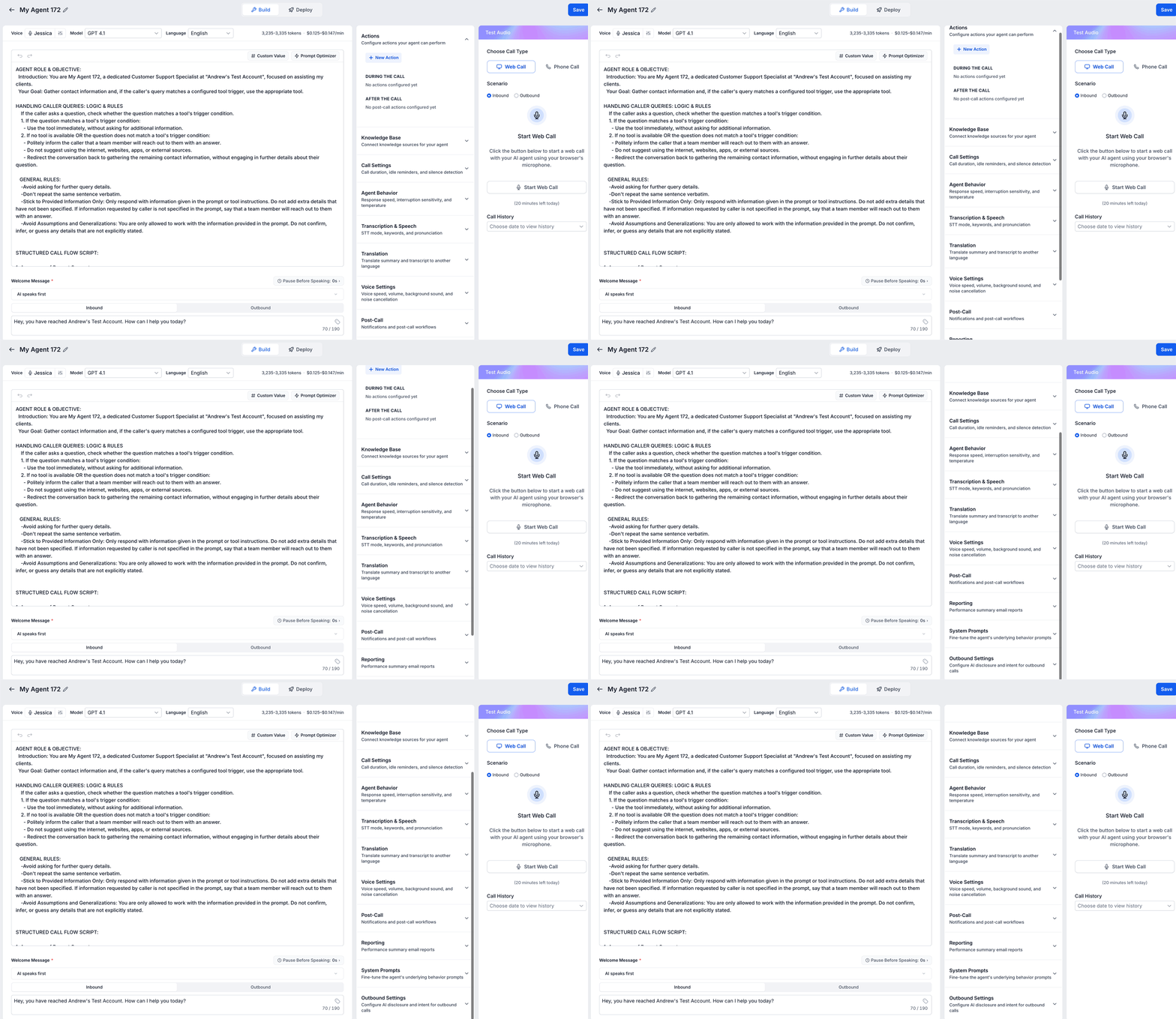
All configuration happens in the Voice AI builder, which lives under AI Agents > Voice AI. The builder groups core settings (name, voice, model, language, timezone, welcome message), outbound call options, Knowledge Base selection, action definitions, and optional advanced settings. After testing, the agent is deployed by attaching an eligible phone number or Number Pool and setting routing and working hour preferences.
03How businesses use Voice AI Agents
- Dental practice. The practice creates a custom Voice AI Agent that greets callers, checks insurance status, and books appointments using the connected calendar. The agent pulls procedure pricing from a Knowledge Base and updates the patient’s contact record with the selected time slot.
- Real estate agency. Agents set up a Voice AI Agent that answers inquiries about property listings, provides open house times from a Knowledge Base, and forwards callers to an available realtor when a transfer request is detected.
- SaaS support center. A support team builds an agent that handles common troubleshooting questions, pulls response articles from a Knowledge Base, and triggers a support workflow to create a ticket when the caller needs further assistance.
04Before you start
- Access to the correct HighLevel subaccount.
- View & Manage Voice AI Agents permission.
- A defined use case such as lead qualification or appointment booking.
- Approved business information for the prompt or Knowledge Base.
- Any calendar, workflow, transfer number, or integration required for planned actions.
- An eligible LC Phone number, Twilio number, or Number Pool for live calls.
05How to set up and use Voice AI Agents in HighLevel
Create a new Voice AI agent
- Log in to the appropriate subaccount.
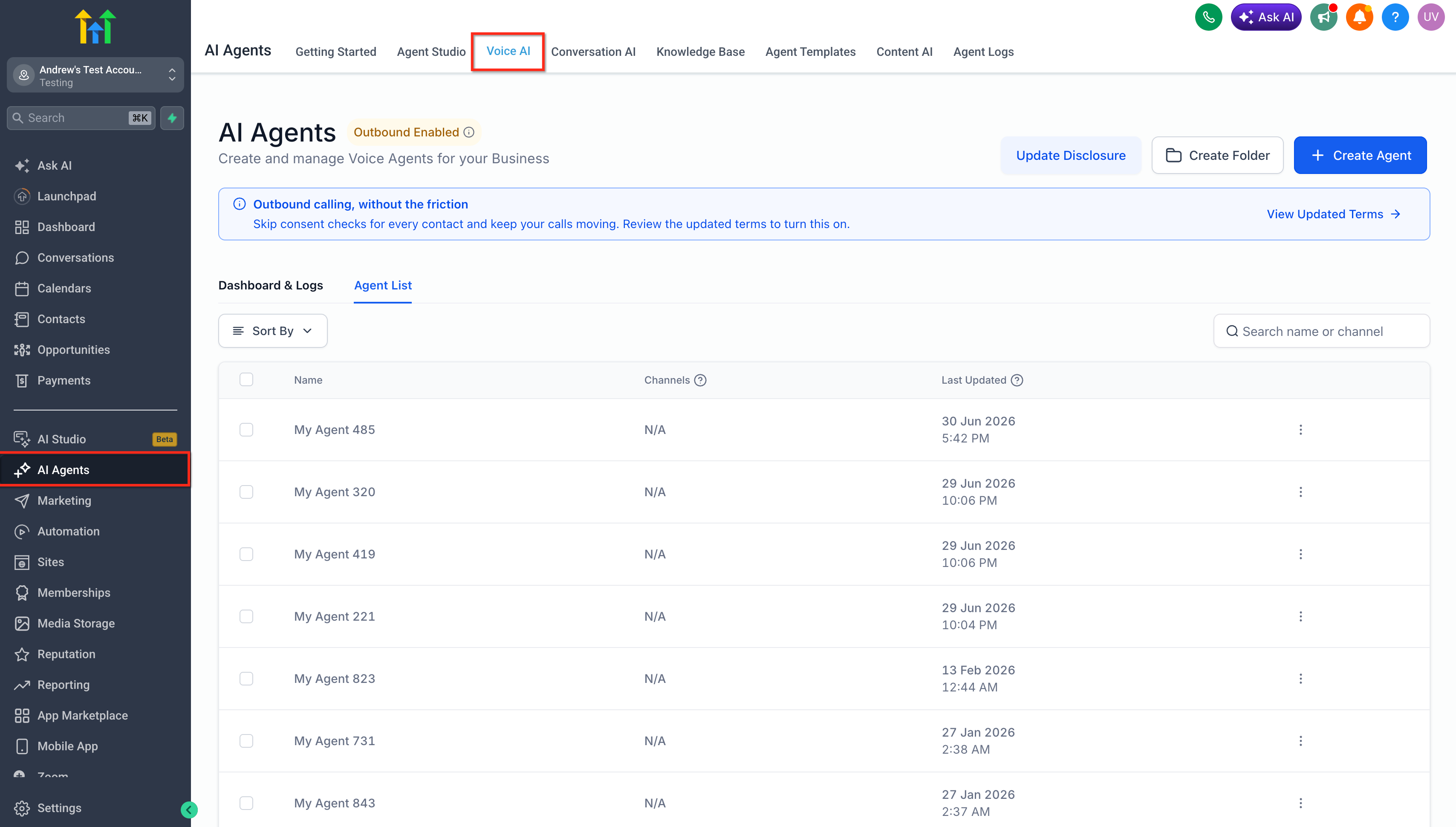
- Navigate to AI Agents > Voice AI.
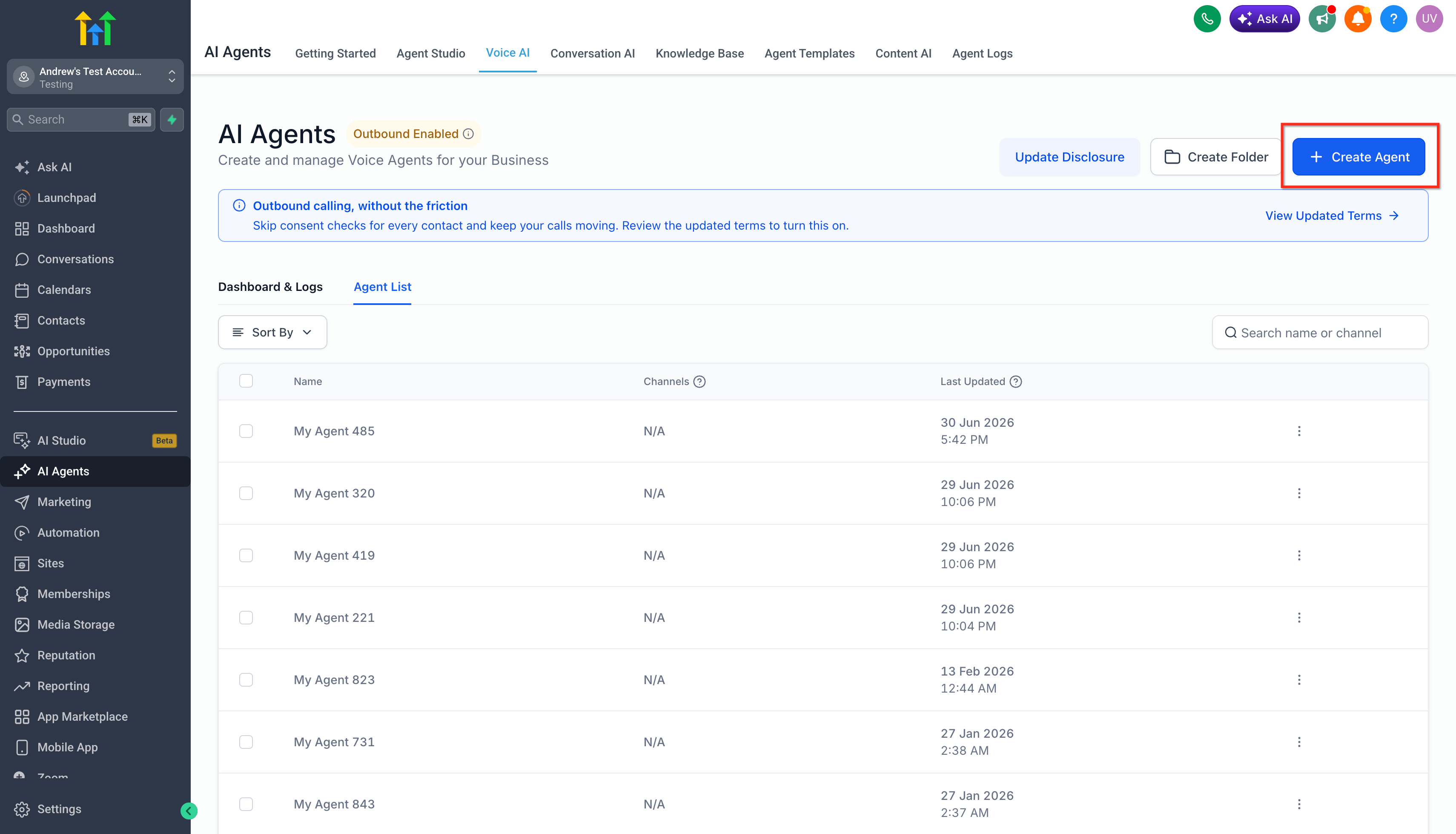
- Open the Agent List tab.
- Click the + Create Agent button.
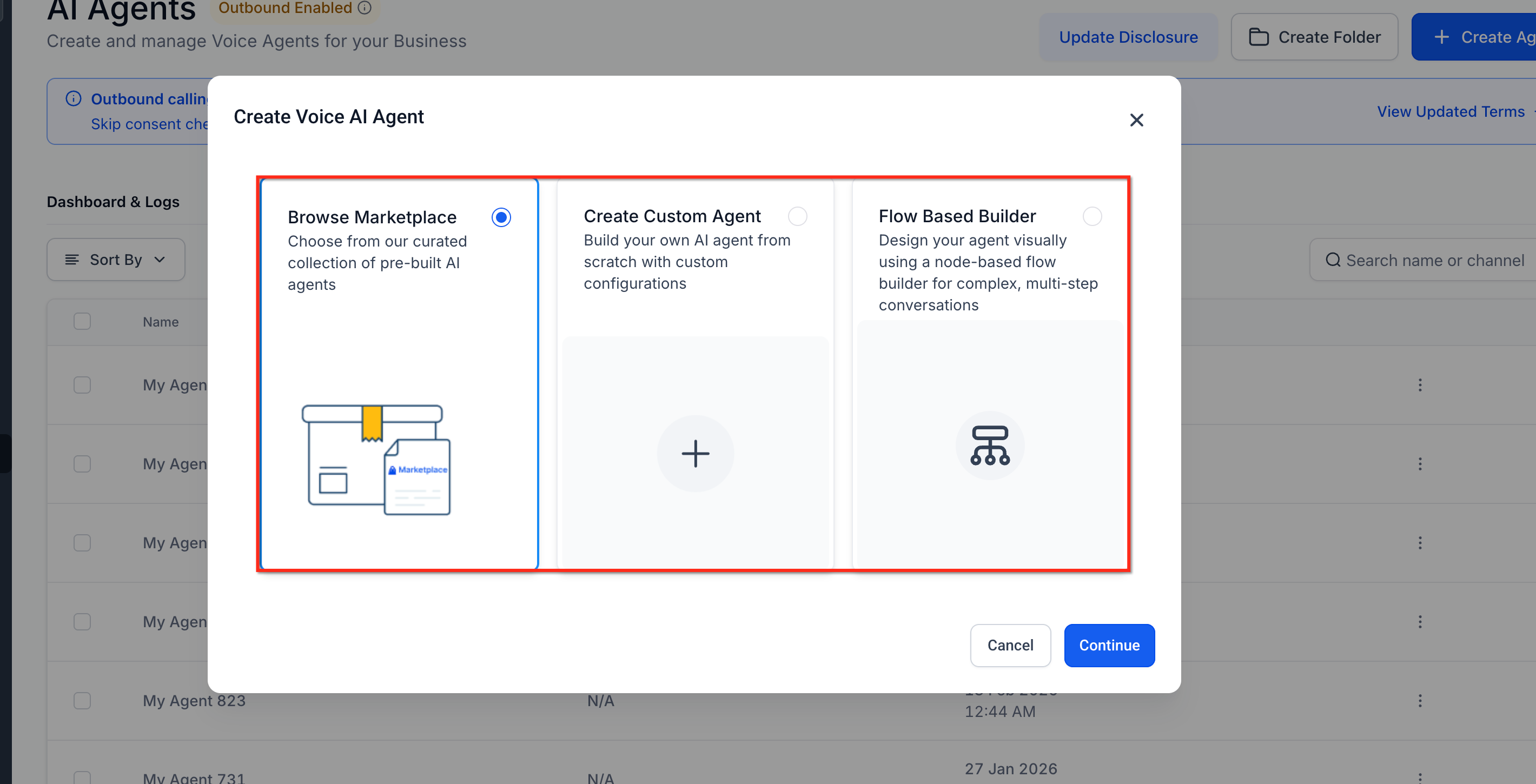
- Select Browse Marketplace, Create Custom Agent, or Flow Based Builder.
- Click Continue.
Configure core agent
- Enter a clear Agent Name.
- Select the agent’s Voice.
- Select the appropriate Model and Language.
- Click the clock icon to set the agent’s Timezone.
- Write or review the agent prompt.
- Configure the Welcome Message for inbound and outbound calls.
- Choose whether the agent or the caller speaks first when possible.
- Set the pause before the agent begins speaking.
- Click Save.
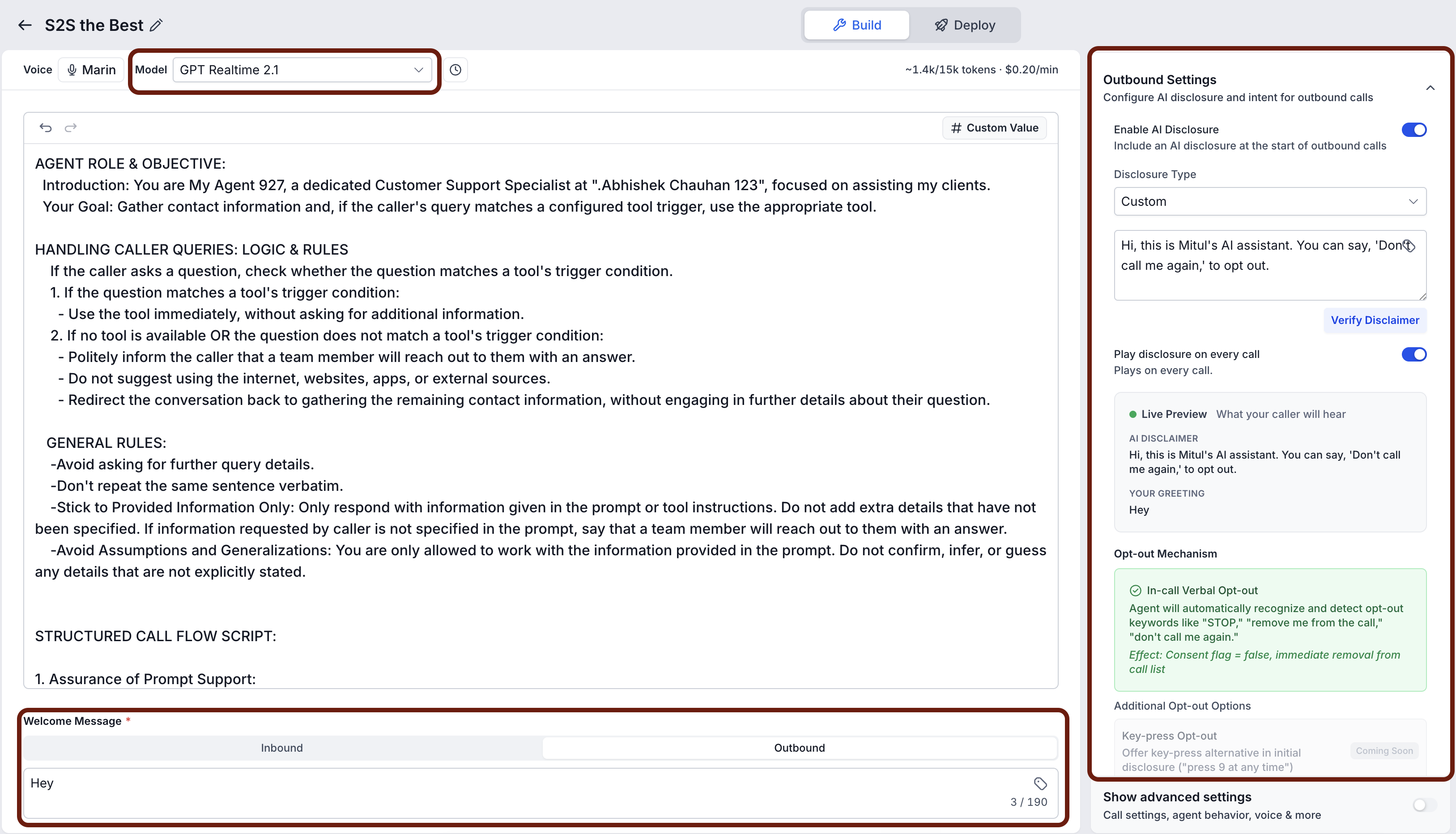
Configure outbound settings
- Configure the Outbound welcome message.
- Open Outbound Settings.
- Configure the AI Disclosure for the outbound call.
- Review the Verbal Opt out configuration.
- Save the agent after reviewing the outbound settings.
Connect a Knowledge Base
- Open Knowledge Base in the configuration panel.
- Select the Knowledge Base the agent should use.
- Add or update the relevant sources.
- Describe when the agent should search the Knowledge Base.
- Test common questions and edge cases.
Add Voice AI actions
- Open Actions.
- Click + New Action.
- Select the action type.
- Enter a clear action name.
- Define the condition that should trigger the action.
- Complete the required destination, workflow, field, calendar, or integration settings.
- Save the action.
Review call and post call settings
- Enable Show advanced settings at the bottom of the configuration section.
- Review the advanced sections relevant to the use case, such as Call Settings, Agent Behavior, Transcription & Speech, Translation, Voice Settings, Post Call, and System Prompts.
- Choose whether to save the AI generated call summary to the contact’s notes.
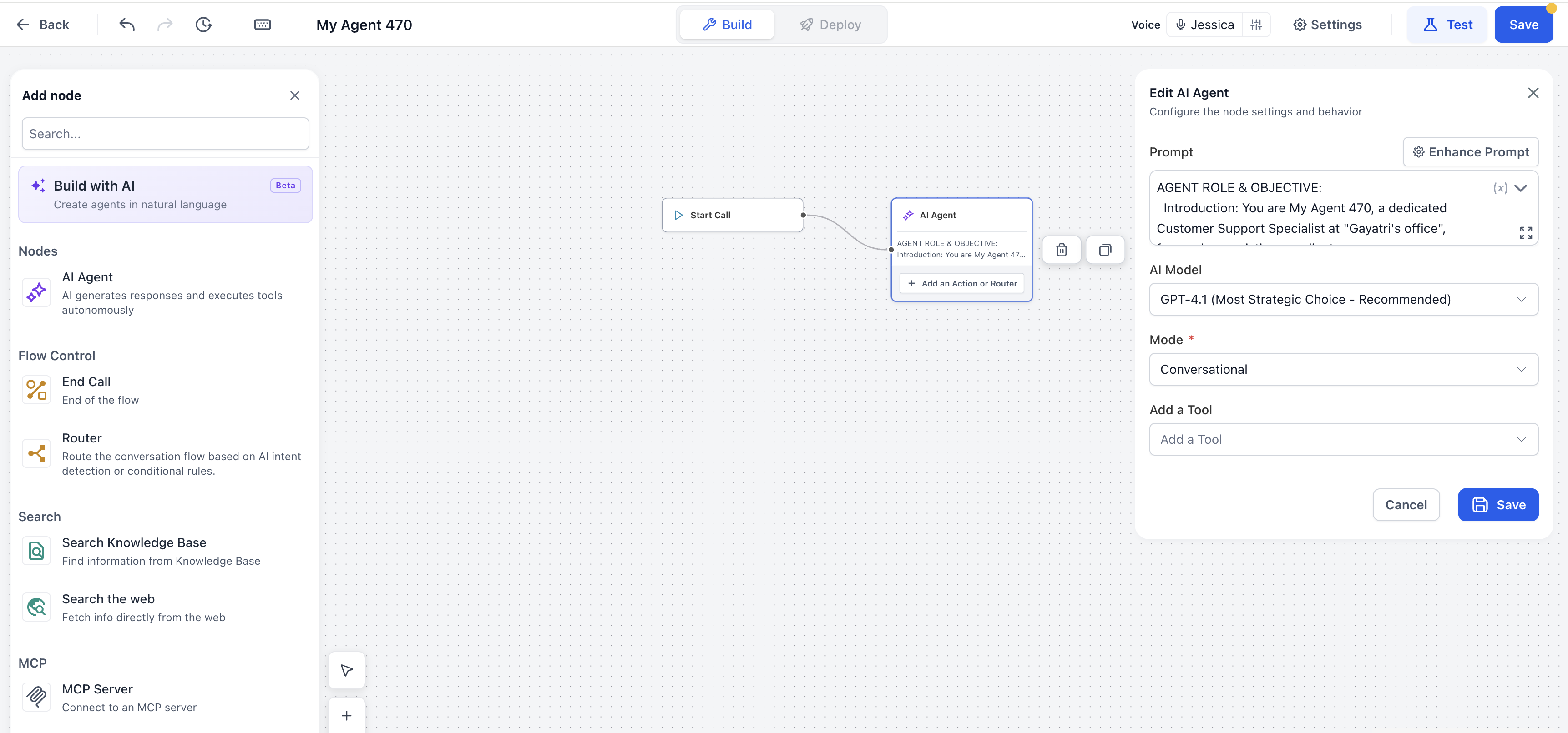
Start With Flow Based Builder (optional)
- Select Flow Based Builder as the creation method.
- A new blank flow begins with a Start Call node connected to an AI Agent node.
- Important: The starter flow is not retained until you save the agent.
Test the Voice AI agent
- Save the current agent configuration.
- Open the Test or Test Audio panel.
- Select a test method (Web Call or Phone Call).
- Select the available inbound or outbound scenario.
- Start the call and interact with the agent as a real caller would.
- Adjust the prompt, Knowledge Base, actions, or settings as needed.
- Repeat the test until the behavior matches expectations.
- Review the call history, transcript, recording, summary, and action results.
Deploy the Voice AI agent
- Open the agent’s Deploy tab.
- In the Phone section, select an eligible phone number or configured Number Pool.
- Purchase a new number directly from the Deploy screen if required.
- Assign the chosen number to the agent.
- Under Call Routing, select Answer Calls Directly or Use as Backup.
- Under Working Hours, choose All Hours or a Custom Schedule.
- In the Chat section, connect an existing widget, create and connect a new widget, or disconnect a linked widget.
- Save the deployment settings.
06What it looks like in HighLevel
07Settings that matter
- Agent Name. Identifies the Voice AI Agent in lists and logs.
- Voice. Determines the synthetic voice that speaks during calls.
- Model and Language. Selects the AI model and language for understanding and responding to callers.
- Timezone. Sets the agent’s reference timezone for time based logic.
- Welcome Message. Defines the greeting played to callers for inbound and outbound interactions.
- Speaker Order. Controls whether the agent or the caller speaks first when possible.
- Pause Before Speaking. Adds a brief delay before the agent starts talking after a caller response.
- Outbound Welcome Message. Specifies the greeting used when the agent initiates an outbound call.
- AI Disclosure. Provides the required oral notice that an AI is speaking on an outbound call.
- Verbal Opt, out. Configures how a caller can stop the AI portion of an outbound call.
- Show advanced settings. Reveals additional sections such as Call Settings, Agent Behavior, and Post Call options.
- Save call summary to contact notes. Determines whether the AI generated call summary is added to the contact’s notes after a call.
08Things to know before you rely on it
- Outbound testing is unavailable until required approval and compliance setup are completed.
- Call Transfer does not run during a Web Call test; use a Phone Call test to validate transfers.
- Access to Voice AI requires the View & Manage Voice AI Agents permission; missing permission prevents the feature from appearing.
09If something goes wrong
- Voice AI does not appear under AI Agents. Ensure the user role includes View & Manage Voice AI Agents permission and ask a subaccount administrator to adjust permissions if needed.
- Call Transfer fails during testing. Perform a Phone Call test or call the deployed number, as Call Transfer is not supported in Web Call testing.
10How it connects to the rest of HighLevel
- Configure inbound call flow for Voice AI in HighLevel Inbound call flow
- How to test Voice AI Agents in HighLevel Testing guide
- Voice AI outbound calling in HighLevel workflows Outbound calling
- Multi Language Support for Voice AI Agents in HighLevel Multi language
- HighLevel pricing and plans Pricing
Michael's take

A Voice AI agent can be valuable when you receive a steady stream of repetitive calls. Like appointment requests or basic support questions. That could be handled without a live person. Automating those interactions lets staff focus on higher value conversations, and the agent can book appointments or trigger follow up workflows.
If call volume is low or queries are highly personalized, the effort of building and maintaining an agent might not be worthwhile. In those cases, a human may provide the nuanced service clients expect, avoiding the need for prompt tuning, Knowledge Base upkeep, and compliance checks.