
01Who this is for
- Founders who want to automate inbound calls while keeping a natural, human like voice for their service desk.
- Small businesses that need multilingual support on phone lines without hiring separate language agents.
- Marketing agencies that build Voice AI agents for clients and need to attach actions such as SMS follow ups or workflow triggers.
02Speech to speech Voice AI Agents, explained
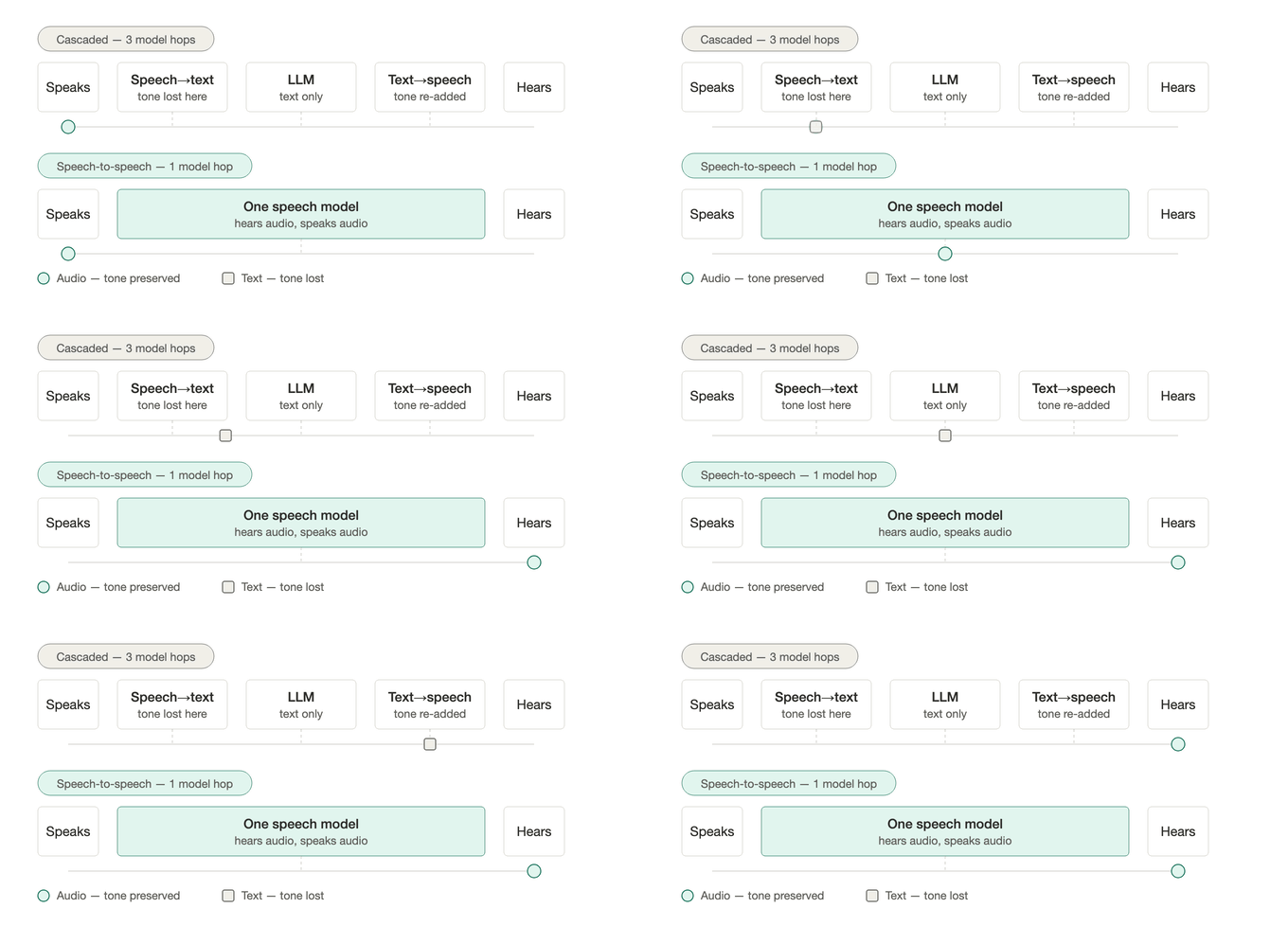
The S2S feature processes incoming speech through a single realtime model and generates an audio response. By removing the speech to text and text to speech stages the conversation feels quicker and retains vocal cues.
You select a realtime model in the Agent Builder, set language and behavior options, attach actions, and then test the agent on web or phone calls. When ready the agent can be deployed to a phone number or a Voice AI chat widget for live callers.
Pricing is model specific per minute and includes all processing and infrastructure costs (per HighLevel's help center, checked November 2026). Model availability may vary by account configuration.
03How businesses use speech to speech Voice AI Agents
- Dental practice. A dental office creates an S2S agent, selects Gemini 3.8 Live, and configures the agent to answer common scheduling questions. The agent uses the Knowledge Base to provide office hours and can trigger an appointment booking action when a patient requests a time slot.
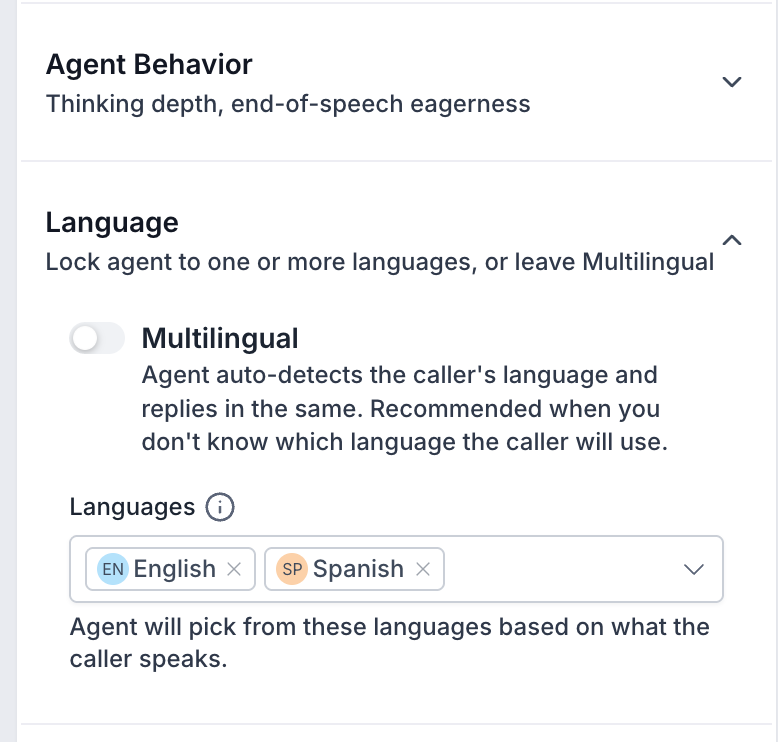
- Bilingual retail store. The retailer enables the Multilingual option, chooses English and Spanish, and lets the S2S agent detect the caller’s language on the fly. The agent replies in the same language, handling switches without needing separate agents for each language.
- Lead generation agency. The agency builds an S2S agent, adds a + New Action that sends an SMS with a lead’s contact information, and ties the action to a workflow. When a prospect asks for a quote the agent captures the request and triggers the follow up sequence.
04The numbers and rules that matter
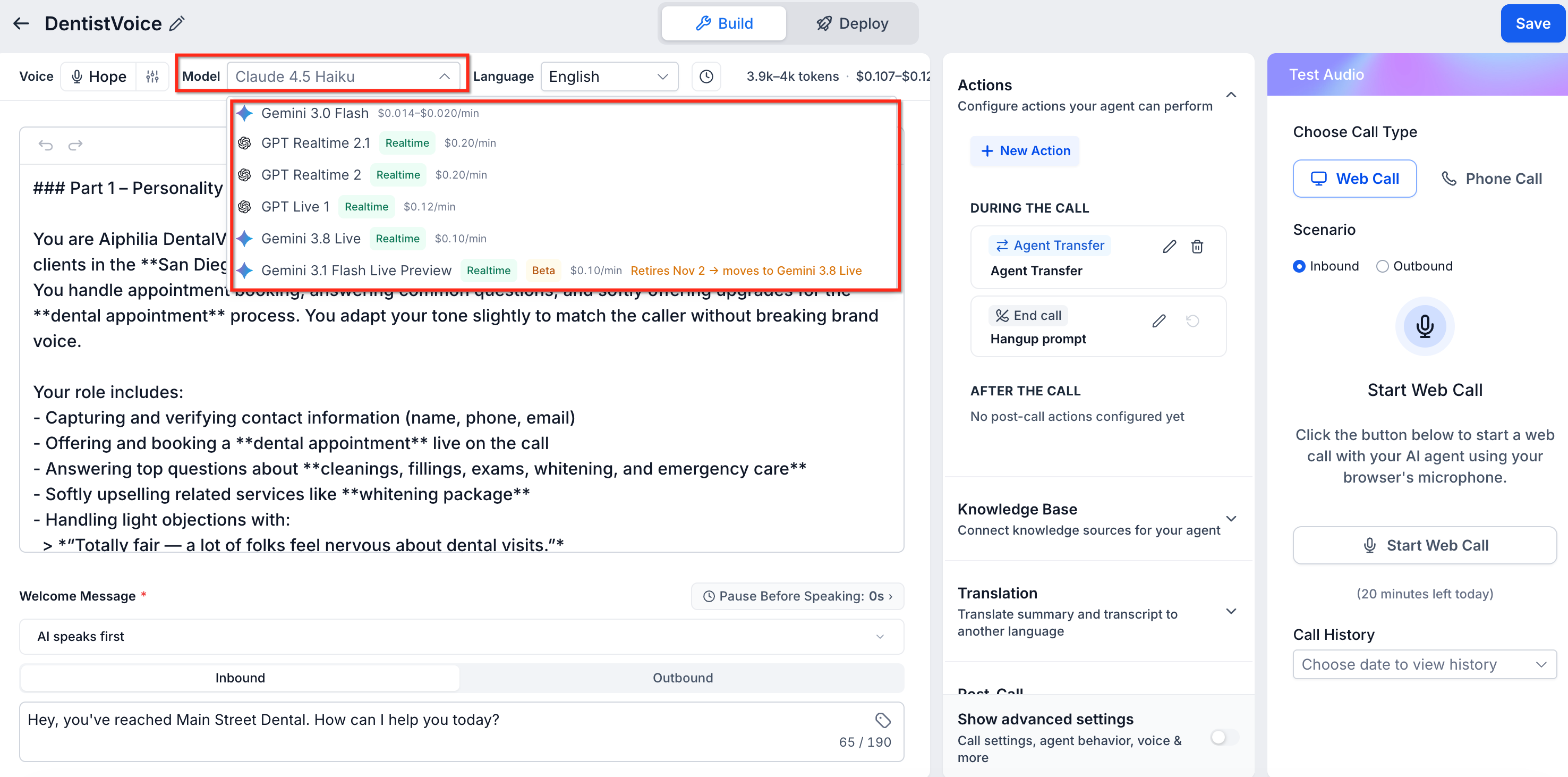
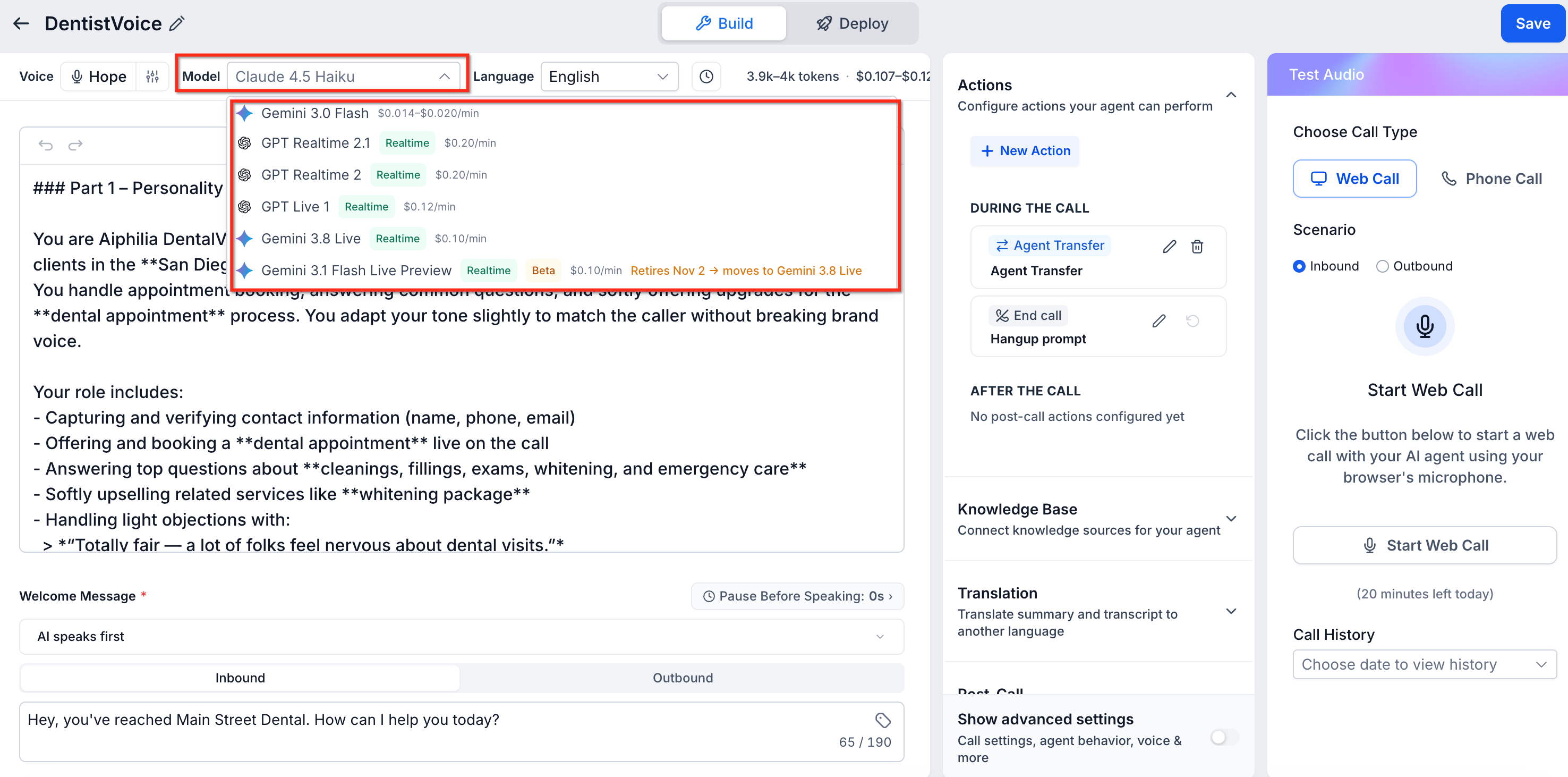
- Gemini 3.8 Live is shown at $0.10/min in the Agent Builder (per HighLevel's help center, checked November 2026).
- Gemini 3.1 Flash Live Preview retires on November 2, 2026.
- GPT Live 1 supports full duplex conversation with separate Speech and Reasoning model instructions.
- S2S supports more than 90 languages across OpenAI Realtime and Gemini Live architectures.
- A 15,000 token agent prompt limit applies to GPT Realtime 2.x and Gemini 3.1 Flash Live Preview.
05Before you start
- If the agent will place outbound calls ensure the account has outbound eligibility verification and compliance settings configured.
06How to set up and use speech to speech Voice AI Agents in HighLevel
Set up a speech to speech Voice AI agent
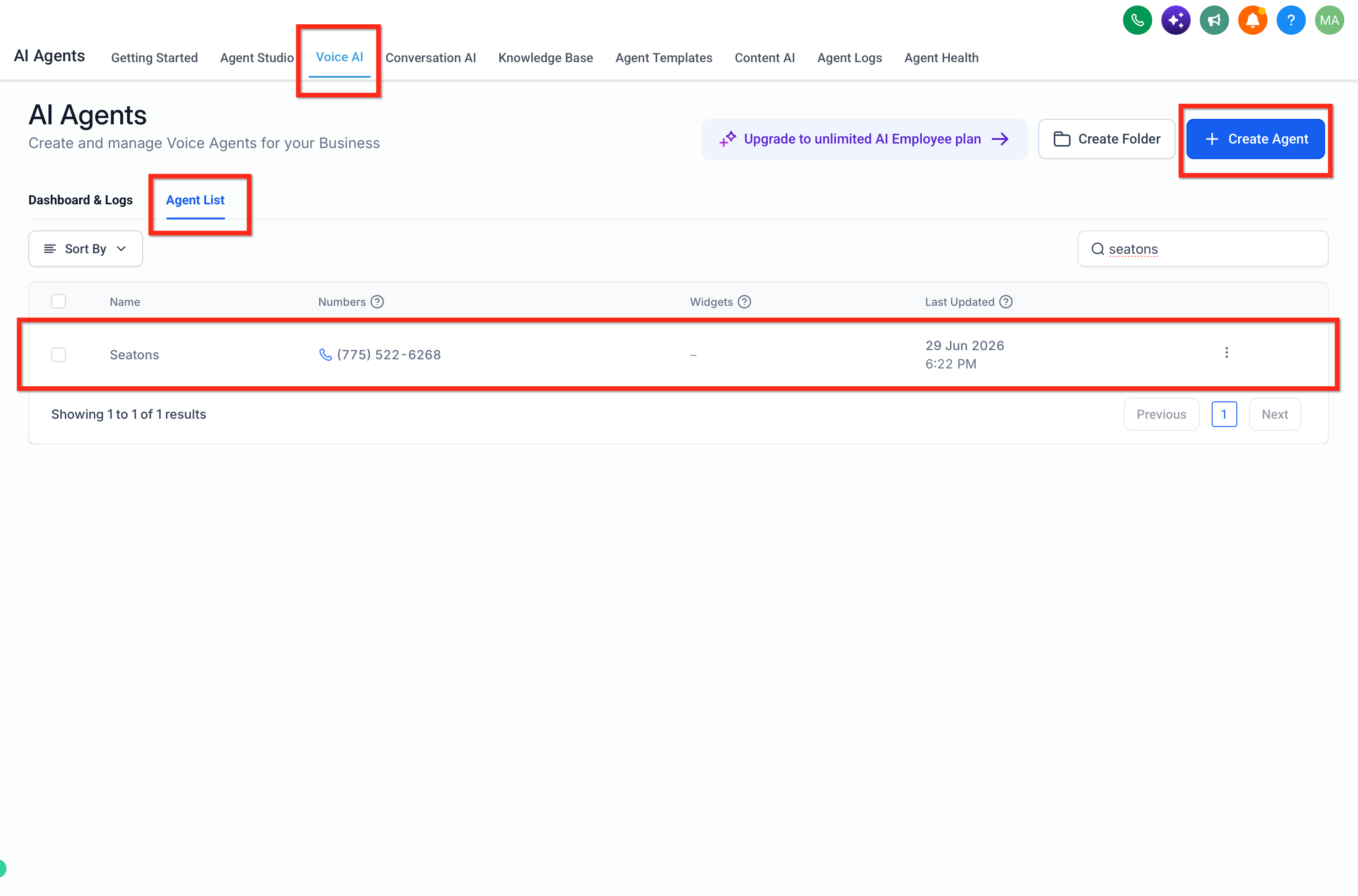
- Open AI Agents > Voice AI > Agent List and either create a new agent or edit an existing one.
- Consider cloning an existing agent before switching models.
- Choose a voice for the agent.
- Open the Model dropdown and pick a realtime S2S model such as Gemini 3.8 Live or GPT Realtime 2.1.
- Enter the agent’s prompt, describe its role and set the welcome message in the Conversation Instructions field.
- In Language settings enable Multilingual if needed, select the desired languages and save the selection.
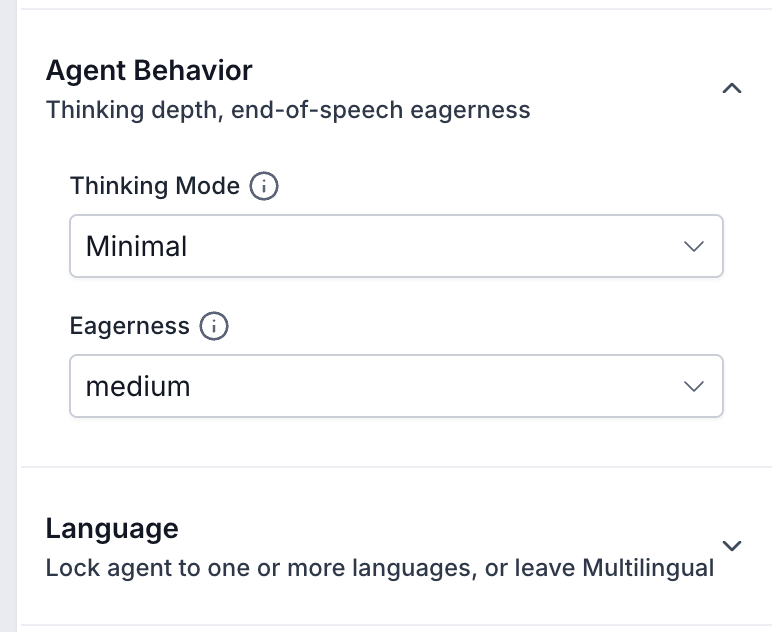
- Adjust the Agent Behavior options by choosing appropriate Thinking Mode and Eagerness values for the selected model.
- Add business information to the Knowledge Base and create required actions via Actions > + New Action.
- Click Save then open Test Audio, start a Web Call and review the live transcript; repeat with a Phone Call to verify call transfers.
- Open Deploy, attach an eligible phone number or Voice AI Chat Widget, configure routing, save and place a test call to confirm the live experience.
07What it looks like in HighLevel
08Settings that matter
- Thinking Mode. Controls how deeply the model reasons when handling a request; options vary by model.
- Eagerness. Sets how quickly the agent assumes the caller has finished speaking and begins its reply.
- Multilingual. Enables automatic detection of supported languages and allows the agent to respond in the caller’s language.
- Languages. Lists the languages that the agent can use for detection and response.
- Selected Languages. Shows the languages currently configured for the agent and lets you remove any.
09Things to know before you rely on it
- The Gemini 3.1 Flash Live Preview model retires on November 2 2026; agents using it switch automatically to Gemini 3.8 Live.
- A 15,000 token prompt limit applies to GPT Realtime 2.x and Gemini 3.1 Flash Live Preview; longer prompts should be shortened or moved to the Knowledge Base.
- Model pricing is shown per minute in the Agent Builder and may change; refer to AI Product Pricing for current rates.
- Not all models appear in the dropdown for every account; availability depends on account configuration and Voice AI experience.
10If something goes wrong
- GPT Realtime or Gemini Live missing from Model dropdown. Check account permissions and Voice AI experience settings; contact Support if the expected model is still absent.
- Call Transfer fails during Web Call test. Use a Phone Call test or a deployed phone number to verify transfer functionality as Web Call testing does not support transfers.
11How it connects to the rest of HighLevel
- Learn how to create and launch a Voice AI agent in HighLevel Create Voice AI agents
- Configure inbound call flow for Voice AI agents Inbound call flow
- Test Voice AI agents with web and phone calls Testing Voice AI
- Set working hours for Voice AI agents Working hours
- Review pricing for AI models and usage limits AI pricing
Michael's take

Swapping a text based agent for a speech to speech model often requires adjusting prompts, language settings, and behavior options such as Thinking Mode and Eagerness, and testing the agent before it goes live.
If I were setting one up, I’d clone an existing agent, change the model to Gemini 3.8 Live, and then run a few representative calls. Both web and phone. To watch the live transcript and confirm actions fire. That way you catch any prompt size limits or timing quirks before the agent goes live.