
01Who this is for
- Founders who want to reduce manual scheduling work so their team spends less time handling appointment changes.
- Customer support managers who need a self service option for clients to cancel or shift meetings.
- Appointment based service owners who handle multiple calendars and want contacts to manage bookings from any calendar.
02Cancel and reschedule appointments, explained
The feature adds two new actions to a Conversation AI bot: cancel an existing appointment and reschedule an existing appointment. When a contact asks to change a meeting, the bot checks the appointment’s timing, avoids past slots, and prevents conflicts with other appointments. New bookings continue to use the calendar assigned to the bot’s appointment booking action, while cancellations and reschedules can affect appointments in any calendar linked to the contact.
Settings for each action are located inside the bot’s configuration. You can turn on cancellation, rescheduling, both, or neither, and adjust the toggles at any time after the Labs feature is enabled. Testing is done through Bot Trial, which lets you run a simulated conversation before exposing the bot to live contacts.
03How businesses use cancel and reschedule appointments
- Dental practice. The practice enables cancellation only, allowing patients to remove upcoming appointments through chat while the staff manually handles rescheduling. The bot presents only the cancel option during a conversation.
- Fitness studio. The studio turns on both cancellation and rescheduling so members can move class bookings to another open slot. The bot checks for schedule conflicts and suggests the next available time.
- Consulting firm. The firm disables both actions for the bot, keeping Conversation AI focused on new booking requests while a human team member processes any changes.
04Before you start
- The Cancel And Reschedule Labs feature must be available in the account.
- A Conversation AI bot with an appointment booking action must already be configured.
05How to set up and use cancel and reschedule appointments in HighLevel
Enable the Labs feature for cancellation and rescheduling
- Navigate to Labs in the platform.
- Locate the entry labeled Cancel And Reschedule.
- Review the feature information presented.
- Activate the feature.
- Note that enabling the Labs feature cannot be undone.
Configure the bot to allow cancellation and/or rescheduling
- Open the Conversation AI section.
- Select the bot you want to edit.
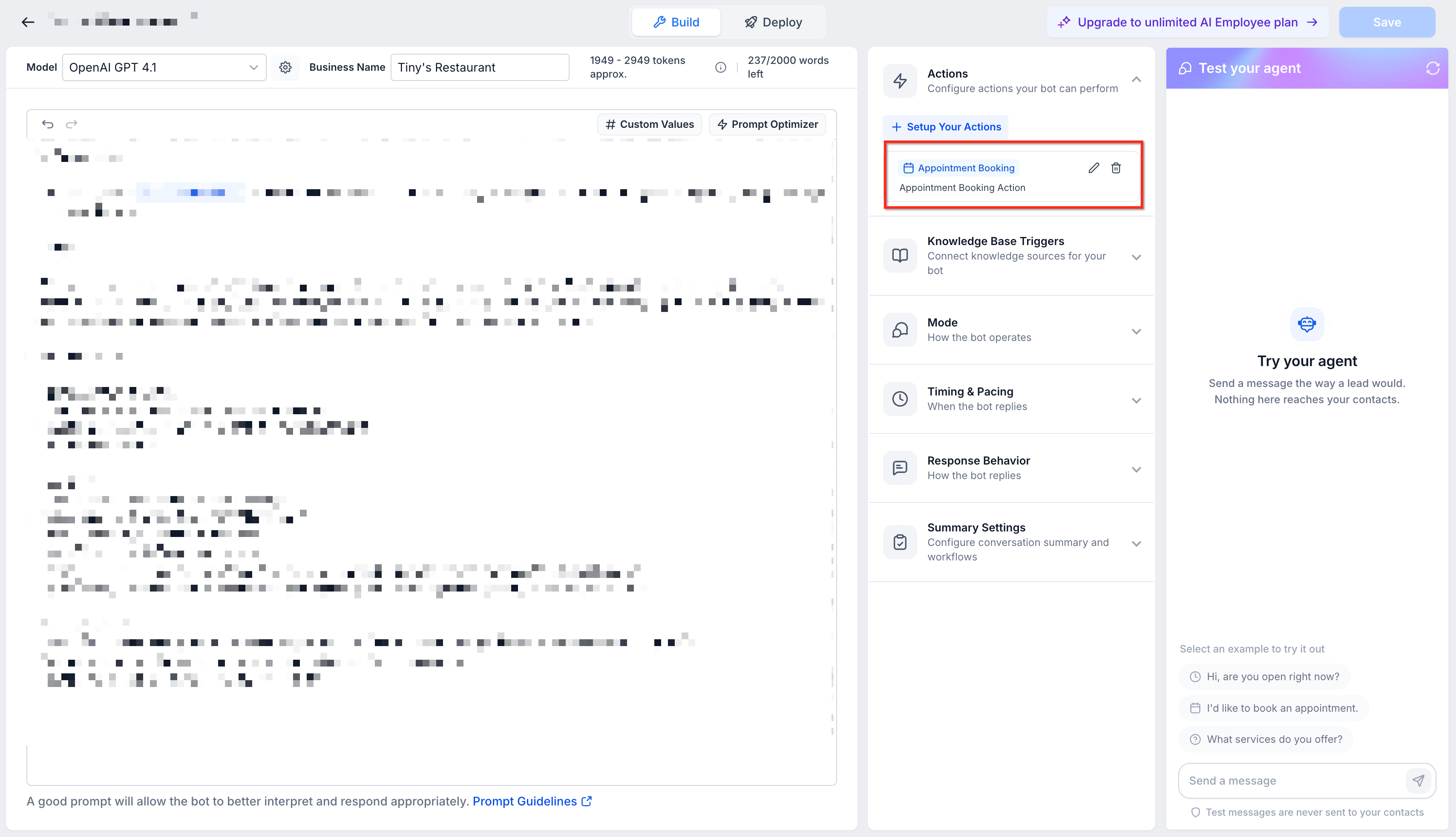
- Click the Edit Bot button.
- Open Bot Goals.
- Locate the action used for appointment booking.
- Open the Appointment Booking Action.
- Confirm that the calendar selected matches the one you want for new bookings.
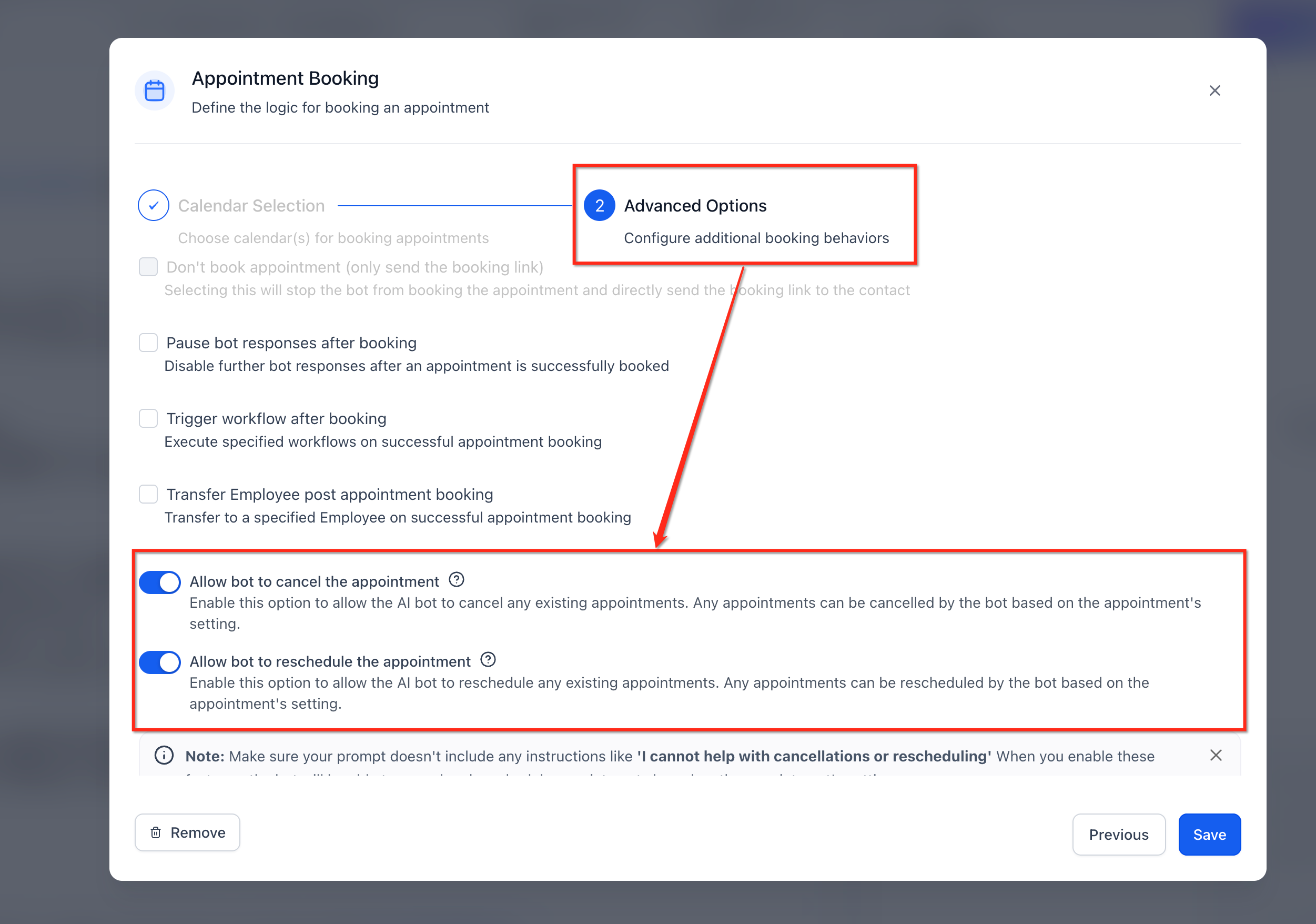
- Turn on the Rescheduling toggle if contacts should be able to move appointments.
- Turn on the Cancellation toggle if contacts should be able to cancel appointments.
- Toggle both controls if the bot should support both actions.
Test the cancellation and rescheduling experience
- Enter Bot Trial for the edited bot.
- Run a simulated conversation that includes a cancel or reschedule request.
- Observe the bot’s replies and confirm the appointment changes behave as expected.
06What it looks like in HighLevel
07Settings that matter
- Cancel And Reschedule. A Labs feature that, once enabled, adds cancellation and rescheduling capabilities to Conversation AI bots.
- Rescheduling. A toggle inside the bot that lets contacts move an existing appointment to another available time.
- Cancellation. A toggle inside the bot that allows contacts to remove an upcoming appointment.
08Things to know before you rely on it
- Activating the Cancel And Reschedule Labs feature cannot be undone.
- Appointments that have already started are not offered for cancellation or rescheduling.
- When rescheduling, the bot blocks moves to times that conflict with another appointment for the same contact.
- If a requested new time is in the past, the bot informs the contact and offers the next available slot.
09How it connects to the rest of HighLevel
- Set up appointment booking in Conversation AI Appointment booking guide
- Customize the HighLevel chat widget on your site Chat widget guide
- Review HighLevel pricing and plans Pricing page
Michael's take

Cancel and reschedule appointments feel like a small convenience that can become a real shift for service teams that take a lot of phone calls to change bookings. Giving a contact a quick chat option to move or drop an appointment cuts down on back and forth and frees up staff for higher value work.
A health clinic that schedules follow up visits fits the bill perfectly. The bot can let a patient cancel a routine check up or shift it to a later slot without waiting for reception. I would test the flow in Bot Trial first, make sure past appointments are filtered out, and confirm the notification settings send a confirmation text.