
01Who this is for
- Agency owners who manage multiple client subaccounts benefit because templates automate agency level tasks such as user provisioning and phone number purchases.
- Small business Founders gain faster onboarding for new team members by using templates that teach each workflow step without memorizing the platform.
- Marketing teams use templates to launch campaigns and social posts quickly, reducing the time spent searching for settings.
02Ask AI templates, explained
Ask AI templates are prebuilt guided workflows that cover a wide range of HighLevel functions, from creating campaigns to booking appointments. They appear within the Ask AI interface and guide users through each required field and choice.
Templates are grouped by category and filtered by the current context, subaccount or agency, and by the user’s permissions. When a template is run, Ask AI asks for the information, confirms the summary and then creates the requested resource in real time.
03How businesses use Ask AI templates
- Digital marketing agency. The agency selects a template to provision a new client subaccount. Ask AI asks for the client name, location settings and billing preferences, then creates the subaccount and confirms the result.
- Fitness studio owner. The studio runs a template to set up a new booking calendar. Ask AI gathers the calendar name, hours and integration details, creates the calendar and links it to the studio’s Google Calendar.
- Ecommerce retailer. The retailer chooses a template to launch an SMS campaign. Ask AI prompts for the message content, contact segment and sender number, then builds the campaign and reports completion.
04The numbers and rules that matter
- Over 90 templates are available at launch.
05Before you start
- User must have permission for the feature the chosen template manipulates, such as Contacts or Calendars.
- Account must have access to Ask AI; templates are only visible on plans that include this capability.
06How to set up and use Ask AI templates in HighLevel
Run an Ask AI template
- Click the Ask AI icon to open the Templates view.
- Browse the category tabs or type a keyword to locate the desired template.
- Select the template card that matches the required task.
- Answer each prompt presented by Ask AI and make the requested selections.
- Review the summary, confirm the choices and let Ask AI execute the workflow.
- Check the appropriate HighLevel area to verify that the task was completed.
07What it looks like in HighLevel
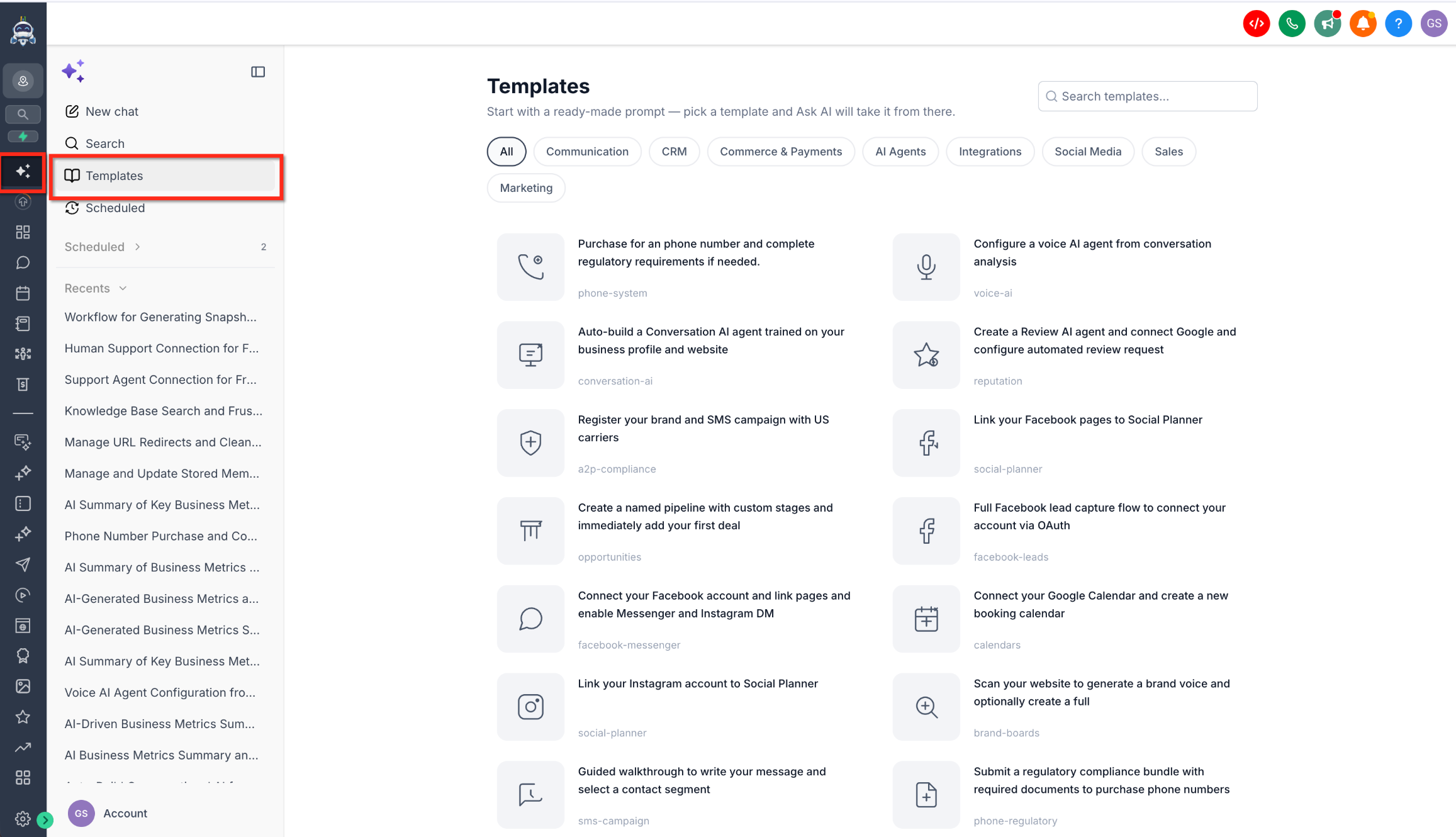
08Things to know before you rely on it
- Over 90 templates are available at launch, covering many common business workflows.
- Templates are shown only if the user’s role includes the necessary permissions for the underlying feature.
- The list adjusts automatically to subaccount or agency context, displaying only relevant templates.
- Templates are included for accounts that have access to Ask AI.
09If something goes wrong
- Certain templates do not appear in the list.. Confirm that your user role has permission for the feature the missing template uses, or ask an admin to grant the required access.
10How it connects to the rest of HighLevel
- Explore all AI Employee features including Ask AI templates. AI Employee features
- Check plan details to see if Ask AI access is included. Pricing and plans
- Start a free trial to test Ask AI templates. 30 day trial
Michael's take

I would pick a task I do often. Like creating a new booking calendar. And run the template from start to finish. That lets me see exactly how the prompts map to the final setup and ensures I’m capturing every required field before I rely on it for the team.