
01Who this is for
- Agency owners can prevent their internal AI usage from being billed to clients.
- Agency staff managing client subaccounts gain control over how AI costs are allocated.
02Separate usage rebilling, explained
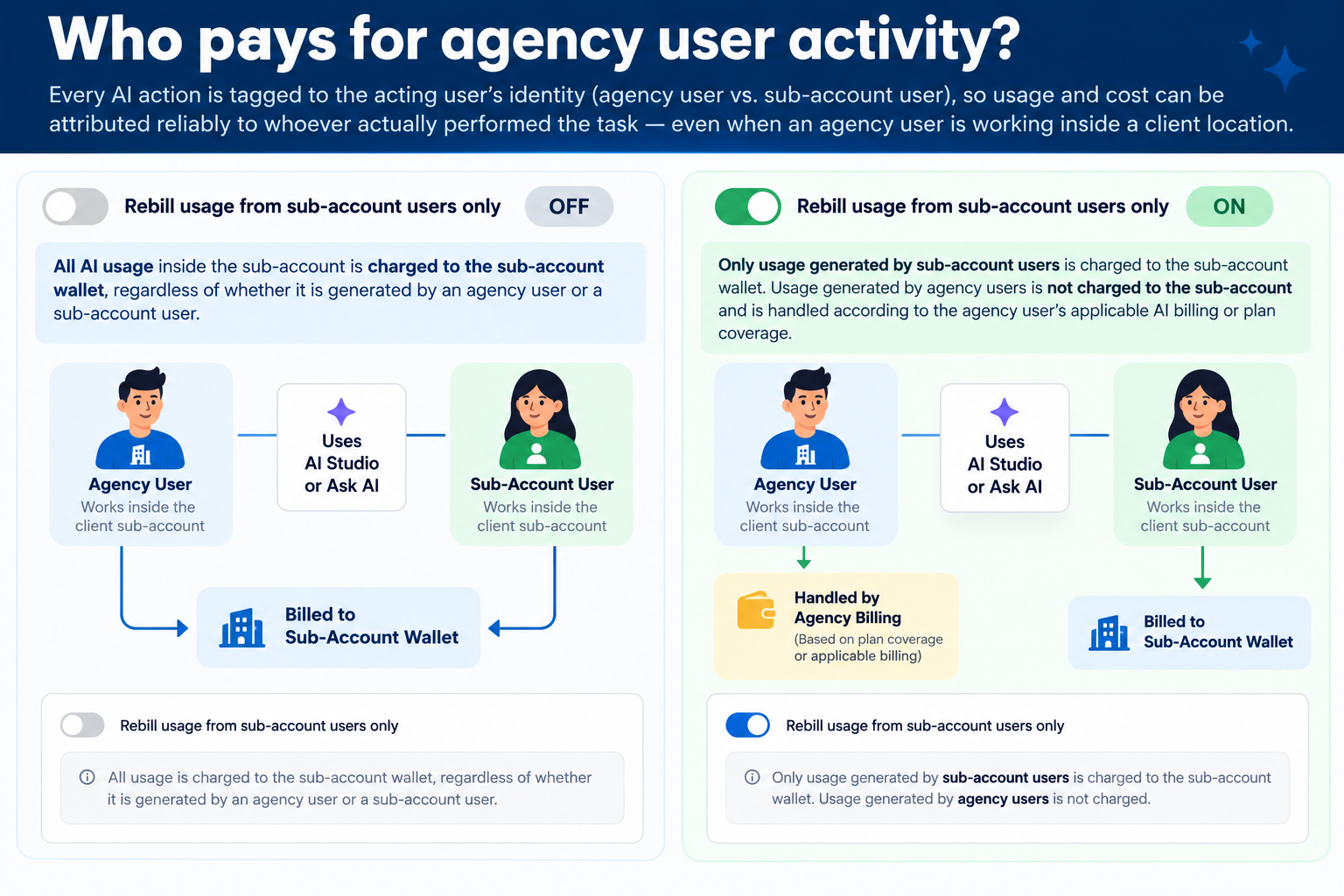
The feature adds a toggle that determines whether agency user AI activity is included in a client’s rebilling calculation. When the toggle is ON, only usage generated by subaccount users follows the client’s rebilling settings; agency user usage remains on the agency’s wallet. The toggle does not enable rebilling by itself and does not stop underlying AI usage charges.
The setting lives inside the Rebilling tab of a subaccount’s management screen. It works together with the subaccount’s active rebilling configuration and required client payment method. Charges still depend on billable activity and any plan allowances.
If the client has no payment card or rebilling is not active, billable AI usage is funded by the Agency Wallet regardless of the toggle. The Agency Wallet can auto recharge from the agency’s payment card when its balance is low.
03How businesses use Ask AI & AI Studio, separate usage rebilling
- Marketing agency. The agency enables Ask AI for a client subaccount but does not want its own consultants’ prompts to increase the client’s bill. It turns the toggle ON so only the client’s users trigger rebilling. The agency’s usage continues to be covered by its agency wallet.
- SaaS startup. A startup uses AI Studio to build onboarding pages for its customers. By switching the toggle OFF, both the startup’s internal staff and the customers’ subaccount users generate usage that can be rebilled to the customer, provided the client’s rebilling is active and a payment method is on file.
- Real estate brokerage. The brokerage grants its agents access to Ask AI within a client subaccount. With the toggle set to ON, the agents’ prompts are excluded from the client’s rebilling, keeping the brokerage’s internal costs on its own wallet while the client only pays for its agents’ usage.
04The numbers and rules that matter
- Adding a payment card is not required before starting pay per use activity when rebilling is not active.
- Spending limits are configured in Agency View > AI Suite > Plans & Limits.
- Blocking behavior options include "Block AI at the limit" or "Notify only".
05Before you start
- The subaccount must have an active rebilling configuration.
- The required client payment method must be completed and valid.
06How to set up and use Ask AI & AI Studio, separate usage rebilling in HighLevel
Set up separate usage rebilling
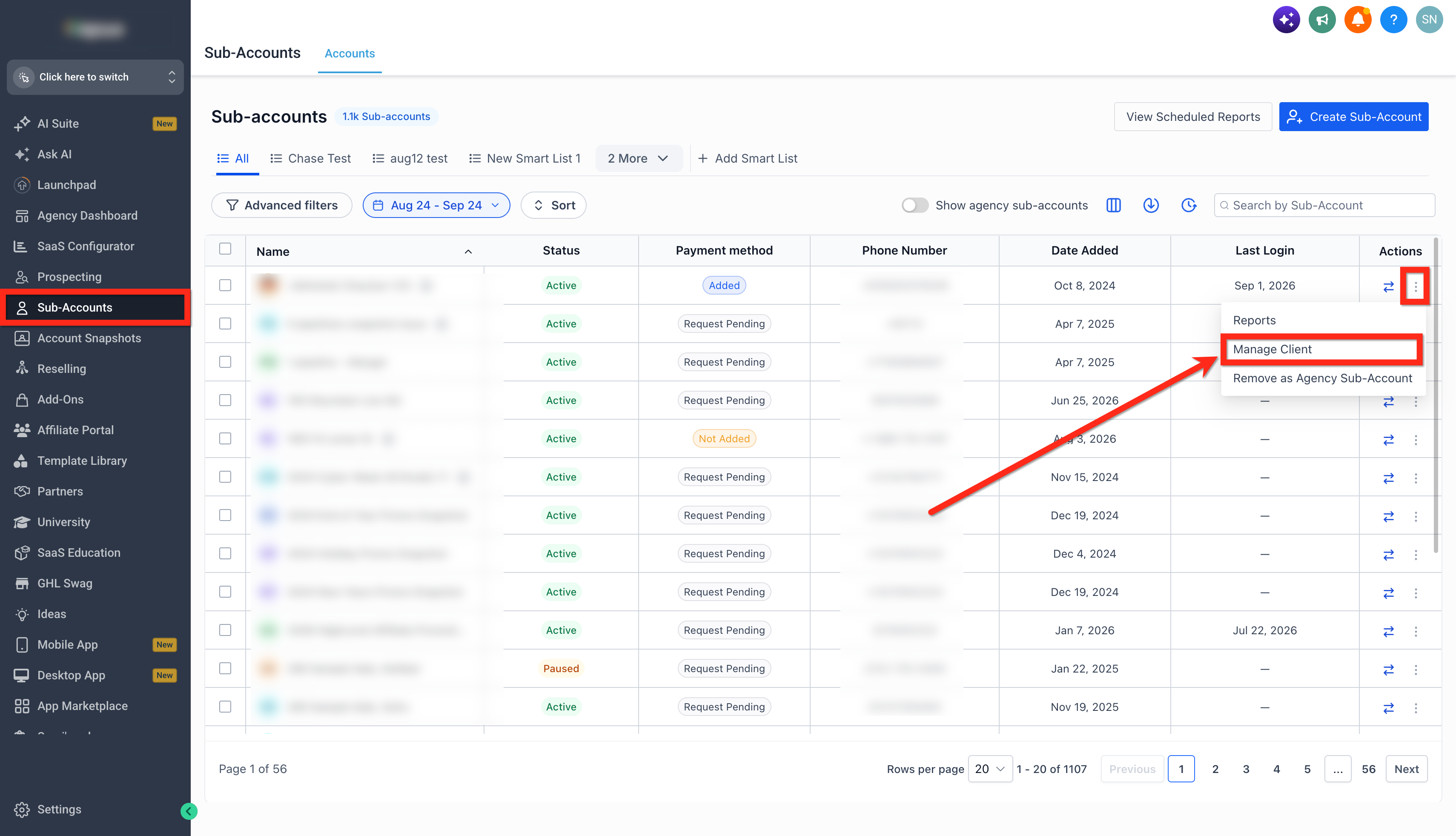
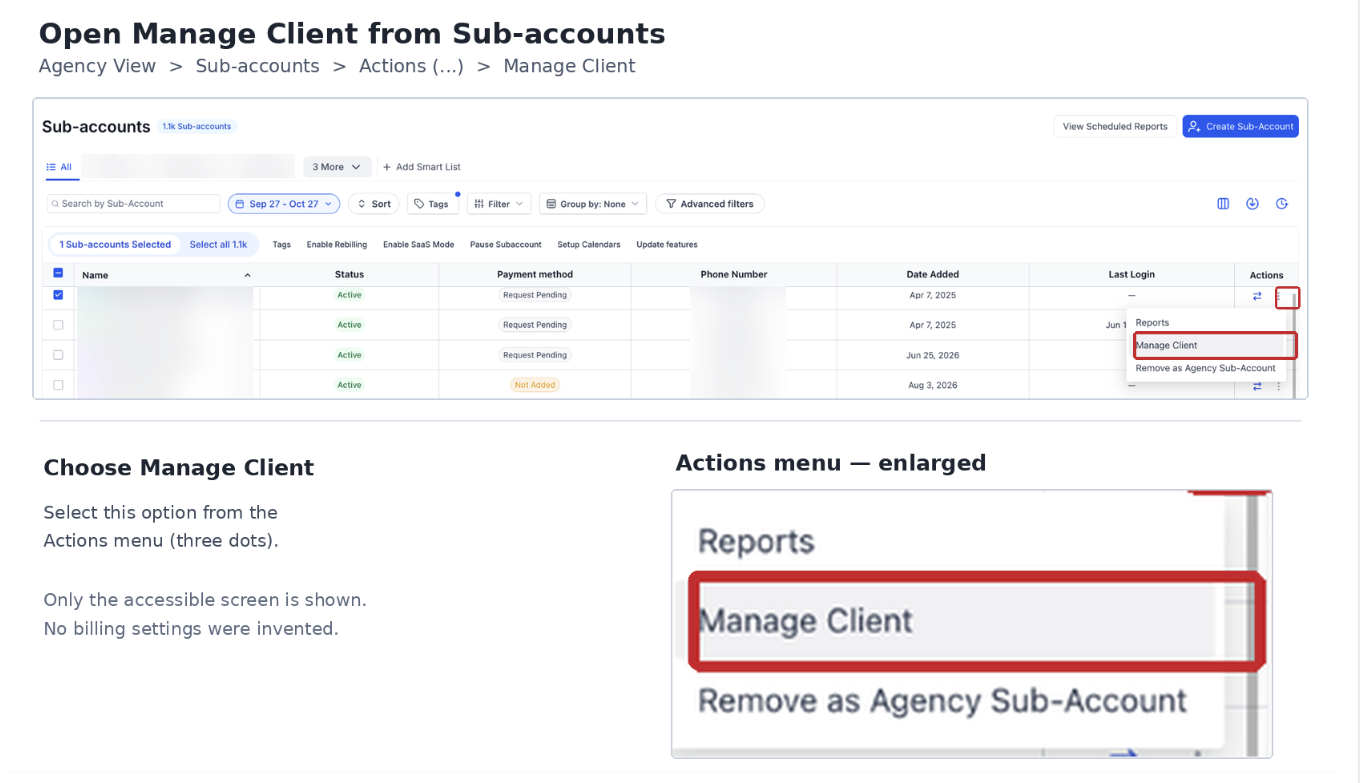
- In Agency View, open Subaccounts.
- Find the target subaccount, open the three dot menu under Actions, and select Manage Client.
- Select the Rebilling tab.
- Review the AI Studio or Ask AI billing configuration and confirm rebilling is enabled and active with a valid client payment method.
- Locate the Rebill usage from subaccount users only toggle.
- Choose OFF to include agency user activity or ON to exclude it.
- If a required client payment method is missing, the rebilling arrangement may remain On Hold and access could be restricted.
- Click Save changes and verify the rebilling status.
07What it looks like in HighLevel
08Settings that matter
- Rebill usage from sub, account users only. Controls whether agency user AI activity is excluded from the client’s rebilled usage; when ON, only subaccount user activity follows the client’s rebilling rules.
09Things to know before you rely on it
- If client rebilling is not active, the toggle does not move charges from the Agency Wallet to the client.
- A missing required client payment method can leave the rebilling arrangement On Hold, which may restrict subaccount access.
- AI spending limits are not configured by default; agencies must enable them to cap billable activity.
- AI Studio Cloud infrastructure and storage charges follow the same rebilling configuration but are separate from generation usage.
10How it connects to the rest of HighLevel
- View AI usage by subaccount and product AI usage dashboard
- Set AI spending limits and blocking behavior AI usage limits
- Understand extra usage pricing for Ask AI and AI Studio AI product pricing
Michael's take

Agencies often worry that client users will generate AI costs that the client never sees, while the agency ends up paying from its wallet. The first setting I would lock in is the "Rebill usage from subaccount users only" toggle. Turning it on makes sure any agency admin activity stays on the agency’s side and only client user usage can be passed back to the client when rebilling is active.
If I were setting this up, I would double check that the subaccount’s rebilling is truly active and that the client’s payment method is valid. Without that, the toggle does nothing to move charges, and the agency continues to absorb the cost.