
01Who this is for
- Agency owners who need a dedicated internal workspace separate from client locations.
- Agency admins responsible for SaaS plan creation and rebilling configuration.
- Agency users with permission to manage billing and subscription settings.
02Agency subaccounts, explained
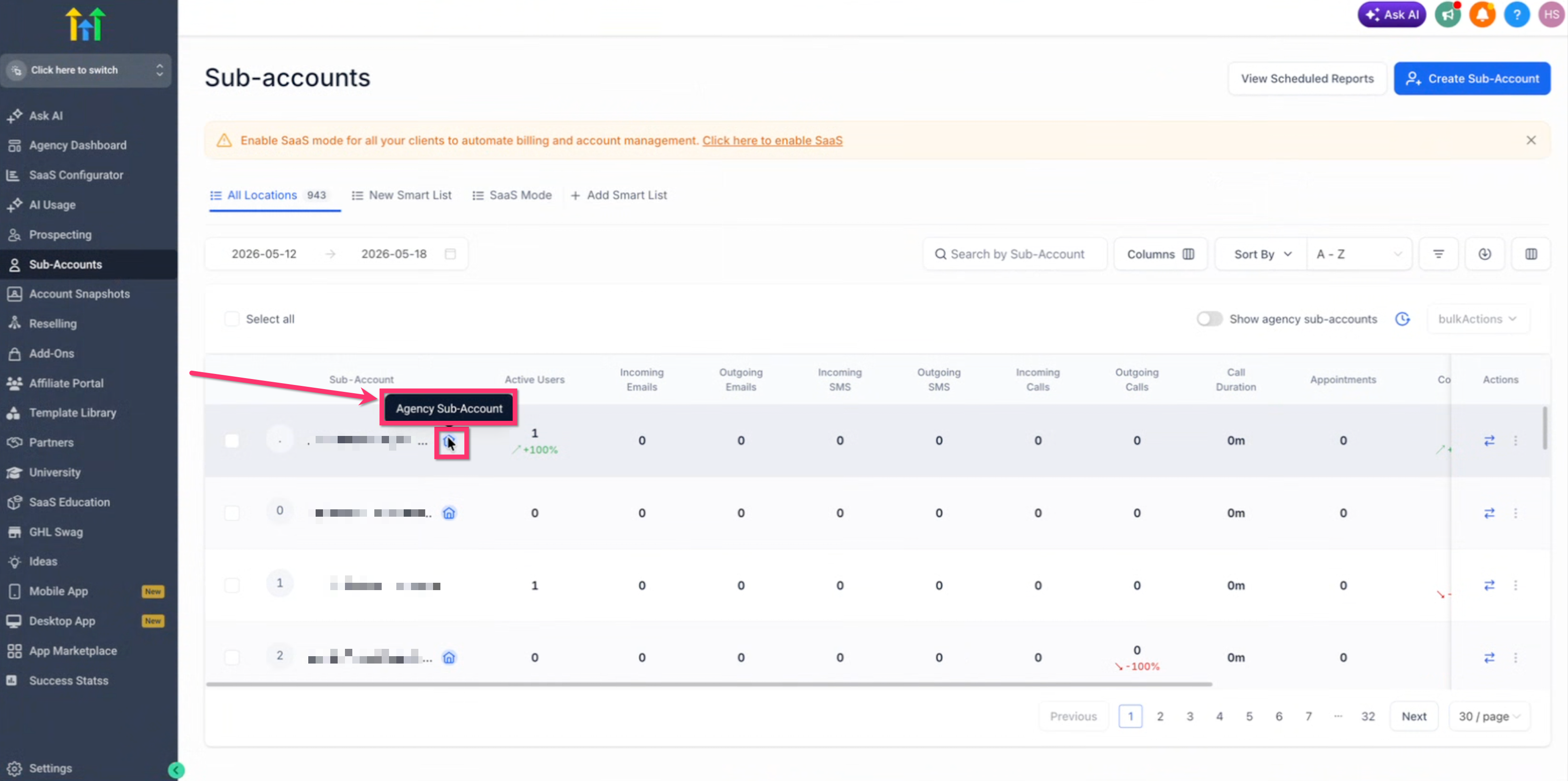
Agency Subaccounts are normal HighLevel subaccounts that carry a special badge indicating they belong to the agency. The badge and a filter option let agencies quickly identify internal accounts among many client locations.
On supported plans the selected Agency Subaccount becomes the hub for SaaS products, subscriptions, and rebilling settings. Payments, payment provider connections, and subscription management are performed from the Payments module within that account.
03How businesses use agency subaccounts
- Digital marketing agency. The agency creates an Agency Subaccount, connects Stripe inside that account, and then builds SaaS plans for its clients. All subscription billing runs through the Payments module of that internal account.
- SaaS provider agency. The agency designates a separate Agency Subaccount for each payment processor configuration, then uses the account to host rebilling settings and to generate new client subaccounts linked to the correct provider.
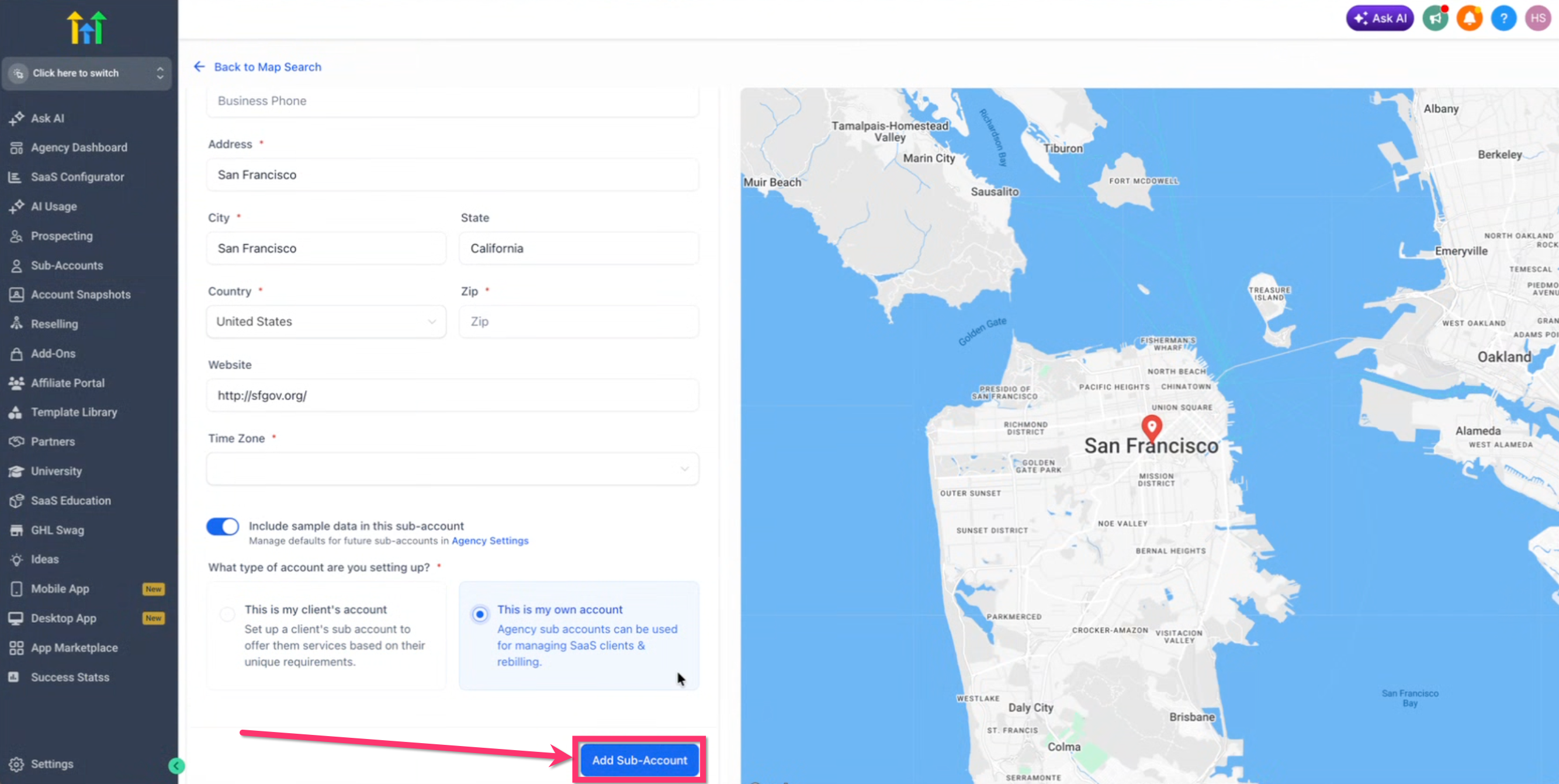
- Consulting firm. The firm selects "This is my own account" when adding a new subaccount, keeping its own operational tools and reporting separate from client accounts while still using the same HighLevel workspace.
04The numbers and rules that matter
- Supported plans: $497/mo Founder, $297/mo Unlimited, $97/mo Starter (per HighLevel's help center, checked November 2026).
- Supported payment providers: Stripe, NMI, Authorize.net, Square, Adyen, Mercado Pago, Custom payment integrations (marketplace).
05Before you start
- Be on a supported plan: $497 Founder, $297 Unlimited, or $97 Starter (per HighLevel's help center, checked November 2026).
- Have Agency Owner, Agency Admin, or a user with the Agency Subaccount management permission.
06How to set up and use agency subaccounts in HighLevel
Create an agency subaccount
- Open the agency view in HighLevel.
- Click to start a new subaccount.
- When prompted, choose the account type.
- Select the "This is my own account" option.
- Complete the remaining fields and save the subaccount.
- If needed, connect a supported payment provider inside the new agency subaccount.
- Use the Payments module of the agency subaccount to create or manage SaaS plans and subscriptions where supported.
- Warning: Selecting a client account for SaaS or rebilling will cause those workflows to be managed from the wrong location.
07What it looks like in HighLevel
08Settings that matter
- This is my own account. Marks the new subaccount as the agency’s internal workspace, enabling SaaS and rebilling features when the plan supports them.
09Things to know before you rely on it
- Agency Subaccounts are available only on $497 Founder, $297 Unlimited, and $97 Starter plans (per HighLevel's help center, checked November 2026).
- They cannot be transferred to another agency; attempts are blocked.
- Removal of the Agency Subaccount badge is prevented while active SaaS plans, subscriptions, or linked client subaccounts exist.
- On $97 plans the subaccount serves mainly as an internal workspace; SaaS and rebilling features are limited to higher tier plans (per HighLevel's help center, checked November 2026).
10How it connects to the rest of HighLevel
- Enable SaaS for many subaccounts at once Bulk SaaS enablement
- Organize agency subaccounts with tags Subaccount tags
- Check which plans include Agency Subaccounts Pricing and plans
Michael's take

In my experience, using an Agency subaccount makes it easier to keep agency billing and subscription settings separate from client work, and the blue badge helps me identify the right account. Managing plans from the Payments module feels straightforward.
If you’re only using the basic account without SaaS or rebilling, the extra overhead may not be worth it. The badge and filters add steps you might never need, and the transfer restrictions can slow down account migrations. In those cases, a regular client style subaccount may be simpler.