
01Who this is for
- Agency owners who run multiple client subaccounts can keep lead discovery and sales automation together, reducing manual handoffs.
- Marketing teams that need to trigger email or SMS outreach as soon as a new prospect is saved benefit from the automatic workflow trigger.
- Consultants managing a portfolio of businesses can migrate agency level prospects into a client’s subaccount to let the client handle follow up in their own pipeline.
02Prospecting in subaccounts, explained
Prospecting in a subaccount combines business discovery with the platform’s contact and automation tools. When a prospect is saved, the system can create a contact record, attach phone numbers, emails and website data, and make the contact available for workflows.
The feature lives under Marketing > Prospecting within each eligible subaccount. It works with Contacts, Opportunities, pipelines, email, SMS and automation. Premium adds enrichment, richer reporting and the ability for Prospect AI agents to add leads directly to a chosen pipeline stage.
03How businesses use prospecting in subaccounts
- Digital marketing agency. The agency enables Prospecting Premium for a client’s subaccount, runs Prospect AI to locate new businesses and configures the AI agent to automatically save each find as a contact and place it into the client’s sales pipeline.
- Real estate brokerage. Agents use the free tier inside the brokerage’s internal subaccount, save discovered properties as prospects, and rely on the default Contact Creation setting to generate contacts for follow up outreach.
- SaaS startup. The startup builds a workflow with the Prospect Generated trigger, adds filters for Prospect AI sources, and sets actions that email a prospect and add a tag, ensuring new leads receive immediate nurture steps.
04The numbers and rules that matter
- $497 Agency plan is required to mark a location as an Agency Subaccount (per HighLevel's help center, checked November 2026).
05Before you start
- The subaccount must be marked as an Agency Subaccount for Free Tier access.
- The Agency Labs toggle for the Prospecting Free Tier must be turned on.
- A Premium enabled subaccount is required to use Prospect AI pipeline routing or to receive migrated agency prospects.
06How to set up and use prospecting in subaccounts in HighLevel
Enable the Prospecting Free Tier
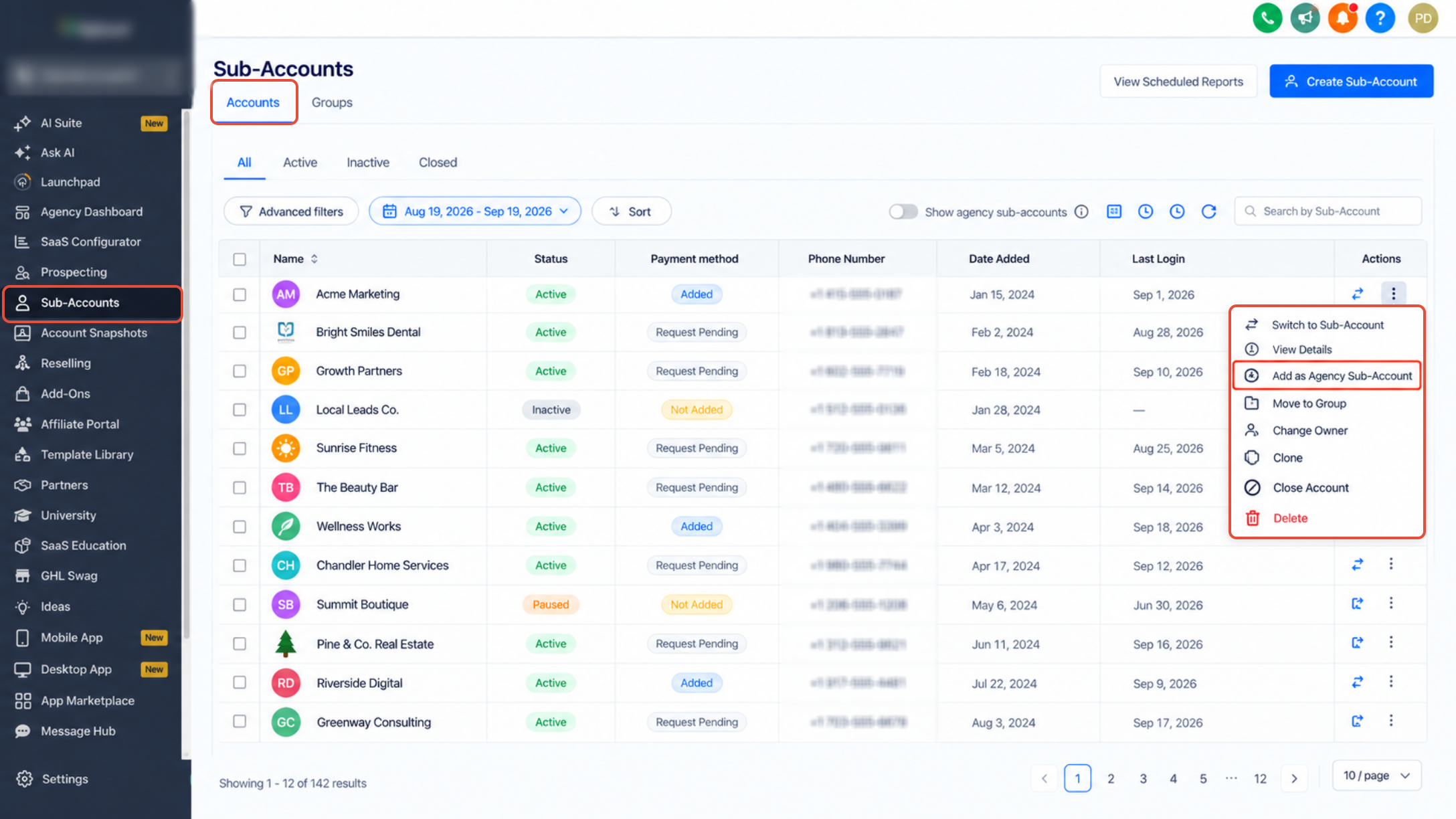
- Navigate to Agency View and select Subaccounts.
- Find the subaccount that will receive free tier access.
- Open the three dot menu beside that subaccount.
- Choose Add as Agency Subaccount to label it correctly.
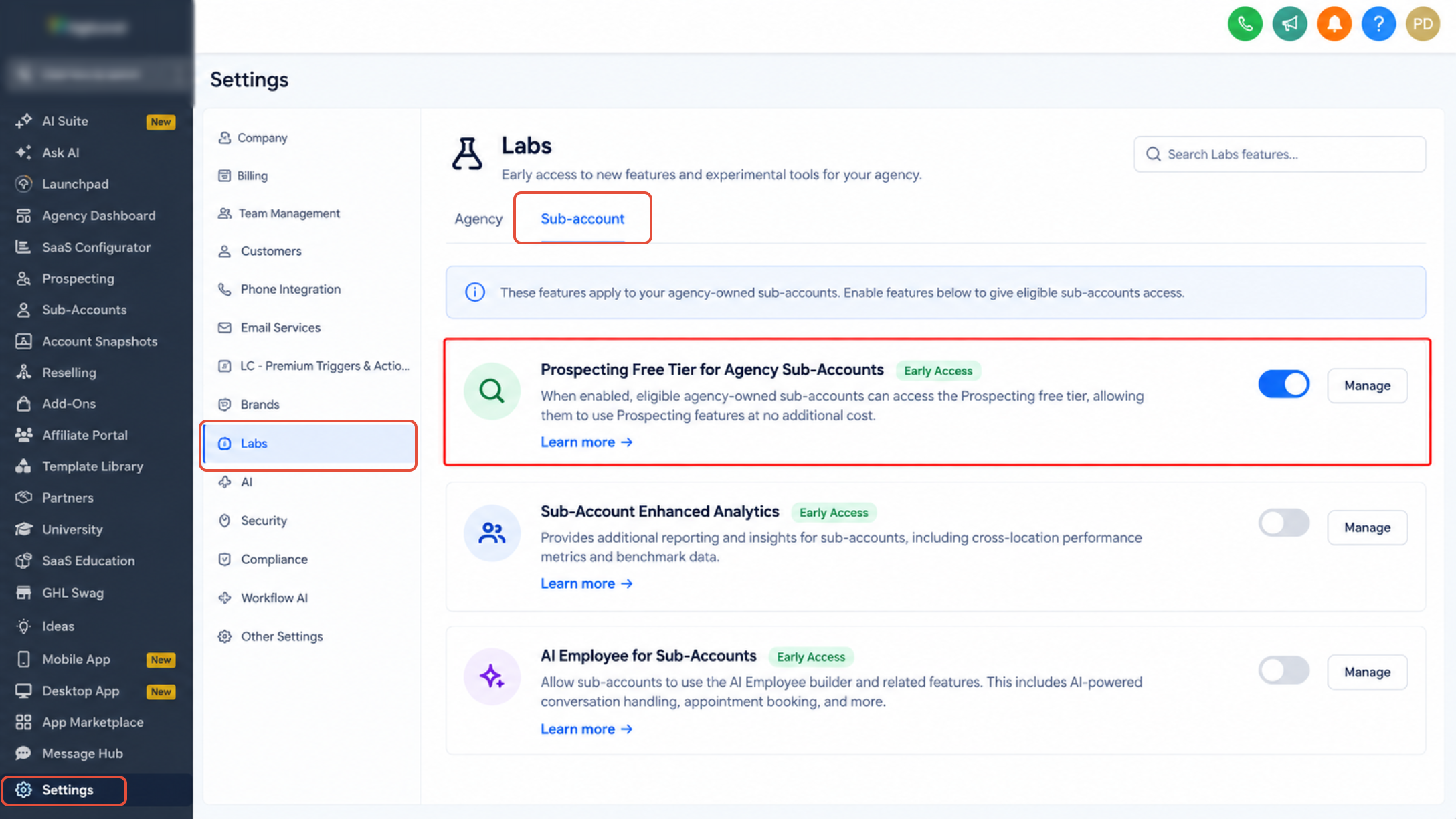
- Verify that the Prospecting Free Tier toggle is active in Agency Labs.
- Enter the subaccount by opening it.
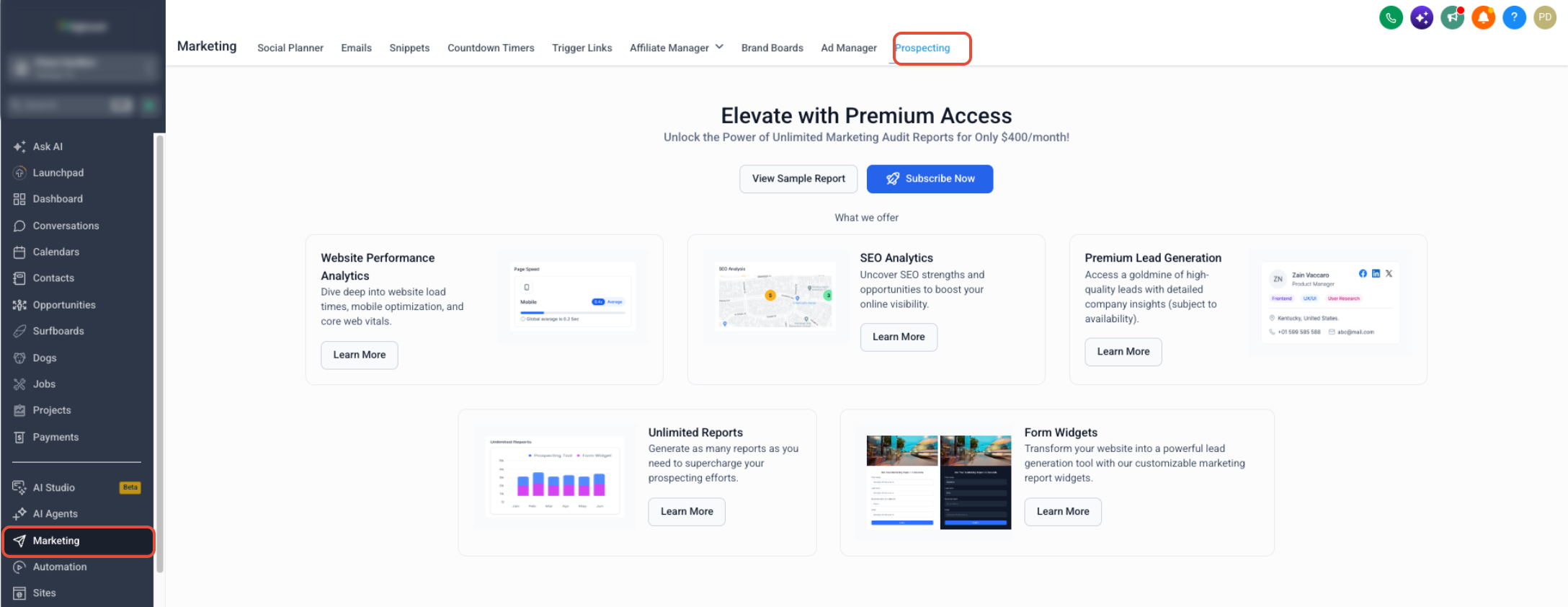
- Go to Marketing > Prospecting to confirm the feature is visible.
Enable Prospecting Premium
- From Agency View open the Reselling section.
- Turn on the option that allows Prospecting to be resold.
- Set up the resale offer according to the agency’s needs.
- Open the target subaccount where Premium will be applied.
- Navigate to Marketing > Prospecting inside that subaccount.
- Complete the activation or purchase flow for Prospecting Premium.
Manage Contact Creation
- Open the subaccount and go to Marketing > Prospecting.
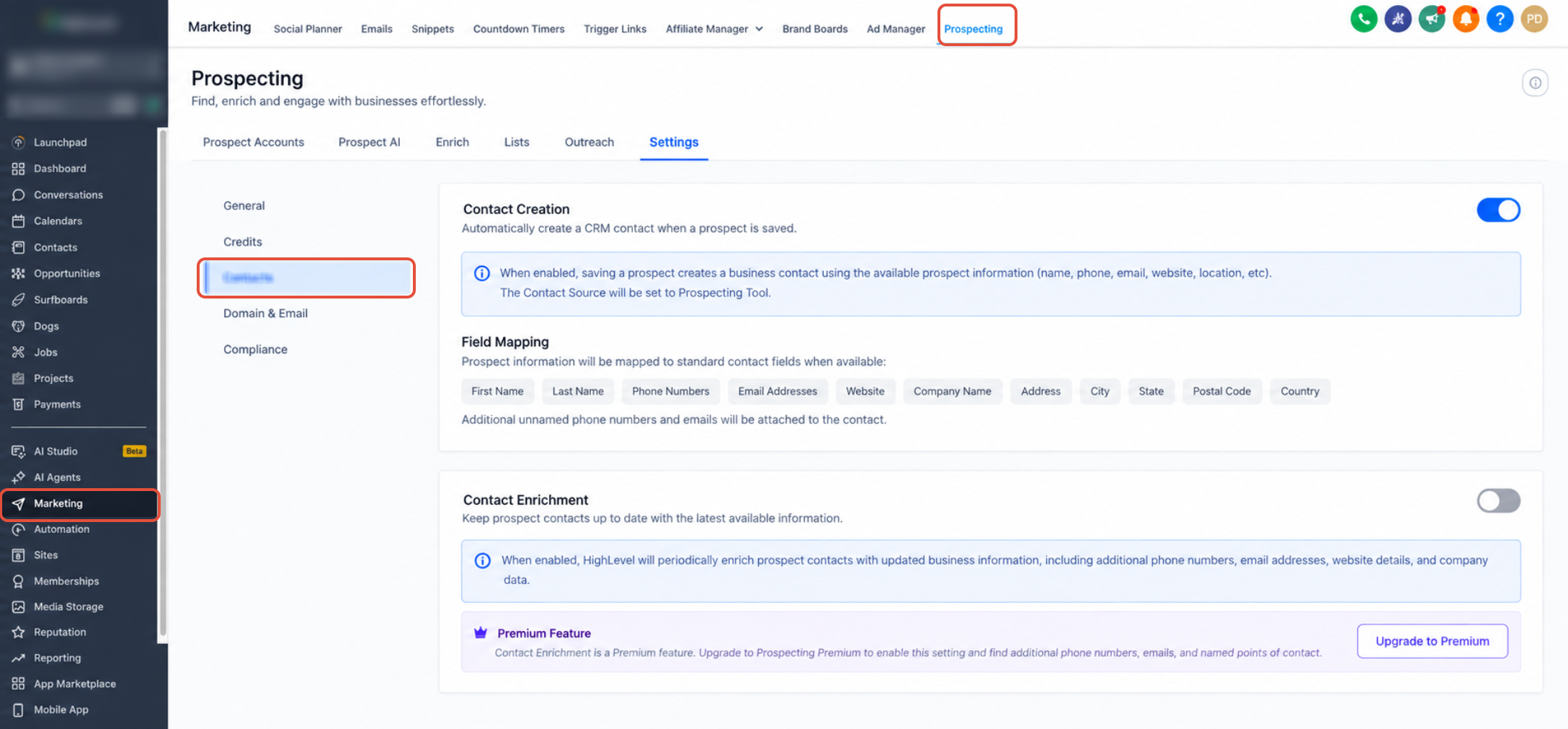
- Select Settings from the Prospecting menu.
- Open the Contacts subsection.
- Review the Contact Creation toggle to decide if saved prospects become contacts.
Automate prospect follow up
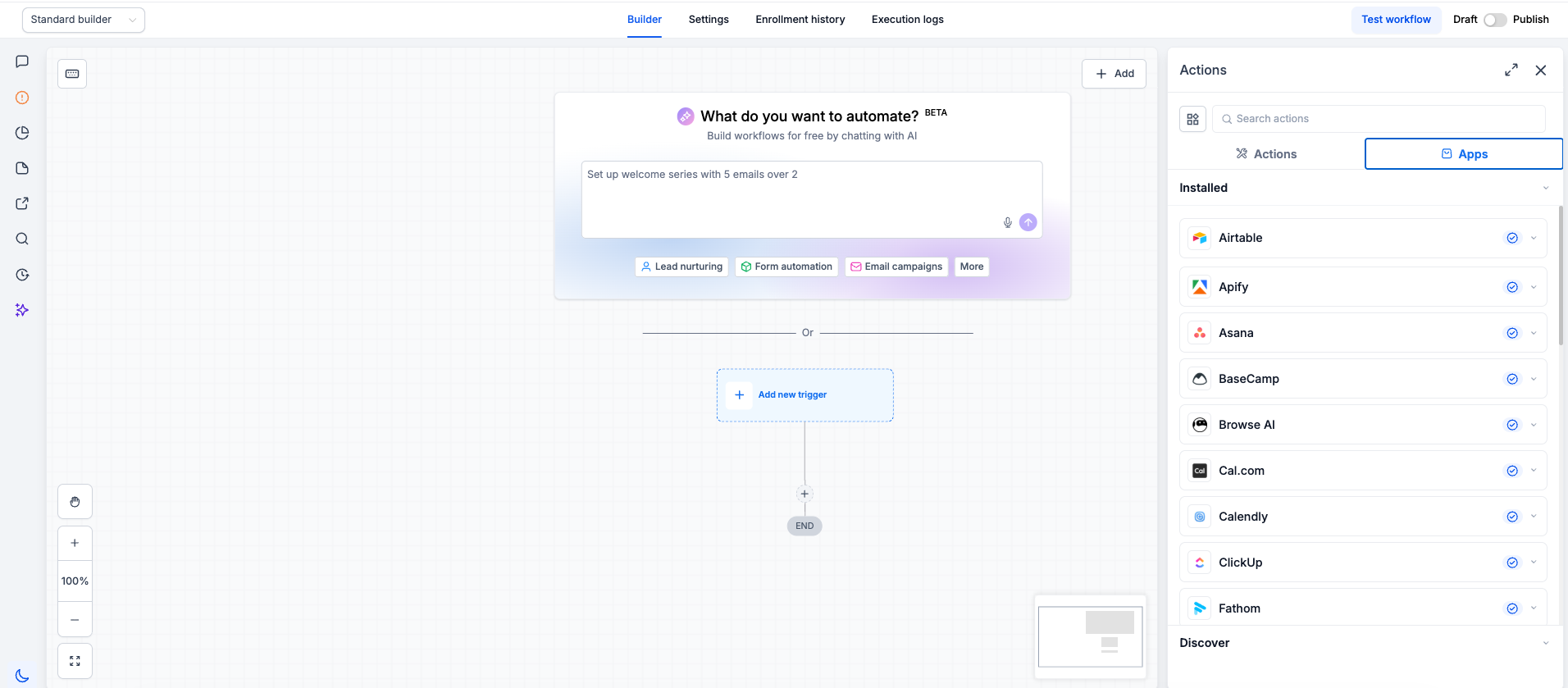
- Go to Automation > Workflows in the subaccount.
- Create a new workflow or edit an existing one.
- Add the Prospect Generated trigger as the first step.
- Insert any needed filters such as source type or conversion rate.
- Add the actions that should run when the trigger fires.
- Save the trigger along with its associated actions.
- Publish the workflow and run a test to ensure it works.
Send Prospect AI leads to a pipeline
- Enter the subaccount that will hold the AI agent.
- Select Marketing > Prospecting.
- Open the Prospect AI section.
- Either open an existing AI agent or create a new one.
- Click the Edit button to modify the agent settings.
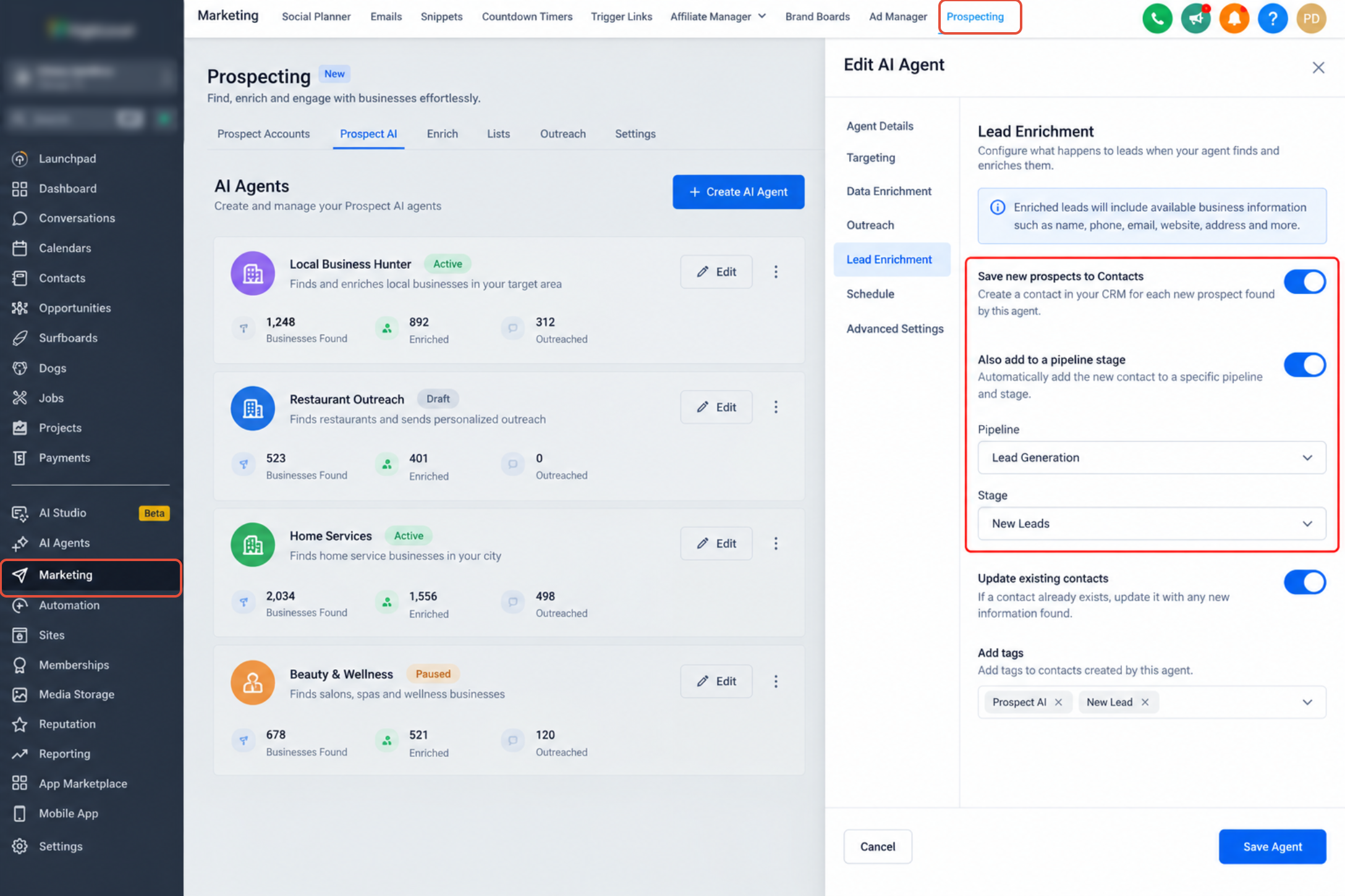
- Find the Lead Enrichment area inside the configuration.
- Turn on Save new prospects to Contacts.
- Turn on Also add to a pipeline stage.
- Choose the pipeline that should receive the leads.
- Select the specific stage within that pipeline.
- Save the changes to the AI agent.
- Important: Pipeline settings affect only prospects discovered after the configuration is saved; existing prospects are not moved automatically.
Migrate Agency prospects to a subaccount
- From Agency View open the Prospecting page.
- Select Settings from the Prospecting menu.
- Open the Migrate option.
- Click the button labeled Migrate Prospects.
- Pick the destination subaccount that has Premium enabled.
- Press Select Prospects to continue.
- Choose one, several, or all eligible prospects to move.
- Click the final Migrate button to copy the prospects.
07What it looks like in HighLevel
08Settings that matter
- Contact Creation. Controls whether each saved prospect automatically generates a contact record.
- Contact Enrichment. When turned on, searches for additional phone numbers, emails and named contacts; available only with Prospecting Premium.
09Things to know before you rely on it
- The Free Tier only works for subaccounts marked as Agency Subaccounts and requires the $497 Agency plan (per HighLevel's help center, checked November 2026).
- Premium features must be enabled either through reselling, direct purchase, or linking an eligible Agency Premium subscription.
- Pipeline routing for Prospect AI is limited to subaccount agents; agency level agents cannot use this integration.
- Pipeline settings affect only prospects discovered after the configuration is saved; existing prospects are not moved automatically.
- Migration copies prospects to a Premium enabled subaccount; the original agency level prospects stay available for further migrations.
10How it connects to the rest of HighLevel
- How to enable, locate and engage prospects in HighLevel Prospect engagement guide
- Prospect migration in HighLevel: Move prospects to subaccounts Migration guide
- HighLevel pricing and plans Pricing page
Michael's take

Do I really need to run Prospecting inside each subaccount, or can I keep it at the agency level? For most teams that already have their CRM, contacts and pipelines in a subaccount, moving the discovery step there reduces manual handoffs and lets automation fire the moment a prospect is saved.
If I were setting this up, I would first enable the Free Tier on an internal subaccount to confirm the contact creation flow works, then add a simple workflow that tags new prospects and sends a welcome email. Once I see the data moving cleanly, I’d consider upgrading to Premium for AI driven enrichment and pipeline routing.