
01Who this is for
- Founders of brand new agencies who need immediate, relevant leads to start outreach.
- Agency admins looking for a quick way to produce Marketing Audit Reports for local prospects.
02Prospect AI recommendations, explained
The feature supplies a one time batch of local businesses that match the agency’s niche, location and postal code. The leads are sent to agency admins via email and appear in the Prospecting view with an AI Recommended Lead tag. From there, users can generate Marketing Audit Reports, contact the leads, and set up ongoing prospect discovery.
Prospect AI can then be enabled to automatically find new, contextual leads on a weekly or monthly schedule. Settings let the agency balance lead quality versus volume, add enrichment contacts, and define audit preferences. The tool lives under the Prospecting menu in the agency dashboard.
03How businesses use prospect AI recommendations for new agencies
- Digital marketing agency. The agency opens the Prospecting tab, reviews the three AI recommended local businesses, creates a Marketing Audit Report for each, and begins outreach. Afterwards, the agency configures an AI agent to receive fresh leads each week.
- SEO consultancy. The consultancy accesses the emailed list, selects a lead, runs a competitor analysis report via the Marketing Audit feature, and then activates Prospect AI with a custom finding strength to continuously receive SEO focused prospects.
- Local web design firm. The firm clicks the AI Recommended Lead tag, generates audit reports for the suggested nearby businesses, and then creates an AI agent set to Wider Hunting to maximize the volume of web design leads delivered monthly.
04The numbers and rules that matter
- Eligibility: Agencies 15, 30 days old on the platform and have not yet generated any prospects.
- Cool down period: First 15 days are left open for natural exploration.
- Maximum points of contact per prospect: 3.
05Before you start
- The agency must be between 15 and 30 days old on the platform.
- The agency must not have generated any prospects yet.
06How to set up and use prospect AI recommendations for new agencies in HighLevel
Use AI recommended prospects
- Log in to your agency account.
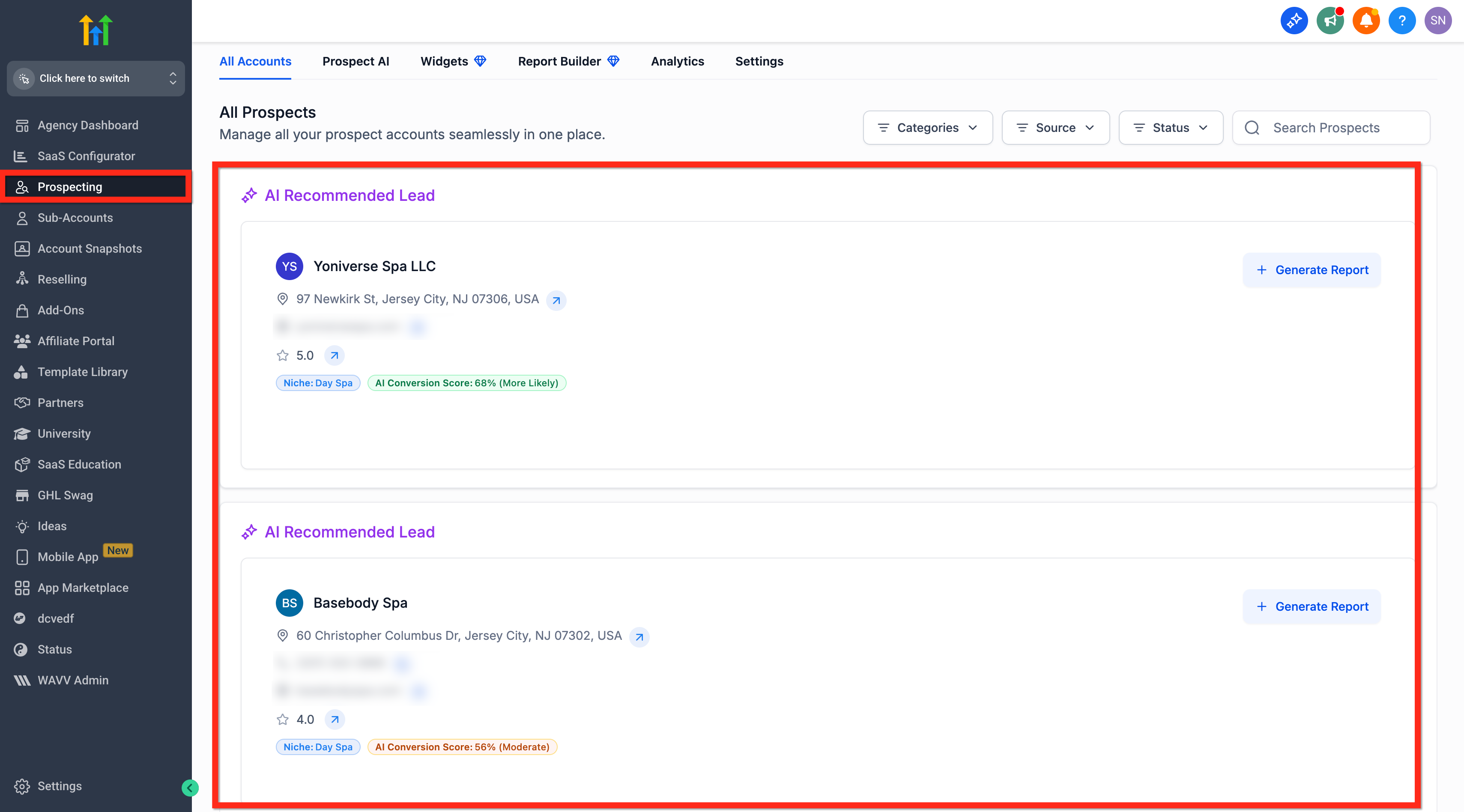
- Open the Prospecting section.
- Locate the three leads tagged AI Recommended Lead under All Prospect.
- Review the suggested local leads.
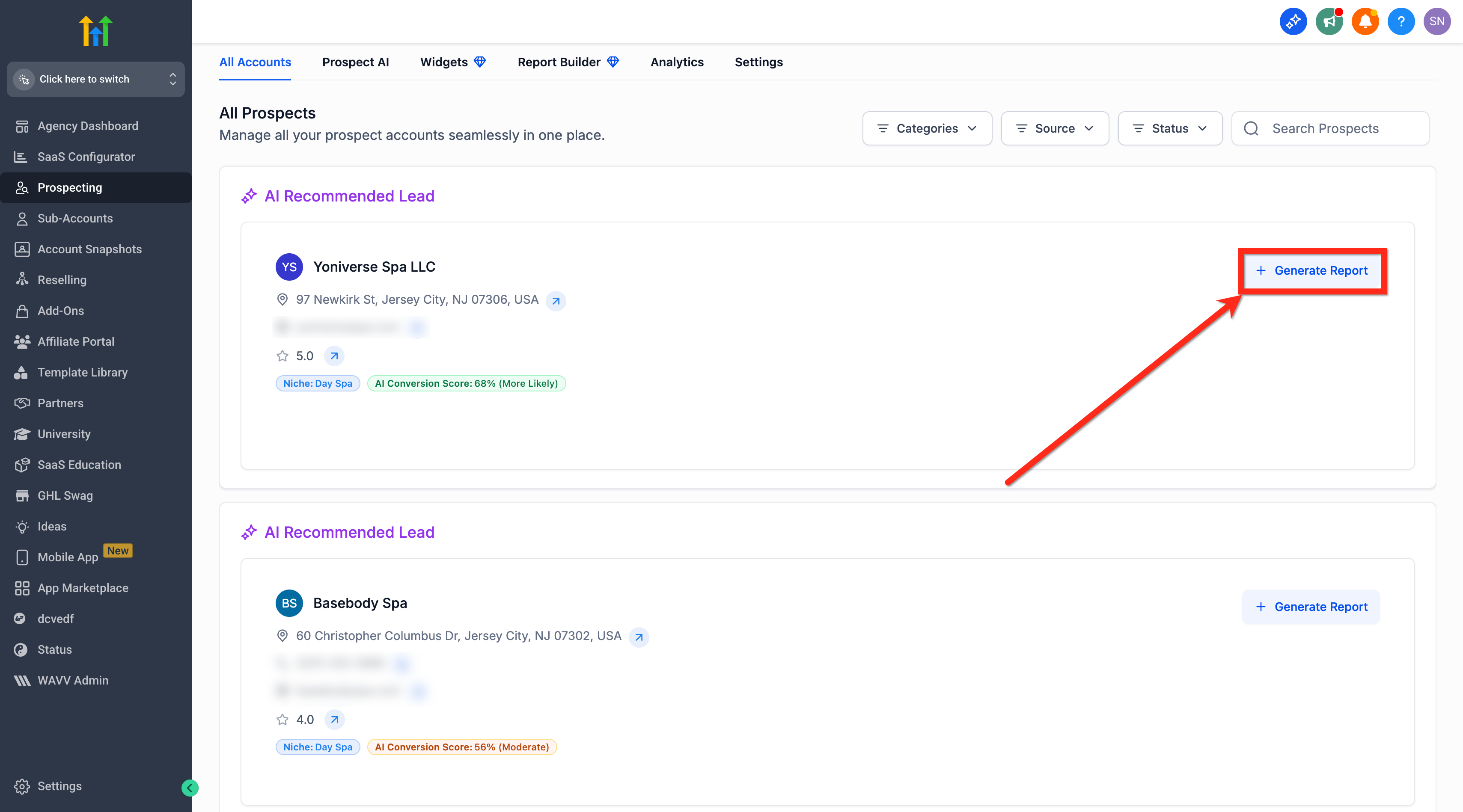
- Create a Marketing Audit Report for each lead and initiate outreach.
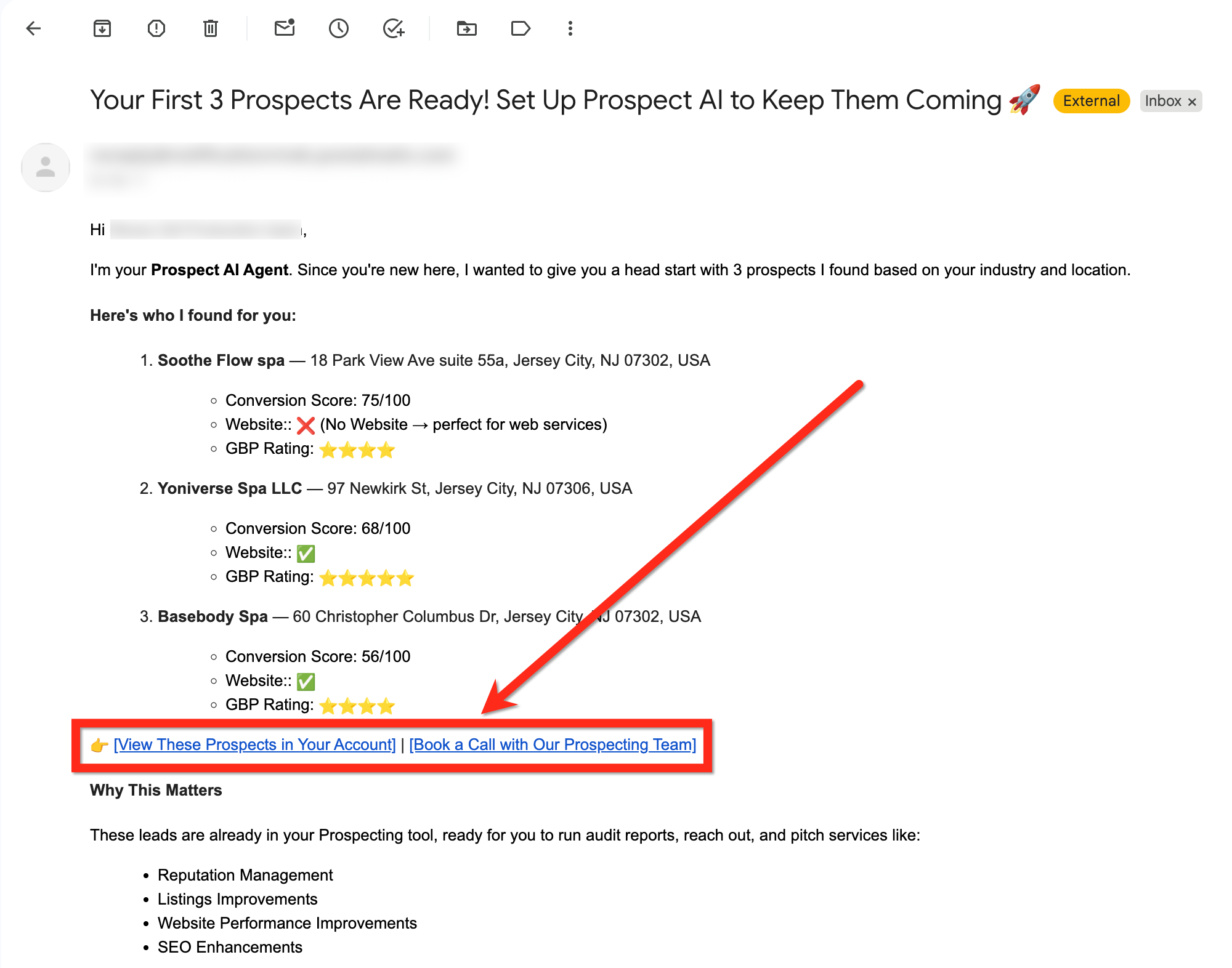
- Check your email inbox for the list of prospects.
- Open the email, view the prospects in the platform, and optionally schedule a guidance call with the Prospecting Team.
Enable Prospect AI for ongoing discovery
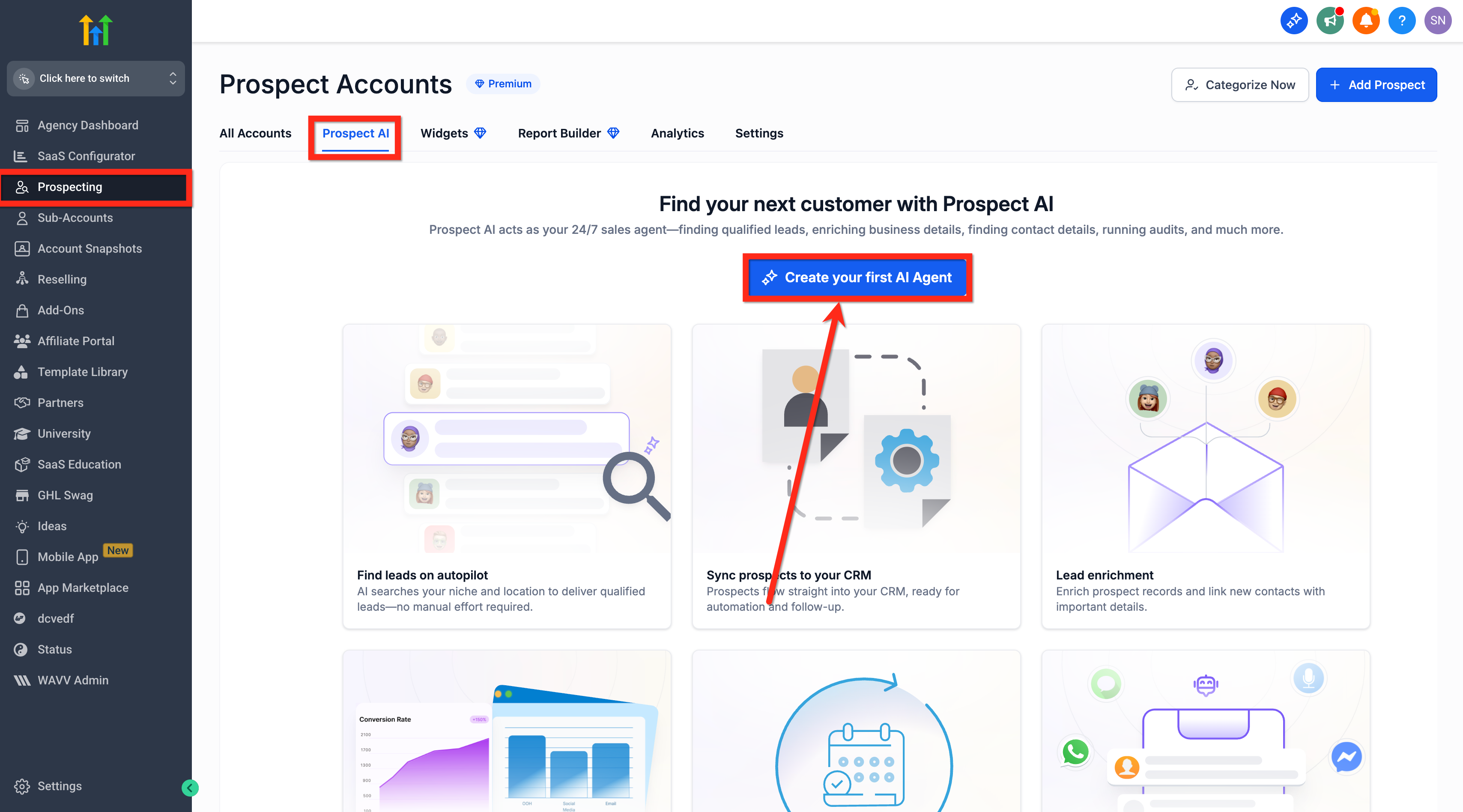
- Go to Prospecting > Prospect AI within your agency account.
- Select Create Your First AI Agent.
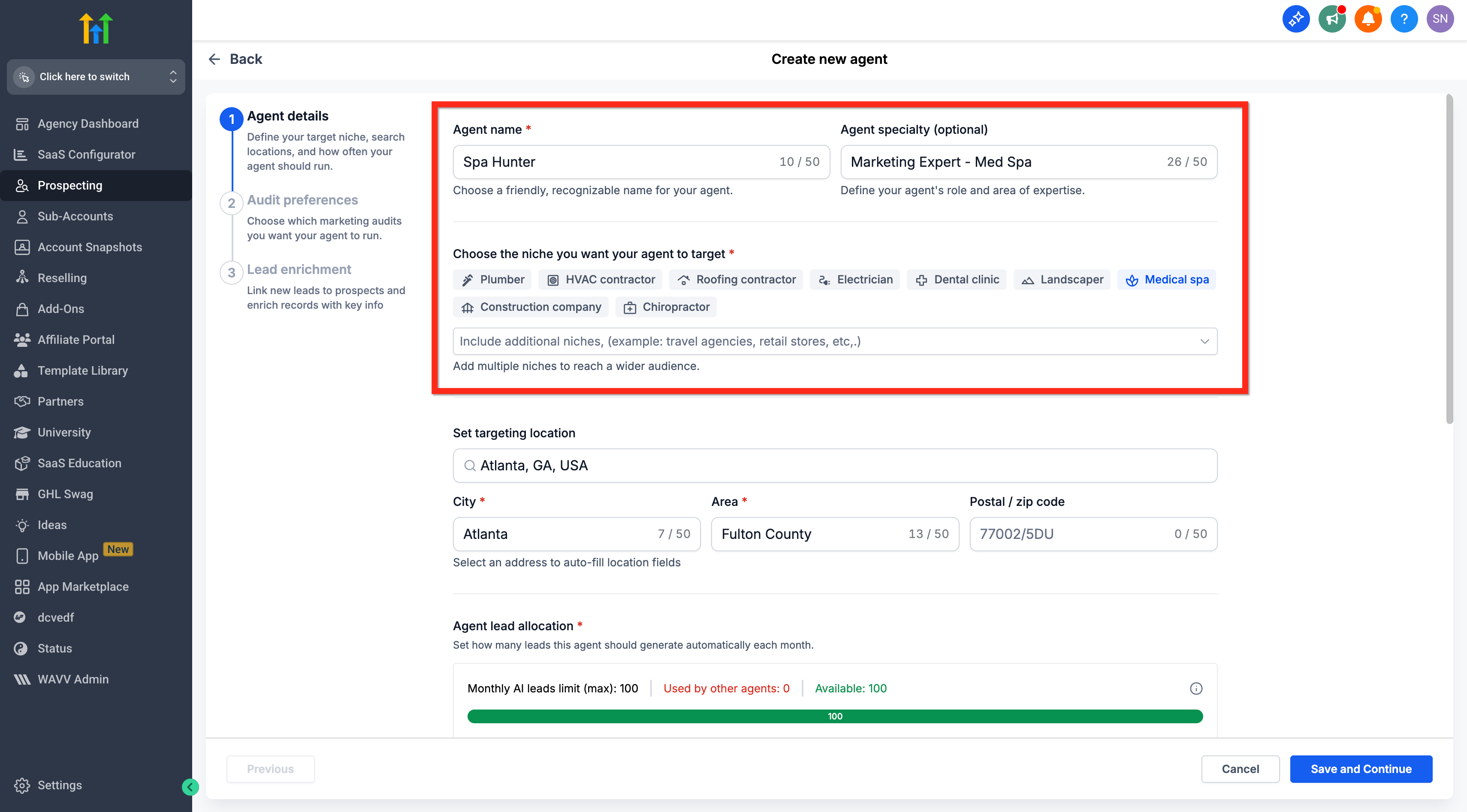
- Enter an Agent Name and, if desired, an Agent Specialty.
- Choose existing niches or add new ones.
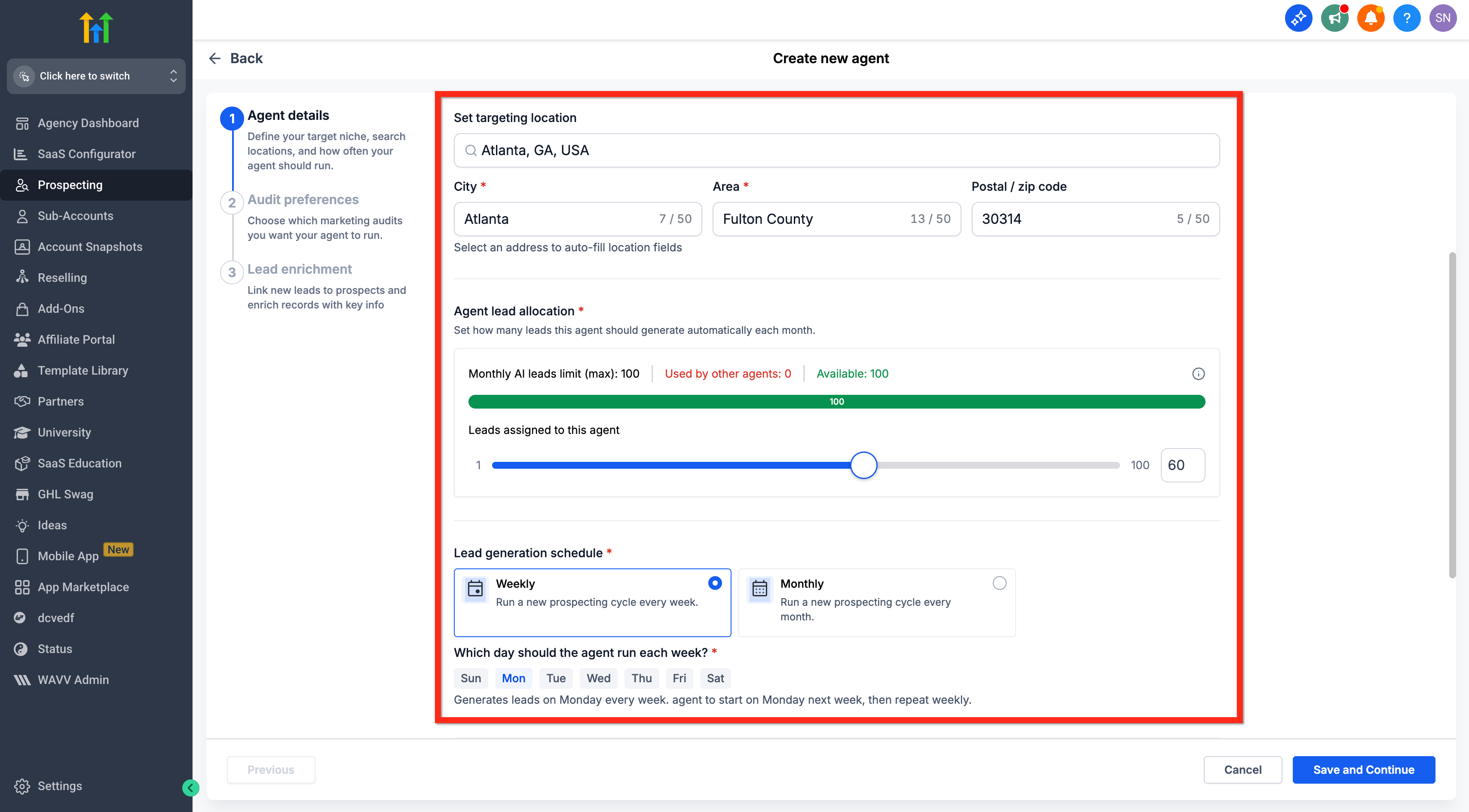
- Define the Targeting Location, set the Agent Lead Allocation, and choose a Lead Generation Schedule (weekly or monthly).
- Choose a Prospect Finding Strength option, Focused Hunting, Wider Hunting, or Custom.
- Click Save and Continue.
- Set your Audit Preferences.
- Click Save and Continue again.
- Enable Lead Enrichment (optional) and specify the number of points of contact to find per prospect, up to three.
- Click Create Agent to finish the setup.
07What it looks like in HighLevel
08Settings that matter
- Agent Name. Provides a label that identifies the AI agent within the platform.
- Agent Specialty. An optional tag that narrows the agent’s focus to a specific area.
- Niches. Specifies the business categories the agent will target for lead generation.
- Targeting Location. Sets the geographic area that the agent will search for prospects.
- Agent Lead Allocation. Determines how many leads the agent is allowed to generate per cycle.
- Lead Generation Schedule. Controls how often the agent runs, either weekly or monthly.
- Prospect Finding Strength. Selects the balance between lead quality and volume (Focused Hunting, Wider Hunting, or Custom).
- Audit Preferences. Defines the parameters used when generating Marketing Audit Reports for found prospects.
- Lead Enrichment. When enabled, adds up to three contact points for each prospect automatically.
09Things to know before you rely on it
- Only agencies aged 15 to 30 days with no existing prospects are eligible.
- Each eligible agency receives only one set of AI recommended leads; no repeats or refreshes are provided.
- Recommendations are sent a single time via email to agency admins.
- Lead enrichment can return a maximum of three points of contact per prospect.
- Geographic coverage depends on regional data availability.
10How it connects to the rest of HighLevel
- Generate leads with the HighLevel prospecting tool Lead generation guide
- Move prospects to subaccounts when needed Prospect migration
Michael's take

Prospect AI recommendations feel like a convenient help for a brand new agency. Getting a ready made list of nearby businesses can make the first weeks feel less uncertain.