
01Who this is for
- Agency owners who need to control promotional exposure across client subaccounts, ensuring only appropriate accounts see the Summer of AI offer.
- Marketing teams handling many client accounts, allowing bulk visibility adjustments without changing AI Employee feature settings.
- Sales managers who want to preview the promotion centrally before sharing with eligible clients.
02Summer of AI agency landing & access control, explained
The feature provides a central place for Agency Admins to review the Summer of AI promotion and decide which subaccounts can view it. It separates the visibility of the offer from the AI Employee feature, so hiding the offer does not alter existing AI Employee access.
Admins can open a dedicated agency landing page that shows the promotion details and controls for managing visibility. From there they can include or exclude individual subaccounts or apply the same choice to many accounts at once.
An alternative path exists in the AI Employee settings, where the same visibility option appears alongside other AI Employee controls, letting admins manage the offer at the account level or in bulk.
03How businesses use summer of AI agency landing & access control
- Digital marketing agency. The agency admin opens the Summer of AI landing page, reviews the promotion, and selects client subaccounts that should see the offer. The admin can later adjust the list in bulk from AI Employee settings.
- Consulting firm. A firm uses the AI Employee settings to locate a specific subaccount, then updates the Summer of AI offer setting for that account without touching other AI Employee options.
- SaaS reseller. The reseller accesses the landing page, searches for multiple subaccounts, and applies a single visibility decision to all of them using the bulk selection feature.
04How to set up and use summer of AI agency landing & access control in HighLevel
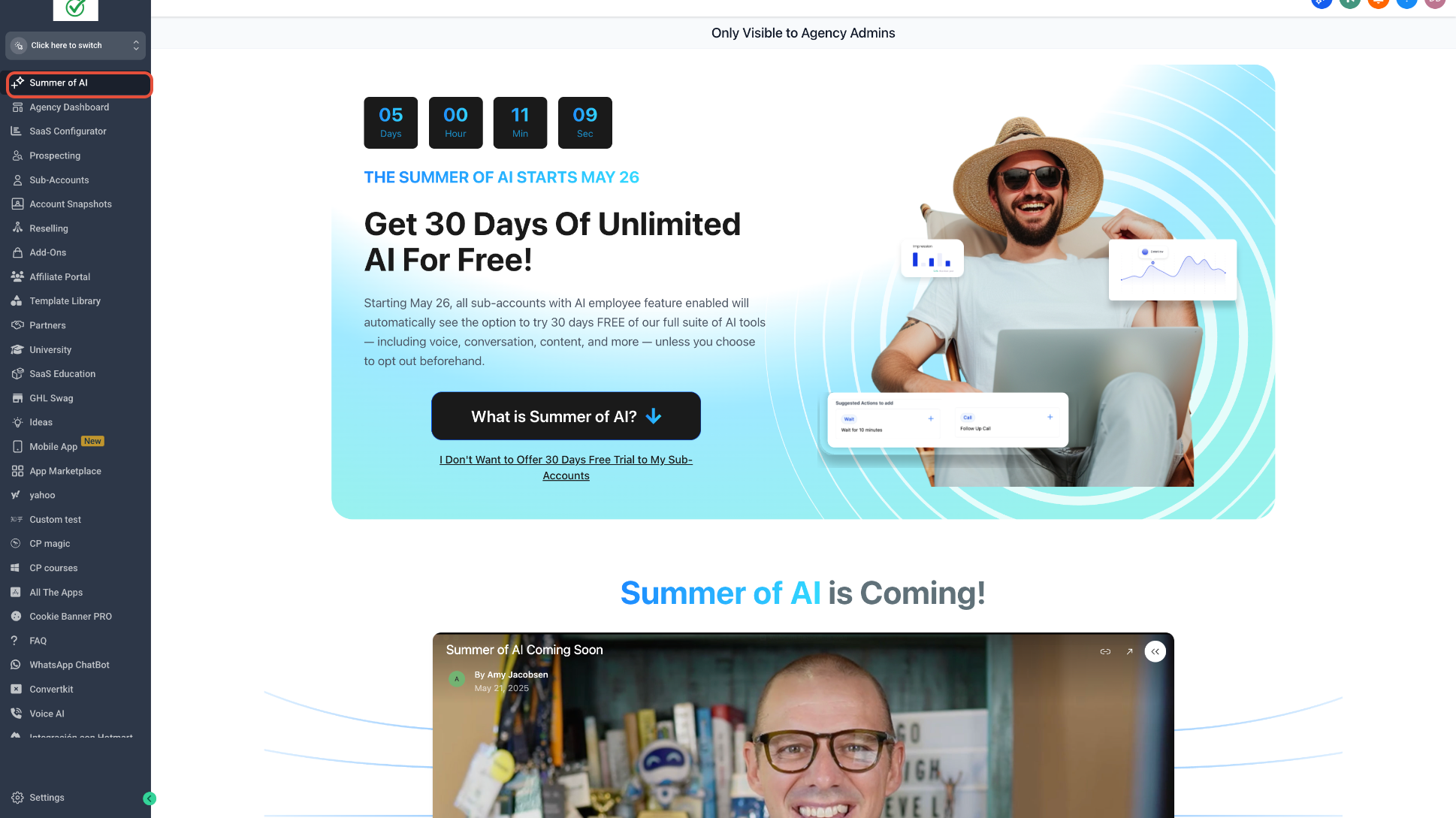
Open the Summer of AI Agency Landing Page
- Switch to Agency View.
- Click the Summer of AI page in the agency navigation when it appears.
- Read the promotion details and access management options.
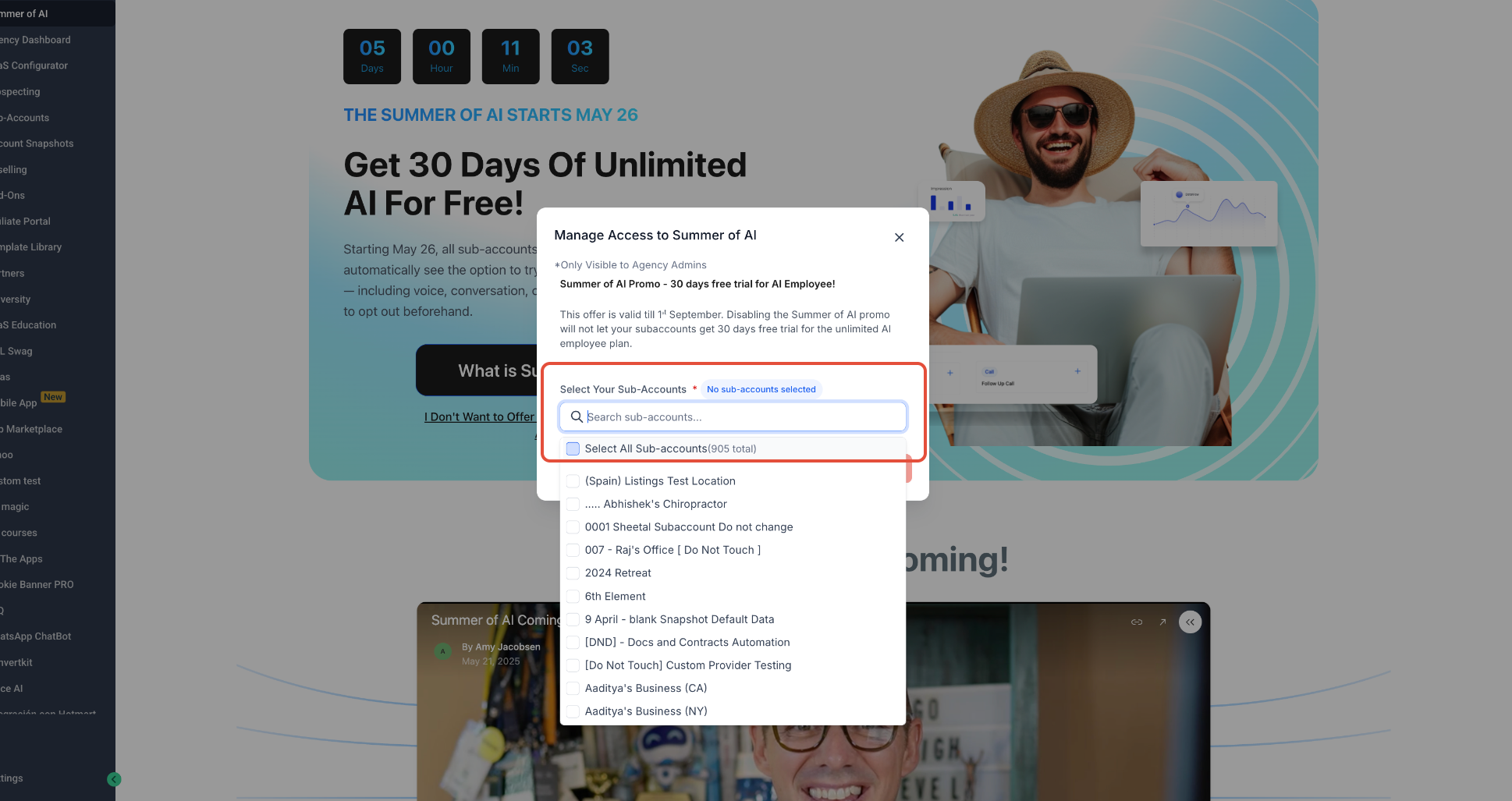
Select Which Subaccounts Can See the Offer
- Choose Manage Access to Summer of AI from the landing page.
- Find a subaccount by entering its name or use the selection tools.
- Mark the subaccounts whose visibility you want to change.
- Confirm the selection shown in the workflow.
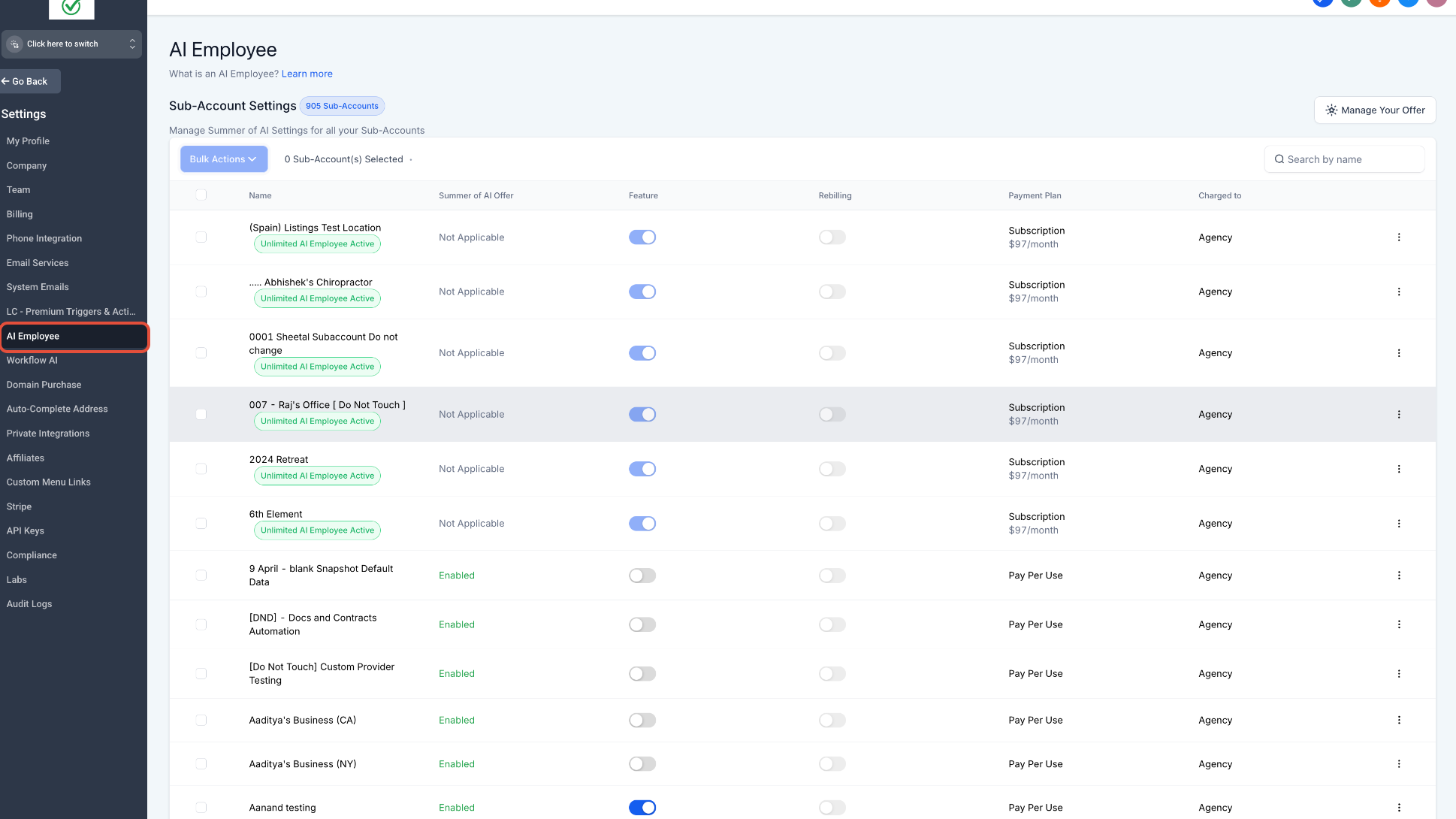
Manage the Offer from AI Employee Settings
- In Agency View, navigate to Settings then select AI Employee.
- Locate the target subaccount.
- Pick individual control or select several accounts and open Bulk Actions.
- Change the Summer of AI offer setting without altering other AI Employee options unless intended.
05What it looks like in HighLevel
06Settings that matter
- Manage Access to Summer of AI. Determines which subaccounts are included or excluded from seeing the promotion.
- Summer of AI offer setting. Controls whether the promotion appears for an eligible subaccount.
07Things to know before you rely on it
- The Summer of AI promotion may change its availability, eligibility, and dates; always check the current offer details.
- Hiding the promotion does not remove existing AI Employee feature access.
- Bulk actions only affect the subaccounts that are selected during the operation.
08If something goes wrong
- The Summer of AI page is not visible. Confirm you are using an Agency Admin account and that the promotional page is currently available.
- A subaccount cannot see the offer. Check the Summer of AI offer visibility setting and confirm the subaccount is eligible for the promotion.
- The offer is hidden but AI Employee still works. This is expected because promotion visibility and AI Employee access are separate controls.
- Bulk controls do not affect an account as expected. Confirm the intended subaccounts were selected and review the current Summer of AI status for each account in AI Employee settings.
09How it connects to the rest of HighLevel
- Explore agency level metrics that complement promotion visibility. Agency dashboard overview
- Check pricing and eligibility details that affect Summer of AI availability. Pricing and plans
- Start a trial to test agency controls before the promotion launches. 30 day trial
Michael's take

Wondering how you can keep a promotion from showing up in the wrong client account? The agency landing page lets you see the Summer of AI offer in one place and then pick exactly which subaccounts get to see it, or hide it entirely.
If I were setting this up, I’d first walk the landing page to verify the offer details, then use the bulk selector to turn visibility on for the accounts that fit the client’s strategy. A quick check in AI Employee settings afterward confirms everything lines up without touching the actual AI feature.