
01Who this is for
- Agency owners benefit because the dashboard consolidates revenue, MRR and profit data in one place, simplifying oversight.
- Finance managers gain quick access to recurring revenue and margin details, helping them track SaaS growth and reselling profitability.
- Operations leads can monitor new versus total customers and see which products drive the most margin across subaccounts.
02Agency dashboards, explained
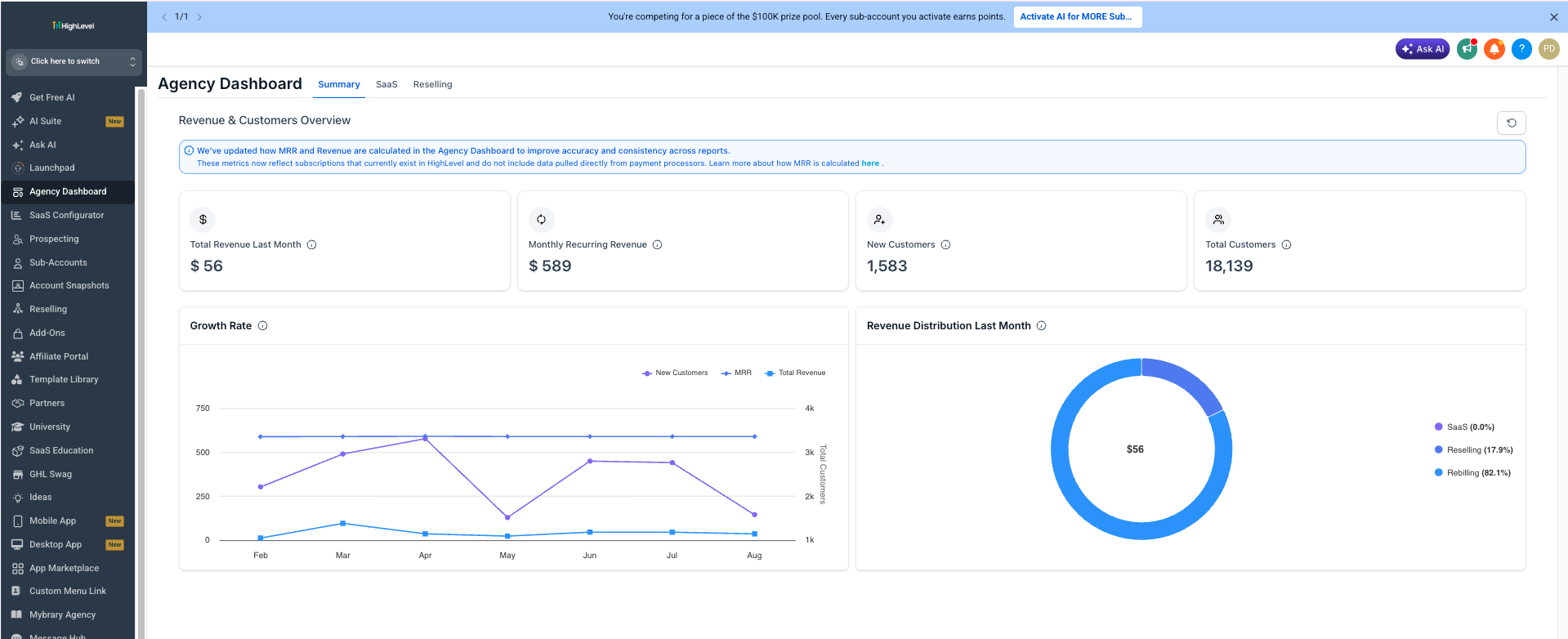
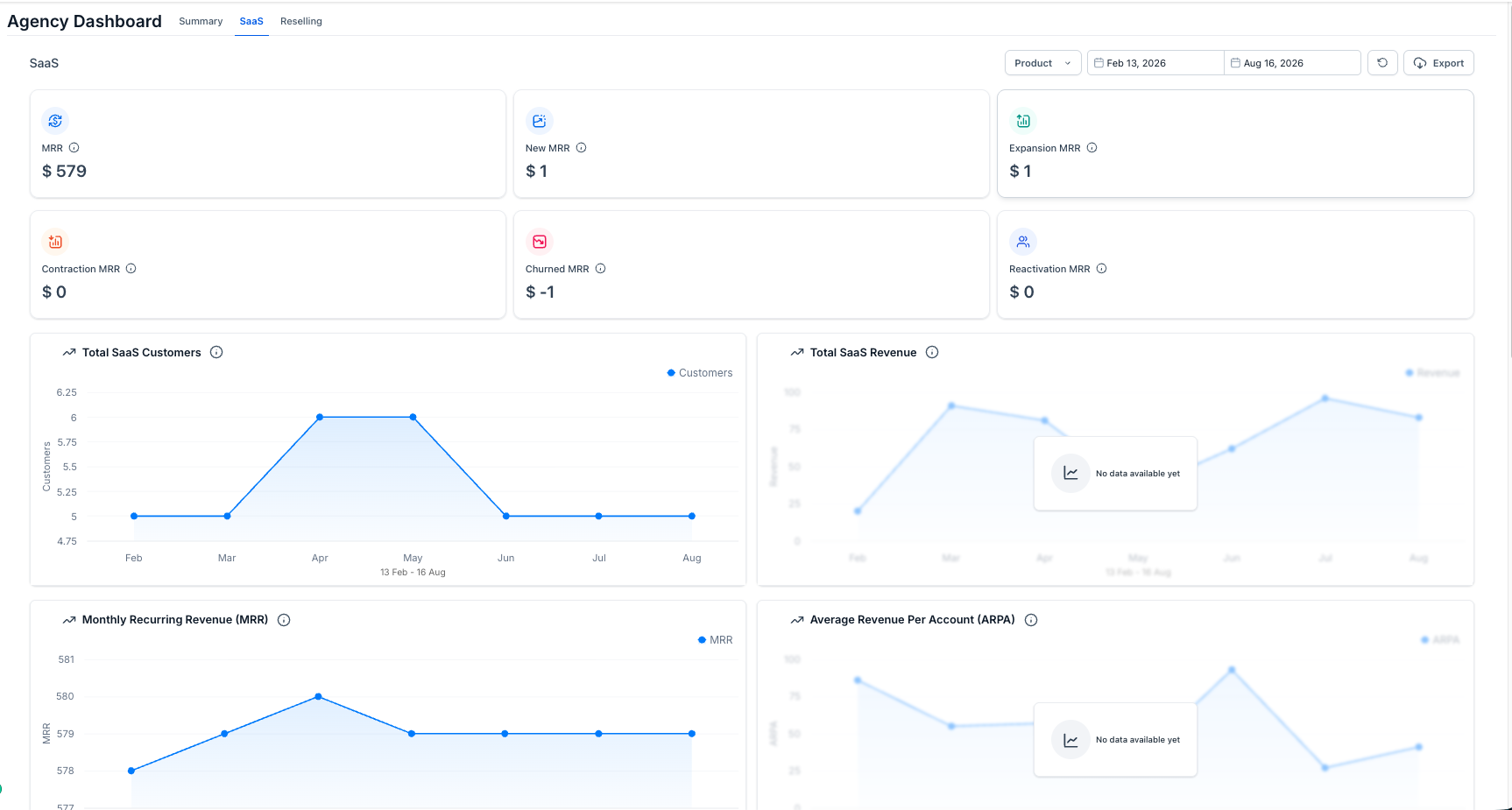
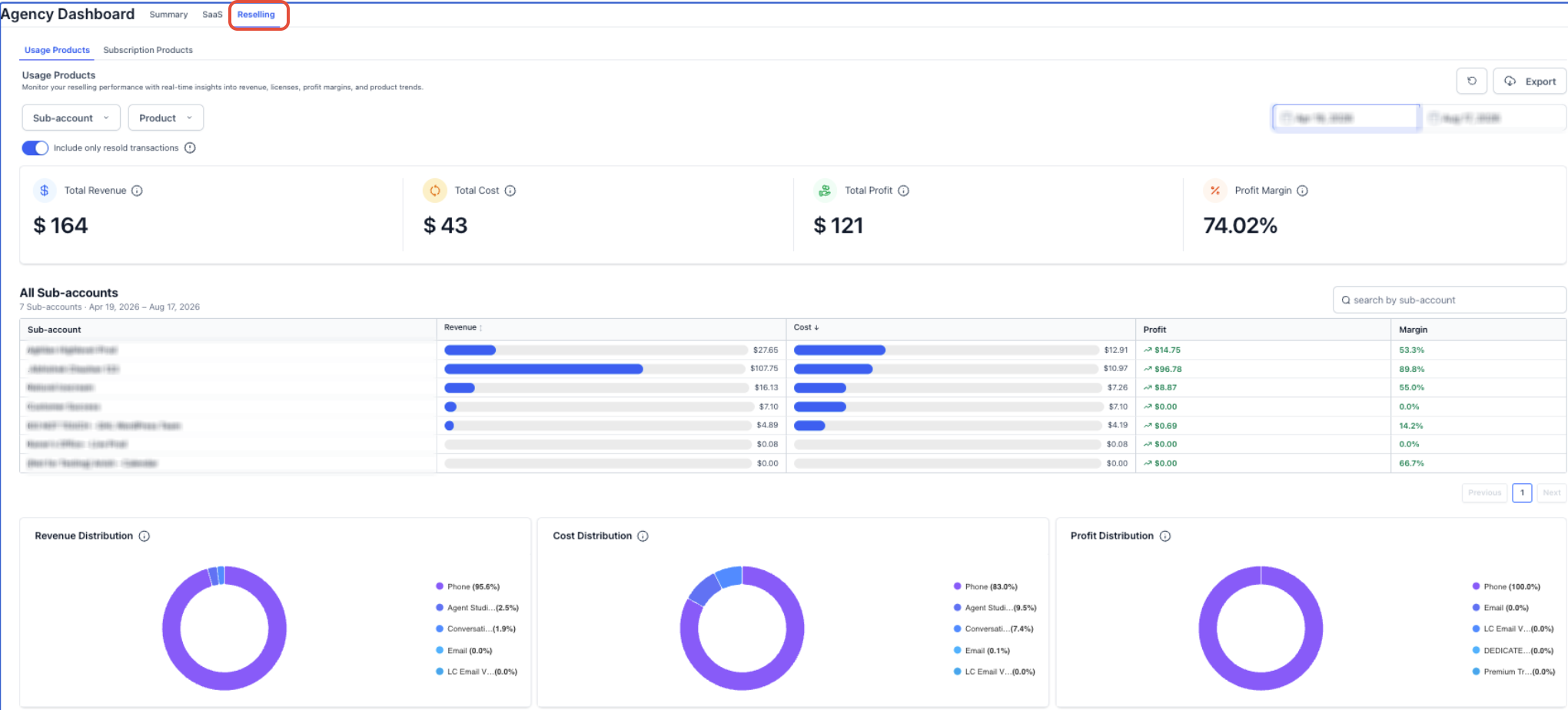
The Agency Dashboard lives in the Agency View section of HighLevel. It presents three tabs, Summary, SaaS and Reselling, each focused on a different aspect of agency performance. The Summary tab shows headline figures such as total revenue last month, MRR, new customers and total customers, plus a growth rate chart and revenue distribution breakdown. The SaaS tab drills down into subscription related MRR components, showing new, expansion, contraction, churned, and reactivation values along with trend charts for customers, revenue and average revenue per account. The Reselling tab isolates revenue, cost, profit and margin for usage based and subscription based products, with distribution charts and a subaccount table to highlight the most and least profitable accounts.
Data shown on the dashboard comes only from qualifying HighLevel backed sources. Subscriptions created outside of HighLevel are excluded from MRR calculations, and revenue metrics reflect only transactions that meet HighLevel’s qualifying criteria. Users can narrow the view with filters for subaccount, product, date range and a toggle to include only resold transactions. An Export button lets users download the filtered data, and a Refresh control reloads the latest figures.
03How businesses use agency dashboard
- Marketing agency. The agency opens the Summary tab to see total monthly revenue and new client counts, then filters by date range to compare performance quarter over quarter. This helps the agency track overall growth without pulling separate reports from each client account.
- SaaS provider. The provider navigates to the SaaS tab to examine the breakdown of MRR into new, expansion, churned and reactivation segments. By selecting a specific product filter, the provider can pinpoint which subscription tier contributes most to recurring revenue.
- Reseller of HighLevel products. The reseller selects the Reselling tab, applies the "Include only resold transactions" filter, and reviews profit margin charts for usage based services. This reveals which resold products yield the highest margin across client subaccounts.
04The numbers and rules that matter
- Total Revenue Last Month includes revenue from SaaS, Reselling, and Rebilling.
05Before you start
- Access to Agency View in HighLevel is required.
06How to set up and use agency dashboard in HighLevel
Access agency dashboard
- Log in to HighLevel while in Agency View.
- Choose Agency Dashboard from the left hand navigation menu.
- Click the Summary, SaaS, or Reselling tab to open the desired reporting view.
- If needed, apply product, subaccount and date filters to narrow the displayed data.
- Confirm the selected filters before comparing totals or exporting data.
07What it looks like in HighLevel
08Settings that matter
- Subaccount. Limits the report to the selected client accounts.
- Product. Restricts the data to the chosen product or service.
- Date Range. Defines the time period for which metrics are calculated.
- Include only resold transactions. Excludes non resold activity from the Reselling calculations.
- Export. Downloads the current filtered report for offline analysis.
- Refresh. Reloads the dashboard to show the latest data.
09Things to know before you rely on it
- Revenue and MRR values count only qualifying HighLevel backed sources; external payments are not included.
- SaaS analytics exclude subscriptions created outside of HighLevel.
- Changing filters alters the set of transactions used for Reselling totals, which can cause revenue, cost or profit figures to shift.
- Customer count metrics (New Customers and Total Customers) are calculated separately from revenue and MRR logic.
10How it connects to the rest of HighLevel
- Explore how the agency rebilling dashboard filters and exports work. Agency rebilling dashboard
- Learn about SaaS analytics and MRR details within the agency dashboard. SaaS analytics
- Compare HighLevel MRR reporting with ProfitWell and Stripe. MRR comparison
Michael's take

I find the Agency Dashboard useful for viewing revenue, MRR, customer growth, and reselling margins in one place.